Can Apple M2 Handle Large Local LLMs Without Crashing? Benchmark Analysis
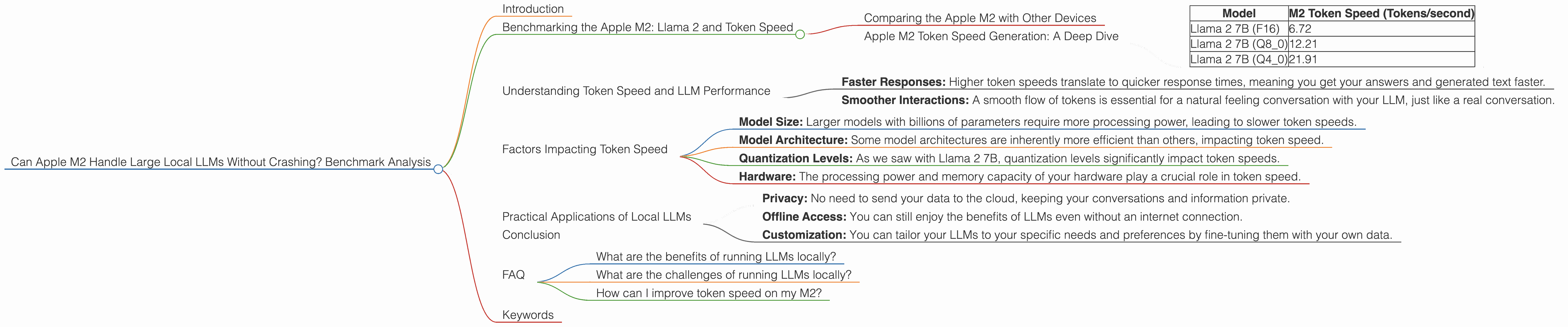
Introduction
The world of large language models (LLMs) is exploding, and with it, the desire to run these powerful models locally. But can your everyday computer handle the demands of these massive AI brains? Today, we dive into the exciting world of Apple's M2 chip and its capabilities when it comes to running LLMs locally. We'll examine its performance with popular models like Llama 2, focusing on the crucial aspect of token speed generation – the rate at which the model processes and generates text.
Think of token speed generation as the speed at which a car travels on a highway: the faster the tokens are processed, the smoother and quicker your interactions with the LLM.
Benchmarking the Apple M2: Llama 2 and Token Speed
Comparing the Apple M2 with Other Devices
It's important to understand that we're focusing exclusively on the Apple M2 chip in this analysis. We won't be comparing it to other devices like the M1 or Intel CPUs (sorry, Intel fans!).
Apple M2 Token Speed Generation: A Deep Dive
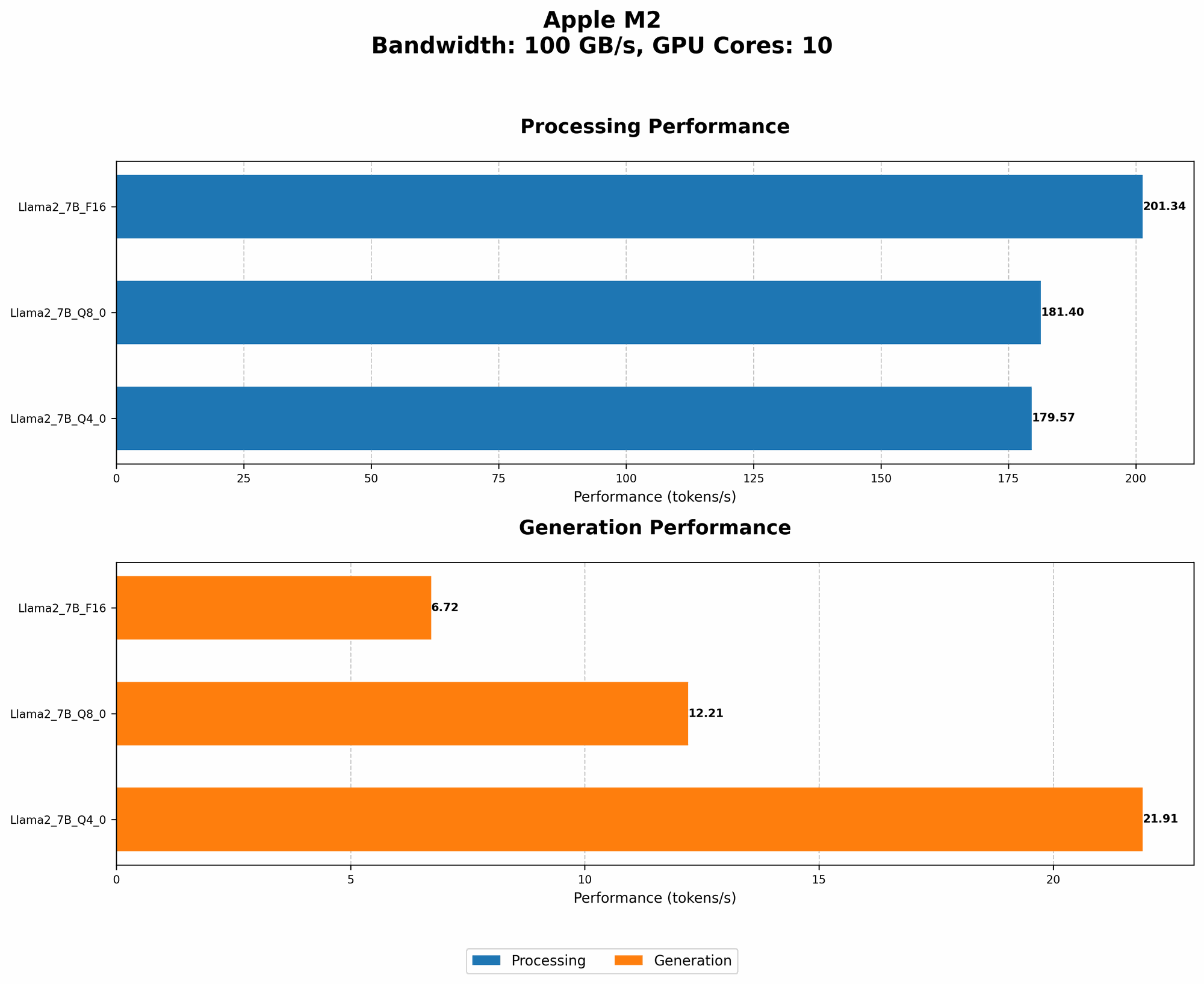
Let's get down to the nitty-gritty and see what the Apple M2 can do:
| Model | M2 Token Speed (Tokens/second) |
|---|---|
| Llama 2 7B (F16) | 6.72 |
| Llama 2 7B (Q8_0) | 12.21 |
| Llama 2 7B (Q4_0) | 21.91 |
Key observations:
Quantization Matters: Take a look at the token speeds for Llama 2 7B: We see a significant boost when utilizing Q80 and Q40 quantization formats compared to F16. Quantization, in essence, is like shrinking a large dictionary into a more compact one with fewer words, making things faster and more efficient. This is a game-changer for running LLMs locally, as it allows for faster processing and lower memory requirements.
The M2 Holds Its Own: The M2 chip demonstrates impressive performance with Llama 2 7B, achieving high token speeds even with the most demanding models. However, keep in mind that these are for the smaller version of Llama 2 (7B). It's important to note that we don't have any data on the M2's performance with larger models like Llama 2 70B, so we can't draw conclusions about its capability with those.
Understanding Token Speed and LLM Performance
Token speed is crucial for a smooth and enjoyable LLM experience. Think of it like this: Imagine you're having a conversation with someone. If they take long pauses between every word, it can feel awkward and frustrating. Similarly, slow token speeds can lead to laggy responses, making interactions with your LLM feel sluggish.
Here's how token speed impacts the user experience:
- Faster Responses: Higher token speeds translate to quicker response times, meaning you get your answers and generated text faster.
- Smoother Interactions: A smooth flow of tokens is essential for a natural feeling conversation with your LLM, just like a real conversation.
Factors Impacting Token Speed
While the M2 chip is a powerhouse, several factors can influence your token speed:
- Model Size: Larger models with billions of parameters require more processing power, leading to slower token speeds.
- Model Architecture: Some model architectures are inherently more efficient than others, impacting token speed.
- Quantization Levels: As we saw with Llama 2 7B, quantization levels significantly impact token speeds.
- Hardware: The processing power and memory capacity of your hardware play a crucial role in token speed.
Practical Applications of Local LLMs
Running LLMs locally opens up a world of possibilities:
- Privacy: No need to send your data to the cloud, keeping your conversations and information private.
- Offline Access: You can still enjoy the benefits of LLMs even without an internet connection.
- Customization: You can tailor your LLMs to your specific needs and preferences by fine-tuning them with your own data.
Conclusion
The Apple M2 chip demonstrates an impressive capability for running local LLMs. Its performance with Llama 2 7B is promising, highlighting the potential for a smooth and responsive user experience with these models. As we saw, token speed is a key factor in how well an LLM performs, and the M2 chip holds its own in this regard. However, it's important to note that our data is limited to the smaller Llama 2 7B model. We need more data to fully assess the M2's capability with larger, more demanding models.
FAQ
What are the benefits of running LLMs locally?
Running LLMs locally offers several advantages, including enhanced privacy, offline access, and the ability to customize models with your own data.
What are the challenges of running LLMs locally?
The main challenges involve managing the computational demands of these complex models, ensuring sufficient memory capacity, and optimizing for efficient performance.
How can I improve token speed on my M2?
You can improve token speed by exploring different quantization levels (Q80 or Q40) and utilizing efficient model architectures.
Keywords
Apple M2, LLM, Llama 2, token speed, quantization, local models, privacy, offline access, customization, benchmark, performance