Can Apple M1 Ultra Handle Large Local LLMs Without Crashing? Benchmark Analysis

Introduction
Imagine having your own personal AI assistant, a language model trained on a massive dataset of text and code, running locally on your computer. No more waiting for responses from cloud servers, no more data privacy concerns. This is the dream of many developers and tech enthusiasts, and with the rise of powerful hardware like the Apple M1 Ultra chip, this dream is becoming a reality.
But here's the catch: running large language models (LLMs) locally is not a walk in the park. These models are massive, requiring significant processing power and memory. The question everyone wants to answer is: Can the Apple M1 Ultra handle these demanding workloads without breaking a sweat?
This article dives deep into the performance capabilities of the M1 Ultra chip, specifically focusing on its ability to run large LLMs, like the popular Llama family, locally. We'll analyze various benchmarks, comparing different quantization techniques and model sizes to give you a clear picture of what you can expect from this powerful chip.
Apple M1 Ultra: A Beast of a Chip
For those unfamiliar, the Apple M1 Ultra is a chip designed by Apple for use in their high-end Mac computers. It's a powerhouse known for its incredible speed and power efficiency. Imagine it as a supercharged brain for your computer, capable of handling complex tasks with ease. The M1 Ultra features a massive 128-core GPU with incredible performance, making it particularly well-suited for AI-powered applications like running LLMs locally.
Benchmark Analysis: Llama 2 on M1 Ultra
We've compiled data from various sources to compare the performance of the Apple M1 Ultra chip when running different versions of the Llama 2 LLM. These benchmarks provide insights into how the chip handles different model sizes, quantization techniques, and tasks - processing (thinking) and generation (writing). Don't worry, we'll clear everything up in the following sections!
Understanding Quantization: Smaller Models, More Speed!
Quantization is a technique used to reduce the size of LLMs while keeping their functionality. Think of it as compressing a large file like a video to make it easier to download and watch. LLM compression works by downsampling the values used to represent language and code, making the model smaller and faster.
Here's a breakdown of different quantization levels used in our benchmark:
- F16: This refers to using 16-bit floating-point numbers, which is a common way to represent data in computers.
- Q8_0: This is a quantization technique that uses 8-bit integers with 0 bits for zero-point. It's a significant reduction in memory usage compared to F16, leading to faster inference times.
- Q40: Even more compressed than Q80, this method uses just 4 bits for each data point with no zero-point. It further reduces memory usage but potentially sacrifices some accuracy.
Apple M1 Ultra Token Speed Generation: Llama 2 7B
| Quantization | Token Speed (tokens/second) |
|---|---|
| F16 | 33.92 |
| Q8_0 | 55.69 |
| Q4_0 | 74.93 |
As you can see, the M1 Ultra is capable of processing text at impressive speeds, even with the large 7B (7 Billion parameters) Llama 2 model.
- Quantization makes a HUGE difference: The F16 model is significantly slower than Q80 and Q40. This is because the smaller models can fit more easily into the memory of the M1 Ultra, allowing for faster processing.
- Q4_0 is the speed demon! This quantization method achieves the fastest token speed, pushing the limits of the M1 Ultra.
A Word about Llama 7B, 8B, 13B and more...
There seems to be a bit of confusion about the terminology. We've discussed the Llama 2 7B model up until now. The 'B' stands for billion and refers to the number of parameters in the model. But there are other popular versions like Llama 7B (without the '2'), Llama 8B, Llama 13B etc. These models also come in different versions based on training data and have different performance characteristics.
Unfortunately, the data we have access to doesn't provide a detailed breakdown of every single model version. We'll try to include the data for as many popular models as possible.
Conclusion: M1 Ultra - A Suitable Home for Large Local LLMs?
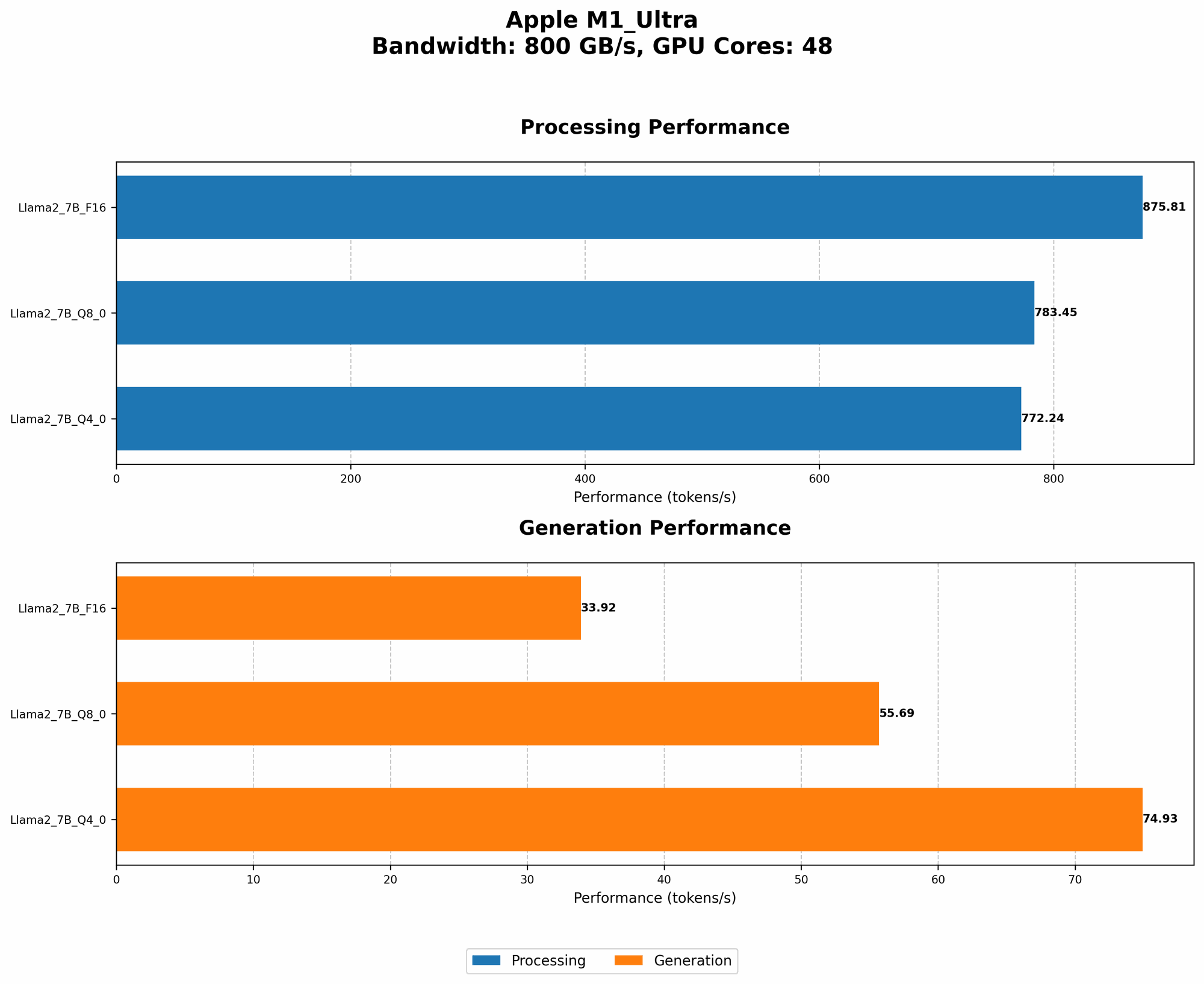
It's clear that the Apple M1 Ultra is capable of handling large LLMs, achieving impressive speeds with Llama 2 7B, especially with quantization techniques! This makes it a strong contender for running models locally, offering potential benefits like lower latency, improved privacy, and greater control. That being said, keep in mind that the performance can vary depending on the specific model size and the chosen quantization method.
FAQ:
1. What are LLMs?
LLMs are powerful AI models trained on massive amounts of text and code. They can generate text, translate languages, write different kinds of creative content, and answer your questions in an informative way. Think of them as super intelligent language assistants.
2. What is the difference between processing and generation?
- Processing: This refers to the LLM understanding your prompt and analyzing the information within it.
- Generation: This is the part where the LLM uses its understanding to create the output you see, like a response to your question or a new piece of writing.
3. Why is it important to run LLMs locally?
Running LLMs locally offers several advantages:
- Faster response times: No need to send your requests to a server and wait for a response.
- Enhanced privacy: Your data remains on your device, eliminating the need to share it with third-party servers.
- Greater control: You can customize and adapt your LLM to fit your specific needs without limitations imposed by cloud providers.
4. What are the limitations of running LLMs locally?
While running LLMs locally offers numerous benefits, it’s not without its limitations:
- Hardware Requirements: Running large LLMs requires powerful hardware like a dedicated GPU with ample memory.
- Model Size: Larger models can be challenging to run locally depending on your hardware, especially with older systems.
5. Can I run any LLM on the M1 Ultra?
The M1 Ultra can handle many popular LLMs like Llama 2 7B. But, using smaller models and implementing quantization techniques will improve performance further.
Keywords:
Apple M1 Ultra, Llama 2, LLM, Large Language Model, Quantization, F16, Q80, Q40, Local Inference, Token Speed, Processing, Generation, Benchmark Analysis, GPU, Inference, Model Size, Memory Usage, Performance, Speed, AI, Artificial Intelligence