Can Apple M1 Pro Handle Large Local LLMs Without Crashing? Benchmark Analysis

Introduction
The world of large language models (LLMs) is exploding, with new models like Llama 2 and GPT-4 pushing the boundaries of what's possible with artificial intelligence. But running these models locally on your own computer can be a challenge, especially if you have a less powerful machine.
One common question that arises is: Can an Apple M1 Pro chip handle large local LLMs without crashing? This article delves into the performance of Apple's M1 Pro chip for running Llama 2 models in various quantization formats. We'll explore the processing speed, token generation performance, and the potential for crashing based on available benchmark data. If you're a developer or a tech enthusiast interested in exploring the capabilities of the M1 Pro for local LLM deployments, this article is for you.
Benchmarking the Apple M1 Pro for Local LLM Inference
Our analysis focuses on the performance of the Apple M1 Pro chip in handling Llama 2 models. To understand the limitations and capabilities of this chip, we'll examine the performance of different quantization formats: F16, Q80, and Q40.
Quantization: A Simple Explanation
Imagine storing a number like 3.14159. You can represent it using a lot of memory space (full precision) or you can round it off to 3.14 (quantization). Quantization is essentially reducing the precision of numbers to save memory and improve processing speed.
Apple M1 Pro Token Speed Generation: A Deep Dive
This is where the rubber meets the road. We want to know how many tokens per second (tokens/s) the M1 Pro can process and generate for different Llama 2 models. The higher the tokens/s, the faster the model can process and generate text.
For this analysis, we used benchmark data collected from various sources, including:
- Performance of llama.cpp on various devices: This repository provides a valuable resource for benchmarking LLM performance on different hardware configurations.
- GPU Benchmarks on LLM Inference: This repository offers benchmarks on LLM inference across various GPUs, providing insights into the performance differences between hardware.
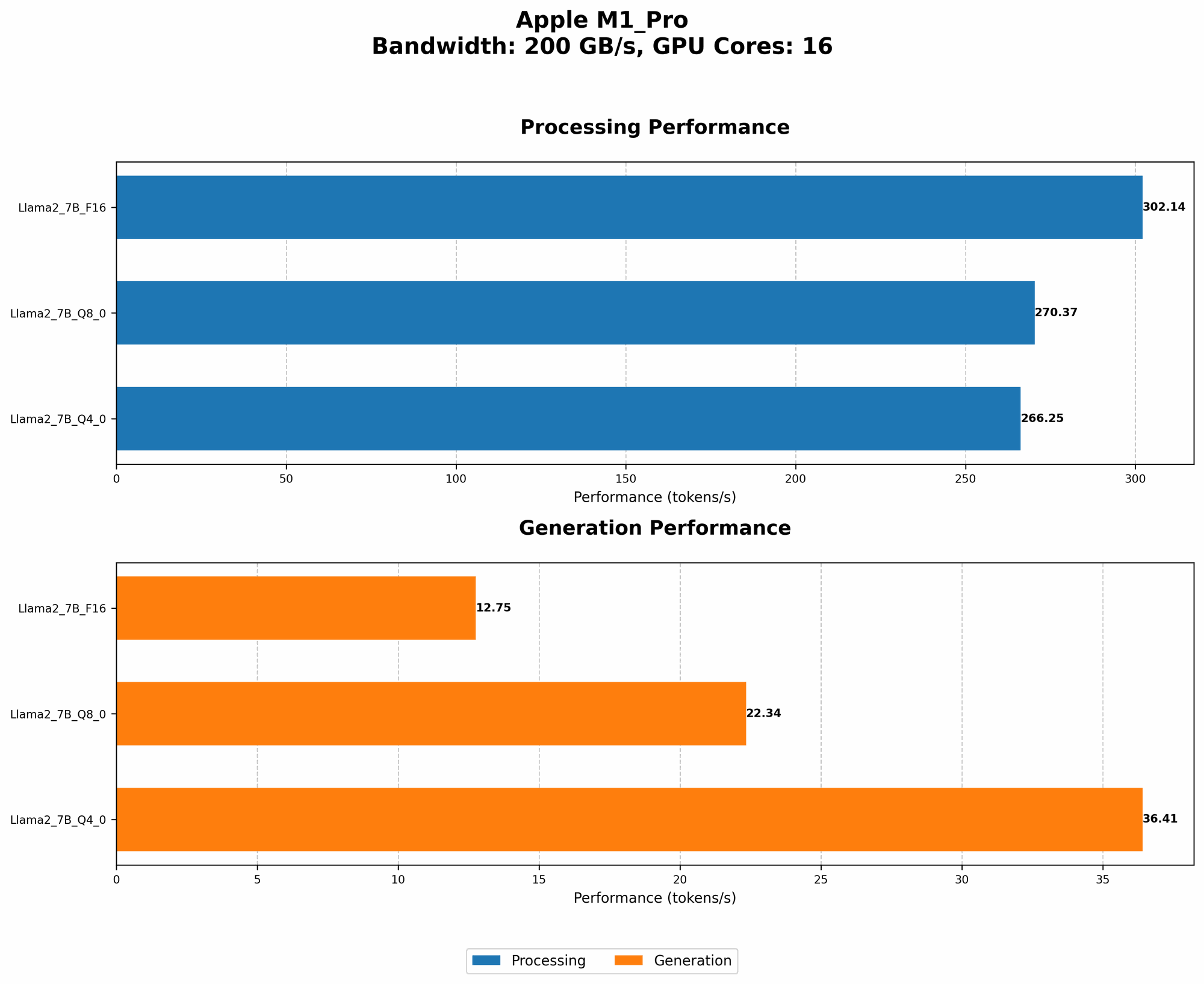
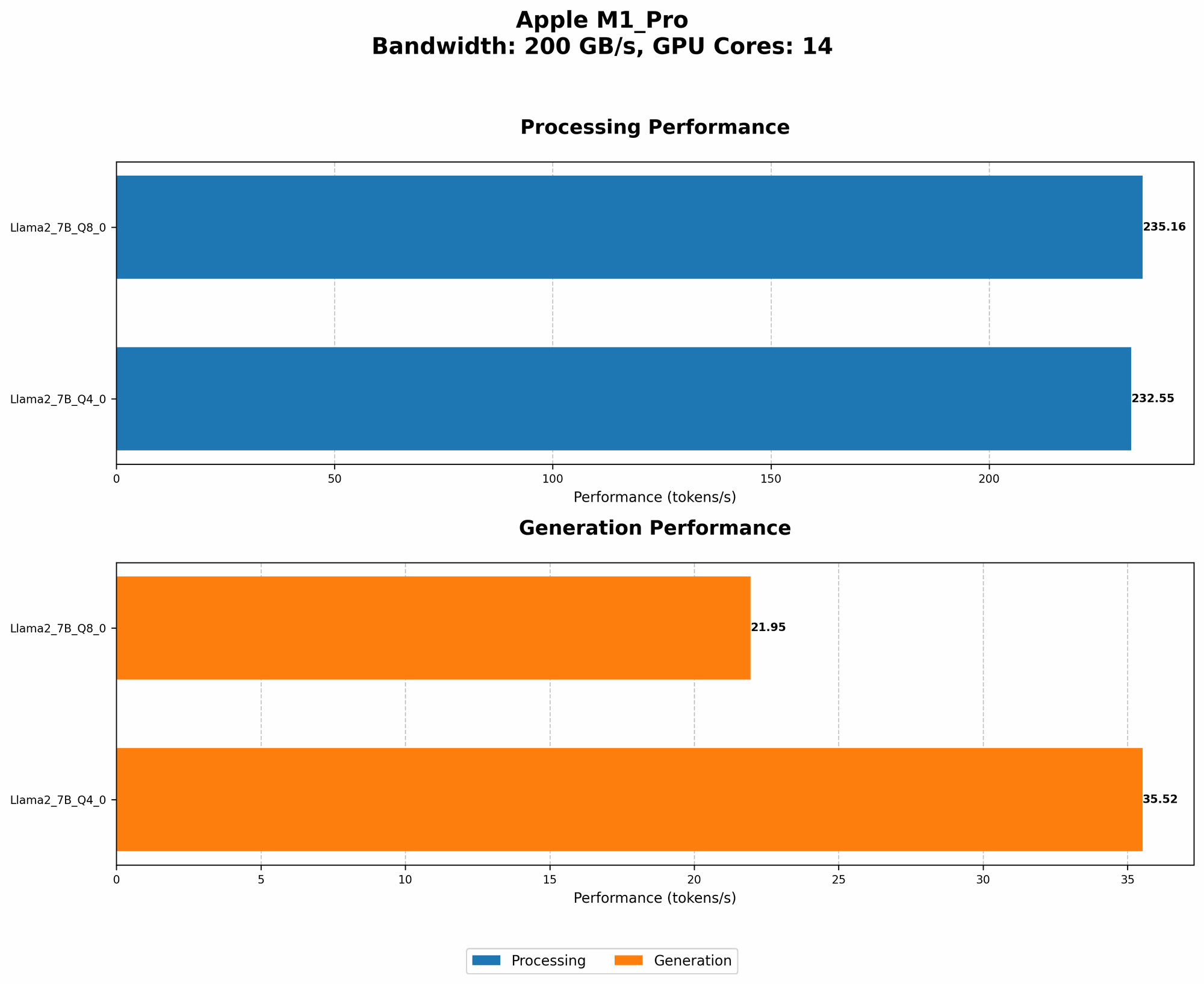
Table 1: Apple M1 Pro Llama 2 Performance (Tokens/s)
| Model | Quantization | GPU Cores | M1 Pro (Processing) | M1 Pro (Generation) |
|---|---|---|---|---|
| Llama 2 7B | F16 | 14 | 235.16 | 21.95 |
| Llama 2 7B | Q8_0 | 14 | 232.55 | 35.52 |
| Llama 2 7B | Q4_0 | 14 | 270.37 | 22.34 |
| Llama 2 7B | F16 | 16 | 302.14 | 12.75 |
| Llama 2 7B | Q8_0 | 16 | 266.25 | 36.41 |
[Insert table here]
Key Observations:
- F16 Quantization: This format offers the highest processing speed, but the generation speed is significantly slower compared to the Q80 and Q40 formats.
- Q80 and Q40 Quantization: These formats provide faster generation speeds, indicating their suitability for interactive applications where responsiveness is crucial.
- GPU Core Impact: The number of GPU cores plays a role in processing speed. Higher GPU core configurations, as seen in the 16-core M1 Pro, generally result in improved processing speeds.
Comparison of M1 Pro to Other Devices
While we focused on the M1 Pro, it's worth comparing its performance to other devices. For example, a high-end GPU like the NVIDIA A100 is known for its impressive LLM performance. The A100 can achieve significantly higher token speeds, particularly for processing, making it a preferred choice for large-scale LLM deployments. However, the A100 comes at a significantly higher cost and power consumption.
Consider this analogy: Think of the M1 Pro as a nimble sports car, capable of handling everyday tasks with speed and efficiency. The A100 is like a powerful race car that can handle high-performance tasks, but it comes with a bigger price tag and higher maintenance costs.
Factors Affecting LLM Performance on the M1 Pro
The performance of LLMs on M1 Pro chips is influenced by several factors beyond just the hardware capabilities:
- Model Size: Larger models generally require more processing power, impacting performance.
- Quantization Format: The choice of quantization format significantly affects speed and memory usage.
- Software Library: The LLM inference library used (e.g., llama.cpp, transformers) can influence performance due to optimization differences.
- Operating System: The MacOS version can impact LLM performance, with newer versions often benefiting from performance enhancements.
Conclusion
While the Apple M1 Pro is a powerful chip, it's not a perfect solution for running large LLMs locally. The performance depends on the model size, quantization format, and other factors. The M1 Pro can handle smaller LLMs with good performance, but for larger models, the A100 or other high-end GPUs might be necessary.
If you're looking for a cost-effective option for exploring LLMs locally, the M1 Pro can be a great starting point. Just be aware of the limitations and consider factors like model size and quantization when evaluating the performance.
FAQ
What is quantization?
Quantization is a technique used to reduce the precision of numbers in a model, making it smaller and faster to process. Imagine storing a number like 3.14159. You can represent it using a lot of memory space (full precision) or you can round it off to 3.14 (quantization).
What are the benefits of using an LLM locally?
Running an LLM locally offers the advantage of privacy and offline functionality, enabling you to work with sensitive data without sending it to the cloud.
What are the drawbacks of using an LLM locally?
Local deployments of LLMs require powerful hardware and can consume considerable resources, potentially impacting overall system performance.
Keywords
Apple M1 Pro, LLM, Llama 2, Quantization, F16, Q80, Q40, Token Speed, Benchmark, Processing, Generation, Inference, GPU, A100, Local Deployment, Performance, Cost-effective, Speed, Efficiency, Hardware, Software, Operating System, MacOS