Can Apple M1 Max Handle Large Local LLMs Without Crashing? Benchmark Analysis

Introduction
The world of Large Language Models (LLMs) is exploding, with new models popping up like daisies after a spring rain. These powerful AI systems are capable of generating human-like text, translating languages, writing different kinds of creative content, and answering your questions in an informative way. But running these behemoths locally on your computer can feel like trying to fit a giant elephant into your living room – a messy, complicated, and potentially disastrous endeavor.
That's where the question arises: can the powerful Apple M1 Max chip handle the heavy lifting required to run these massive LLMs without crashing your computer into a digital abyss? To answer this question, we'll dive into the fascinating world of LLM performance benchmarks, exploring the capabilities of the Apple M1 Max chip in handling various LLM sizes and configurations.
Apple M1 Max Token Speed: A Quick Look at the Numbers
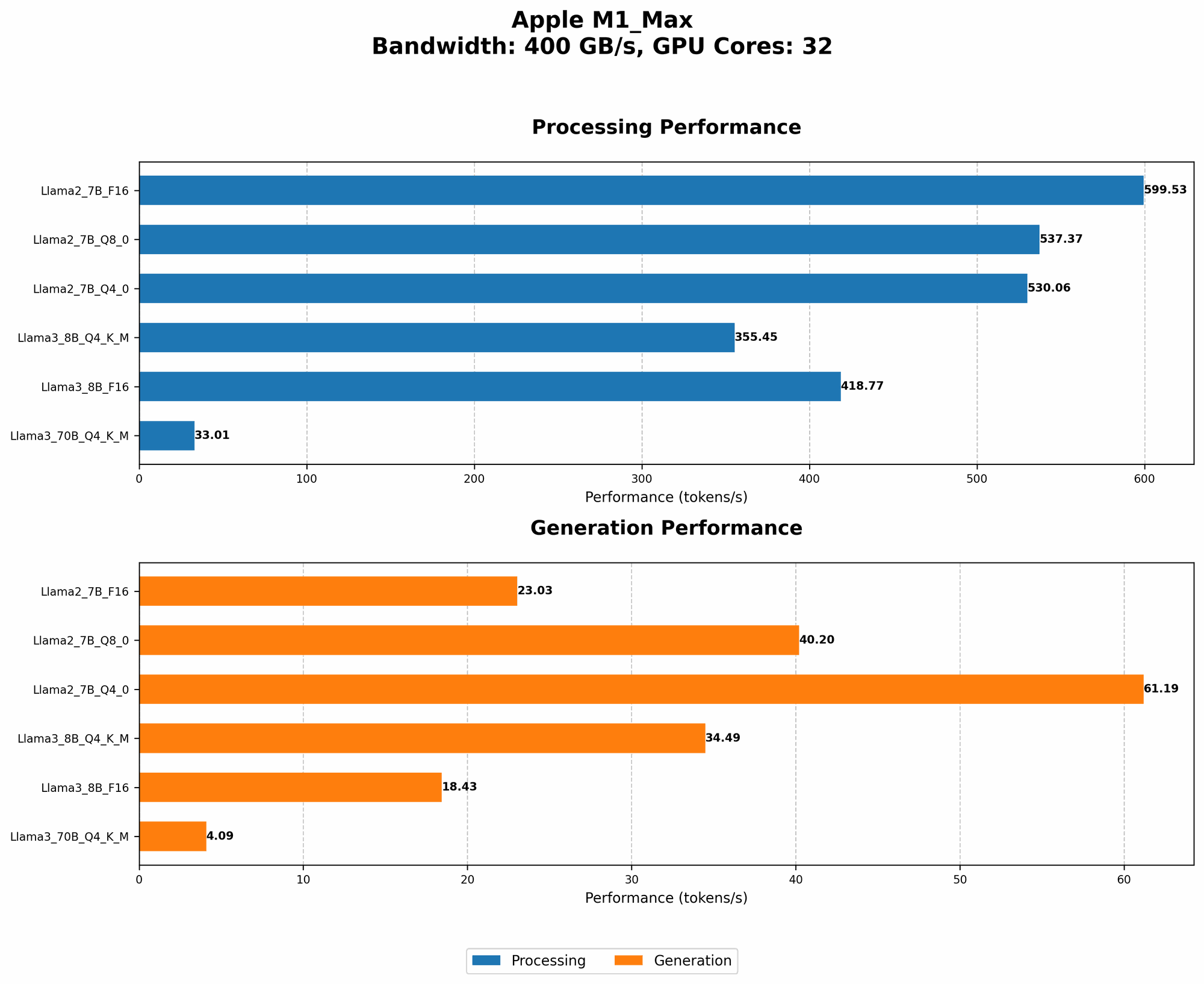
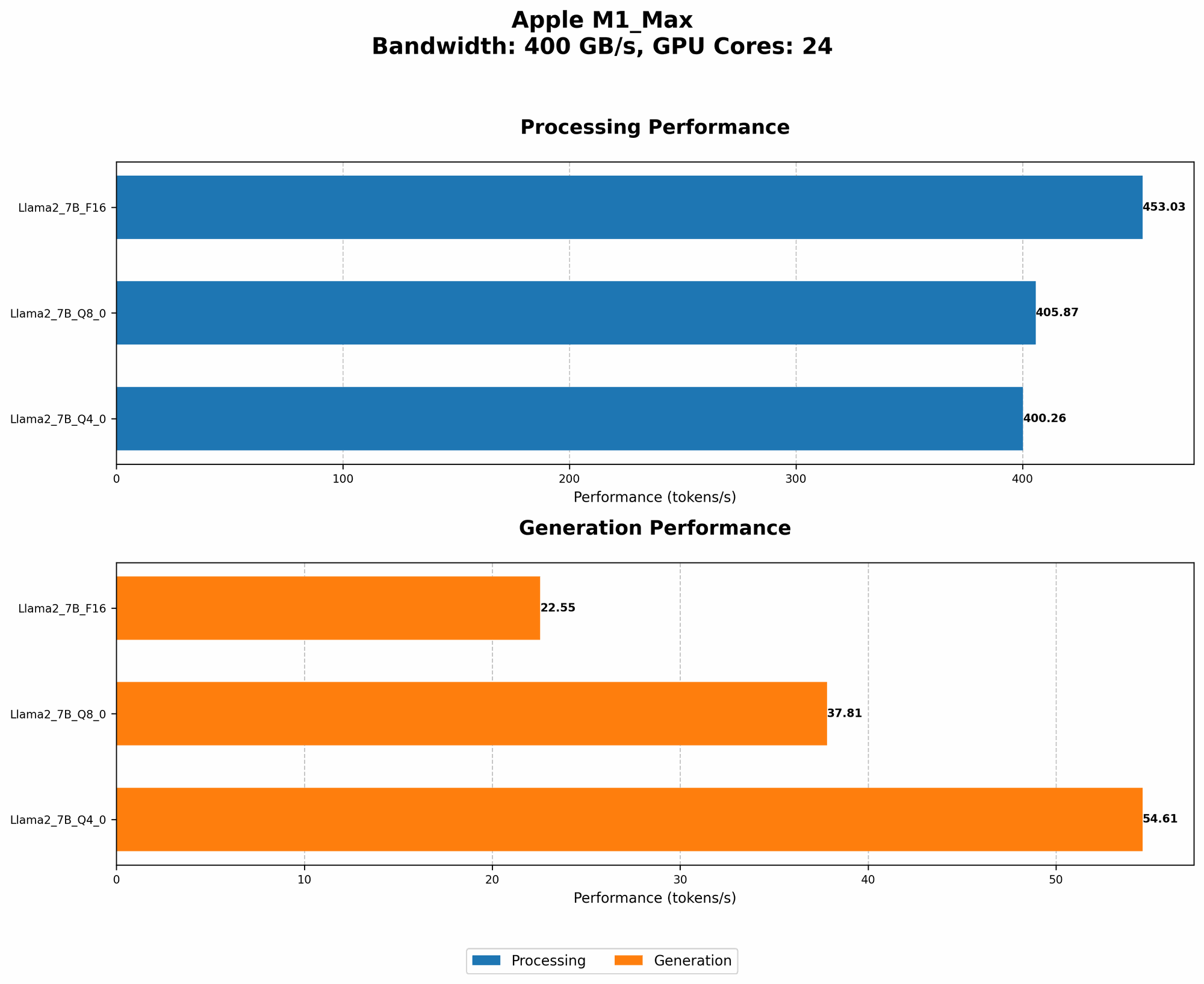
Before we delve into the nitty-gritty details, let's take a quick peek at the performance numbers. The Apple M1 Max chip, a behemoth in its own right, boasts impressive capabilities, thanks to its powerful GPU (Graphics Processing Unit) and its vast memory bandwidth.
The numbers we'll be looking at will be in tokens per second, essentially a measure of how quickly the chip can process the building blocks of text. Think of it like the speed of a text-processing factory, where the faster the factory churns out tokens, the quicker your LLM can generate responses.
Benchmarking the Apple M1 Max: A Tale of Two Models
We'll be focusing on two prominent LLM families: Llama 2 and Llama 3. While both families are known for their impressive capabilities, they differ in their size and complexity. Llama 2 is lighter, with a 7B (7 Billion) parameter model (think of parameters as the knowledge a model has) while Llama 3 comes in a larger 8B (8 Billion) and a colossal 70B (70 Billion) parameter variant.
Apple M1 Max & Llama 2: A Match Made in Tech Heaven?
First, let's take a closer look at how the M1 Max performs with the 7B Llama 2 model. The results are quite intriguing:
| Specification | Llama 2 7B F16 Processing | Llama 2 7B F16 Generation | Llama 2 7B Q8_0 Processing | Llama 2 7B Q8_0 Generation | Llama 2 7B Q4_0 Processing | Llama 2 7B Q4_0 Generation |
|---|---|---|---|---|---|---|
| M1 Max 24 GPU Cores | 453.03 | 22.55 | 405.87 | 37.81 | 400.26 | 54.61 |
| M1 Max 32 GPU Cores | 599.53 | 23.03 | 537.37 | 40.2 | 530.06 | 61.19 |
Key Takeaways:
- Increased GPU Cores = Increased Performance: As expected, the M1 Max with 32 GPU cores shows significantly better performance than the one with 24 GPU cores. More computing power equals faster token processing.
- Quantization Matters: The different quantization levels (F16, Q80, and Q40 ) represent different ways of compressing the model's weights for improved efficiency. The speed of processing (reading text) is similar across the different quantization levels, but the generation (writing text) speed is significantly slower with Q40 and even slower with Q80. This means while the M1 Max can process text data quickly, it might take longer to generate its responses when using lower quantization levels.
Apple M1 Max & Llama 3: The Challenge of Big LLMs
Let's shift our focus to the more challenging task of running Llama 3, a model known for its sheer size and power. The data reveals some interesting insights:
| Specification | Llama 3 8B Q4KM Processing | Llama 3 8B Q4KM Generation | Llama 3 8B F16 Processing | Llama 3 8B F16 Generation | Llama 3 70B Q4KM Processing | Llama 3 70B Q4KM Generation | Llama 3 70B F16 Processing | Llama 3 70B F16 Generation |
|---|---|---|---|---|---|---|---|---|
| M1 Max 32 GPU Cores | 355.45 | 34.49 | 418.77 | 18.43 | 33.01 | 4.09 | NULL | NULL |
Key Takeaways:
- Llama 3 8B: A Decent Performance: The M1 Max handles the 8B Llama 3 model relatively well. The performance numbers are comparable to Llama 2, but the model is even more impressive due to its greater parameter count, showcasing the capabilities of the Apple M1 Max in handling larger models.
- Llama 3 70B: The Limits of the M1 Max: The M1 Max struggles heavily with the 70B Llama3. It is important to note that there are currently no benchmark numbers available for Llama 3 70B with F16 quantization. This stark contrast suggests that the M1 Max might be reaching its limits for local LLM inference, especially with the large 70B model.
Understanding Quantization: A Simplified Explanation
Quantization is a technique used to reduce the size of LLMs, making them easier to store and run on devices with limited resources. It's like compressing a large photo file to a smaller size – you lose some quality but gain a lot in terms of storage space and loading speed.
Think of it like this. Imagine your LLM is a dictionary with millions of words. Each word has a very precise definition (represented by numbers). With quantization, you round off those numbers to simpler values, similar to rounding off 3.14 to 3. This might result in a slight loss of accuracy, but it makes the dictionary much smaller and quicker to access.
The more you "round off" the numbers (the lower the quantization level), the smaller the dictionary becomes, but the less precise the words become. This trade-off between accuracy and speed is what makes quantization an important tool for optimizing LLMs for various devices.
How Does the Apple M1 Max Compare to Other Devices?
While we're focused on the M1 Max, it's worth briefly mentioning some other devices. For example, the Nvidia A100 GPU is a powerhouse commonly used in data centers for more demanding LLM workloads. It's considerably more powerful than the M1 Max, capable of achieving much higher token processing speed and handling even larger LLM models with ease.
However, the A100 is not designed for local use like the M1 Max. It's a hefty investment, requiring dedicated hardware and significant power consumption. The M1 Max offers a more accessible and energy-efficient option, especially for individual users and developers.
Choosing the Right LLM and Quantization Level for the M1 Max
The M1 Max is a powerful chip, but it's not a magic bullet for running all LLMs. Choosing the right LLM and quantization level for your needs is a critical decision.
- Consider your needs: If speed and resources are at a premium, and you're working with relatively small LLMs, the M1 Max is a viable option.
- Scaling up: If you're aiming for large-scale deployments of complex LLMs, more powerful hardware like the A100 might be necessary.
Remember, the choice ultimately depends on your specific requirements, the tradeoff between accuracy, speed, and resource constraints, and your budget!
FAQ: Unraveling the Mysteries of LLMs and Apple M1 Max
Let's address some common questions about LLMs and the Apple M1 Max chip:
1. Can I run a 100B parameter LLM on my M1 Max?
While the M1 Max is powerful, running a 100B parameter LLM locally would be extremely resource-intensive and likely result in slow performance and potential crashes. Consider using cloud-based platforms for such large LLMs, where powerful hardware is readily available.
2. Is it possible to increase the speed further on the M1 Max for LLMs?
There are a few potential ways to boost performance:
- Optimize the model: This can involve techniques such as pruning (removing unnecessary connections) or further quantization.
- Fine-tuning: Customize the model for specific tasks, potentially improving its efficiency.
- Utilize LLMOps: Use tools and techniques for optimizing LLM deployments, including model and parameter tuning.
3. Is the M1 Max suitable for running other AI tasks besides LLMs?
Absolutely. The M1 Max is a versatile chip designed for a wide range of AI applications, including:
- Image and video processing
- Machine learning
- Computer vision
4. What are the best LLMs to run on the M1 Max?
The best choice depends on your needs. Consider the following:
- Llama 2 7B: A good starting point, offering a balance of size and performance.
- Llama 3 8B: A larger model with impressive capabilities, but it might require more resources.
- Smaller, specialized models: There are many specialized models available for tasks like text summarization or translation, which might be more suitable for local deployment.
5. What are the limitations of running LLMs locally?
- Limited processing power: Even with powerful chips like the M1 Max, running large LLMs locally can strain your device.
- Memory constraints: Large LLMs require significant memory, which could impact the performance of other applications running on your computer.
- Data access: LLMs often require access to extensive datasets, which can pose challenges for local deployments.
Keywords
Apple M1 Max, LLM, large language models, Llama 2, Llama 3, quantization, F16, Q80, Q40, token speed, processing, generation, performance, benchmark, GPU, GPU cores, AI, local deployment, cloud-based, LLMOps, fine-tuning, pruning,