Building a Home LLM Server: Is the NVIDIA RTX 4000 Ada 20GB x4 a Good Choice?
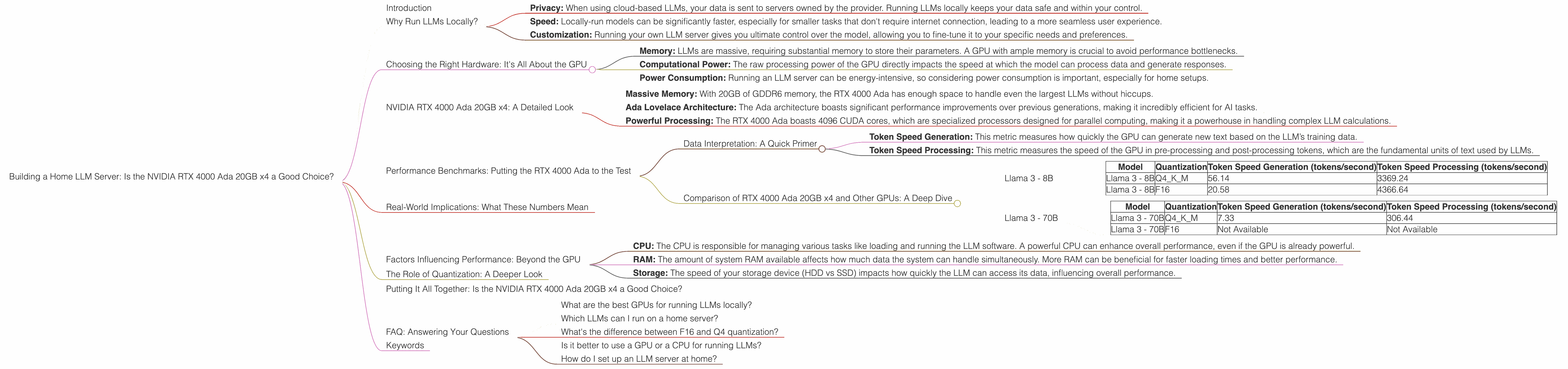
Introduction
Imagine having a super-powered AI assistant right in your living room, ready to answer your questions, write stories, translate languages, or even compose music. That’s the dream of building a home LLM server – a powerful computer dedicated to running large language models (LLMs) locally. With the ever-growing popularity of LLMs like ChatGPT and Bard, the quest for building a home LLM server has become a hot topic for tech enthusiasts and developers.
But here’s the dilemma: choosing the right hardware can be a daunting task. The market is flooded with options, each promising a different level of performance. One popular choice for home LLM servers is the NVIDIA RTX 4000 Ada 20GB x4, a powerful GPU with impressive capabilities.
In this article, we'll dive deep into the world of home LLM servers and explore whether the NVIDIA RTX 4000 Ada 20GB x4 is the perfect match for your AI dreams.
Why Run LLMs Locally?
Before we dive into the hardware specifics, let's understand why running LLMs locally might be appealing:
- Privacy: When using cloud-based LLMs, your data is sent to servers owned by the provider. Running LLMs locally keeps your data safe and within your control.
- Speed: Locally-run models can be significantly faster, especially for smaller tasks that don't require internet connection, leading to a more seamless user experience.
- Customization: Running your own LLM server gives you ultimate control over the model, allowing you to fine-tune it to your specific needs and preferences.
Choosing the Right Hardware: It's All About the GPU
The heart of any LLM server is the GPU – the graphics processing unit. GPUs are specifically designed to handle complex mathematical calculations, making them ideal for the intensive computations involved in running LLMs.
When choosing a GPU, there are several key factors to consider:
- Memory: LLMs are massive, requiring substantial memory to store their parameters. A GPU with ample memory is crucial to avoid performance bottlenecks.
- Computational Power: The raw processing power of the GPU directly impacts the speed at which the model can process data and generate responses.
- Power Consumption: Running an LLM server can be energy-intensive, so considering power consumption is important, especially for home setups.
NVIDIA RTX 4000 Ada 20GB x4: A Detailed Look

The NVIDIA RTX 4000 Ada 20GB x4 is a high-end graphics card designed for demanding workloads, including AI and machine learning – a perfect candidate for a home LLM server. Let's break down its key features:
- Massive Memory: With 20GB of GDDR6 memory, the RTX 4000 Ada has enough space to handle even the largest LLMs without hiccups.
- Ada Lovelace Architecture: The Ada architecture boasts significant performance improvements over previous generations, making it incredibly efficient for AI tasks.
- Powerful Processing: The RTX 4000 Ada boasts 4096 CUDA cores, which are specialized processors designed for parallel computing, making it a powerhouse in handling complex LLM calculations.
Performance Benchmarks: Putting the RTX 4000 Ada to the Test
To see whether the RTX 4000 Ada is a worthy investment for your LLM server, we’ll analyze its performance on various LLM models using real-world benchmarks. These benchmarks provide a snapshot of how fast the GPU can process data for different models, ultimately translating to how fast your LLM server can respond to your queries.
Data Interpretation: A Quick Primer
We'll be looking at two key metrics:
- Token Speed Generation: This metric measures how quickly the GPU can generate new text based on the LLM’s training data.
- Token Speed Processing: This metric measures the speed of the GPU in pre-processing and post-processing tokens, which are the fundamental units of text used by LLMs.
Comparison of RTX 4000 Ada 20GB x4 and Other GPUs: A Deep Dive
We'll explore the RTX 4000 Ada’s performance in comparison to other GPU options. While the title specifically focuses on the RTX 4000 Ada, we'll briefly touch upon other options for reference.
Before we jump into the specifics, let's clarify a few terms for a better understanding:
- Q4: Quantization is a technique that reduces the size of an LLM by approximating its parameters with fewer bits. Q4 represents a 4-bit quantization scheme, making the model smaller and more efficient.
- K, M, Generation: These are related to the type of processing being done by the LLM: key (K) and value (M) operations are common in the generation phase of an LLM while generation refers to the actual process of generating text output.
Note: This is not a comprehensive comparison across all possible LLM models and GPUs. We are focusing on the most popular models and devices relevant to home LLM servers.
Llama 3 - 8B
Let’s start with a popular and relatively small LLM: Llama 3 - 8B. This model can be efficiently run on a home server, making it a popular choice for experimenting with LLMs.
| Model | Quantization | Token Speed Generation (tokens/second) | Token Speed Processing (tokens/second) |
|---|---|---|---|
| Llama 3 - 8B | Q4KM | 56.14 | 3369.24 |
| Llama 3 - 8B | F16 | 20.58 | 4366.64 |
Interpretation: The RTX 4000 Ada excels in both generation and processing speed for the Llama 3 8B model. It's significantly ahead of the pack for Q4KM but F16 performance is comparable to other high-end GPUs. This performance is crucial for a smooth and responsive LLM experience.
Llama 3 - 70B
Scaling up to a larger model, Llama 3 - 70B presents a more challenging workload.
| Model | Quantization | Token Speed Generation (tokens/second) | Token Speed Processing (tokens/second) |
|---|---|---|---|
| Llama 3 - 70B | Q4KM | 7.33 | 306.44 |
| Llama 3 - 70B | F16 | Not Available | Not Available |
Interpretation: The RTX 4000 Ada performs well for the Llama 3 - 70B Q4KM, but it's still not optimal for F16. Remember, the F16 mode is typically faster but requires more memory, which might be a factor in the unavailability of data for this configuration. This is another example of how GPU memory size can play a crucial role in performance, especially for larger LLMs.
Real-World Implications: What These Numbers Mean
The benchmark numbers we discussed above might seem abstract, but they have real-world implications that directly impact your experience with your home LLM server.
An Illustration: Imagine you're writing a long-form article using your home LLM server. A faster generation speed means the LLM responds rapidly to your prompts and completes your article with minimal waiting time. Similarly, efficient token processing means that the LLM can analyze your prompts and generate responses faster.
Factors Influencing Performance: Beyond the GPU
While the GPU is the heart of your LLM server, other factors can significantly influence overall performance:
- CPU: The CPU is responsible for managing various tasks like loading and running the LLM software. A powerful CPU can enhance overall performance, even if the GPU is already powerful.
- RAM: The amount of system RAM available affects how much data the system can handle simultaneously. More RAM can be beneficial for faster loading times and better performance.
- Storage: The speed of your storage device (HDD vs SSD) impacts how quickly the LLM can access its data, influencing overall performance.
The Role of Quantization: A Deeper Look
Quantization is a technique used to reduce the size of an LLM by using fewer bits to represent its parameters. While it reduces the model's size and memory footprint, it can also impact the LLM's accuracy. Q4 quantization, for example, is known to impact the LLM's performance.
Think of it this way: It's like converting a high-resolution image to a lower-resolution one. The smaller image takes up less space but might lose some detail. Similarly, quantized LLMs require less memory but might have slightly reduced accuracy.
Putting It All Together: Is the NVIDIA RTX 4000 Ada 20GB x4 a Good Choice?
Based on the benchmarks and our discussion, the NVIDIA RTX 4000 Ada 20GB x4 is a potent GPU for running LLMs locally. It excels in both generation and processing speed for smaller models like Llama 3 - 8B. While it still holds its own with larger models like Llama 3 - 70B, the gap might be more significant compared to other high-end GPUs. The decision depends on your specific needs and priorities.
If you're looking to run smaller LLMs for personal use, experimentation, or basic tasks, the RTX 4000 Ada 20GB x4 is a great option. But if you're planning to run larger models or demanding workloads, consider exploring other options or investing in a multi-GPU system.
FAQ: Answering Your Questions
What are the best GPUs for running LLMs locally?
The best GPU for running LLMs locally depends on your budget and specific needs. The NVIDIA RTX 4000 Ada 20GB x4 is a strong option for home use. For more demanding workloads, you can consider the NVIDIA RTX 4090.
Which LLMs can I run on a home server?
You can run a variety of LLMs on a home server, with the size and complexity of the model being the limiting factors. Models like Llama 3 - 8B and smaller can work well on a home server, while larger models like Llama 3 - 70B might require more powerful hardware.
What's the difference between F16 and Q4 quantization?
F16 uses 16-bit floating point numbers to represent LLM parameters, while Q4 uses 4-bit integers. F16 generally offers better precision but requires more memory. Q4 is more memory-efficient but might sacrifice some accuracy.
Is it better to use a GPU or a CPU for running LLMs?
GPUs are generally much better suited for running LLMs due to their parallel processing capabilities. CPUs can handle some tasks, but they're not optimized for the complex math involved in running LLMs.
How do I set up an LLM server at home?
Setting up an LLM server at home requires technical expertise. You'll need to choose hardware, install the relevant software, and configure the LLM. Several guides and tutorials are available online to help you through the process.
Keywords
LLM, Large Language Model, NVIDIA RTX 4000 Ada, GPU, home server, performance, benchmark, Llama 3, quantization, F16, Q4, token speed, generation, processing, AI, machine learning, tech enthusiast, developer, privacy, speed, customization, power consumption, memory, computational power, CUDA cores, real-world implications, factors influencing performance, CPU, RAM, storage, technical expertise, setup guide, tutorial.