Building a Home LLM Server: Is the NVIDIA A100 PCIe 80GB a Good Choice?
Introduction
The world of large language models (LLMs) is exploding, and with it comes the desire to run these powerful AI models locally. Imagine having your own personal Bard or ChatGPT, ready to answer your questions and generate creative content with just a few keystrokes. But can you really do this at home?
This article dives into the world of building a home LLM server and explores if the NVIDIA A100PCIe80GB, a powerful GPU, is a good choice for running the Llama 3 model. We’ll explore the performance of this GPU with different Llama 3 configurations, providing insights into the potential of building a home LLM server for your own use.
The NVIDIA A100PCIe80GB: A Powerhouse for Deep Learning
The NVIDIA A100PCIe80GB is known as a powerhouse in the world of deep learning. This GPU offers a massive amount of memory and compute power, making it an ideal choice for training and running complex AI models like LLMs. But will its might be enough to handle the demanding Llama 3?
Llama 3: The Next Generation of Open-Source LLMs
Llama 3 is a new generation of open-source LLMs released by Meta. This model is renowned for its impressive performance and ability to generate creative and contextually relevant text, making it a popular choice for both researchers and enthusiasts.
Performance of the A100PCIe80GB with Llama 3
Token Generation Speed
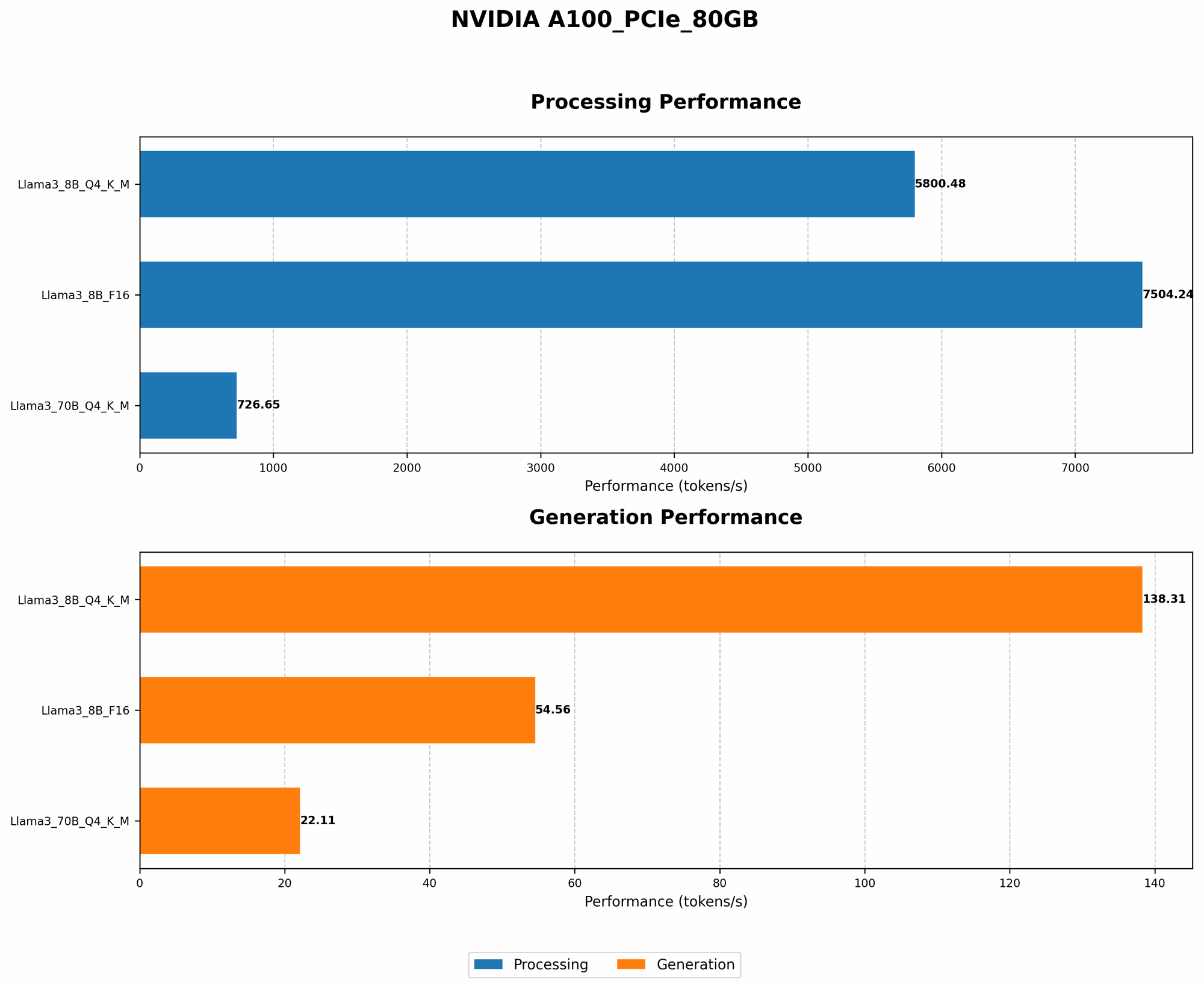
The A100PCIe80GB shows impressive performance for Llama 3. It can generate up to 138.31 tokens per second for the 8B model with Q4 quantization, meaning it's incredibly fast at processing text and generating responses. This is similar to having a conversation with a human, where responses come quickly and smoothly.
Table: Token Generation Speed (Tokens per Second)
| Model | Quantization | A100PCIe80GB |
|---|---|---|
| Llama 3 8B | Q4 | 138.31 |
| Llama 3 8B | F16 | 54.56 |
| Llama 3 70B | Q4 | 22.11 |
| Llama 3 70B | F16 | N/A |
Q4 stands for 4-bit quantization, a technique that reduces the memory footprint of the model while retaining most of its accuracy. F16 represents 16-bit floating-point precision.
What does this mean?
- Q4 quantization: The A100PCIe80GB demonstrates a significant speed advantage for the 8B Llama 3 model using Q4 quantization. This means that even with a smaller model, you can get incredibly quick response times.
- F16 Quantization: While still impressive, the F16 quantization shows a slower token generation speed for the 8B Llama 3 model. This suggests that while the A100PCIe80GB can handle F16, the Q4 configuration might be the better option if speed is your priority.
- 70B Model: For the 70B Llama 3 model, using Q4 quantization the A100PCIe80GB still offers impressive speed, though it's significantly lower than the smaller 8B model. This is expected, as the larger model requires more processing power.
Processing Speed
The A100PCIe80GB also excels in terms of processing speed, reaching up to 5800.48 tokens per second for the 8B Llama 3 model with Q4 quantization. This means the model is able to process a massive amount of text in a short timeframe.
Table: Processing Speed (Tokens per Second)
| Model | Quantization | A100PCIe80GB |
|---|---|---|
| Llama 3 8B | Q4 | 5800.48 |
| Llama 3 8B | F16 | 7504.24 |
| Llama 3 70B | Q4 | 726.65 |
| Llama 3 70B | F16 | N/A |
What does this mean?
- Processing power: The A100PCIe80GB demonstrates remarkable processing speed, especially for the smaller 8B model using Q4 quantization. This indicates that the A100PCIe80GB is capable of handling complex tasks with a large number of tokens, like generating long text passages or summarizing extensive documents.
Is the NVIDIA A100PCIe80GB a Good Choice for Your Home LLM Server?
The answer to this question depends on your specific needs and budget. The A100PCIe80GB is not exactly a cheap GPU. However, if you're looking for the ultimate performance in running Llama 3 models, especially the smaller 8B model, it's a strong contender.
Here's a breakdown:
Pros:
- Impressive performance: The A100PCIe80GB offers blazing-fast token generation and processing speeds, leading to quick and smooth interactions with LLM models like Llama 3.
- Suitable for multiple tasks: The raw power of this GPU allows you to explore both smaller and larger Llama 3 models, making it versatile for a range of projects.
Cons:
- High cost: The A100PCIe80GB is a professional-grade GPU, and its cost reflects that. It might be an investment that not everyone can afford.
- Power consumption: This type of GPU demands a significant amount of power, which might impact your electricity bill. You’ll need a robust power supply and cooling system to handle the heat generated by the A100PCIe80GB.
Alternatives:
If the A100PCIe80GB is outside your budget, there are other options available:
- Consumer-grade GPUs: For a more budget-friendly approach, you can consider powerful consumer-grade GPUs like the RTX 4090 or RX 7900 XTX. These cards might not match the performance of the A100PCIe80GB, but they offer a good balance between price and performance.
- Cloud solutions: Consider running your LLM models in the cloud if you need access to more resources for processing large models. Services like Google Colab, AWS, and Azure offer powerful cloud computing environments that can handle the demands of LLMs.
Optimizing Your Home LLM Server
Even with a powerful GPU like the A100PCIe80GB, there are still ways to optimize your home LLM server for better performance:
- Fine-tuning: Fine-tuning your LLM model on your specific dataset can significantly improve its performance and accuracy.
- Quantization: Using techniques like quantization can reduce the memory footprint of your model, allowing you to run larger models with more efficiency.
- Hardware optimization: Ensure you have a robust power supply, effective cooling system, and fast storage for your LLM server.
Building Your Home LLM Server: A Step-by-Step Guide
- Choose your hardware: Select a GPU that fits your budget and processing needs. Consider the A100PCIe80GB for top-tier performance, or explore consumer-grade alternatives.
- Install the necessary software: Choose a framework like llama.cpp, which is designed for running LLMs on a variety of devices, including GPUs.
- Download and prepare your LLM model: Download your chosen Llama 3 model and ensure it's compatible with your chosen framework.
- Fine-tune your model (optional): If you want to customize your LLM for specific tasks, fine-tune it on your own data.
- Optimize for performance: Experiment with quantization and other methods to enhance the speed and efficiency of your LLM.
FAQ
Q: What is the difference between a server and a desktop computer?
A: A server is designed for continuous, reliable operation and handling multiple users concurrently. It often has more powerful hardware and a different operating system compared to a desktop computer.
Q: What are the different types of large language models?
A: There are many different LLMs, each with its own strengths and weaknesses. Some of the most popular models include:
- GPT-3: Developed by OpenAI, this model is known for its ability to generate creative and coherent text.
- LaMDA: Developed by Google, LaMDA is trained on a massive dataset of dialogue and can engage in natural-sounding conversations.
- PaLM: Developed by Google, PaLM is a powerful LLM that can perform complex tasks like translating languages, writing code, and answering open-ended questions.
Q: How do I choose the right LLM for my needs?
A: The right LLM depends on your specific needs and use case. Factors to consider:
- Size: The larger the model, the more powerful it is, but it also requires more resources to run.
- Task: Different LLMs excel in specific tasks, like text generation, translation, or code generation.
Q: Is it safe to run an LLM model on my home computer?
A: Running an LLM on your personal computer can be safe if you take appropriate precautions. Ensure you're downloading the model from a trusted source and keep your system updated with the latest security patches.
Keywords
A100PCIe80GB, NVIDIA, Llama 3, LLM, large language model, home server, token generation, processing speed, quantization, performance, optimization, GPU, deep learning, AI, open-source, GPT-3, LaMDA, PaLM.