Building a Home LLM Server: Is the NVIDIA 4090 24GB x2 a Good Choice?
Introduction
The world of Large Language Models (LLMs) is exploding, and with it comes the desire to run these powerful AI models locally. For developers, researchers, and even enthusiasts, the allure of having an LLM server humming away in their own home is enticing. But with the computational demands of these models, finding the right hardware is crucial.
One popular choice for a home LLM server is the NVIDIA GeForce RTX 4090 24GB, known for its impressive performance. In this article, we'll dive into the specifics of using two of these powerful graphics cards to build an LLM server and explore how they stack up against some of the most popular Llama models. We'll examine performance metrics, explore the benefits and drawbacks, and ultimately help you decide if the NVIDIA 4090 24GB x2 is the right choice for your home LLM setup.
Performance Evaluation of NVIDIA 4090 24GB x2: A Deep Dive
Understanding the Numbers: Tokens Per Second (TPS)
Before we dive into the performance numbers, let's clarify what we're looking at. In the context of LLMs, token speed is a crucial metric. A token is essentially a single unit of information that an LLM processes. Think of it like a word, but it can also include punctuation marks and other symbols. The more tokens your LLM can process per second, the faster it can generate text, translate languages, or complete other tasks.
Benchmarking the Llama Models
Llama 3 8B Model: A Powerful Baseline
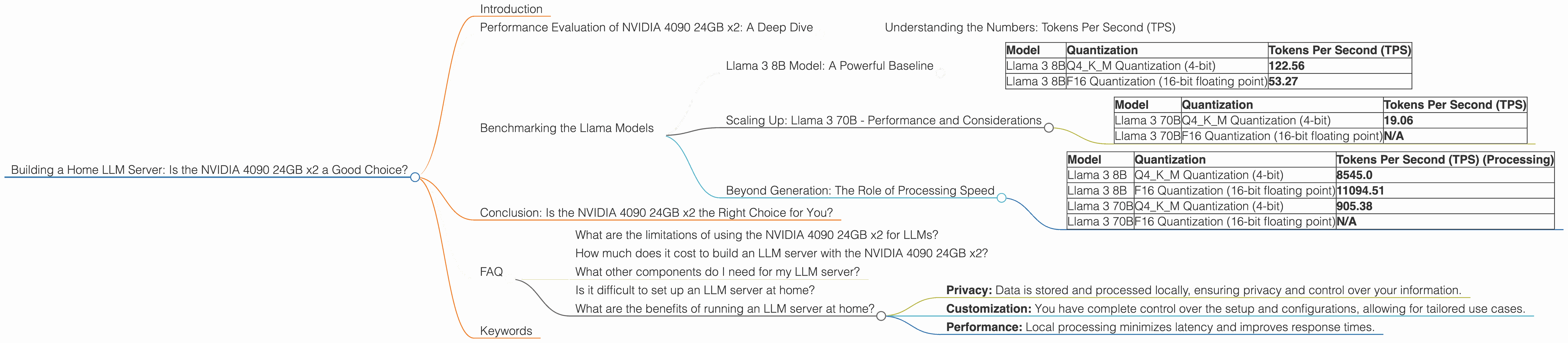
The Llama 3 8B model is a popular starting point for many LLM enthusiasts due to its impressive balance of performance and computational requirements. Let's see how it performs on our NVIDIA 4090 24GB x2 setup.
| Model | Quantization | Tokens Per Second (TPS) |
|---|---|---|
| Llama 3 8B | Q4KM Quantization (4-bit) | 122.56 |
| Llama 3 8B | F16 Quantization (16-bit floating point) | 53.27 |
What do these numbers mean?
- Q4KM Quantization: This technique reduces the memory footprint of the model by representing numbers using 4 bits instead of the usual 32 bits. This leads to faster processing and lower memory usage, but can sometimes affect accuracy.
- F16 Quantization: This method uses 16-bit floating-point numbers, providing a balance between performance and accuracy.
The NVIDIA 4090 24GB x2 demonstrates impressive performance with the Llama 3 8B model, offering a significant speedup with Q4KM quantization compared to F16. Imagine processing over 120 tokens per second! This translates to incredibly fast response times when interacting with the model.
Scaling Up: Llama 3 70B - Performance and Considerations
Now let's see how our setup handles the much larger Llama 3 70B model.
| Model | Quantization | Tokens Per Second (TPS) |
|---|---|---|
| Llama 3 70B | Q4KM Quantization (4-bit) | 19.06 |
| Llama 3 70B | F16 Quantization (16-bit floating point) | N/A |
Key Takeaways:
- The NVIDIA 4090 24GB x2 can handle the Llama 3 70B model with Q4KM quantization, but the performance is significantly lower than the 8B model. This is expected, given the increased computational demands of the larger model.
- We don't have data for the F16 quantization of the 70B model. This might be due to insufficient VRAM, the complexity of the model, or limitations of the benchmark software.
Beyond Generation: The Role of Processing Speed
While token generation speed is important, it's not the only metric to consider. Processing speed—how quickly the model can analyze and process the input tokens—also plays a significant role in overall performance.
| Model | Quantization | Tokens Per Second (TPS) (Processing) |
|---|---|---|
| Llama 3 8B | Q4KM Quantization (4-bit) | 8545.0 |
| Llama 3 8B | F16 Quantization (16-bit floating point) | 11094.51 |
| Llama 3 70B | Q4KM Quantization (4-bit) | 905.38 |
| Llama 3 70B | F16 Quantization (16-bit floating point) | N/A |
The NVIDIA 4090 24GB x2 demonstrates impressive processing speeds for both Llama 3 8B and 70B models. However, as expected, the 8B model processes tokens significantly faster than the 70B model, even with Q4KM quantization.
Conclusion: Is the NVIDIA 4090 24GB x2 the Right Choice for You?

So, is the NVIDIA 4090 24GB x2 a good choice for building a home LLM server? The answer is a resounding yes, especially if you're working with models like Llama 3 8B. It offers excellent performance, allowing you to run these models smoothly and efficiently.
The NVIDIA 4090 24GB x2 delivers a significant advantage over lower-end graphics cards, especially when working with larger models like the 70B. However, it requires a considerable investment. If you're on a budget, consider exploring alternative options like the NVIDIA 4070 or 4080, which might be more affordable while still providing solid performance for smaller LLMs.
FAQ
What are the limitations of using the NVIDIA 4090 24GB x2 for LLMs?
While the NVIDIA 4090 24GB x2 is a powerful card, running large LLMs requires a significant amount of RAM and processing power. You may encounter performance limitations with even larger models or when using complex tasks such as fine-tuning.
How much does it cost to build an LLM server with the NVIDIA 4090 24GB x2?
The cost of building an LLM server can vary depending on the other components you choose. However, the NVIDIA 4090 24GB itself is a significant investment, so expect to pay a premium for this setup.
What other components do I need for my LLM server?
Apart from the graphics card, you'll need a processor, motherboard, RAM, storage, and a power supply. You'll also need a suitable operating system and software for running the LLM models, such as llama.cpp.
Is it difficult to set up an LLM server at home?
Setting up an LLM server can be technically demanding, especially for users who are not familiar with server management and LLM technologies. It requires understanding the nuances of LLM models, quantization techniques, and software configurations.
What are the benefits of running an LLM server at home?
Running an LLM server at home offers several benefits, including:
- Privacy: Data is stored and processed locally, ensuring privacy and control over your information.
- Customization: You have complete control over the setup and configurations, allowing for tailored use cases.
- Performance: Local processing minimizes latency and improves response times.
Keywords
LLM Server, NVIDIA 4090 24GB x2, Home LLM, Llama 3, Llama 3 8B, Llama 3 70B, Token Speed, Quantization, Q4KM, F16, Performance, Processing Speed, Computational Demands, Cost, Setup, Benefits, Privacy, Customization