Building a Home LLM Server: Is the NVIDIA 4090 24GB a Good Choice?

Introduction
The world of Large Language Models (LLMs) is exploding. These powerful AI models can generate text, translate languages, write different kinds of creative content, and answer your questions in an informative way. While you can access LLMs through cloud services like OpenAI's ChatGPT, having your own personal LLM server offers more control, privacy, and flexibility. This article explores the NVIDIA 4090 24GB, a behemoth of a graphics card, as a potential powerhouse for running LLMs at home. We'll dive into its performance with different LLM models and various configurations, helping you decide if the 4090 is the right choice for your home LLM setup.
Understanding LLMs and Home Servers
Before we dive into the technical details, let's clarify what LLMs are and why you might want to run them locally. LLMs are essentially massive neural networks trained on immense amounts of text data. They've learned to understand and generate human-like text, making them incredibly versatile for various tasks.
Running an LLM locally gives you several advantages:
- Privacy: No need to send your data to a cloud service.
- Cost-Effectiveness: You can avoid paying for cloud services, especially if you use your LLM frequently.
- Control: You have full control over model selection, configuration, and data usage.
- Customization: You can fine-tune models for specific tasks or domains.
The NVIDIA 4090 24GB: A GPU Powerhouse

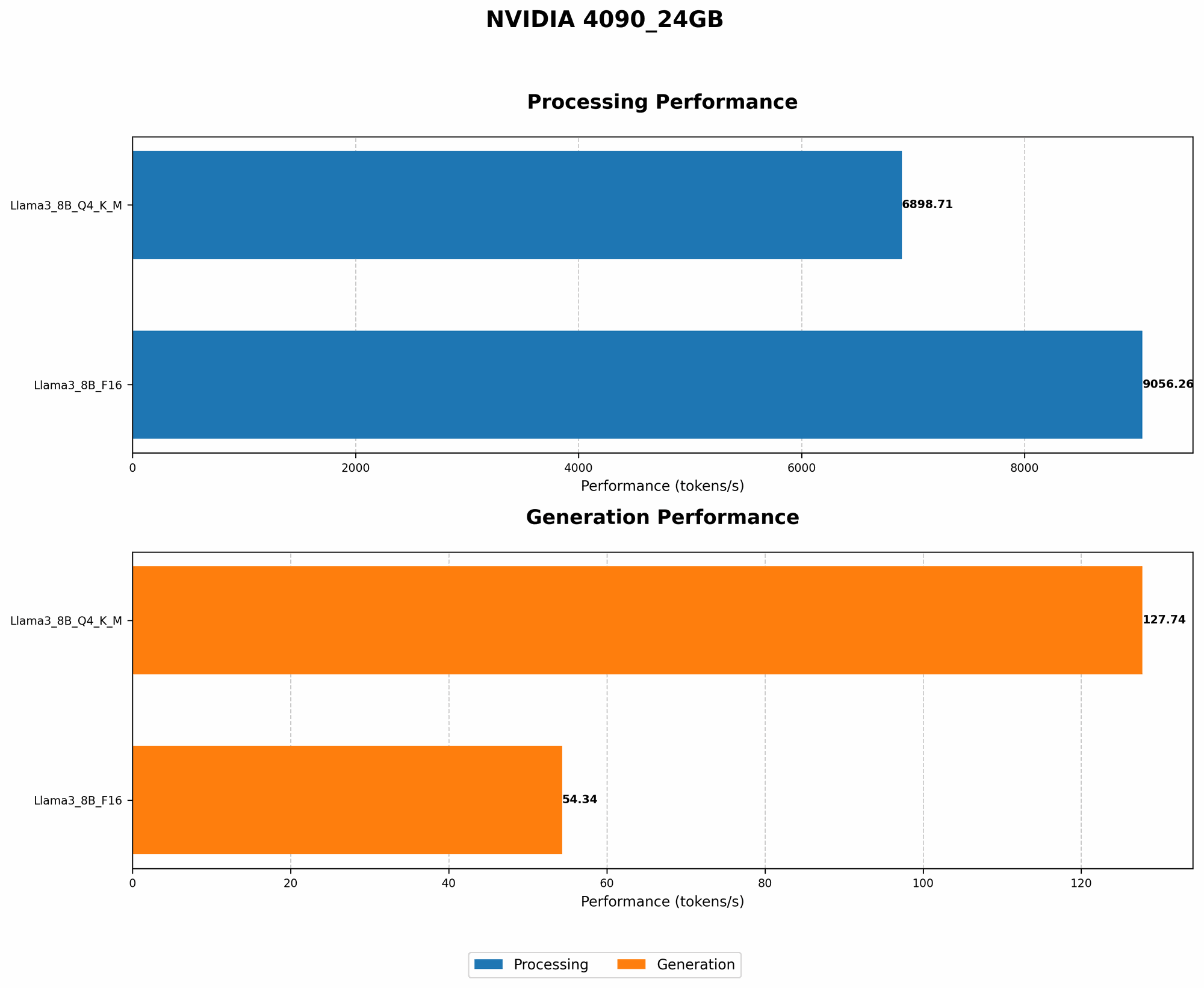
The NVIDIA 4090 24GB is, put simply, a beast of a graphics card. With its massive memory capacity and powerful processing capabilities, it's designed for high-end gaming, demanding professional programs, and yes, even running LLMs efficiently. To understand its potential for running LLMs, we need to consider some key factors:
Token Speed Generation: The Heart of LLM Performance
One crucial metric for evaluating GPU performance with LLMs is the token speed generation, which measures how quickly the GPU can process and generate text tokens. Tokens are the basic building blocks of language, think of them like LEGO bricks for building sentences. The higher the token speed, the faster your LLM can process text and generate responses.
Quantization: Making LLMs Run on Less Powerful Hardware
Now, LLMs, especially the larger ones, require a ton of memory and processing power. This is where quantization comes in, like a clever diet plan for LLMs. It essentially reduces the size of the model without sacrificing too much accuracy.
Think of it like this: You can store the same information in a large, detailed picture or a simpler, pixelated version. Quantization does the same for LLMs, making them smaller and more efficient to run.
The NVIDIA 4090 24GB: Performance in Action
Let's analyze the performance of the NVIDIA 4090 24GB with different LLMs. We’ll use the data provided in the JSON file, focusing on the Llama 3 model family.
NOTE: The provided data does not include performance figures for the 70B versions of Llama 3 when using the NVIDIA 4090 24GB. It's important to keep this limitation in mind when evaluating the overall performance of the 4090 24GB for larger LLMs.
Llama 3 8B: A Powerful Choice
The Llama 3 8B model, despite being relatively small, is still capable of impressive performance. Let's examine how the 4090 24GB handles it:
| Model | Quantization | Tokens/Second (Generation) | Tokens/Second (Processing) |
|---|---|---|---|
| Llama 3 8B | Q4KM | 127.74 | 6898.71 |
| Llama 3 8B | F16 | 54.34 | 9056.26 |
Observations:
- The NVIDIA 4090 24GB delivers impressive token generation speeds for Llama 3 8B, showcasing its strong performance with smaller models.
- Q4KM quantization, a more efficient format, achieves a significantly higher token speed than F16, highlighting the importance of choosing the right quantization level for optimal performance.
- The F16 quantization, while slower, demonstrates its effectiveness for tasks requiring higher precision.
What does this mean for you? The 4090 24GB is a very capable choice for running Llama 3 8B. You'll have a smooth and fast experience, whether you're generating text or engaging in complex language tasks.
Llama 3 70B: A Challenge for the 4090 24GB
The Llama 3 70B model is a much larger and more demanding LLM, requiring a considerable amount of resources. Unfortunately, there's no data available on the performance of the 4090 24GB with this model. This means that at this time, we can't comment on its ability to run Llama 3 70B efficiently.
What does this mean for you? While the 4090 24GB is powerful, it might struggle with large models like Llama 3 70B. Further investigation is needed to assess its performance with these models.
NVIDIA 4090 24GB: Beyond the Numbers
While the data provides a clear picture of token speeds, it's essential to consider other factors when evaluating the 4090 24GB for your LLM setup:
- Memory Capacity: The 4090 24GB boasts a massive 24GB of VRAM, crucial for handling larger models and complex tasks. This makes it a good choice for users who might want to experiment with larger LLMs in the future.
- Power Consumption: The 4090 24GB is known for its high power consumption. Make sure that your power supply can handle it, and be prepared for higher electricity bills. You could consider using a power-saving mode for your GPU to help mitigate this.
- Cost: The 4090 24GB is a high-end card with a price tag to match. Factor this into your budget before taking the plunge.
Comparison with Other Devices: A Quick Glimpse
Although this article focuses on the NVIDIA 4090 24GB, it's worth briefly mentioning that other GPUs, like the AMD RX 7900 XTX, also offer impressive performance for LLMs. However, the 4090 24GB generally outperforms other GPUs in terms of token speed and memory capacity, positioning it as a top contender for home LLM setups.
Conclusion: The NVIDIA 4090 24GB - A Solid Choice, But Not Without Trade-offs
The NVIDIA 4090 24GB offers impressive performance for smaller LLMs like Llama 3 8B. Its high memory capacity makes it a future-proof choice, potentially allowing you to handle larger LLMs as they become more accessible. However, the 4090 24GB comes with significant power consumption and a high price tag.
Ultimately, the decision of whether the NVIDIA 4090 24GB is right for you depends on your specific needs and budget. If you're serious about running LLMs locally and have the financial means, it's definitely a compelling option.
FAQ
1. Can I run LLMs on a CPU?
Yes, you can run LLMs on a CPU, but you'll likely experience much slower speeds compared to a GPU. CPUs aren't as well-suited for parallel computations, which are essential for efficient LLM processing.
2. What kind of RAM do I need for my LLM server?
The amount of RAM you need depends on the size of the LLM and other tasks running on your system. Generally, having at least 16GB of RAM is recommended for a basic LLM setup.
3. How do I choose the right LLM for my needs?
Consider factors like:
- Model size: Larger models offer more features and capabilities but require more resources.
- Task-specific training: Some models are fine-tuned for specific tasks, like code generation or translation.
- Availability: Not all LLMs are publicly available, so check for licensing and accessibility.
Keywords
Large Language Models, LLM, Home Server, NVIDIA 4090 24GB, GPU, Token Speed Generation, Quantization, Llama 3, Performance, Cost, Power Consumption, AMD RX 7900 XTX, RAM, CPU, LLM Choice, Task-Specific Training