Building a Home LLM Server: Is the NVIDIA 4080 16GB a Good Choice?

Introduction
The world of large language models (LLMs) is exploding, and building a home LLM server is becoming increasingly popular. This allows you to run these powerful models locally, giving you faster response times, more control over your data, and the ability to experiment with different models without relying on cloud services.
But with so many different GPUs on the market, choosing the right one can be daunting. Today, we're diving into the NVIDIA 4080 16GB, a popular choice for AI enthusiasts, and exploring its suitability for building a home LLM server.
We'll analyze its performance across different LLM models and discuss its pros and cons, ultimately helping you decide if this GPU is the right fit for your needs.
NVIDIA 4080 16GB: A Powerful GPU for AI
The NVIDIA 4080 16GB is a powerful GPU designed for demanding tasks like gaming, video editing, and of course, AI. It boasts impressive performance, especially when it comes to training and running large language models.
But is it a good choice for building a home LLM server? Let's find out!
Understanding LLM Performance Metrics
Before we jump into the specifics, let's briefly discuss the metrics used to measure LLM performance on different GPUs:
Tokens/Second: This metric represents the number of tokens (individual words or sub-words) the GPU can process per second. A higher tokens/second value means faster inference, which translates to quicker responses from your LLM.
Quantization: Quantization is a technique used to compress LLM models, reducing the memory footprint and increasing inference speed. This is like using less ink to write the same text, making the book smaller but keeping the same information.
For example, Q4KM uses 4 bits for each element of the model, making it significantly smaller and faster than using 16-bit floating-point numbers (F16).
Q4KM: A quantization technique that uses 4 bits to represent each element in the model's weights and activations.
F16: Uses 16-bit floating-point numbers for the model's weights and activations.
Performance of the NVIDIA 4080 16GB with Llama 3 Models
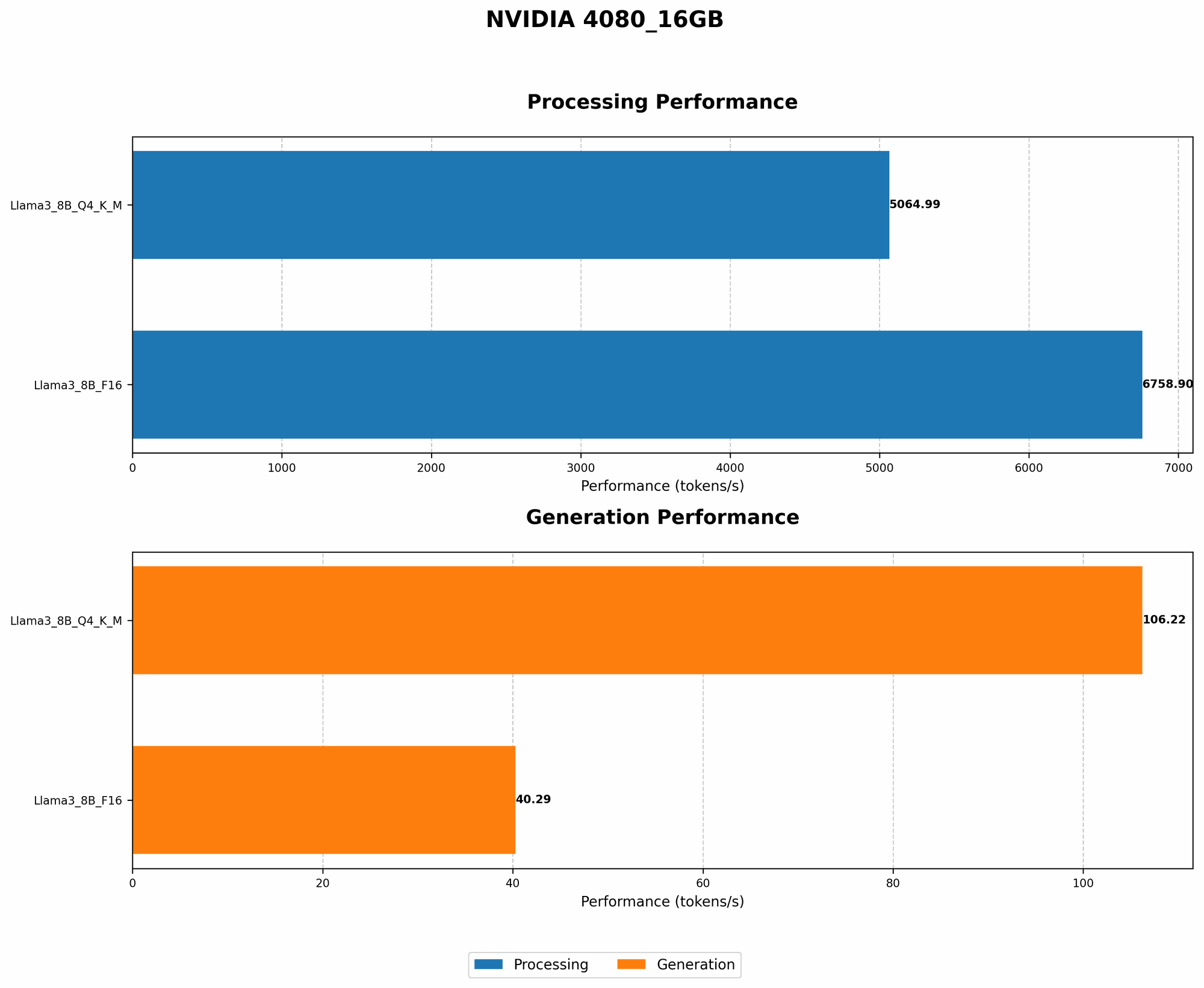
Llama 3 8B: A Balanced Choice
The NVIDIA 4080 16GB delivers excellent performance with Llama 3 8B, a popular and versatile LLM. Let's look at the numbers:
| Model & Quantization | Tokens/Second |
|---|---|
| Llama 3 8B Q4KM (Generation) | 106.22 |
| Llama 3 8B F16 (Generation) | 40.29 |
As you can see, the 4080 16GB excels with Llama 3 8B when using Q4KM quantization. It's an impressive speed that's likely to satisfy most users for everyday tasks.
However, when using F16 quantization, the performance drops significantly. This is because the GPU needs to process more data, resulting in slower inference.
Llama 3 70B: Data Not Available
Unfortunately, we don't have data for Llama 3 70B on the NVIDIA 4080 16GB. This is likely because this model is too large for some implementations, and because it is a newer model, data points are still being collected.
The NVIDIA 4080 16GB: Pros and Cons
Pros:
- Powerful Performance: The 4080 16GB is capable of handling even demanding LLMs with impressive speed.
- Larger Memory: The 16GB of VRAM is enough to handle most LLMs including those requiring larger memory footprints.
- Broad Applicability: This GPU is not just for LLMs - you can also use it for other demanding tasks like gaming, video editing, and machine learning.
Cons:
- Cost: The NVIDIA 4080 16GB is a premium GPU, so it comes with a premium price tag.
- Power Consumption: You'll need a powerful power supply to handle the energy demands of this GPU.
- Availability: The 4080 16GB can be hard to find at times due to supply chain issues.
Is the NVIDIA 4080 16GB Right for You?
The NVIDIA 4080 16GB is a great choice for users who want a powerful GPU for running LLMs and are not afraid of the cost and power consumption associated with it. Its high speed and decent memory capacity should satisfy even demanding users.
However, if you're on a budget or are only just starting out with LLMs, there might be more cost-effective options available.
Frequently Asked Questions
What other GPUs are good for running LLMs?
The NVIDIA 4080 16GB is a great choice, but there are other powerful GPUs available, like the NVIDIA 4090 and the AMD Radeon RX 7900 XT, each offering unique advantages for LLMs and home servers.
Do I need a dedicated GPU for LLMs?
While a dedicated GPU is not strictly necessary, it offers significantly faster performance compared to CPU-only setups. You can run smaller LLMs on a CPU, but larger ones will require a GPU for optimal speed and efficiency.
What are the best LLM models for home servers?
The best LLM model for your home server depends on your specific needs and workloads. Popular options include Llama 3, StableLM, and BLOOM, each offering strengths in different areas.
How do I set up an LLM on my home server?
Setting up an LLM on your home server involves several steps:
- Install the necessary software and libraries.
- Download the LLM model.
- Configure the LLM environment.
- Run the model and start interacting with it.
Many resources and guides are available online to help you through this process.
Keywords
NVIDIA 4080, LLM, Home server, GPU, Llama 3, Quantization, Q4KM, F16, AI, Machine learning, Tokens/second, Inference speed, Performance, Cost, Power consumption, Availability, Budget, LLM models, GPU options, Setup, Installation, Libraries.