Building a Home LLM Server: Is the NVIDIA 3090 24GB a Good Choice?

Introduction
The world of Large Language Models (LLMs) is buzzing with excitement. These powerful AI systems, capable of generating human-like text, translating languages, writing different kinds of creative content, and answering your questions in an informative way, are changing the way we interact with technology. But running these models on your own computer is no simple feat.
The NVIDIA 3090 24GB graphics card is a popular choice for home LLM servers, boasting impressive processing power. But is it the right choice for you? In this article, we'll dive into the performance of the 3090 24GB with various LLM models and explore whether it can handle the demands of your home LLM setup.
Understanding the Basics: LLMs and Quantization

LLMs are like super-smart AI brains that can learn from massive amounts of text data. The bigger the model, the more information it can process and the more sophisticated its abilities. For example, the popular Llama 2 model comes in different sizes, ranging from 7 billion parameters (7B, a smaller model) to 70 billion parameters (70B, a much larger and more complex model).
But these big models need a lot of resources to run. That's where quantization comes in. Imagine you're trying to fit a giant puzzle in a small box - you need to shrink the pieces. Quantization does the same for LLMs, making the model smaller and more efficient. This allows it to run on less powerful hardware, like your home computer.
NVIDIA 3090 24GB: A Powerhouse for LLMs?
The NVIDIA 3090 24GB is a beastly graphics card with ample memory and processing power. It's designed for demanding tasks like gaming and video editing, but it can also handle the computational demands of running LLMs.
Performance with Llama 3 Model: A Closer Look
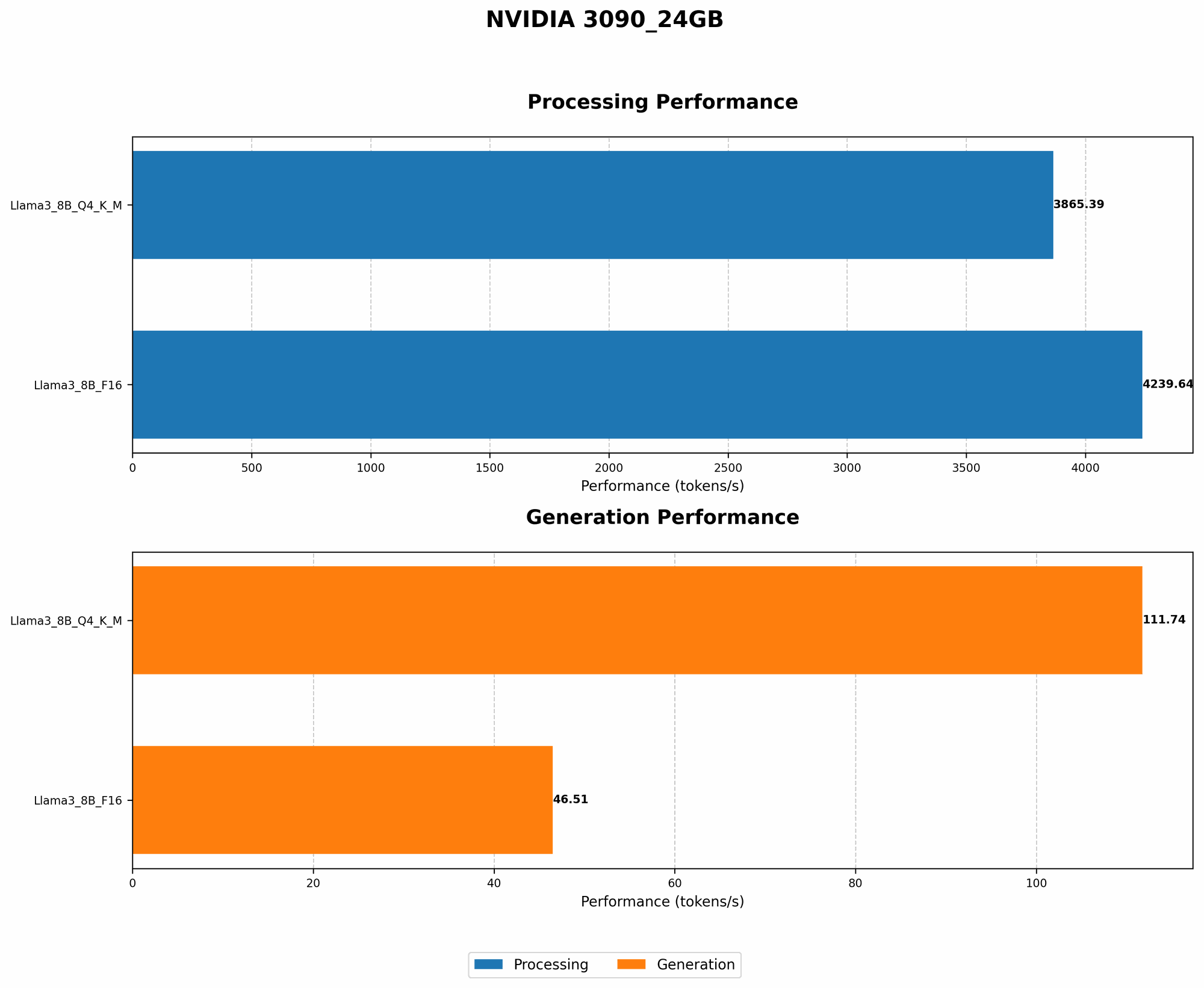
To see how the 3090 24GB performs, we'll focus on the Llama 3 model, a popular choice for home LLM enthusiasts. We'll analyze its performance with two different quantization levels: Q4KM (a more compressed format) and F16 (a less compressed format).
Table 1: Performance of NVIDIA 3090 24GB with Llama 3 Model
| Model | Quantization | Tokens/Second (Generation) | Tokens/Second (Processing) |
|---|---|---|---|
| Llama 3 8B | Q4KM | 111.74 | 3865.39 |
| Llama 3 8B | F16 | 46.51 | 4239.64 |
| Llama 3 70B | Q4KM | N/A | N/A |
| Llama 3 70B | F16 | N/A | N/A |
Note: Data for Llama 3 70B performance is not available from the sources used for this article.
Analysis:
- Smaller Model (Llama 3 8B): The 3090 24GB shows strong performance with the Llama 3 8B model, achieving a respectable token generation speed of 111.74 tokens per second (tokens/s) with Q4KM quantization. This means the model can generate 111.74 words of text per second.
- Quantization Impact: As expected, the compressed Q4KM format delivers faster token generation speeds compared to F16. However, the F16 format offers a significant boost in token processing speed, implying it's a better choice for applications requiring rapid processing of text.
Token Generation vs. Token Processing:
- Token Generation: This refers to the model's ability to create new text, like writing a story or answering a question.
- Token Processing: This refers to the model's ability to analyze and understand existing text, making it suitable for tasks like summarization or translation.
Understanding Tokens:
Think of a token as a single building block of text. It could be a word, a punctuation mark, or even a special character like a newline. For example, the sentence "This is a sentence." contains seven tokens: "This", "is", "a", "sentence", ".", space, space.
Using the NVIDIA 3090 24GB for Home LLM Server
The NVIDIA 3090 24GB can be a good choice for your home LLM server, especially if you're running smaller models like Llama 3 8B, especially with Q4KM quantization. You can enjoy reasonable performance and generate text at a decent speed.
However, it's important to understand that:
- Larger Models (70B and Beyond): The 3090 24GB might struggle with larger LLM models like Llama 3 70B due to the sheer computational demands. You might need to consider a more powerful GPU or optimize your setup further.
- Power Consumption: Keep in mind that this card is an energy hog. Running it for extended periods might significantly impact your electricity bill.
Alternatives to the NVIDIA 3090 24GB
If you're looking for other options besides the 3090 24GB, you might consider:
- NVIDIA 4090: This is the current flagship GPU from NVIDIA, offering even more processing power and memory than the 3090. It's a great option if you want to run larger LLM models.
- AMD Radeon RX 7900 XT: This GPU from AMD is a worthy competitor to the NVIDIA 4090, offering similar performance at a slightly lower price.
- CPU-Based Inference: You can also run LLMs on your CPU, although this requires more time and resources. It might be a good option if you're on a tight budget.
Conclusion: Is the NVIDIA 3090 24GB Right for You?
The NVIDIA 3090 24GB can be a good choice for building a home LLM server, offering adequate performance for smaller models like Llama 3 8B. However, it's not the ideal choice if you want to run extremely large models or if you're on a tight budget.
FAQ:
Q: What are the benefits of running LLM models locally?
A: Running LLMs locally gives you full control over your data and processing. You don't need to rely on external servers or APIs, which can be more secure and cost-effective in the long run.
Q: Is the NVIDIA 3090 24GB the only option for running LLMs locally?
A: No, there are other graphics cards and even CPUs that can handle LLM inference. The choice depends on your budget, model size, and performance requirements.
Q: What are some other important factors to consider when building a home LLM server?
A: Besides the GPU, you'll need sufficient RAM, a good motherboard, and a stable power supply. You'll also need to install a software like llama.cpp to run the LLM models.
Q: What are some of the most popular LLM models available?
A: Some popular choices include Llama 2, GPT-3, and Stable Diffusion.
Q: Can I build a home LLM server on a budget?
A: Yes, you can build a basic home LLM server using a less powerful GPU and CPU. You'll need to be prepared for slower performance and limited model size.
Q: Do I need a powerful computer to run LLMs?
A: While a powerful machine can help achieve better performance and handle larger models, you can still explore basic LLM models on a standard computer.
Keywords:
LLM, Large Language Model, Home Server, NVIDIA 3090 24GB, GPU, Graphics Card, Llama 3, Quantization, Token Generation, Inference, Performance, Processing, AMD Radeon RX 7900 XT, Budget, Power Consumption, RAM, CPU, llama.cpp