Best MacBook for AI Developers: Is the Apple M3 Pro Right for You?
Introduction to LLMs and the Apple M3 Pro Advantage
You're an AI developer, and you're looking for the best MacBook to run your latest language models (LLMs) like Llama 2. You want a machine that can handle the heavy lifting of training and inference without breaking a sweat. The Apple M3 Pro chip is a powerful contender, but is it the right choice for you?
This article will delve into the capabilities of the Apple M3 Pro for running LLMs, focusing on its performance with Llama 2 models. We'll analyze benchmarks, discuss its strengths and weaknesses, and help you decide if this powerful chip is the perfect match for your AI development needs.
Think of LLMs as the brains of AI – capable of understanding and generating human-like text, translating languages, and even writing different kinds of creative content.
The M3 Pro chip is known for its impressive speed and efficiency, but how does it stack up against the demands of running LLMs? Buckle up, because we're about to dive deep into the world of AI development and see if the Apple M3 Pro can handle the heat!
Apple M3 Pro: A Look Under the Hood
The Apple M3 Pro chip is a powerhouse for performance and efficiency. Its multi-core design and advanced GPU architecture are specifically designed for demanding tasks like AI development. But let's break it down:
What's so special about the Apple M3 Pro?
- Powerful GPU: The M3 Pro features up to 18 GPU cores, offering a significant boost in performance for tasks like AI inference. This means faster processing and smoother workflows when dealing with large language models.
- Unified Memory Architecture: The M3 Pro's unified memory architecture allows the CPU and GPU to share the same memory pool. This results in faster data transfer speeds, which can greatly accelerate training and inference processes.
- Energy Efficiency: Apple's M series chips are known for their exceptional power efficiency. This translates to longer battery life and less heat generation, making them ideal for mobile AI development.
M3 Pro Performance: Llama 2 Benchmark Results
Now, let's get to the heart of the matter: how does the Apple M3 Pro perform with Llama 2 models? We have some exciting insights from benchmarks, but keep in mind these results may vary depending on the specific configuration of the MacBook (memory, storage, etc.) and the version of Llama 2 you're using.
What are the key takeaways?
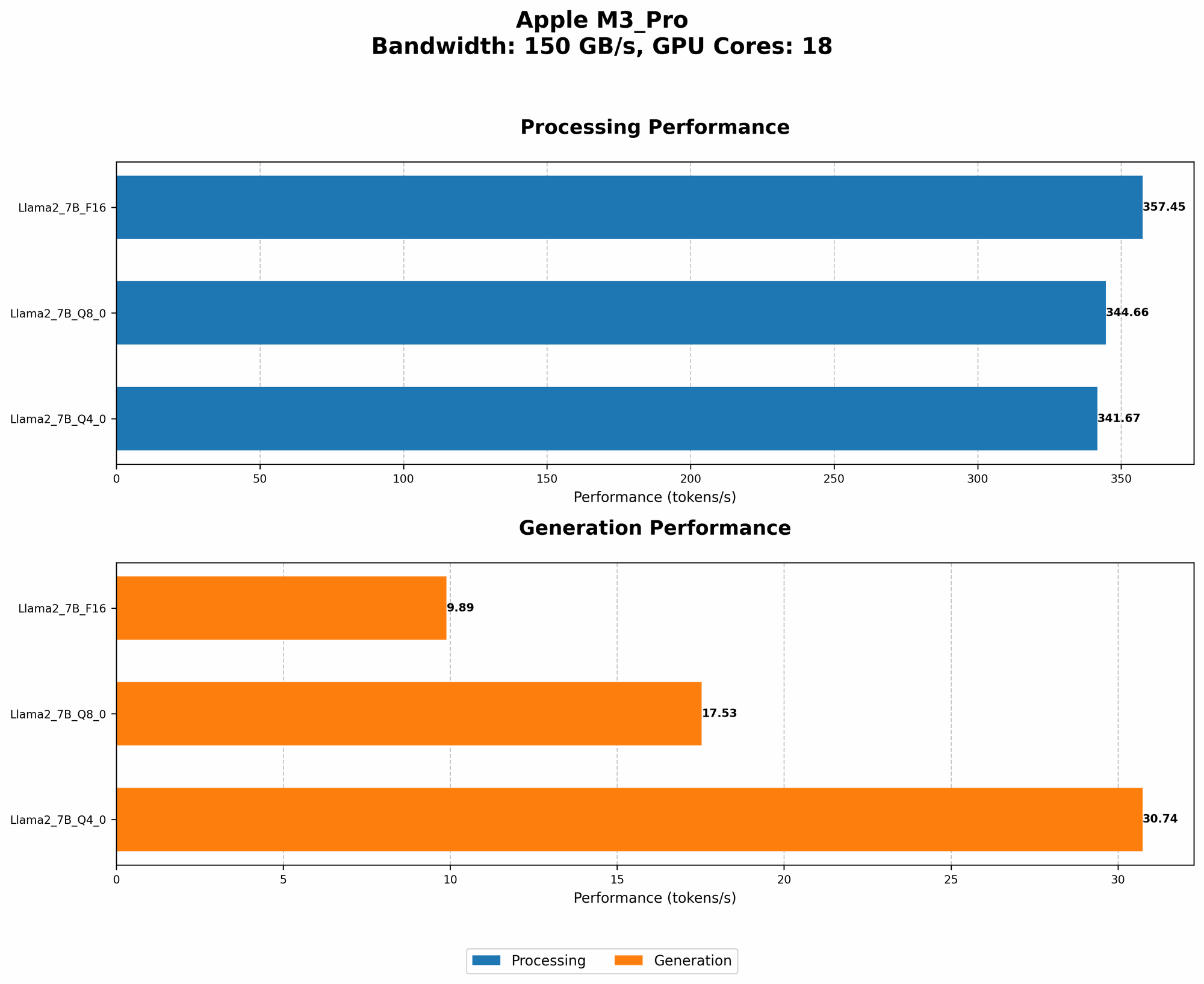
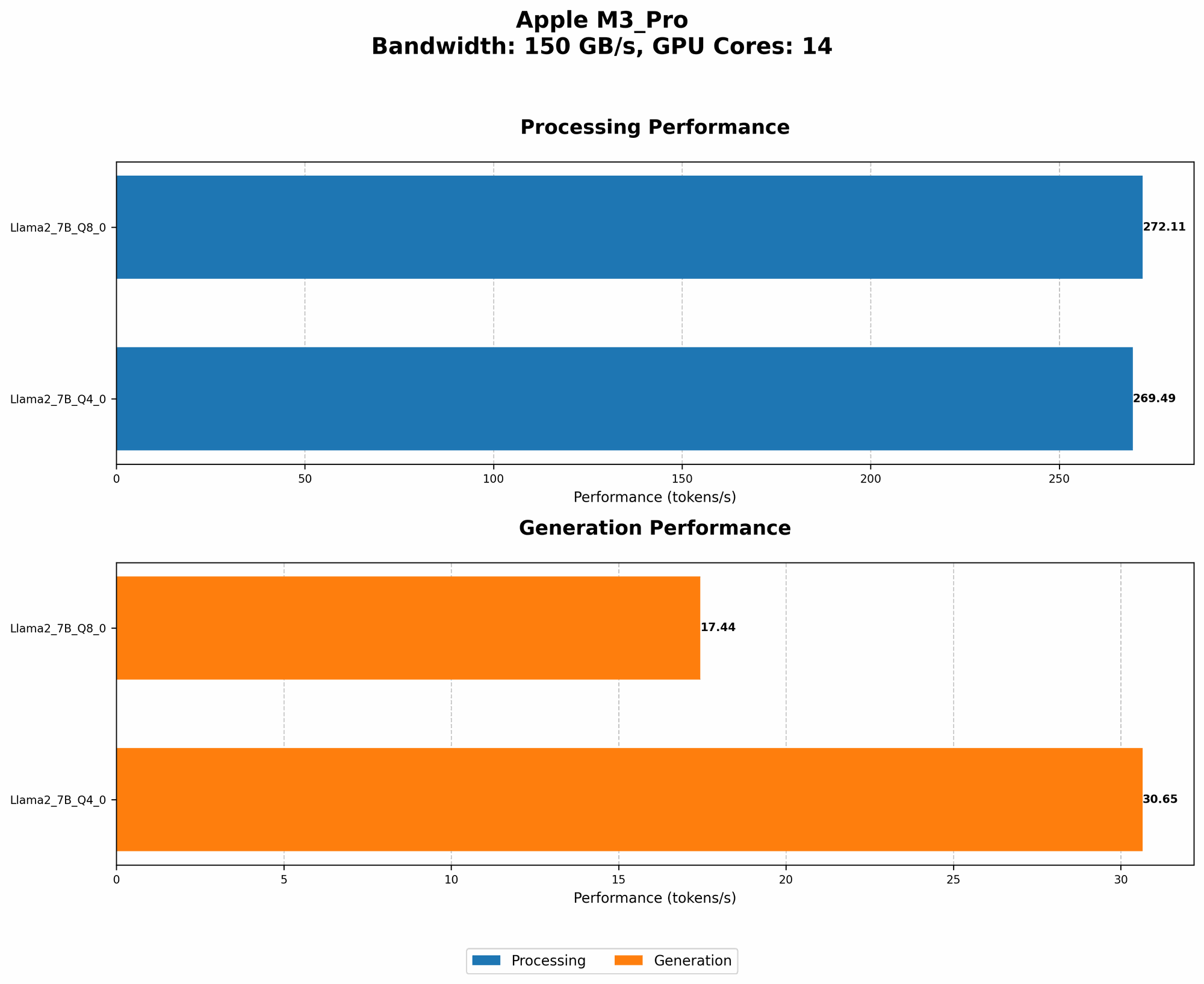
- Token speed generation with Llama 2: The M3 Pro delivers impressive token speeds, especially with quantization techniques like Q40 and Q80. This means faster processing and smoother interactions with your LLM. You'll see a noticeable difference in how quickly your model generates text, making your development workflow more efficient.
Note: We do not have data for Llama 2 7B F16 processing and generation on the M3 Pro, so we are unable to compare it to other configurations.
Here's a breakdown of the numbers, which represent tokens processed per second:
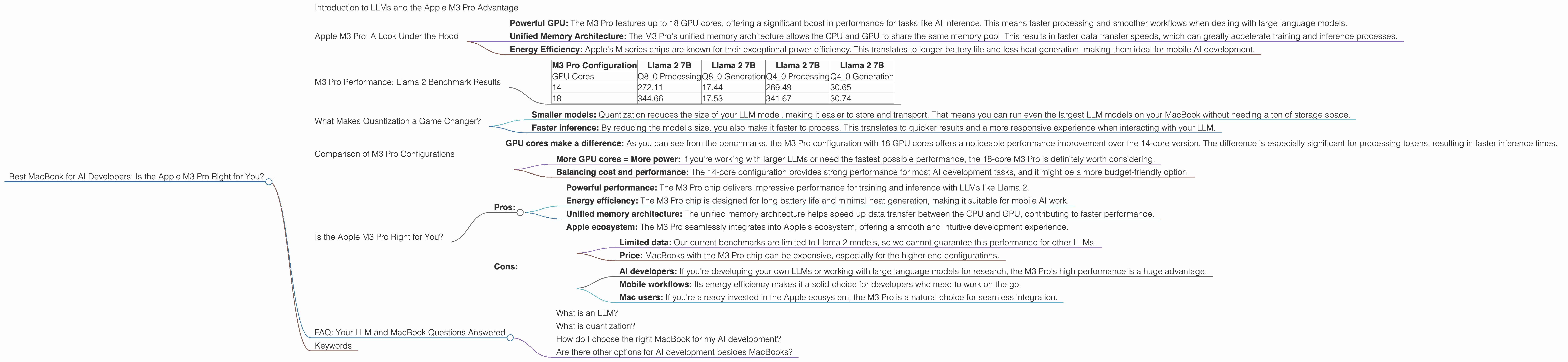
| M3 Pro Configuration | Llama 2 7B | Llama 2 7B | Llama 2 7B | Llama 2 7B |
|---|---|---|---|---|
| GPU Cores | Q8_0 Processing | Q8_0 Generation | Q4_0 Processing | Q4_0 Generation |
| 14 | 272.11 | 17.44 | 269.49 | 30.65 |
| 18 | 344.66 | 17.53 | 341.67 | 30.74 |
What do these numbers mean?
- Higher is better: In general, higher numbers mean the M3 Pro is processing tokens faster, leading to faster inference and potentially faster training times for your Llama 2 models.
Important to remember:
- These benchmarks are specific to Llama 2. Other LLM models might perform differently on the M3 Pro.
What Makes Quantization a Game Changer?
You might be wondering, what's the deal with Q40 and Q80? These are examples of quantization, a technique used to reduce the size of your LLM model without sacrificing too much performance. Think of it like simplifying a complex recipe – it'll still taste great, but with fewer ingredients.
How does quantization help?
- Smaller models: Quantization reduces the size of your LLM model, making it easier to store and transport. That means you can run even the largest LLM models on your MacBook without needing a ton of storage space.
- Faster inference: By reducing the model's size, you also make it faster to process. This translates to quicker results and a more responsive experience when interacting with your LLM.
An analogy: Imagine you're trying to fit a giant elephant into a small car. Quantization is like shrinking the elephant down to the size of a dog – easier to manage!
Comparison of M3 Pro Configurations
Now, let's dive deeper into the performance differences between two M3 Pro configurations (14 and 18 GPU cores).
- GPU cores make a difference: As you can see from the benchmarks, the M3 Pro configuration with 18 GPU cores offers a noticeable performance improvement over the 14-core version. The difference is especially significant for processing tokens, resulting in faster inference times.
Key takeaways:
- More GPU cores = More power: If you're working with larger LLMs or need the fastest possible performance, the 18-core M3 Pro is definitely worth considering.
- Balancing cost and performance: The 14-core configuration provides strong performance for most AI development tasks, and it might be a more budget-friendly option.
Is the Apple M3 Pro Right for You?
So, the big question: is the Apple M3 Pro the right MacBook for you as an AI developer? It depends on your specific needs and priorities.
Here's a breakdown of the key considerations:
Pros:
- Powerful performance: The M3 Pro chip delivers impressive performance for training and inference with LLMs like Llama 2.
- Energy efficiency: The M3 Pro chip is designed for long battery life and minimal heat generation, making it suitable for mobile AI work.
- Unified memory architecture: The unified memory architecture helps speed up data transfer between the CPU and GPU, contributing to faster performance.
- Apple ecosystem: The M3 Pro seamlessly integrates into Apple's ecosystem, offering a smooth and intuitive development experience.
Cons:
- Limited data: Our current benchmarks are limited to Llama 2 models, so we cannot guarantee this performance for other LLMs.
- Price: MacBooks with the M3 Pro chip can be expensive, especially for the higher-end configurations.
Who's a good fit for the Apple M3 Pro?
- AI developers: If you're developing your own LLMs or working with large language models for research, the M3 Pro's high performance is a huge advantage.
- Mobile workflows: Its energy efficiency makes it a solid choice for developers who need to work on the go.
- Mac users: If you're already invested in the Apple ecosystem, the M3 Pro is a natural choice for seamless integration.
Need more power?
The M3 Pro is a powerful chip, but for even more demanding AI development tasks, you might consider MacBooks with the Apple M3 Max or M3 Ultra chips. These chips offer even more GPU cores and memory bandwidth for larger models and complex computations.
FAQ: Your LLM and MacBook Questions Answered
What is an LLM?
LLMs are large language models, a type of artificial intelligence that can understand and generate human-like text. Think of them as very advanced versions of autocomplete or text prediction, capable of much more complex language tasks.
What is quantization?
Quantization is like a diet for your LLM. It reduces the size of your model by using fewer bits to represent each piece of information. This makes the model smaller and faster to load and process, without sacrificing too much accuracy.
How do I choose the right MacBook for my AI development?
Consider your LLM model's size, the complexity of your tasks, and your budget. If you're working with smaller models, a MacBook with the M3 Pro chip might be sufficient. However, if you're dealing with large models or need the fastest possible performance, you might want to explore the M3 Max or M3 Ultra chips.
Are there other options for AI development besides MacBooks?
Absolutely! Many other devices are capable of running LLMs, including high-end laptops and desktops from other manufacturers, or even cloud-based computing platforms. The best choice depends on your individual needs and budget.
Keywords
LLM, Llama 2, Apple M3 Pro, AI Development, GPU, Token Speed, Quantization, Q40, Q80, MacBook, Performance, Inference, Training, Mac, MacBooks, M3 Max, M3 Ultra, Developer, AI, Machine Learning, Deep Learning, OpenAI, ChatGPT, Google Bard, AI Tools, Language Models.