Best MacBook for AI Developers: Is the Apple M2 Pro Right for You?

Introduction
The world of artificial intelligence (AI) is rapidly evolving, with large language models (LLMs) like ChatGPT and Bard taking center stage. These models can generate human-like text, translate languages, write different kinds of creative content, and answer your questions in an informative way. But these capabilities come with a price tag: powerful hardware is needed to run them efficiently.
Many AI developers are turning to Apple's M-series chips for their high performance and energy efficiency. But with various M-series chips available, it's difficult to know which one is right for you. This article examines the Apple M2 Pro, focusing on its capabilities as a platform for local LLM development. This will help clarify whether it's the right choice for those tinkering with LLMs on their Mac.
Understanding Local LLM Development
Local LLM development is the process of running and experimenting with LLMs directly on your device, rather than relying on cloud services. This offers several advantages, including faster response times, greater privacy, and the ability to work offline.
However, LLMs are computationally intensive. They require a significant amount of memory and processing power to function effectively. This is where powerful hardware, like the Apple M2 Pro, comes in.
Apple M2 Pro: A Powerful Choice for AI Developers
The Apple M2 Pro is a high-performance chip designed for demanding tasks like AI development. It's specifically beneficial for those who are experimenting with local LLM models. To dive into why, let's look at the performance of the M2 Pro with different LLM models and quantization techniques.
Performance of the Apple M2 Pro with Llama2 Models
Apple M2 Pro Token Speed Generation: Llama2 7B Models
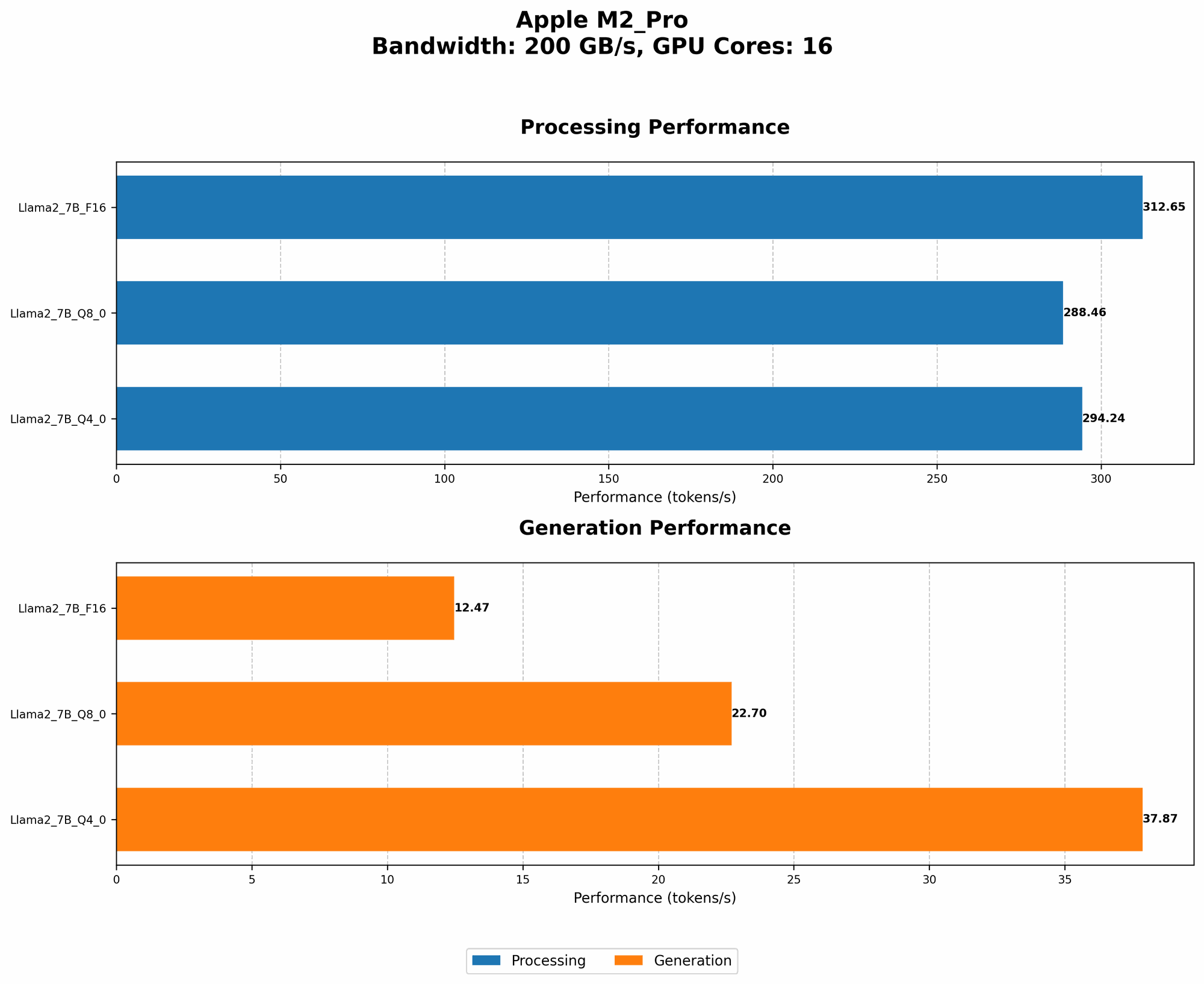
- Llama2 7B F16: The M2 Pro provides a processing speed of 312.65 tokens/second and a generation speed of 12.47 tokens/second for Llama2 7B with F16 precision.
- Llama2 7B Q80: For Llama2 7B with Q80 quantization, the M2 Pro reaches a processing speed of 288.46 tokens/second and a generation speed of 22.7 tokens/second. A Q8_0 model sacrifices some accuracy but significantly reduces the model's size, making it more manageable for local development.
- Llama2 7B Q40: The M2 Pro can process Llama2 7B with Q40 quantization at 294.24 tokens/second and generate tokens at 37.87 tokens/second. Q4_0 models offer a balance between accuracy and model size.
Important: The M2 Pro shows impressive performance with Llama2 7B models, showcasing its ability to handle local development effectively.
Comparison of Different M2 Pro Configurations
Two M2 Pro configurations were tested, with different GPU core counts:
- M2 Pro Configuration 1: 16 GPU cores
- M2 Pro Configuration 2: 19 GPU cores
Findings:
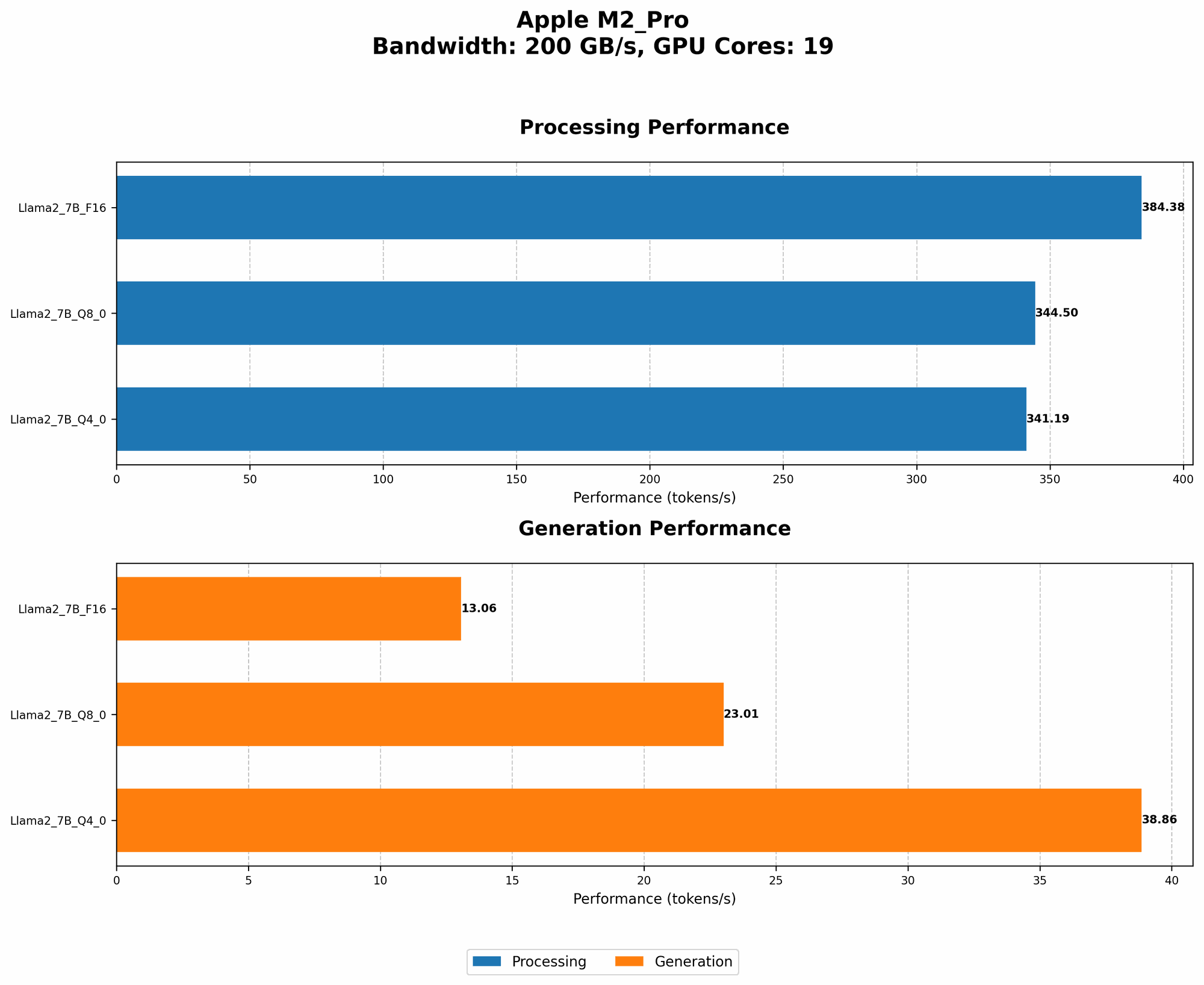
- Llama2 7B F16: The M2 Pro with 19 GPU cores demonstrates a noticeable jump in processing speed, reaching 384.38 tokens/second compared to 312.65 tokens/second for the 16-core configuration.
- Llama2 7B Q8_0: The 19-core variant shows a significant advantage in processing speed, achieving 344.5 tokens/second compared to 288.46 tokens/second for the 16-core version.
- Llama2 7B Q4_0: The 19-core configuration shows a performance improvement in processing speed, reaching 341.19 tokens/second compared to 294.24 tokens/second for the 16-core model.
Conclusion: The M2 Pro configurations with more GPU cores offer a clear advantage for local LLM development, particularly for processing speed. However, the difference in generation speeds is less pronounced.
Understanding Quantization: A Simplified Explanation
Quantization is a technique used to reduce the size of LLMs without significant loss of accuracy. Think of it like this: Imagine you have a giant bookshelf filled with thousands of books, but you want to pack them into a smaller suitcase. To do this, you can compress the information in each book by using abbreviations, symbols, and shorter sentences. You'll lose some detail, but you'll be able to fit more information in the smaller suitcase.
Quantization works similarly. It reduces the number of bits used to represent each number in the LLM. F16 is a standard floating-point representation that uses 16 bits. Q80 and Q40 are quantized formats that use 8 or 4 bits, respectively. This reduces the size of the model, allowing it to run faster on devices with limited memory.
Key Considerations for Choosing the Right MacBook
Here are some factors to consider when deciding if the Apple M2 Pro is the right choice for you.
Project Complexity and Model Size
- Smaller models: If you're working with smaller LLMs like Llama2 7B, the Apple M2 Pro is a great choice. It's powerful enough to handle processing and generation tasks efficiently.
- Larger models: For larger models, such as Llama2 13B or 70B, you might need a more powerful machine like a Mac Studio with an M2 Max or M2 Ultra chip.
Workflow and Usage Patterns
- Frequent LLM usage: If you plan to work with LLMs frequently, the M2 Pro's performance and energy efficiency are a great advantage.
- Occasional LLM usage: If you only use LLMs occasionally, a less powerful model might be sufficient.
Budget
- M2 Pro: While the M2 Pro is a powerful chip, it's still more affordable than the M2 Max or M2 Ultra found in the Mac Studio.
- Other options: If you're on a tight budget, consider the M2 or M1 Pro as alternatives. They offer decent performance for smaller LLM models.
FAQ - Frequently Asked Questions
How does the Apple M2 Pro handle different LLM models?
The M2 Pro excels with smaller LLMs like Llama2 7B. For larger models, you might need a more powerful chip like the M2 Max or M2 Ultra.
What are the best options for local LLM development?
The Apple M2 Pro is a strong choice for local LLM development, but it's essential to consider the size of your models and the specific requirements of your workflow. The M2 Max and M2 Ultra are excellent options for larger models.
What is quantization, and how does it impact LLM performance?
Quantization is a technique for reducing the size of LLMs. It sacrifices some accuracy but makes the model faster and more efficient.
How can I optimize my MacBook for AI development?
Consider installing a dedicated AI-focused operating system, like Ubuntu, alongside macOS to take advantage of the full potential of the M2 Pro chip.
Keywords
Apple M2 Pro, MacBook, AI, developers, LLM, Llama2, 7B, token speed, processing speed, generation speed, quantization, F16, Q80, Q40, GPU cores, local development, model size, budget, workflow, FAQ, optimzation, Ubuntu