Best MacBook for AI Developers: Is the Apple M1 Ultra Right for You?
Introduction
The world of AI development is buzzing with excitement, and a key player in this space is the Large Language Model (LLM). LLMs are powerful AI systems that can understand and generate human-like text, making them invaluable for tasks like code generation, translation, and creative writing. To effectively train and run these models on your local machine, you need a powerful processor. And what better way to unleash the potential of LLMs than with the mighty Apple M1 Ultra chip?
This article dives deep into the performance of the M1 Ultra chip for running LLMs, specifically focusing on the Llama 2 family. We'll break down the numbers, compare different configurations, and help you determine if the M1 Ultra is the right choice for your AI endeavors.
Diving into the Numbers: M1 Ultra's Performance
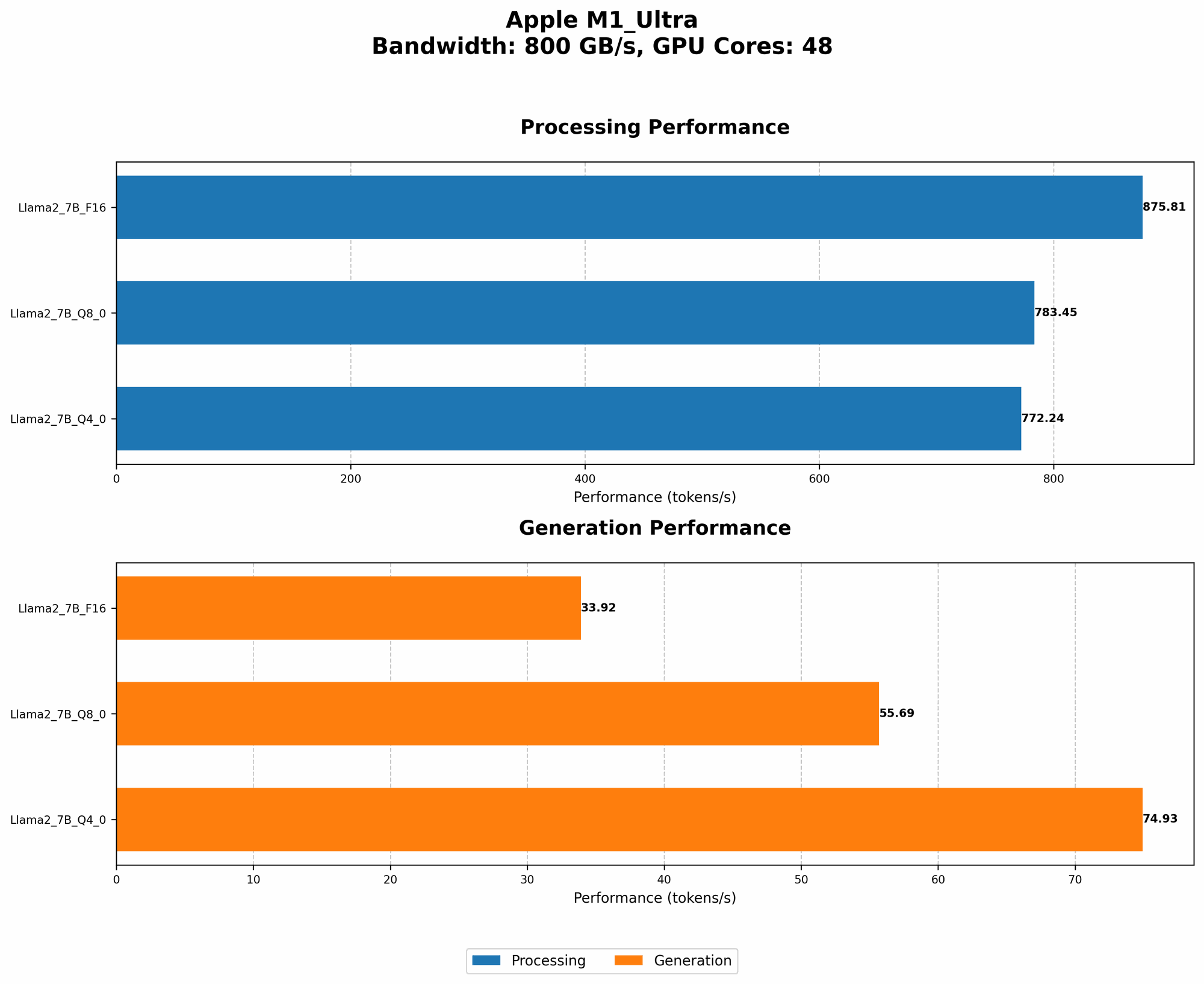
The M1 Ultra chip is a powerhouse, boasting a whopping 48 GPU cores. Let's see how these cores translate to real-world performance with Llama 2, a popular open-source LLM.
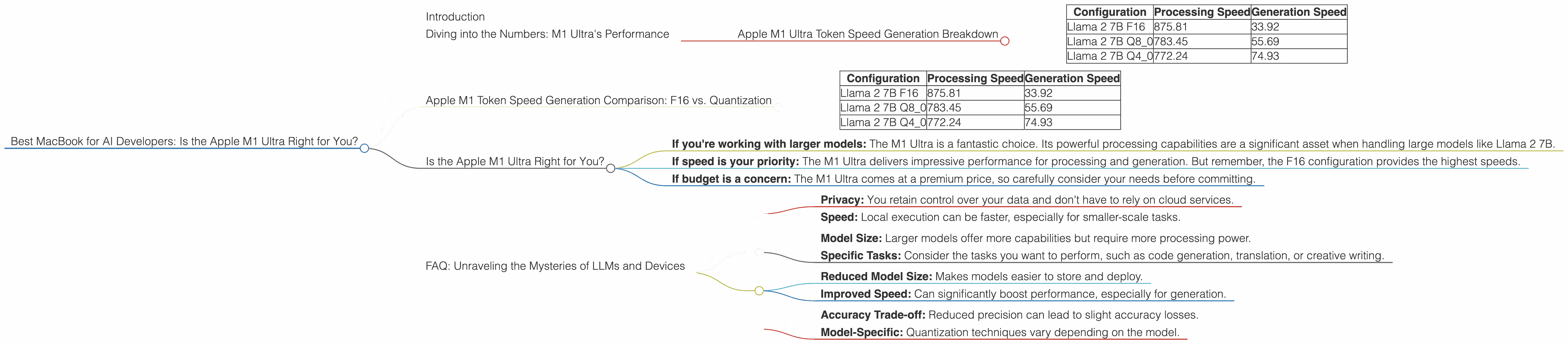
Apple M1 Ultra Token Speed Generation Breakdown
Remember: these numbers represent tokens processed per second.
| Configuration | Processing Speed | Generation Speed |
|---|---|---|
| Llama 2 7B F16 | 875.81 | 33.92 |
| Llama 2 7B Q8_0 | 783.45 | 55.69 |
| Llama 2 7B Q4_0 | 772.24 | 74.93 |
Let's unpack these results:
- F16: This refers to a 16-bit floating-point representation of the model's weights. It's a standard format that offers a good balance between accuracy and memory efficiency.
- Q80: This is a type of quantization. Imagine you have a really large recipe, and you want to simplify it. Quantization does that by reducing the size of the model's weights, making it smaller and faster. In this case, Q80 represents 8-bit quantization with zero-point.
- Q4_0: This uses 4-bit quantization, further reducing the model's size with zero-point.
As you can see, the Apple M1 Ultra chip delivers impressive performance for processing Llama 2, particularly when using the F16 format. The generation speed, however, is significantly impacted by quantization.
Think of it this way: Processing is like reading a recipe, while generation is like actually cooking. The M1 Ultra can blaze through the recipe, but when it comes to cooking (generation), the smaller and simplified recipes (quantization) help it work a bit faster.
Apple M1 Token Speed Generation Comparison: F16 vs. Quantization
It's essential to compare the performance of the M1 Ultra with different configurations of the Llama 2 7B model. Let's see how the M1 Ultra fares when using F16 vs. Q80 and Q40:
| Configuration | Processing Speed | Generation Speed |
|---|---|---|
| Llama 2 7B F16 | 875.81 | 33.92 |
| Llama 2 7B Q8_0 | 783.45 | 55.69 |
| Llama 2 7B Q4_0 | 772.24 | 74.93 |
Key Observations:
- Processing Speed: The F16 configuration achieves the highest processing speed, indicating that the M1 Ultra is particularly well-suited for handling the larger, full-precision weights.
- Generation Speed: As you move from F16 to Q80 and then Q40, the generation speed improves. This is because the quantized models are smaller and more efficient for the GPU.
This comparison highlights the importance of finding the right balance between model size and speed. If you prioritize processing speed, F16 offers the best performance. However, if generation speed is your top concern, quantization can be a valuable optimization strategy.
Is the Apple M1 Ultra Right for You?
Now, let's answer the question: is the M1 Ultra the right MacBook for you? It depends on your needs.
Here's a breakdown to help you decide:
- If you're working with larger models: The M1 Ultra is a fantastic choice. Its powerful processing capabilities are a significant asset when handling large models like Llama 2 7B.
- If speed is your priority: The M1 Ultra delivers impressive performance for processing and generation. But remember, the F16 configuration provides the highest speeds.
- If budget is a concern: The M1 Ultra comes at a premium price, so carefully consider your needs before committing.
FAQ: Unraveling the Mysteries of LLMs and Devices
Q: What are the benefits of running LLMs locally?
A: Running an LLM on your local machine offers two main benefits:
- Privacy: You retain control over your data and don't have to rely on cloud services.
- Speed: Local execution can be faster, especially for smaller-scale tasks.
Q: How do I choose the right LLM for my project?
*A: * Selecting the right LLM depends on your specific use case:
- Model Size: Larger models offer more capabilities but require more processing power.
- Specific Tasks: Consider the tasks you want to perform, such as code generation, translation, or creative writing.
Q: What are the pros and cons of quantization?
*A: * Quantization can be a double-edged sword:
Pros:
- Reduced Model Size: Makes models easier to store and deploy.
- Improved Speed: Can significantly boost performance, especially for generation.
Cons:
- Accuracy Trade-off: Reduced precision can lead to slight accuracy losses.
- Model-Specific: Quantization techniques vary depending on the model.
Keywords: M1 Ultra, AI, LLMs, Apple, MacBook, Llama 2, 7B, Performance, Token Speed, Processing, Generation, Quantization, F16, Q80, Q40, GPU, GPU Cores, Inference, Developers, geeks, locally, models, comparison, benchmark, AI development, open source, privacy, speed, accuracy, trade off, model size, GPU Benchmarks, performance benchmarks, local execution, cloud services