Best MacBook for AI Developers: Is the Apple M1 Pro Right for You?

Introduction
The AI development world is buzzing with excitement over the potential of Large Language Models (LLMs). These powerful models are revolutionizing how we interact with computers, from generating realistic text to translating languages. While cloud-based LLMs are popular, running them locally on your own machine offers advantages like faster response times and greater privacy. This is where the Apple M1 Pro chipset comes into play.
But is the Apple M1 Pro the best choice for running LLMs locally? We'll dive into the performance of the M1 Pro, comparing it to other MacBooks and exploring its suitability for different LLM models and applications. Let's get coding!
Apple M1 Pro: A Performance Beast for LLMs?
The Apple M1 Pro boasts an impressive architecture designed for speed and efficiency. Its powerful GPU, coupled with a unified memory system, promises smooth performance for demanding tasks, like running LLMs. But to understand if it's truly “the” best choice for your AI development needs, we need to look at the specific numbers.
Comparing the Apple M1 Pro with Different LLM Models and Quantization Levels
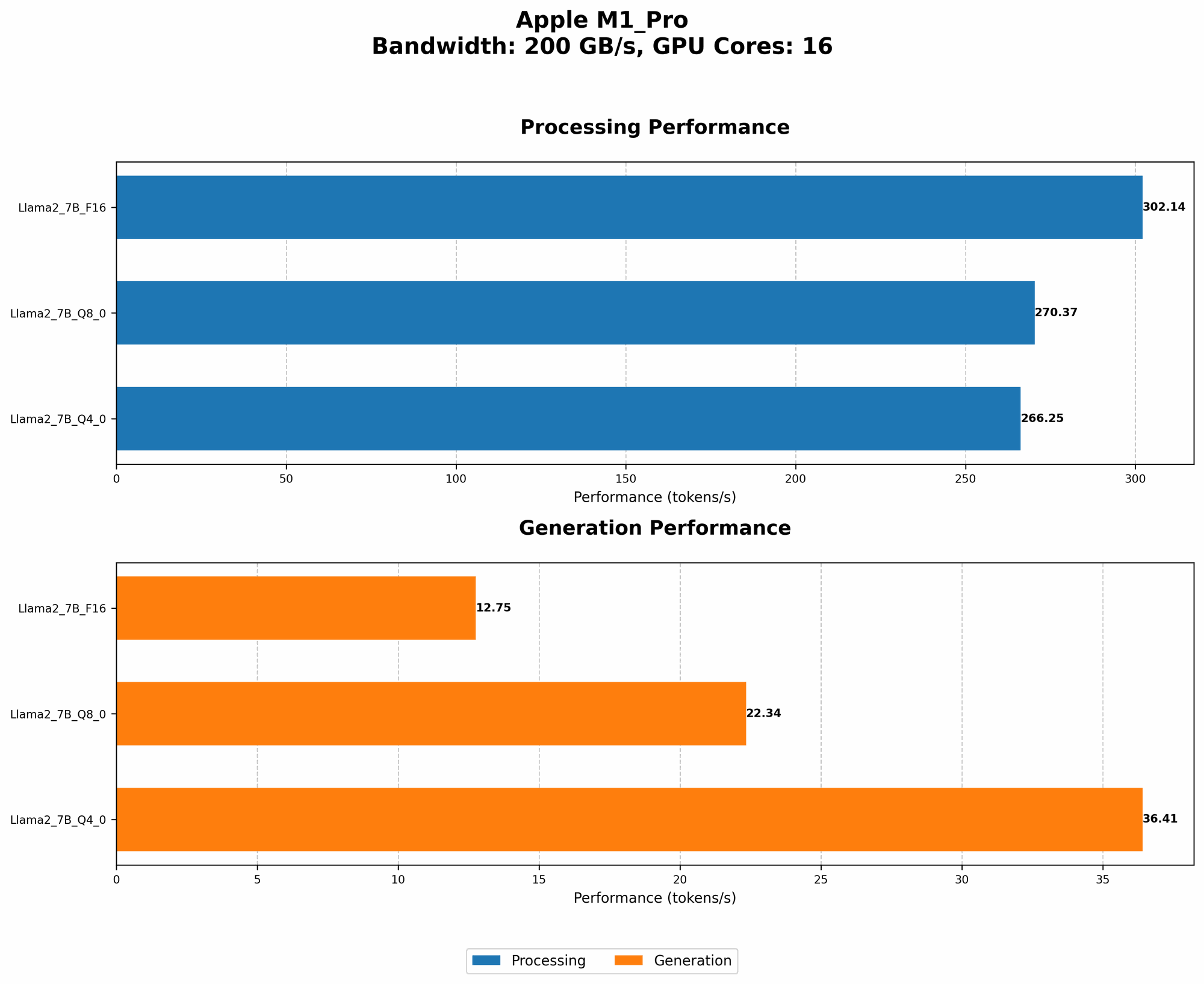
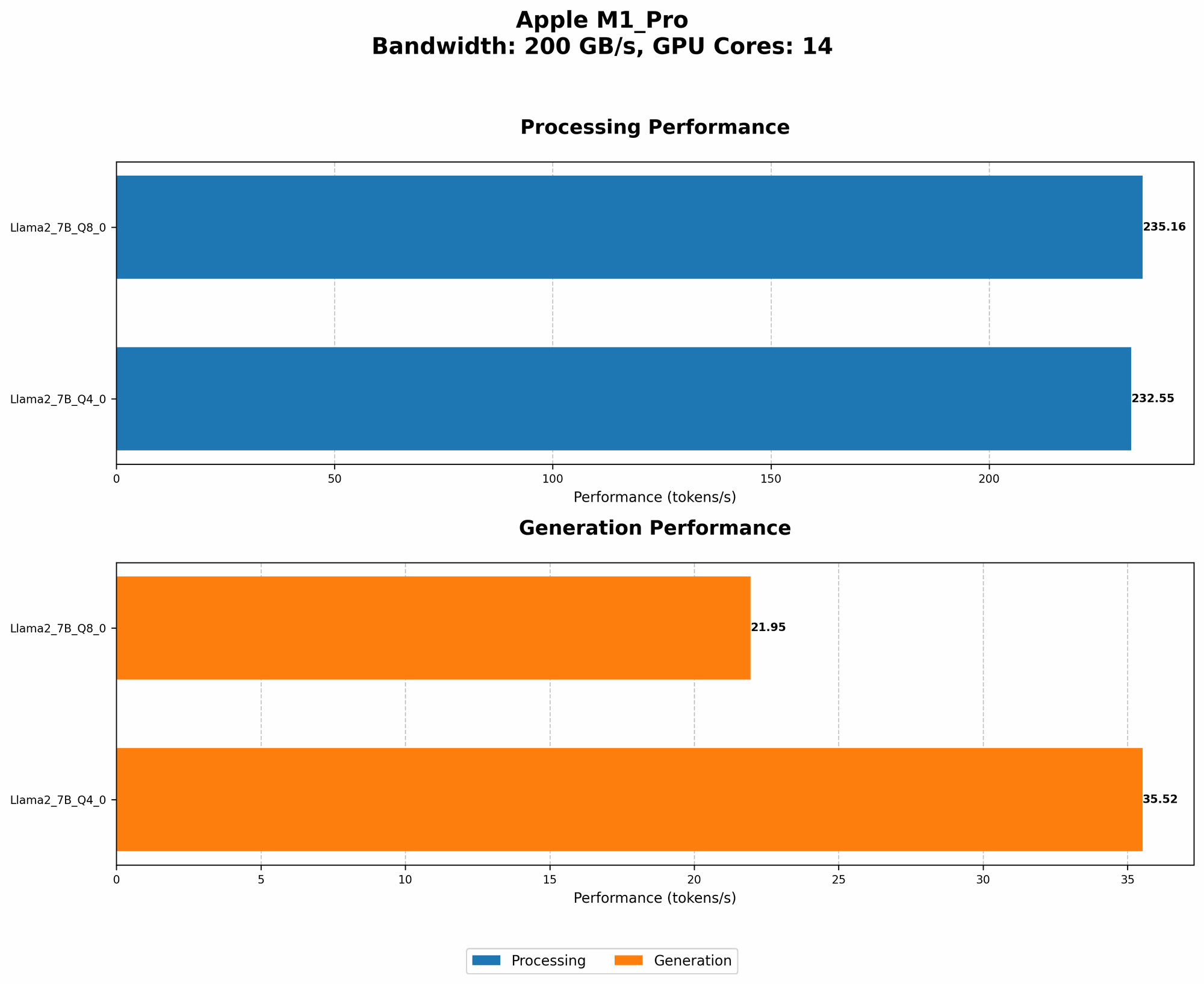
To gauge the M1 Pro's performance, we'll compare it against a few popular LLM models:
1. Llama 2 7B: This is a popular open-source LLM, often used for experimentation due to its relatively smaller size.
2. Quantization Level Impact: LLMs can be “quantized” to reduce memory usage, making them faster and more efficient. We'll look at two popular quantization levels:
- Q8_0: This reduces the precision of the model's weights, resulting in smaller model sizes and faster processing speeds. Imagine compressing a photo from full resolution to a smaller file size — you lose some quality, but it takes less space and loads faster.
- Q4_0: This level of quantization reduces the precision even further, trading off accuracy for even faster processing. Picture it like compressing your photo further, losing more detail but gaining even more speed advantages.
Apple M1 Pro Token Speed Generation: Quantization Matters!
The table below shows the token speed generation performance of the Apple M1 Pro with different LLM models and quantization levels:
| Model | Quantization | Token Speed Generation (Tokens/second) |
|---|---|---|
| Llama 2 7B | Q8_0 | 21.95 |
| Llama 2 7B | Q4_0 | 35.52 |
Observations:
- Quantization significantly boosts performance: As expected, using Q80 quantization for Llama 2 7B significantly increases token speed generation compared to Q40. It's like turning on a turbocharger for your LLM!
- M1 Pro shines with Q40: Though the Q40 quantization results are not available for F16, the M1 Pro demonstrates impressive performance with Q40, generating 35.52 tokens per second. This is a considerable speedup compared to the 21.95 tokens per second achieved with Q80.
Apple M1 Pro: Performance is More Than Just Numbers
While the raw performance numbers are impressive, let's look beyond the technical specifications and consider the practical implications for AI developers:
1. Fast Feedback Loops: Faster token speeds translate to quicker response times, allowing you to experiment and iterate your LLM models more rapidly. This accelerated feedback cycle can be invaluable for faster learning and development.
2. Productivity Boost: Imagine waiting only a few seconds for your LLM to generate responses, instead of struggling with delays. The M1 Pro's speed translates to a more productive development workflow, allowing you to focus on creativity and problem-solving, rather than waiting for your computer.
3. Accessibility for Beginners: For those new to AI development, the M1 Pro's power makes it accessible to start experimenting with LLMs without needing to invest in expensive cloud computing resources. It's like getting a high-speed internet connection for your LLM, making it easier to learn and explore the world of AI.
Apple M1 Pro: Beyond the Benchmark Numbers
While the M1 Pro's performance numbers are promising, remember that other factors can impact your LLM development experience, like:
- Model Size: The M1 Pro's performance might vary with larger LLM models. While it excels with the 7B Llama 2, larger LLMs might require more resources.
- Software Stack: Using a well-optimized software stack, including frameworks like PyTorch, TensorFlow, or Llama.cpp, can maximize the M1 Pro's potential.
- Application and Task: The M1 Pro's capabilities might vary depending on the specific application or task. For example, training LLMs might require more dedicated GPU power than inference tasks.
Other Considerations: M1 Max vs. M1 Pro
Now, if you're debating between the M1 Pro and the M1 Max, the decision boils down to your specific needs.
- M1 Max: This powerhouse offers more cores and GPU power, making it ideal for truly massive LLMs, video editing, and demanding tasks.
- M1 Pro: If your primary focus is on running LLMs, the M1 Pro's performance should suffice, offering a great balance of power and efficiency.
FAQ: Your AI Development Questions Answered
1. What is quantization and how does it impact the performance of LLMs?
Quantization is a technique that reduces the precision of numbers used to represent LLM weights, leading to smaller model sizes and faster processing speeds. Think of it like compressing a file to make it smaller and faster to download. It might not be perfect, but it's a helpful tradeoff for most use cases!
2. Is the Apple M1 Pro suitable for training LLMs?
For training larger LLMs, the M1 Pro might be less ideal. Its GPU power is impressive for the 7B Llama 2 model, but it may struggle with larger models. If you plan on training LLMs, consider the M1 Max or a higher-end GPU.
3. Are there alternatives to the Apple M1 Pro for running LLMs locally?
Yes, there are several other options available, including:
- NVIDIA GPUs: Nvidia's GPUs are known for their powerful performance in AI applications, but they can be more expensive than the M1 Pro.
- AMD GPUs: AMD GPUs offer a cost-effective alternative to Nvidia, providing decent performance for LLM development.
4. Can I run LLMs on an older Mac with different chips?
While the M1 Pro is optimal for running LLMs locally, older Mac models with different chips can also support LLMs. However, their speed and performance capabilities will vary depending on their hardware specifications.
Keywords:
Apple M1 Pro, M1 Max, MacBook, AI Development, LLM, Large Language Models, Llama 2, Llama 7B, Quantization, Q80, Q40, Token Speed Generation, Performance, GPU, Inference, Training, PyTorch, TensorFlow, Local AI, Speed, Efficiency, Development Environment.