Best MacBook for AI Developers: Is the Apple M1 Max Right for You?
Introduction
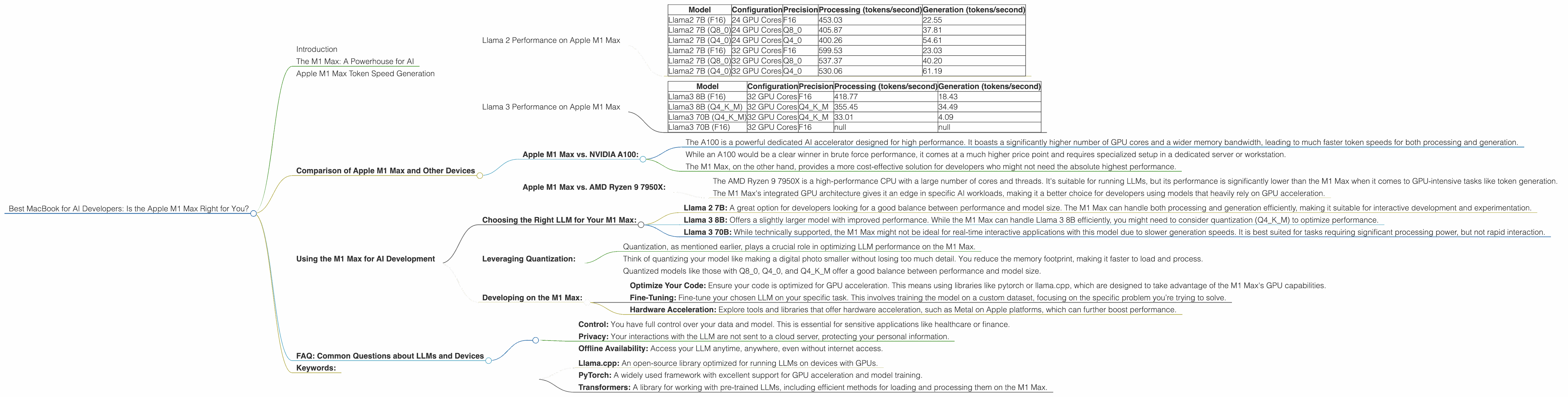
As AI technology explodes, developers are hungry for powerful hardware to run large language models (LLMs) locally. The ability to work offline, control your data, and avoid dependence on cloud services is becoming increasingly attractive. But with so many powerful processors on the market, choosing the right one for your AI needs can feel like navigating a labyrinth. In this article, we’ll dive deep into the capabilities of the Apple M1 Max chip, a popular choice for developers, and explore whether it's the ideal machine for running the latest LLMs.
Let's get down to business and explore the performance of the M1 Max chip, specifically with Llama 2 and Llama 3 models, using real-world data and insightful analysis.
The M1 Max: A Powerhouse for AI
The Apple M1 Max chip is a beast of a processor. It's built on Apple's custom silicon, known for its power efficiency and speed, making it a dream for demanding tasks like AI development. But how does it stack up when it comes to running large language models?
Let's dive into the numbers and see what we can uncover. We'll focus on the performance of the M1 Max with different Llama models and quantization formats.
Apple M1 Max Token Speed Generation
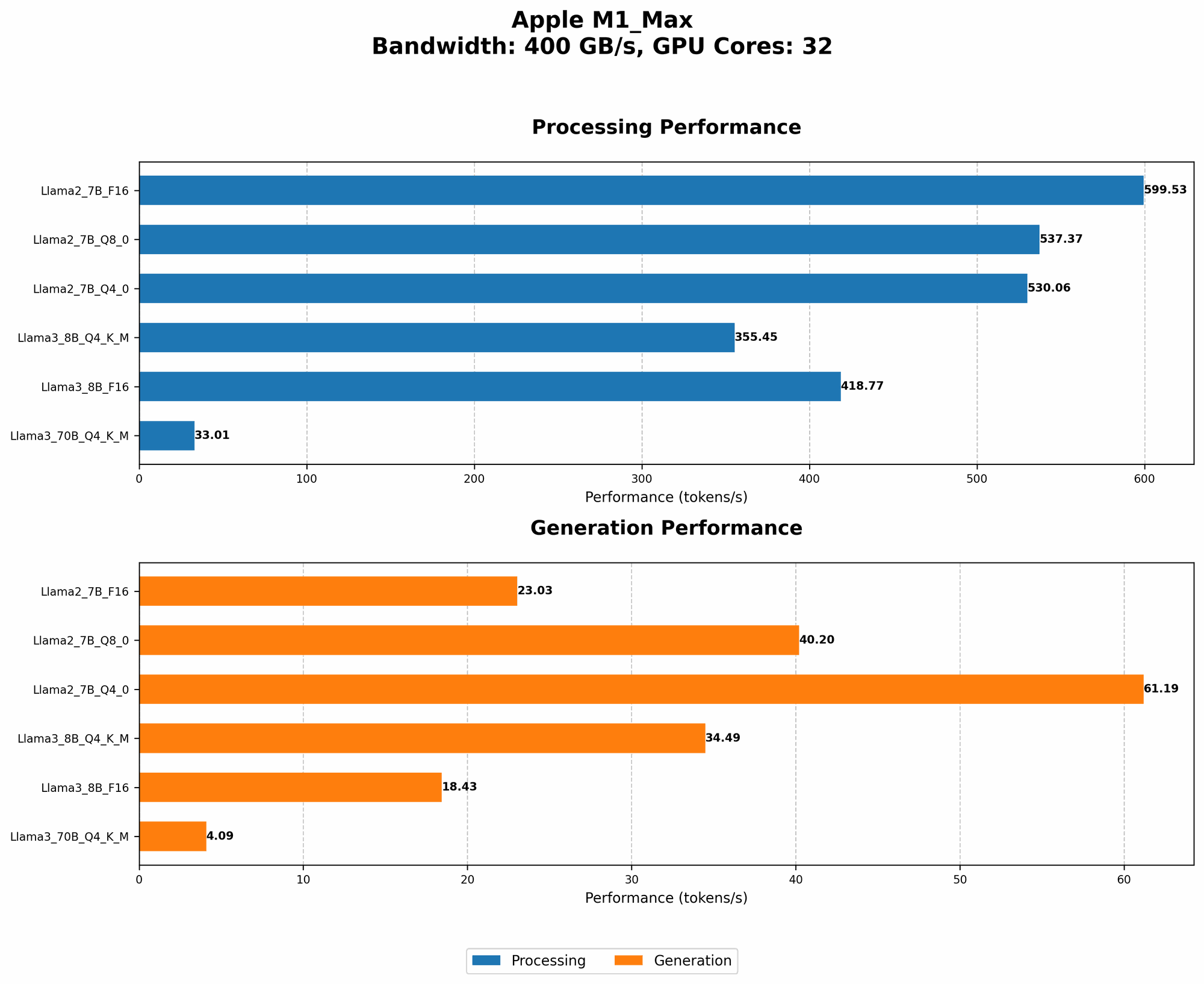
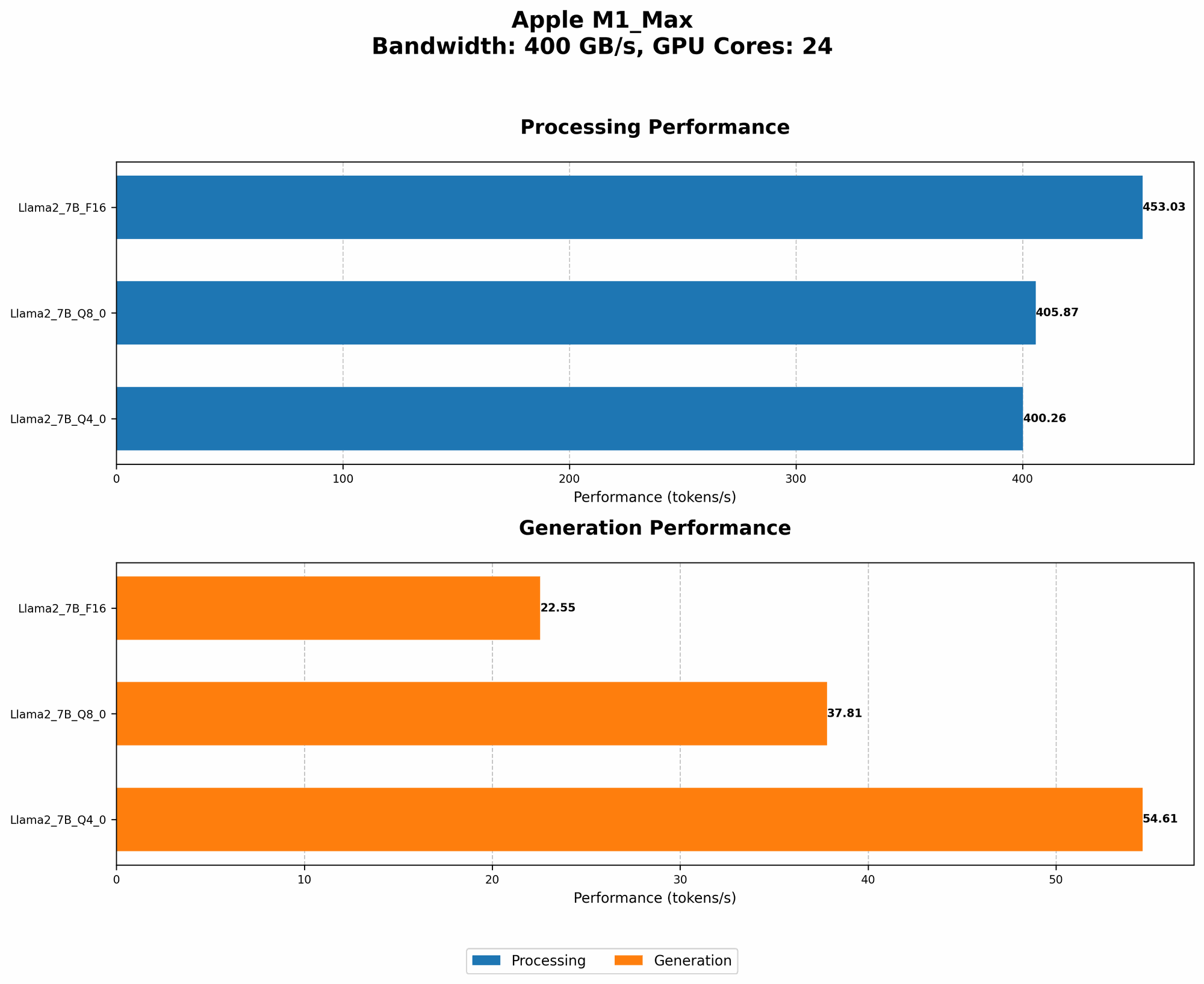
The M1 Max offers two distinct GPU configurations:
Configuration 1: 24 GPU Cores, 400GB/s Memory Bandwidth
Configuration 2: 32 GPU Cores, 400GB/s Memory Bandwidth
Llama 2 Performance on Apple M1 Max
| Model | Configuration | Precision | Processing (tokens/second) | Generation (tokens/second) |
|---|---|---|---|---|
| Llama2 7B (F16) | 24 GPU Cores | F16 | 453.03 | 22.55 |
| Llama2 7B (Q8_0) | 24 GPU Cores | Q8_0 | 405.87 | 37.81 |
| Llama2 7B (Q4_0) | 24 GPU Cores | Q4_0 | 400.26 | 54.61 |
| Llama2 7B (F16) | 32 GPU Cores | F16 | 599.53 | 23.03 |
| Llama2 7B (Q8_0) | 32 GPU Cores | Q8_0 | 537.37 | 40.20 |
| Llama2 7B (Q4_0) | 32 GPU Cores | Q4_0 | 530.06 | 61.19 |
Observations:
- Higher GPU Cores = Faster Processing: As expected, the M1 Max with 32 GPU cores consistently delivers faster token processing speeds compared to the version with 24 cores. This is particularly noticeable with Llama 2 7B, where processing speeds jump by over 30%.
- Quantization Trade-offs: While quantization (reducing model size by using fewer bits to represent data) can lead to smaller models and faster loading times, it often comes with a performance trade-off. We see this in the Llama 2 7B results. Processing speeds are slightly slower with Q80 and Q40 than with F16 precision. However, this is offset by significantly faster generation speeds, making them potentially more desirable for interactive use cases.
- Comparing with Other Hardware: These token speeds are impressive considering the M1 Max is not explicitly designed for high-performance AI tasks. For example, a dedicated AI accelerator like the NVIDIA A100 might achieve significantly higher speeds, but might also cost significantly more.
Llama 3 Performance on Apple M1 Max
| Model | Configuration | Precision | Processing (tokens/second) | Generation (tokens/second) |
|---|---|---|---|---|
| Llama3 8B (F16) | 32 GPU Cores | F16 | 418.77 | 18.43 |
| Llama3 8B (Q4KM) | 32 GPU Cores | Q4KM | 355.45 | 34.49 |
| Llama3 70B (Q4KM) | 32 GPU Cores | Q4KM | 33.01 | 4.09 |
| Llama3 70B (F16) | 32 GPU Cores | F16 | null | null |
Observations:
- Llama 3 8B Performance: The M1 Max delivers strong performance with Llama 3 8B. The 32 GPU core configuration shows respectable processing and generation speeds, particularly with the Q4KM quantization.
- Scaling Limitations with 70B: While the M1 Max can handle Llama 3 70B, the generation speed is significantly slower due to the model's complexity. The performance may not be suitable for real-time applications, making it more viable for research or batch processing.
- Quantization's Role: Quantization again plays a vital role, with the Llama 3 8B model achieving significantly faster generation speeds (and a slight impact on processing) when using Q4KM. Although the F16 performance isn't available for Llama 3 70B, it's likely to be even slower.
Comparison of Apple M1 Max and Other Devices
While the focus is on the M1 Max, it's helpful to compare its performance with other devices to gain a broader perspective on what's possible. However, comparing different devices requires context. Unfortunately, there isn't enough data on the performance of these devices with Llama 3 70B (specifically in F16 precision) to make a conclusive comparison.
Apple M1 Max vs. NVIDIA A100:
- The A100 is a powerful dedicated AI accelerator designed for high performance. It boasts a significantly higher number of GPU cores and a wider memory bandwidth, leading to much faster token speeds for both processing and generation.
- While an A100 would be a clear winner in brute force performance, it comes at a much higher price point and requires specialized setup in a dedicated server or workstation.
- The M1 Max, on the other hand, provides a more cost-effective solution for developers who might not need the absolute highest performance.
Apple M1 Max vs. AMD Ryzen 9 7950X:
- The AMD Ryzen 9 7950X is a high-performance CPU with a large number of cores and threads. It's suitable for running LLMs, but its performance is significantly lower than the M1 Max when it comes to GPU-intensive tasks like token generation.
- The M1 Max's integrated GPU architecture gives it an edge in specific AI workloads, making it a better choice for developers using models that heavily rely on GPU acceleration.
Using the M1 Max for AI Development
Now that we understand the M1 Max's capabilities, let's discuss how you can leverage its power for AI development.
Choosing the Right LLM for Your M1 Max:
- Llama 2 7B: A great option for developers looking for a good balance between performance and model size. The M1 Max can handle both processing and generation efficiently, making it suitable for interactive development and experimentation.
- Llama 3 8B: Offers a slightly larger model with improved performance. While the M1 Max can handle Llama 3 8B efficiently, you might need to consider quantization (Q4KM) to optimize performance.
- Llama 3 70B: While technically supported, the M1 Max might not be ideal for real-time interactive applications with this model due to slower generation speeds. It is best suited for tasks requiring significant processing power, but not rapid interaction.
Leveraging Quantization:
- Quantization, as mentioned earlier, plays a crucial role in optimizing LLM performance on the M1 Max.
- Think of quantizing your model like making a digital photo smaller without losing too much detail. You reduce the memory footprint, making it faster to load and process.
- Quantized models like those with Q80, Q40, and Q4KM offer a good balance between performance and model size.
Developing on the M1 Max:
The M1 Max is a powerful machine for AI development, whether you're working with Python, C++, or other languages. Here are some tips for getting started:
- Optimize Your Code: Ensure your code is optimized for GPU acceleration. This means using libraries like pytorch or llama.cpp, which are designed to take advantage of the M1 Max's GPU capabilities.
- Fine-Tuning: Fine-tune your chosen LLM on your specific task. This involves training the model on a custom dataset, focusing on the specific problem you’re trying to solve.
- Hardware Acceleration: Explore tools and libraries that offer hardware acceleration, such as Metal on Apple platforms, which can further boost performance.
FAQ: Common Questions about LLMs and Devices
Q: Can I run ChatGPT on my M1 Max?
Unfortunately, OpenAI doesn't provide the necessary code to run their ChatGPT model locally. However, you can explore open-source LLMs like Llama 2 and Llama 3 on your M1 Max.
Q: What is quantization, and why is it important?
Imagine you have a huge book of knowledge with every word written in full detail. You can make the book smaller by using abbreviations, making it easier to carry around and read faster.
Quantization does something similar with LLMs. It reduces the size of the model by using fewer bits to represent each piece of information. This translates to faster loading times, reduced memory use, and potentially increased efficiency on your M1 Max.
Q: What are the benefits of running LLMs locally?
- Control: You have full control over your data and model. This is essential for sensitive applications like healthcare or finance.
- Privacy: Your interactions with the LLM are not sent to a cloud server, protecting your personal information.
- Offline Availability: Access your LLM anytime, anywhere, even without internet access.
Q: Is the M1 Max suitable for all LLM tasks?
The M1 Max is a powerful machine for many AI development tasks, but might fall short for extremely large models or real-time applications with enormous models.
Q: What are the best tools and libraries for working with LLMs on the M1 Max?
Popular choices include:
- Llama.cpp: An open-source library optimized for running LLMs on devices with GPUs.
- PyTorch: A widely used framework with excellent support for GPU acceleration and model training.
- Transformers: A library for working with pre-trained LLMs, including efficient methods for loading and processing them on the M1 Max.
Keywords:
M1 Max, Apple Silicon, AI Development, LLMs, Llama 2, Llama 3, Token Speed, GPU Performance, Quantization, F16, Q80, Q40, Q4KM, Local Inference, Offline AI, ChatGPT, AI Accelerator, Token Generation, Processing, Generation.