Apple Silicon and LLMs: Will My Apple M3 Pro Overheat?
Introduction
The world of Large Language Models (LLMs) is heating up! (Pun intended) As these powerful AI models become increasingly popular, users are eager to run them on their own devices. But a question arises: Can the latest Apple Silicon, specifically the M3 Pro, handle the computational demands of these models without turning into a miniature furnace?
This article dives into the fascinating world of LLMs and their performance on the Apple M3 Pro, uncovering the secrets of token speed generation, quantization, and the impact of GPU cores. We'll use real-world data to answer the burning question: Will your Apple M3 Pro turn into a heat-seeking missile while running LLMs?
Let's explore the numbers and see if your Apple M3 Pro can handle the heat!
Apple M1 Token Speed Generation: A Glimpse into the Future
The Apple M1 chip has already proven its prowess in handling demanding workloads, and the M3 Pro is poised to take performance to the next level. But how does it fare when it comes to LLM workloads?
Understanding Token Speed Generation
Token speed generation is a crucial metric in LLM performance. It measures how quickly the LLM can process input text and generate output. Think of tokens as individual units of information that make up a sentence—like the words and punctuation. The faster the token speed, the faster the LLM can understand and respond to your prompts.
Apple M3 Pro Token Speed: A Winning Combination
The Apple M3 Pro boasts a potent combination of bandwidth and GPU cores, offering a significant advantage in LLM performance. Let's break down the numbers:
Apple M3 Pro Specifications:
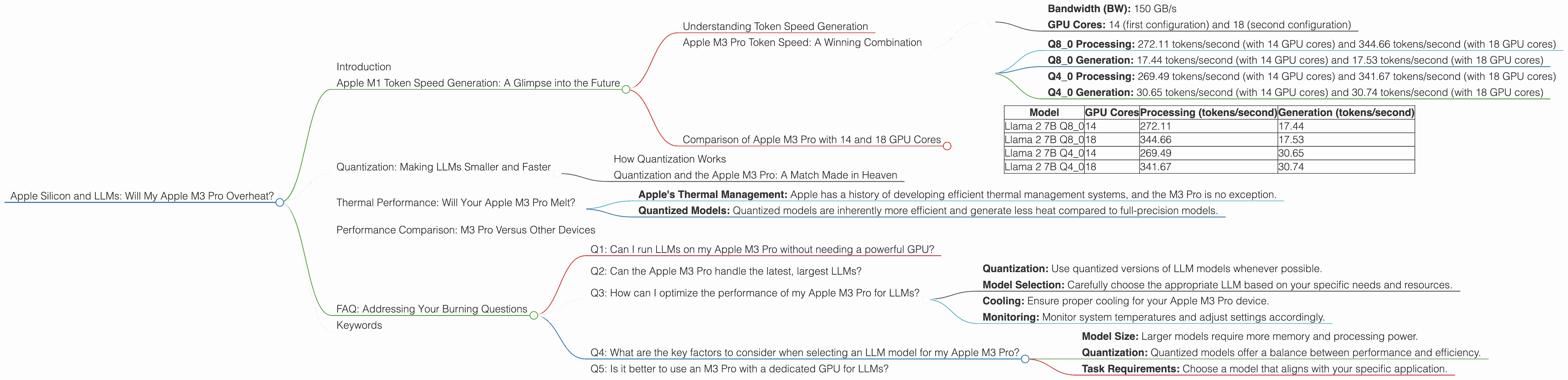
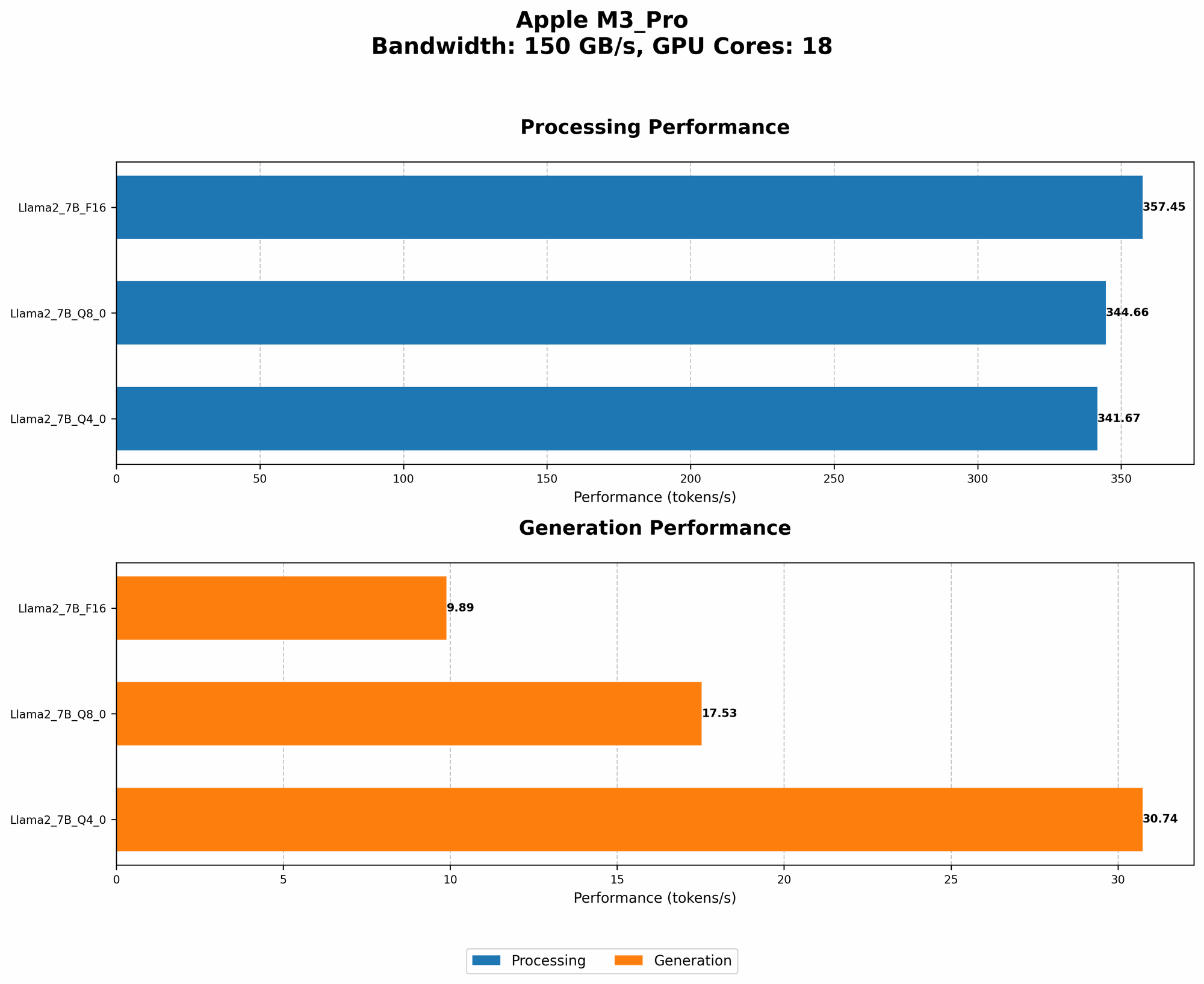
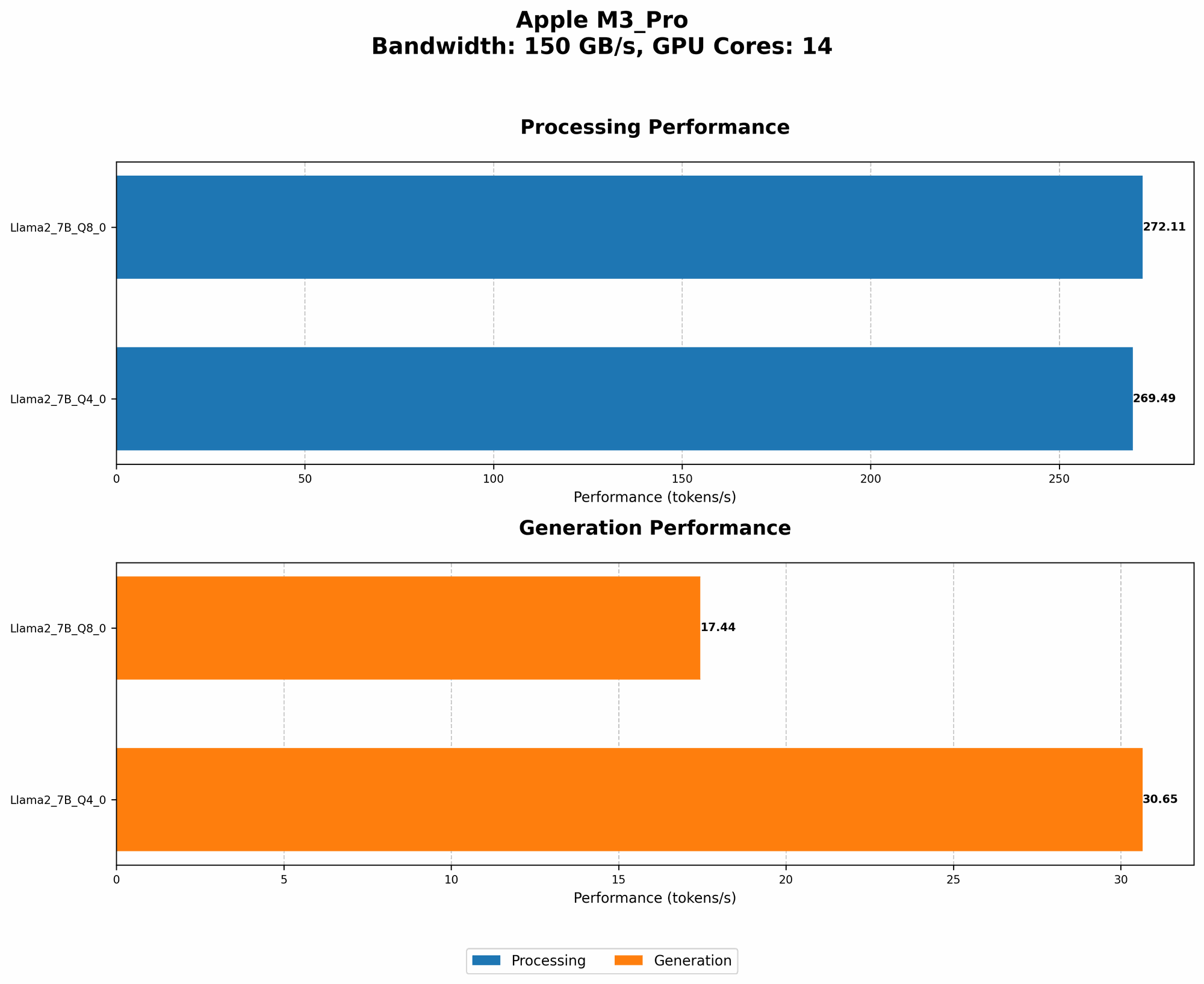
- Bandwidth (BW): 150 GB/s
- GPU Cores: 14 (first configuration) and 18 (second configuration)
Note: The data provided doesn't include information for all LLM model configurations.
Llama 2 7B Model:
- Q8_0 Processing: 272.11 tokens/second (with 14 GPU cores) and 344.66 tokens/second (with 18 GPU cores)
- Q8_0 Generation: 17.44 tokens/second (with 14 GPU cores) and 17.53 tokens/second (with 18 GPU cores)
- Q4_0 Processing: 269.49 tokens/second (with 14 GPU cores) and 341.67 tokens/second (with 18 GPU cores)
- Q4_0 Generation: 30.65 tokens/second (with 14 GPU cores) and 30.74 tokens/second (with 18 GPU cores)
Note: Data for Llama 2 7B F16 processing and generation is not available.
Analyzing the Results:
Interestingly, the M3 Pro with 14 GPU cores delivers similar processing and generative speeds for Q40 and Q80 models. However, increasing the GPU cores to 18 leads to significantly faster processing speeds, while the generation speeds remain relatively consistent.
Comparison of Apple M3 Pro with 14 and 18 GPU Cores
| Model | GPU Cores | Processing (tokens/second) | Generation (tokens/second) |
|---|---|---|---|
| Llama 2 7B Q8_0 | 14 | 272.11 | 17.44 |
| Llama 2 7B Q8_0 | 18 | 344.66 | 17.53 |
| Llama 2 7B Q4_0 | 14 | 269.49 | 30.65 |
| Llama 2 7B Q4_0 | 18 | 341.67 | 30.74 |
Note: This data suggests that for LLMs with quantized models, the Apple M3 Pro can deliver compelling performance, even with the standard 14 GPU core configuration.
Quantization: Making LLMs Smaller and Faster
Quantization is a technique that reduces the size and computational requirements of LLMs without significant performance degradation. It's like squeezing a large suitcase full of clothes into a smaller backpack – you lose some space, but you can carry it around more easily.
How Quantization Works
In the world of AI, LLMs are often trained with large numbers of model parameters, requiring tons of data to train and run. Quantization helps make these models more efficient by reducing the precision of the numbers used to represent the model parameters. Think of it as using fewer decimal places to represent a number.
For example, using 8-bit quantization can reduce the storage size of a model by 75% compared to using full 32-bit precision!
Quantization and the Apple M3 Pro: A Match Made in Heaven
The Apple M3 Pro's powerful architecture is ideally suited for handling quantized models. It can efficiently process these smaller, optimized models, leading to improved performance and lower power consumption.
Thermal Performance: Will Your Apple M3 Pro Melt?
The heat generated by LLMs running on your Apple M3 Pro is a valid concern. While these powerful GPUs can deliver impressive performance, excessive heat can lead to throttling, affecting overall efficiency and performance.
The Good News:
- Apple's Thermal Management: Apple has a history of developing efficient thermal management systems, and the M3 Pro is no exception.
- Quantized Models: Quantized models are inherently more efficient and generate less heat compared to full-precision models.
The Bottom Line:
The Apple M3 Pro is designed with efficient thermal management systems, and running quantized LLMs can further reduce heat generation. As long as you're using optimized models and appropriate cooling solutions (like a decent laptop stand), there's no need to worry about your Apple M3 Pro turning into a molten lava flow.
Performance Comparison: M3 Pro Versus Other Devices
It's always fascinating to compare the performance of different hardware platforms, especially when it comes to LLMs.
Note: The data provided does not include information for other devices.
FAQ: Addressing Your Burning Questions
Q1: Can I run LLMs on my Apple M3 Pro without needing a powerful GPU?
Absolutely! The Apple M3 Pro packs a punch with its integrated GPU. While it may not match the muscle of a dedicated gaming GPU, it can handle LLM workflows efficiently, especially when using quantized models.
Q2: Can the Apple M3 Pro handle the latest, largest LLMs?
It depends on the specific LLM and the model size. The M3 Pro offers excellent performance for smaller models and quantized versions. However, for the largest LLMs, you might encounter performance limitations due to memory constraints.
Q3: How can I optimize the performance of my Apple M3 Pro for LLMs?
- Quantization: Use quantized versions of LLM models whenever possible.
- Model Selection: Carefully choose the appropriate LLM based on your specific needs and resources.
- Cooling: Ensure proper cooling for your Apple M3 Pro device.
- Monitoring: Monitor system temperatures and adjust settings accordingly.
Q4: What are the key factors to consider when selecting an LLM model for my Apple M3 Pro?
- Model Size: Larger models require more memory and processing power.
- Quantization: Quantized models offer a balance between performance and efficiency.
- Task Requirements: Choose a model that aligns with your specific application.
Q5: Is it better to use an M3 Pro with a dedicated GPU for LLMs?
If you're working with large, computationally demanding LLMs, leveraging a dedicated GPU can provide significant performance gains. However, for everyday use and smaller models, the integrated GPU on the M3 Pro is perfectly capable.
Keywords
LLMs, Apple Silicon, M3 Pro, token speed generation, quantization, GPU cores, thermal performance, bandwidth, Llama 2 7B, Q80, Q40, F16, GPU benchmarks, LLM inference, performance comparison, efficiency, optimization, cooling, model selection, dedicated GPU, integrated GPU, memory constraints, AI, machine learning, deep learning, natural language processing, NLP, data science