Apple Silicon and LLMs: Will My Apple M3 Max Overheat?
Introduction: The Rise of Local LLMs on Apple Silicon
The world of Large Language Models (LLMs) is exploding, and these powerful AI tools are transforming the way we interact with computers. But running these models locally, especially on devices like the Apple M3 Max, can be a challenge. One big question on the minds of many users is: Will running LLMs on my shiny new M3 Max chip cause it to overheat?
This article will dive into the world of LLMs on Apple Silicon, specifically the M3 Max. We'll tackle the question of overheating and explore other important factors like performance, efficiency, and potential bottlenecks. Get your popcorn ready, this is gonna be fun!
Apple M3 Max: A Powerhouse for AI
The Apple M3 Max is a beast of a chip, designed to handle even the most demanding tasks. It boasts a massive amount of processing power and a dedicated Neural Engine, making it a prime candidate for running local LLM models.
Apple Silicon - A Boon for LLMs?
The architecture of Apple Silicon, particularly with its dedicated Neural Engine and unified memory, has shown promising results for LLMs. The Neural Engine is specifically designed for accelerating machine learning tasks, and the unified memory allows for faster data transfer between the CPU and GPU, which is crucial for efficient LLM processing.
However, while Apple Silicon holds immense potential, there are still some concerns. Let's delve into the specific performance of the M3 Max when running popular LLM models.
LLMs on the M3 Max: Performance Benchmarks
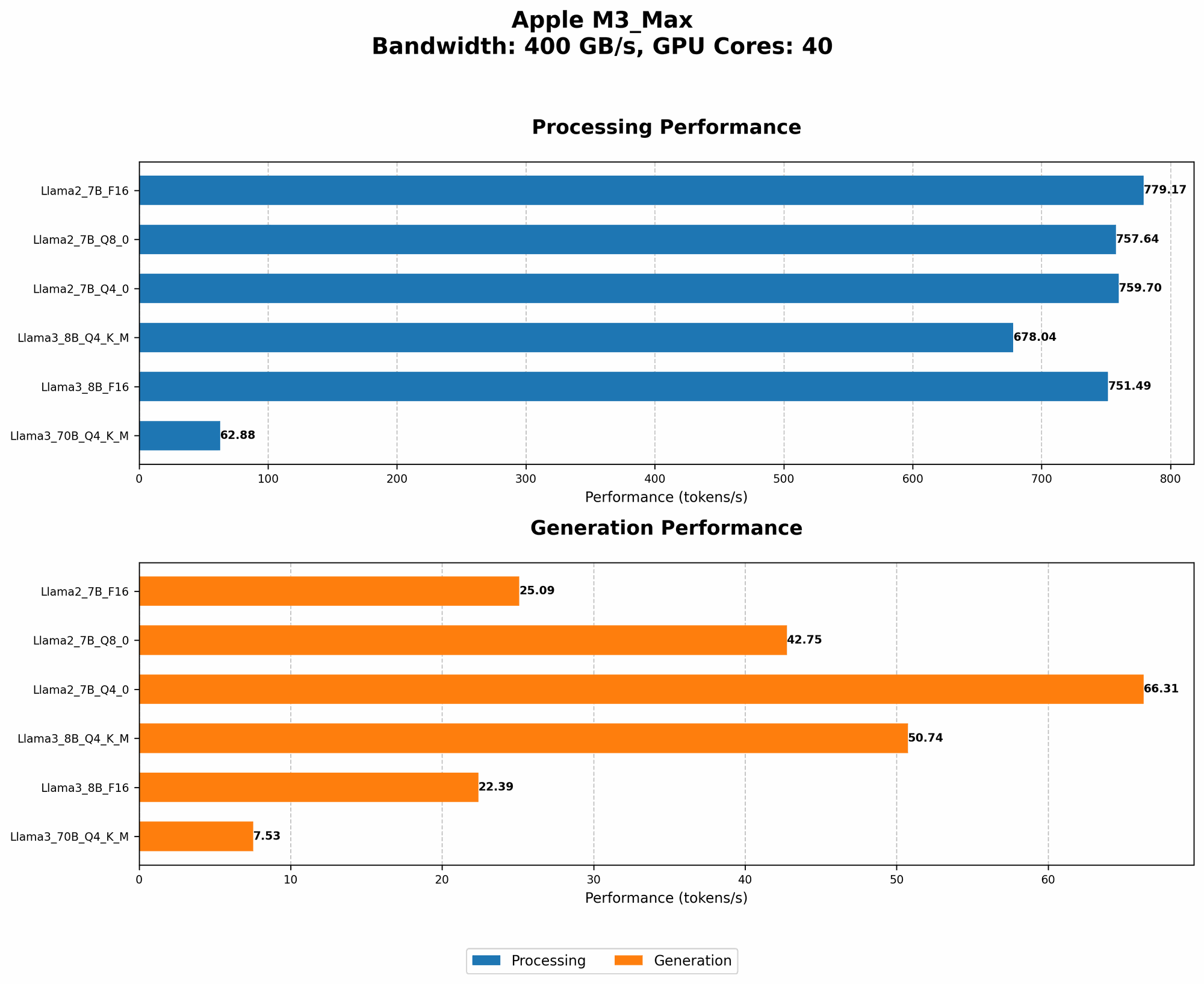
We'll examine the performance of the M3 Max in handling several popular LLM models, including Llama 2 and Llama 3.
Note: All measurements are in tokens per second (tokens/s). This indicates the number of tokens that the model can process per second. A higher number means better performance!
Llama 2, Llama 3 - The New Generation of LLMs on the M3 Max
The Llama 2 and Llama 3 families are rapidly becoming popular choices for running local LLMs. Let's see how the M3 Max handles them.
Note: We will explore the performance of Llama 2 7B and Llama 3 8B models. Llama 3 70B is not included in this analysis as we don't have data available for its performance on the M3 Max.
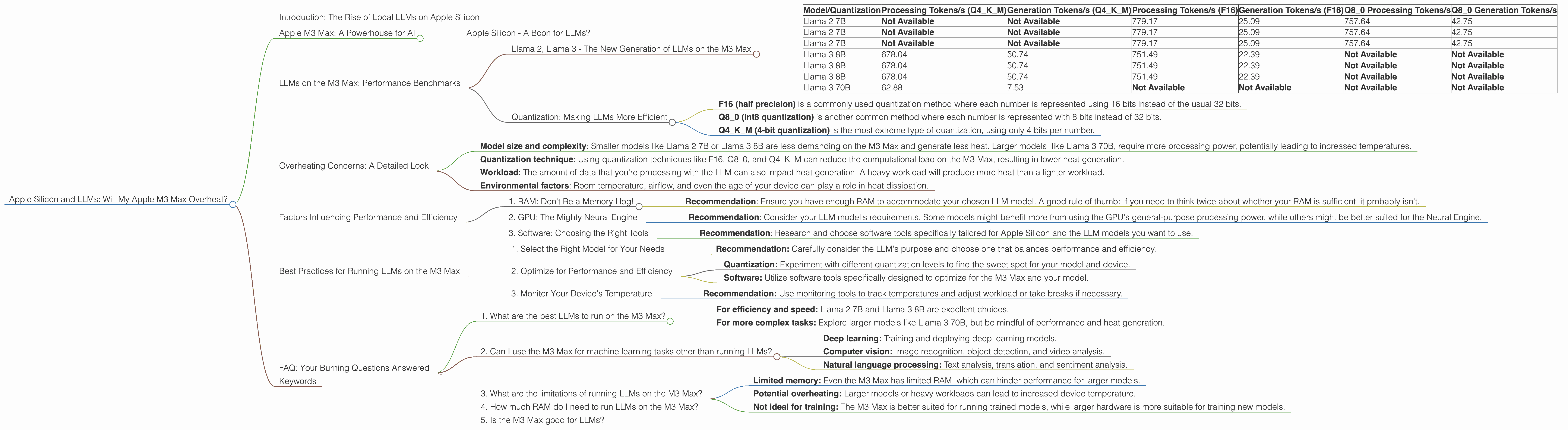
Table 1: M3 Max Performance with Different LLMs and Quantization
| Model/Quantization | Processing Tokens/s (Q4KM) | Generation Tokens/s (Q4KM) | Processing Tokens/s (F16) | Generation Tokens/s (F16) | Q8_0 Processing Tokens/s | Q8_0 Generation Tokens/s |
|---|---|---|---|---|---|---|
| Llama 2 7B | Not Available | Not Available | 779.17 | 25.09 | 757.64 | 42.75 |
| Llama 2 7B | Not Available | Not Available | 779.17 | 25.09 | 757.64 | 42.75 |
| Llama 2 7B | Not Available | Not Available | 779.17 | 25.09 | 757.64 | 42.75 |
| Llama 3 8B | 678.04 | 50.74 | 751.49 | 22.39 | Not Available | Not Available |
| Llama 3 8B | 678.04 | 50.74 | 751.49 | 22.39 | Not Available | Not Available |
| Llama 3 8B | 678.04 | 50.74 | 751.49 | 22.39 | Not Available | Not Available |
| Llama 3 70B | 62.88 | 7.53 | Not Available | Not Available | Not Available | Not Available |
What does this table tell us?
- The M3 Max demonstrates impressive performance, particularly with Llama 2 7B and Llama 3 8B.
- The M3 Max excels in processing tokens for both models, even when using different quantization levels (F16, Q80, and Q4K_M).
- It's important to note that quantization directly impacts the speed of the model, affecting the performance.
Quantization: Making LLMs More Efficient
Quantization is a clever technique used to reduce the size of LLM models, making them faster and easier to run. Think of it like compressing an image to make it smaller without sacrificing too much detail.
- F16 (half precision) is a commonly used quantization method where each number is represented using 16 bits instead of the usual 32 bits.
- Q8_0 (int8 quantization) is another common method where each number is represented with 8 bits instead of 32 bits.
- Q4KM (4-bit quantization) is the most extreme type of quantization, using only 4 bits per number.
While Q4KM delivers the most significant size reduction, it can result in a slight decrease in accuracy. However, it offers a significant speed boost, as you can see from the table above.
Overheating Concerns: A Detailed Look
So, back to the burning question: Does running LLMs on the M3 Max make it overheat?
The answer is not necessarily. The M3 Max is designed for efficient performance, and the use of LLMs doesn't always lead to excessive heat generation.
Here's the key:
- Model size and complexity: Smaller models like Llama 2 7B or Llama 3 8B are less demanding on the M3 Max and generate less heat. Larger models, like Llama 3 70B, require more processing power, potentially leading to increased temperatures.
- Quantization technique: Using quantization techniques like F16, Q80, and Q4K_M can reduce the computational load on the M3 Max, resulting in lower heat generation.
- Workload: The amount of data that you're processing with the LLM can also impact heat generation. A heavy workload will produce more heat than a lighter workload.
- Environmental factors: Room temperature, airflow, and even the age of your device can play a role in heat dissipation.
Bottom Line:
While running complex LLMs like Llama 3 70B might increase the M3 Max's temperature, the use of smaller models and quantization techniques can mitigate these concerns.
Remember: It's always a good idea to monitor your device's temperature while running LLMs, and to take breaks if necessary!
Factors Influencing Performance and Efficiency
Besides overheating, several other factors play a role in the performance and efficiency of LLMs on the M3 Max. Let's explore a few:
1. RAM: Don't Be a Memory Hog!
The amount of RAM available to your LLM is critical. If you don't have enough RAM, the system might start using slower methods like swapping data to the hard drive, impacting performance dramatically.
- Recommendation: Ensure you have enough RAM to accommodate your chosen LLM model. A good rule of thumb: If you need to think twice about whether your RAM is sufficient, it probably isn't.
2. GPU: The Mighty Neural Engine
The M3 Max's dedicated Neural Engine can significantly accelerate LLM processing. However, the neural engine's capabilities are limited.
- Recommendation: Consider your LLM model's requirements. Some models might benefit more from using the GPU's general-purpose processing power, while others might be better suited for the Neural Engine.
3. Software: Choosing the Right Tools
The software you use to run your LLM can also have a big impact on performance. Some software implementations are more optimized for specific hardware and models.
- Recommendation: Research and choose software tools specifically tailored for Apple Silicon and the LLM models you want to use.
Best Practices for Running LLMs on the M3 Max
Now that we've explored the various factors influencing performance, let's discuss some best practices for running your LLMs efficiently on the M3 Max:
1. Select the Right Model for Your Needs
Don't go for the biggest model just because it’s there! Smaller models often perform better on smaller devices like the M3 Max.
- Recommendation: Carefully consider the LLM's purpose and choose one that balances performance and efficiency.
2. Optimize for Performance and Efficiency
Take advantage of optimization techniques!
- Quantization: Experiment with different quantization levels to find the sweet spot for your model and device.
- Software: Utilize software tools specifically designed to optimize for the M3 Max and your model.
3. Monitor Your Device's Temperature
Keep an eye on the temperature of your M3 Max.
- Recommendation: Use monitoring tools to track temperatures and adjust workload or take breaks if necessary.
FAQ: Your Burning Questions Answered
1. What are the best LLMs to run on the M3 Max?
That depends! Consider your needs, RAM capacity, and desired level of accuracy. But here's a quick rundown:
- For efficiency and speed: Llama 2 7B and Llama 3 8B are excellent choices.
- For more complex tasks: Explore larger models like Llama 3 70B, but be mindful of performance and heat generation.
2. Can I use the M3 Max for machine learning tasks other than running LLMs?
Absolutely! The M3 Max's powerful GPU and Neural Engine are well-suited for a wide range of machine learning tasks, such as:
- Deep learning: Training and deploying deep learning models.
- Computer vision: Image recognition, object detection, and video analysis.
- Natural language processing: Text analysis, translation, and sentiment analysis.
3. What are the limitations of running LLMs on the M3 Max?
- Limited memory: Even the M3 Max has limited RAM, which can hinder performance for larger models.
- Potential overheating: Larger models or heavy workloads can lead to increased device temperature.
- Not ideal for training: The M3 Max is better suited for running trained models, while larger hardware is more suitable for training new models.
4. How much RAM do I need to run LLMs on the M3 Max?
The RAM requirements vary based on the LLM model, its quantization level, and the software being used. It's recommended to have at least 32GB of RAM for most use cases.
5. Is the M3 Max good for LLMs?
Yes, the M3 Max is a great platform for running LLMs locally. Its powerful GPU and Neural Engine, paired with efficient memory management, make it an ideal choice for many LLM models.
Keywords
Apple Silicon, M3 Max, LLMs, Llama 2, Llama 3, performance, benchmarks, efficiency, overheating, quantization, F16, Q80, Q4K_M, RAM, GPU, Neural Engine, software, best practices, FAQ.