Apple Silicon and LLMs: Will My Apple M2 Pro Overheat?

Introduction
The world of large language models (LLMs) is heating up, and so are the devices running them! As developers and enthusiasts delve deeper into local LLM deployment, questions about performance and efficiency arise. One particularly hot topic is the compatibility of Apple Silicon – specifically the M2 Pro – with these powerful AI models. If you're using an Apple M2 Pro and are curious about its potential to handle LLMs without turning into a miniature furnace, you've come to the right place!
Apple M2 Pro: A Powerhouse for LLMs?
The Apple M2 Pro chip, a silicon marvel from Apple, boasts impressive performance and efficiency. With its powerful GPU, the M2 Pro promises to handle computationally demanding tasks like LLM inference with aplomb. But does it live up to the hype?
Diving Deep into the Numbers: M2 Pro Performance with LLMs
To understand the M2 Pro's capabilities, we need to dive into some hard numbers. We'll focus on the popular Llama 2 model, available in various sizes (7 billion, 13 billion, and 70 billion parameters). We'll analyze its performance on the M2 Pro for different quantization levels – a technique to reduce model size and improve inference speed.
Comparing M2 Pro Performance for Different Llama 2 Quantization Levels
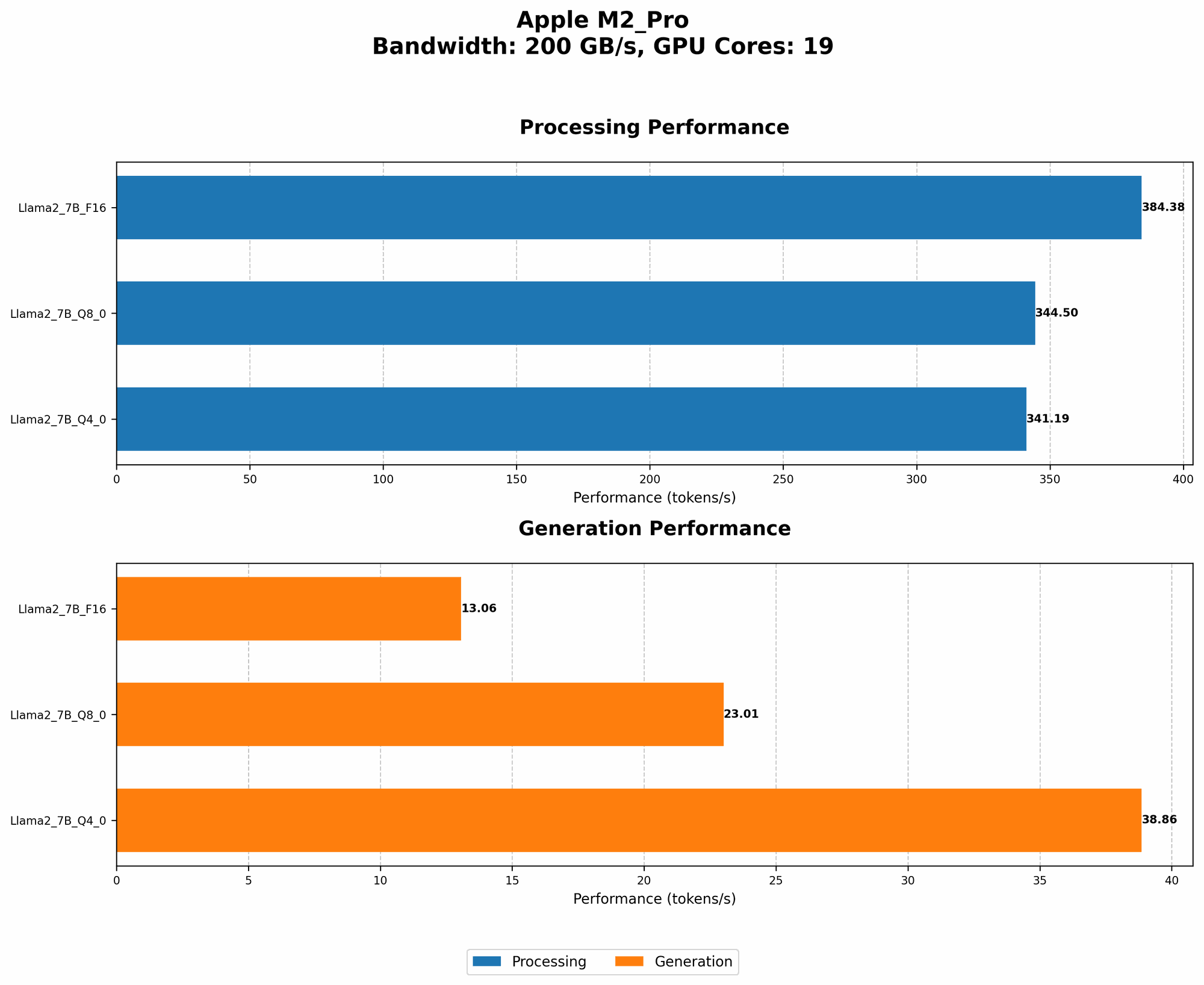
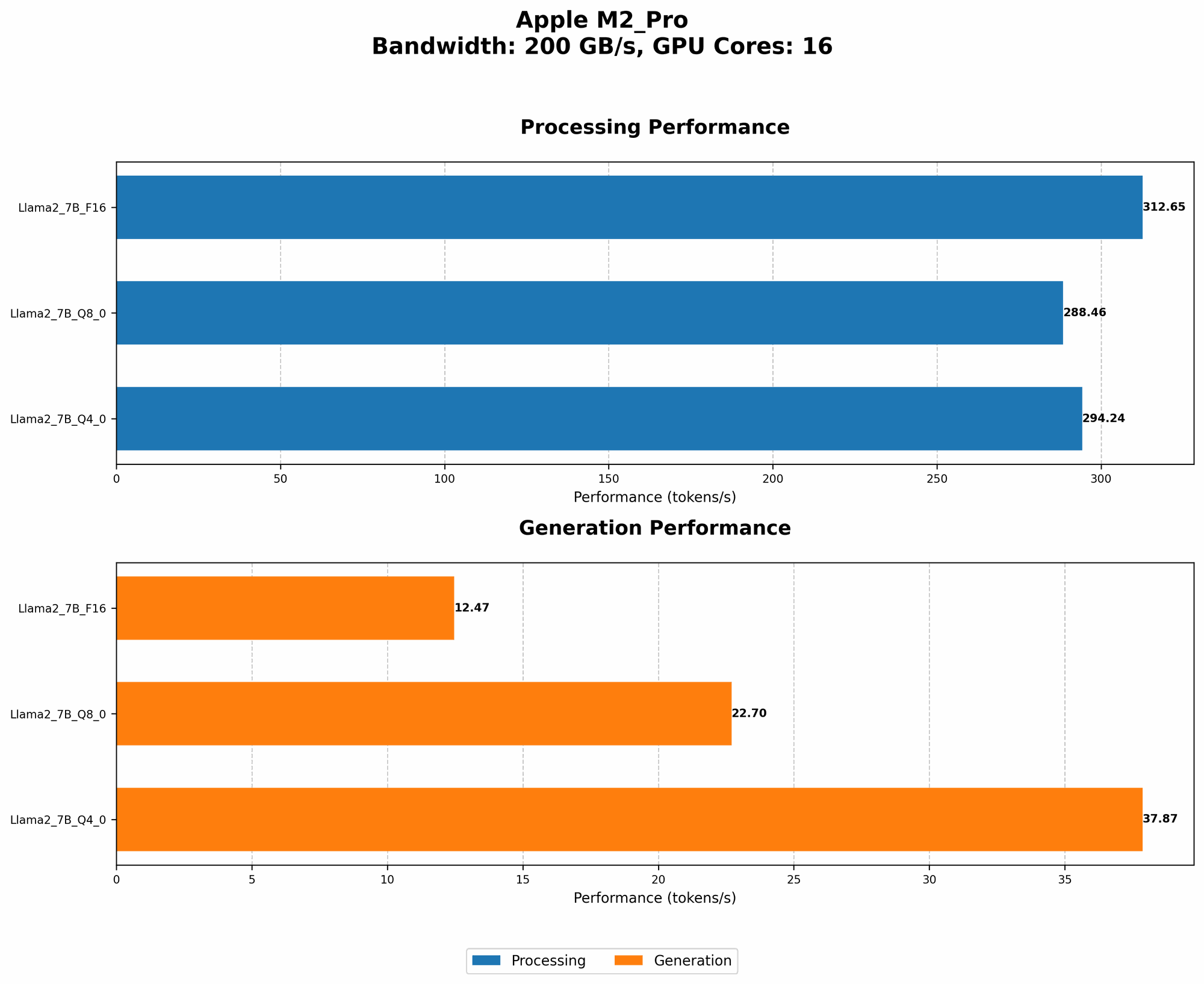
The following table summarizes the performance of the M2 Pro with different Llama 2 models and quantization levels. Note: This table only includes data for the Llama 2 7B model due to the lack of available data for other sizes.
| Configuration | BW (GB/s) | GPU Cores | Llama 2 7B - F16 - Processing (Tokens/s) | Llama 2 7B - F16 - Generation (Tokens/s) | Llama 2 7B - Q8_0 - Processing (Tokens/s) | Llama 2 7B - Q8_0 - Generation (Tokens/s) | Llama 2 7B - Q4_0 - Processing (Tokens/s) | Llama 2 7B - Q4_0 - Generation (Tokens/s) |
|---|---|---|---|---|---|---|---|---|
| M2 Pro (16 Cores) | 200 | 16 | 312.65 | 12.47 | 288.46 | 22.7 | 294.24 | 37.87 |
| M2 Pro (19 Cores) | 200 | 19 | 384.38 | 13.06 | 344.5 | 23.01 | 341.19 | 38.86 |
BW: Bandwidth (GB/s) GPUCores: Number of GPU Cores
Understanding the Numbers: What Do They Mean?
The data reveals interesting insights:
- Higher Quantization, Faster Inference: Lower quantization levels (Q80, Q40) generally lead to faster processing and generation speeds compared to F16. This is because quantization reduces the model's size and memory footprint, enabling faster computations.
- M2 Pro Performance Scales with GPU Cores: The table shows a clear relationship between the number of GPU cores and performance. The M2 Pro with 19 cores consistently outperforms the 16 core version, demonstrating the power of GPU parallelism.
- Processing vs. Generation: As expected, processing speeds are much higher than generation speeds. This difference highlights the computational intensity of text generation compared to processing input text.
Can the M2 Pro Handle the Heat? Overheating Considerations
While the M2 Pro offers compelling performance for LLMs, it's crucial to address potential overheating concerns. Here's what you need to consider:
- Power Consumption: Running LLMs is resource-intensive, demanding power. The M2 Pro, while efficient, can still draw significant power, potentially leading to increased heat generation.
- Thermal Design: Apple has incorporated advanced thermal management systems into the M2 Pro, including a heat sink and fans. These systems work tirelessly to dissipate heat and prevent overheating.
- Cooling Solutions: For demanding workloads or prolonged LLM sessions, external cooling solutions might be necessary. These solutions can improve airflow and reduce CPU and GPU temperatures.
M2 Pro: A Solid Choice for LLM Enthusiasts?
The M2 Pro, with its impressive performance and efficient design, makes a strong case for LLM enthusiasts. It can handle various LLM models and quantization levels effectively. Though overheating concerns exist, they can be mitigated through proper thermal management and external cooling solutions if needed.
FAQ - Frequently Asked Questions
1. What are the best settings for running LLMs on the M2 Pro?
- The "best" settings depend on your specific requirements. Higher quantization levels like Q40 or Q80 can offer better performance, but sacrifice some accuracy. Experiment with different settings and measure the trade-offs between speed and quality.
2. Are there any specific tools or libraries for running LLMs on the M2 Pro?
- Yes, several tools and libraries are tailored for running LLMs on Apple Silicon. llama.cpp is a popular choice for running LLM models on both CPU and GPU. Other options include transformers and Hugging Face, which provide frameworks and pre-trained models for diverse LLM applications.
3. How can I monitor the M2 Pro's temperature while running LLMs?
- You can utilize tools like Activity Monitor in macOS to track the processor temperature. Additionally, various third-party monitoring applications can provide more detailed information and insights into the M2 Pro's thermal performance.
4. Can I run LLMs locally on a Mac with an M2 Pro for practical use cases?
- Yes, you can! While running LLMs locally on the M2 Pro might not be suitable for all applications, it's viable for tasks such as code completion, generating summaries, and answering questions. For more demanding scenarios, consider cloud-based solutions.
Keywords
Apple M2 Pro, Apple Silicon, LLM, Llama 2, Quantization, Overheating, Performance, GPU, Processing speed, Generation speed, Thermal management, Cooling solutions, Local model deployment, Llama.cpp, transformers, Hugging Face