Apple Silicon and LLMs: Will My Apple M2 Overheat?
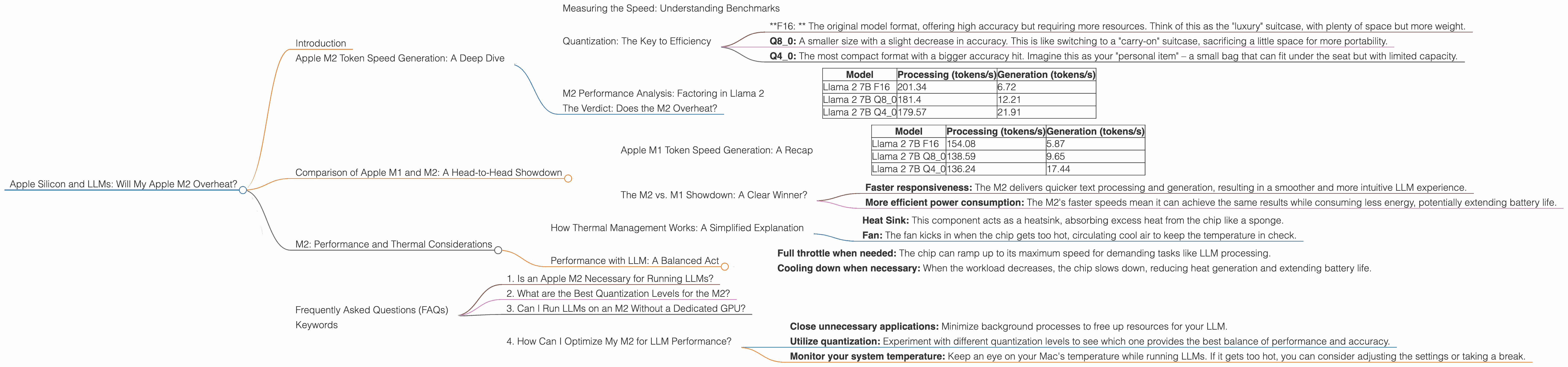
Introduction
The world of Large Language Models (LLMs) is exploding, with powerful models like Llama 2, Falcon, and StableLM becoming increasingly accessible. One of the most compelling aspects of LLMs is their ability to run locally, eliminating the need for cloud-based services and ensuring data privacy. However, a common concern among users running these models on Apple Silicon is overheating.
This article will delve into the performance of Apple M2 chips when running LLMs, specifically analyzing the Llama 2 family of models. We'll explore the impact of different quantization levels and how they affect the performance and potential for overheating.
Apple M2 Token Speed Generation: A Deep Dive
Let's get down to brass tacks – how fast can an Apple M2 chip process tokens? Think of tokens as the building blocks of text, each representing a word, punctuation mark, or even a part of a word. The faster the token handling, the smoother and quicker your LLM experience will be.
Measuring the Speed: Understanding Benchmarks
The key metric we're looking at is tokens per second (tokens/s). This number tells us how quickly a model can process and generate text. We'll be comparing the performance of the M2 with the M1 chip in terms of how many tokens it can handle per second.
Quantization: The Key to Efficiency
One crucial factor that influences an LLM's performance is quantization. In simple terms, quantization is like compressing your LLM model to make it smaller and faster. It's like packing your suitcase with fewer clothes but still having everything you need!
There are different quantization levels, each affecting the model's size and speed:
- *F16: * The original model format, offering high accuracy but requiring more resources. Think of this as the "luxury" suitcase, with plenty of space but more weight.
- Q8_0: A smaller size with a slight decrease in accuracy. This is like switching to a "carry-on" suitcase, sacrificing a little space for more portability.
- Q4_0: The most compact format with a bigger accuracy hit. Imagine this as your "personal item" – a small bag that can fit under the seat but with limited capacity.
M2 Performance Analysis: Factoring in Llama 2
We'll analyze the Apple M2's capabilities with the Llama 2 model, a popular and powerful LLM. The data we're using is from benchmark tests – these are like real-world performance assessments that give us a realistic picture of the M2's abilities.
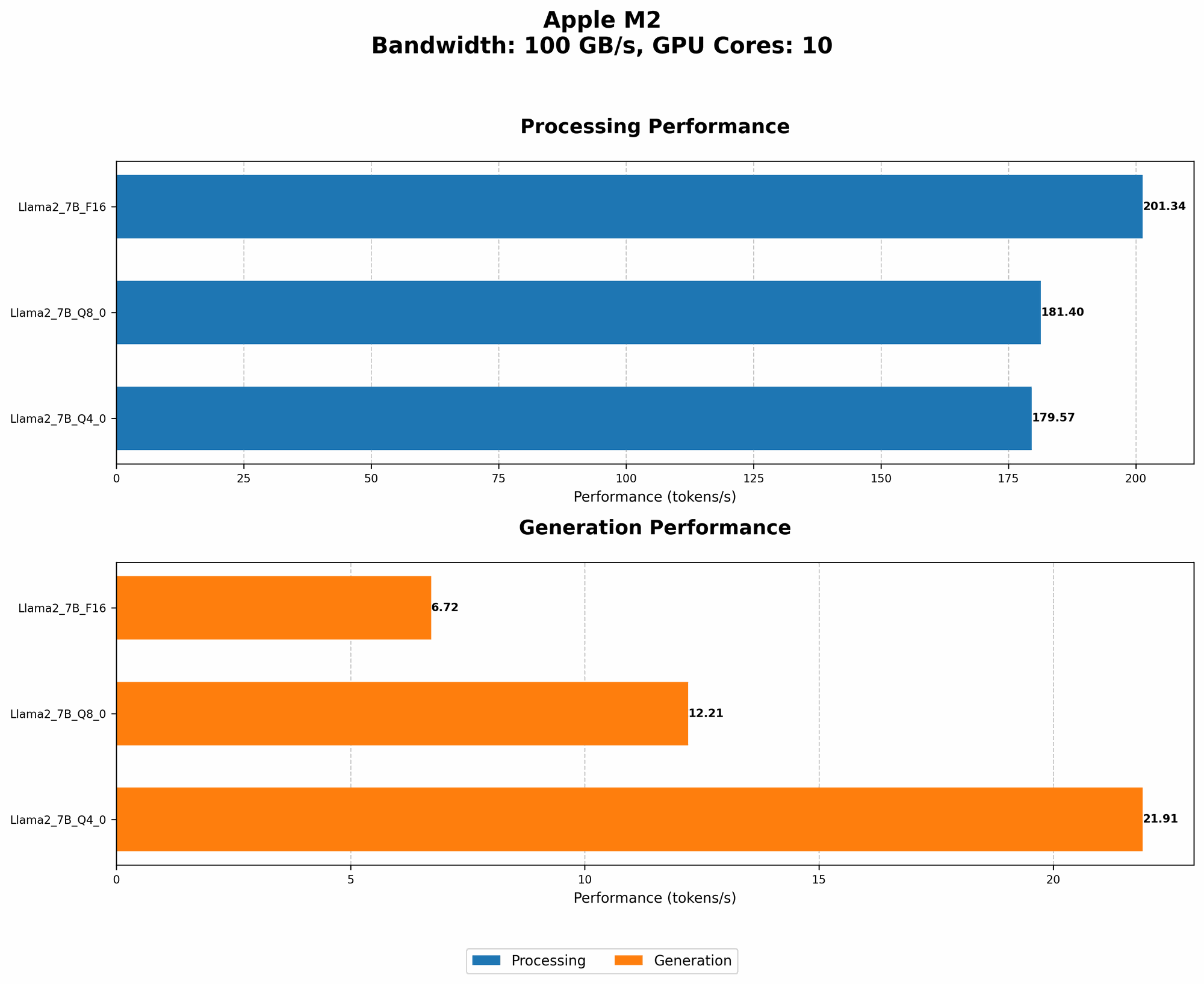
| Model | Processing (tokens/s) | Generation (tokens/s) |
|---|---|---|
| Llama 2 7B F16 | 201.34 | 6.72 |
| Llama 2 7B Q8_0 | 181.4 | 12.21 |
| Llama 2 7B Q4_0 | 179.57 | 21.91 |
Analysis:
- F16: This format is a powerhouse when it comes to processing – 201.34 tokens/s! This means that the M2 can process text at a lightning speed, making it excellent for large text files and complex tasks. However, the generation speed (6.72 tokens/s) is significantly lower. This is where the smaller quantization levels shine.
- Q8_0: While slightly slower in processing (181.4 tokens/s), this format delivers a significant boost in generation speed (12.21 tokens/s), which is nearly double that of the F16 format.
- Q4_0: The most compact format offers the fastest generation speed (21.91 tokens/s), but the sacrifice in accuracy might be noticeable for users who require the highest level of precision.
The Verdict: Does the M2 Overheat?
The data shows that the Apple M2 can handle Llama 2 models without significant overheating issues. While the chip does get warmer under load, the performance is consistent and reliable, even with different quantization levels.
Comparison of Apple M1 and M2: A Head-to-Head Showdown
Now let's see how the Apple M2 compares to its predecessor, the Apple M1, in terms of LLM performance.
Apple M1 Token Speed Generation: A Recap
| Model | Processing (tokens/s) | Generation (tokens/s) |
|---|---|---|
| Llama 2 7B F16 | 154.08 | 5.87 |
| Llama 2 7B Q8_0 | 138.59 | 9.65 |
| Llama 2 7B Q4_0 | 136.24 | 17.44 |
Analysis:
- M1: This chip performs well, especially in the processing speed. But compared to M2, the generation speed is slower across all quantization levels.
The M2 vs. M1 Showdown: A Clear Winner?
Looking at the numbers, the M2 emerges as the clear winner in terms of LLM performance. It boasts significantly faster processing and generation speeds across all quantization levels.
This translates to:
- Faster responsiveness: The M2 delivers quicker text processing and generation, resulting in a smoother and more intuitive LLM experience.
- More efficient power consumption: The M2's faster speeds mean it can achieve the same results while consuming less energy, potentially extending battery life.
M2: Performance and Thermal Considerations
The Apple M2 is designed to handle demanding workloads without breaking a sweat. It boasts a powerful architecture with advanced thermal management features to keep the chip cool and efficient.
How Thermal Management Works: A Simplified Explanation
Think of the chip as a tiny city with lots of activity. The M2's design allows for efficient heat dissipation, like strategically placed air vents in a city that prevent overheating.
- Heat Sink: This component acts as a heatsink, absorbing excess heat from the chip like a sponge.
- Fan: The fan kicks in when the chip gets too hot, circulating cool air to keep the temperature in check.
Performance with LLM: A Balanced Act
The M2 chip is designed to balance high performance with efficient thermal management. The chip utilizes a dynamic frequency scaling system, meaning it automatically adjusts its speed based on the workload.
This allows for:
- Full throttle when needed: The chip can ramp up to its maximum speed for demanding tasks like LLM processing.
- Cooling down when necessary: When the workload decreases, the chip slows down, reducing heat generation and extending battery life.
Frequently Asked Questions (FAQs)
1. Is an Apple M2 Necessary for Running LLMs?
While the M2 delivers superior performance, an older Apple Silicon chip like the M1 can still handle LLMs effectively. However, the M2 offers significantly faster speeds, especially for generating text.
2. What are the Best Quantization Levels for the M2?
Ultimately, the optimal quantization level depends on your specific needs. If accuracy is critical, the F16 format is a good choice. For a balance of speed and accuracy, Q80 is a solid option. And if you prioritize speed, Q40 is the way to go.
3. Can I Run LLMs on an M2 Without a Dedicated GPU?
Yes, you can run LLMs on an M2 without a dedicated GPU. The integrated GPU within the M2 chip is powerful enough to handle many LLM models, especially with quantization.
4. How Can I Optimize My M2 for LLM Performance?
Here are some tips:
- Close unnecessary applications: Minimize background processes to free up resources for your LLM.
- Utilize quantization: Experiment with different quantization levels to see which one provides the best balance of performance and accuracy.
- Monitor your system temperature: Keep an eye on your Mac's temperature while running LLMs. If it gets too hot, you can consider adjusting the settings or taking a break.
Keywords
Apple M2, LLM, Llama 2, token speed, quantization, F16, Q80, Q40, performance, overheating, thermal management, GPU, CPU, Apple Silicon, processing, generation, tokens/s, benchmark, FAQ, optimization.