Apple Silicon and LLMs: Will My Apple M2 Max Overheat?

Introduction
The world of large language models (LLMs) is exploding, with exciting new models like Llama 2 being released regularly. But running these models locally on your own machine can be a challenge, especially if you're using an Apple Silicon machine like the powerful M2 Max.
A common concern among users is overheating. The massive computational demands of LLMs can push your hardware to its limits, leading to thermal throttling and potentially damaging your components. In this article, we'll dive into the world of Apple Silicon and LLMs, specifically focusing on the M2 Max chip and its ability to handle the heat generated by Llama 2 models. We'll explore the performance of different quantization levels, processing speeds, and token generation rates, all while answering the burning question: will your fancy M2 Max overheat running LLMs?
Apple M2 Max: A Powerful Chip for LLMs?
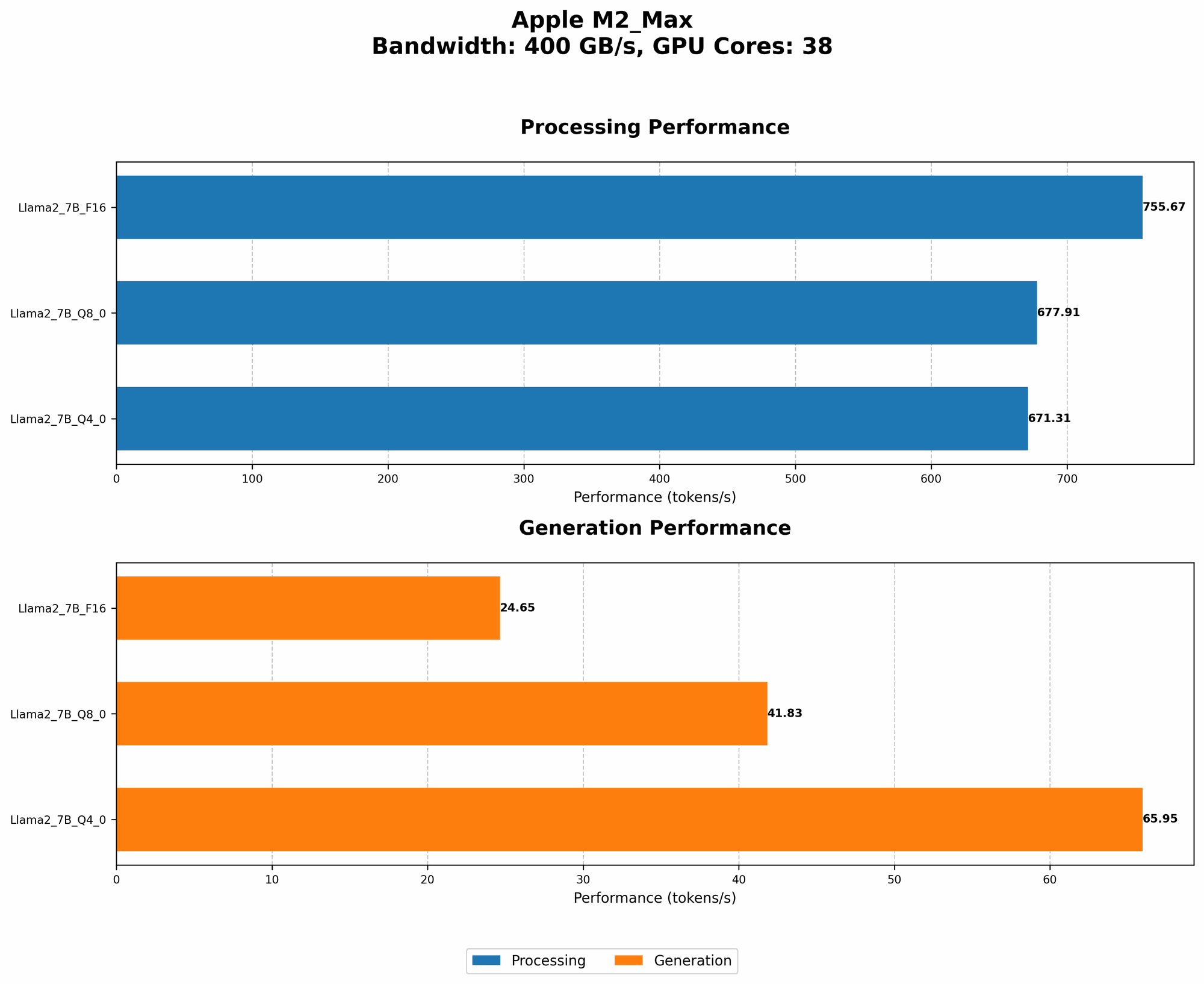
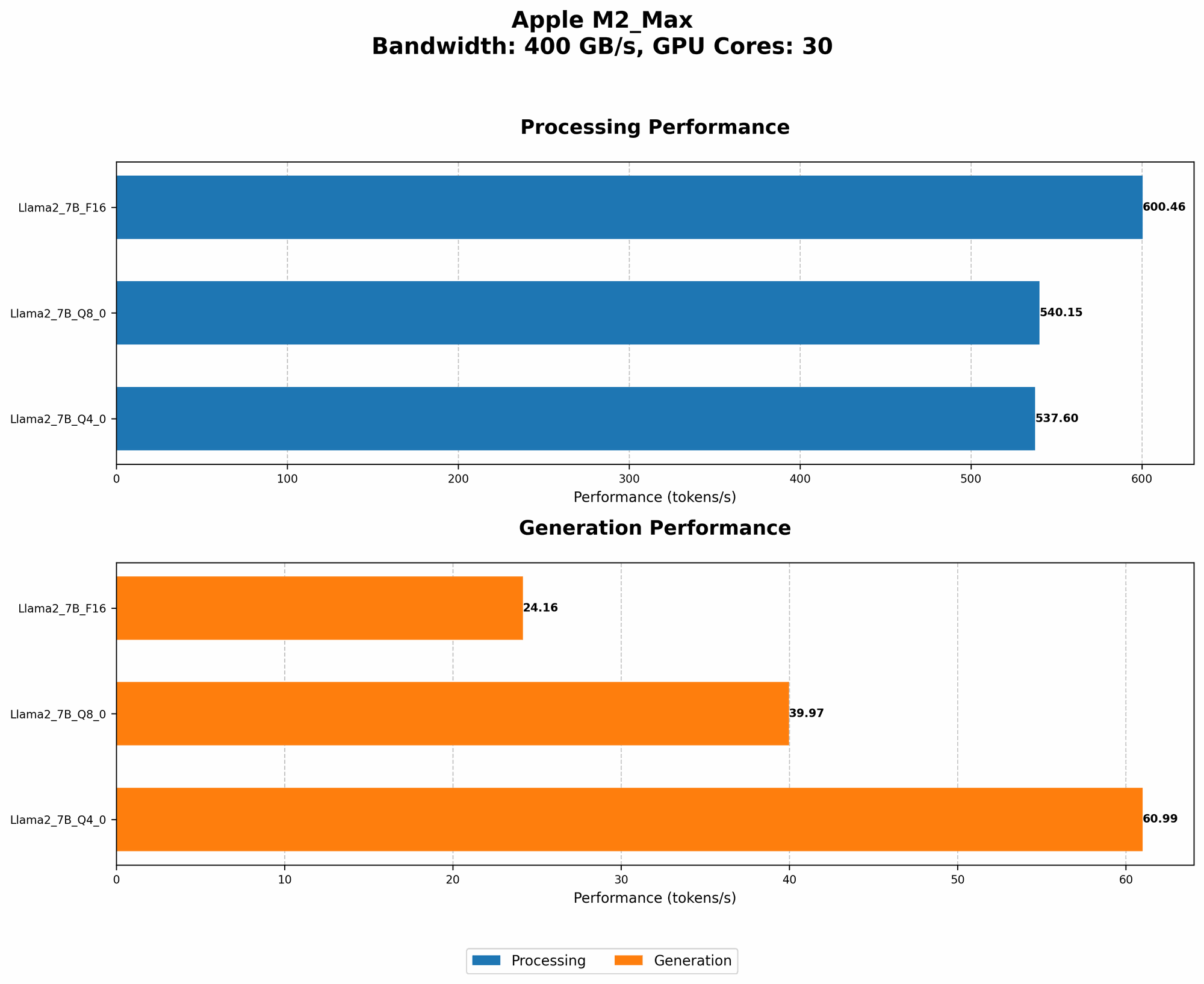
The Apple M2 Max is a beast of a chip, boasting 38 GPU cores and a whopping 96GB of unified memory. It's designed to handle computationally intensive tasks like video editing and 3D rendering, so you might think it's a perfect fit for running LLMs. However, LLMs are notorious for their insatiable appetite for computing power, and the M2 Max is no exception.
Understanding the Numbers
To figure out if your M2 Max will overheat, we'll delve into some hard numbers. We'll examine the performance of different Llama 2 model sizes and quantization levels on the M2 Max. Quantization is a technique used to reduce the size of the model, which can significantly impact its performance. We'll break down the results for you in plain English, so no need to be a coding genius!
Comparison of Apple M2 Max Token Generation Rates
Data source: Performance of llama.cpp on various devices (https://github.com/ggerganov/llama.cpp/discussions/4167) by ggerganov, GPU Benchmarks on LLM Inference (https://github.com/XiongjieDai/GPU-Benchmarks-on-LLM-Inference)by XiongjieDai
The table below shows the token generation rates (measured in tokens per second) for different Llama 2 models and quantization levels on the M2 Max. Keep in mind that higher numbers indicate faster performance.
| Model | Quantization | Processing (tokens/s) | Generation (tokens/s) |
|---|---|---|---|
| Llama 2 7B | F16 | 755.67 | 24.65 |
| Llama 2 7B | Q8_0 | 677.91 | 41.83 |
| Llama 2 7B | Q4_0 | 671.31 | 65.95 |
As you can see, the M2 Max can achieve impressive token generation speeds, hitting over 600 tokens/s for processing and 65 tokens/s for generation. However, the performance varies depending on the quantization level. Let's break it down:
- F16: F16 refers to half precision floating point, which means the model uses less memory but potentially loses accuracy compared to full precision. This configuration provides the fastest processing speeds, but the generation rate is lower.
- Q8_0: This stands for 8-bit quantization with zero point, further reducing the memory footprint. It offers a nice balance between speed and accuracy, with faster generation rates compared to F16.
- Q4_0: 4-bit quantization with zero point is the most aggressive quantization level. It offers the slowest processing speeds, but achieves the fastest generation rates, meaning generating text is faster.
Apple M2 Max Processing Power: A Closer Look
The M2 Max boasts a significant processing power thanks to its 38 GPU cores. This results in impressive throughput and efficiency, especially when dealing with large datasets.
Imagine processing a text document: Think of the M2 Max as a team of 38 super-efficient workers, each diligently processing a section of the text. They work together to handle the immense task of processing the document, making it a breeze for the M2 Max.
Thermal Considerations for Apple M2 Max with LLMs
While the M2 Max is a powerful chip, it's not immune to overheating. The intense processing demands of LLMs can generate a lot of heat, leading to thermal throttling and potentially impacting performance. To combat this, Apple has implemented advanced thermal management systems. These systems monitor the chip's temperature and dynamically adjust the clock speeds to prevent overheating.
Note: It's important to remember that the actual temperature and performance will depend on various factors, including the model size, quantization level, and your environment (like room temperature). For example, running a smaller model in a cooler environment will likely result in lower temperatures and improved performance.
Addressing Common Concerns
Will My M2 Max Overheat?
The good news is that the M2 Max is well-equipped to handle LLMs with its efficient thermal management system. However, running a large model like Llama 2 70B might push the chip's limits, especially in hot environments. You may encounter slight thermal throttling, which can impact performance but shouldn't cause any long-term damage.
How to Prevent Overheating?
Here are some tips to prevent overheating:
- Consider the Environment: Try to run your LLMs in a well-ventilated and cool environment. Avoid using your Mac in a confined space or in direct sunlight.
- Use a Cooling Pad: A cooling pad can help to dissipate heat from your Mac, preventing it from overheating.
- Quantization Levels: Experiment with different quantization levels. Lower quantization levels will result in faster processing speeds but potentially higher temperatures.
- Take Breaks: If you're running large LLMs for extended periods, consider taking breaks to allow your Mac to cool down.
How Long Can I Run LLMs Without Overheating?
The duration you can run LLMs without overheating depends on the model size, quantization level, and environmental conditions. Generally, smaller models and lower quantization levels are less demanding on the hardware and can be run for longer periods without significant overheating. However, if you are running a large model like Llama 2 70B for hours on end, it's advisable to monitor the temperature and take breaks to prevent potential overheating.
How to Monitor Temperature?
You can monitor the temperature of your M2 Max by using the Activity Monitor app. Open Activity Monitor (in the Utilities folder of your Applications folder), and go to the "Window" menu and select "Energy." You can then see the CPU temperature and other relevant performance metrics.
## FAQ
1. Can I run Llama 2 70B on my M2 Max?
Yes, you can run Llama 2 70B on your M2 Max. However, you will need to use quantization and potentially adjust the token generation rate. The performance will likely be affected by thermal throttling, and you may need to take breaks to allow your Mac to cool down.
2. What is the best quantization level for Llama 2 on the M2 Max?
The best quantization level depends on your needs. If you prioritize speed, F16 might be suitable. For a good balance between speed and accuracy, Q80 is an excellent choice. If you're concerned about memory usage, Q40 offers the most aggressive option.
3. Is it safe to run LLMs on the M2 Max for extended periods?
It's generally safe to run LLMs for extended periods on the M2 Max. However, it's essential to monitor the temperature and take breaks to prevent overheating. If you notice excessive thermal throttling, consider using a cooling pad or running the model in a cooler environment.
4. Can I run multiple LLMs simultaneously on the M2 Max?
While it's possible to run multiple LLMs simultaneously, it may result in a significant performance decrease and increased heat output. It's best to run one LLM at a time for optimal performance and thermal management.
5. What alternatives are there to the M2 Max for running LLMs?
For running LLMs, you can consider powerful GPUs like the NVIDIA RTX 40 Series. However, these GPUs are typically more expensive and require specialized cooling solutions. If you're looking for a more budget-friendly option, the Apple M1 Pro or M1 Max can also handle LLMs, albeit with slightly less power.
Keywords
Apple Silicon, M2 Max, Llama 2, Large Language Models, LLMs, Overheating, Thermal Throttling, Quantization, Token Generation Rate, GPU, GPU Cores, Processing Speed, Performance, Temperature Monitoring, Cooling Pad, F16, Q80, Q40, GPU Benchmarks, Llama.cpp