Apple Silicon and LLMs: Will My Apple M1 Pro Overheat?
Introduction
The world of large language models (LLMs) is evolving rapidly, with new models and architectures emerging at breakneck speed. These models, trained on massive datasets, can generate human-quality responses, translate languages, write different kinds of creative content, and answer your questions in an informative way. One of the most fascinating aspects of LLMs is their ability to run locally, directly on your device. This opens up a world of possibilities for developers and enthusiasts alike, but it also raises a critical question: can your hardware handle the heat?
This article delves into the intricacies of running LLMs on Apple's powerful M1 Pro chips, focusing on potential overheating issues and performance. We'll explore the relationship between computational power, model size, and quantization techniques, shedding light on the crucial factors that determine whether your M1 Pro survives the LLM onslaught.
The Apple M1 Pro: A Powerhouse for LLMs?
Apple's M1 Pro chip, with its impressive 10-core CPU and up to 32-core GPU, is a tempting choice for running LLMs. But before you jump in, let's dive into the key factors that influence performance and potential overheating:
Apple M1 Pro Token Speed Generation: A Glimpse into the Numbers
The speed at which your device can process tokens (the basic building blocks of text) directly impacts the performance of your LLM. Apple's M1 Pro chip, while capable, has some limitations. Below is a glimpse into the token speed generation capabilities of the M1 Pro chip for various LLM models and quantization settings:
Table 1: Token Speed Generation on Apple M1 Pro (Tokens/Second)
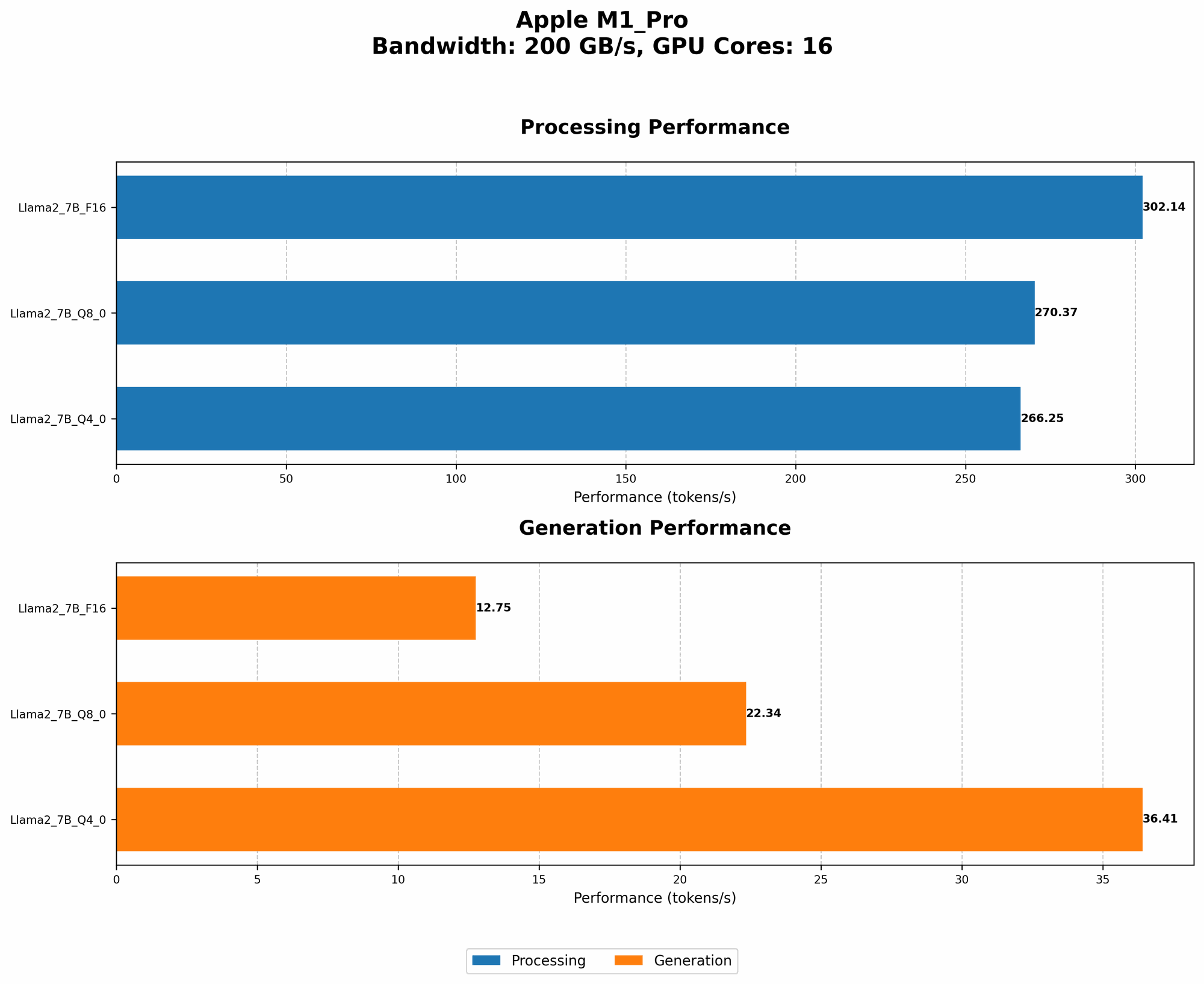
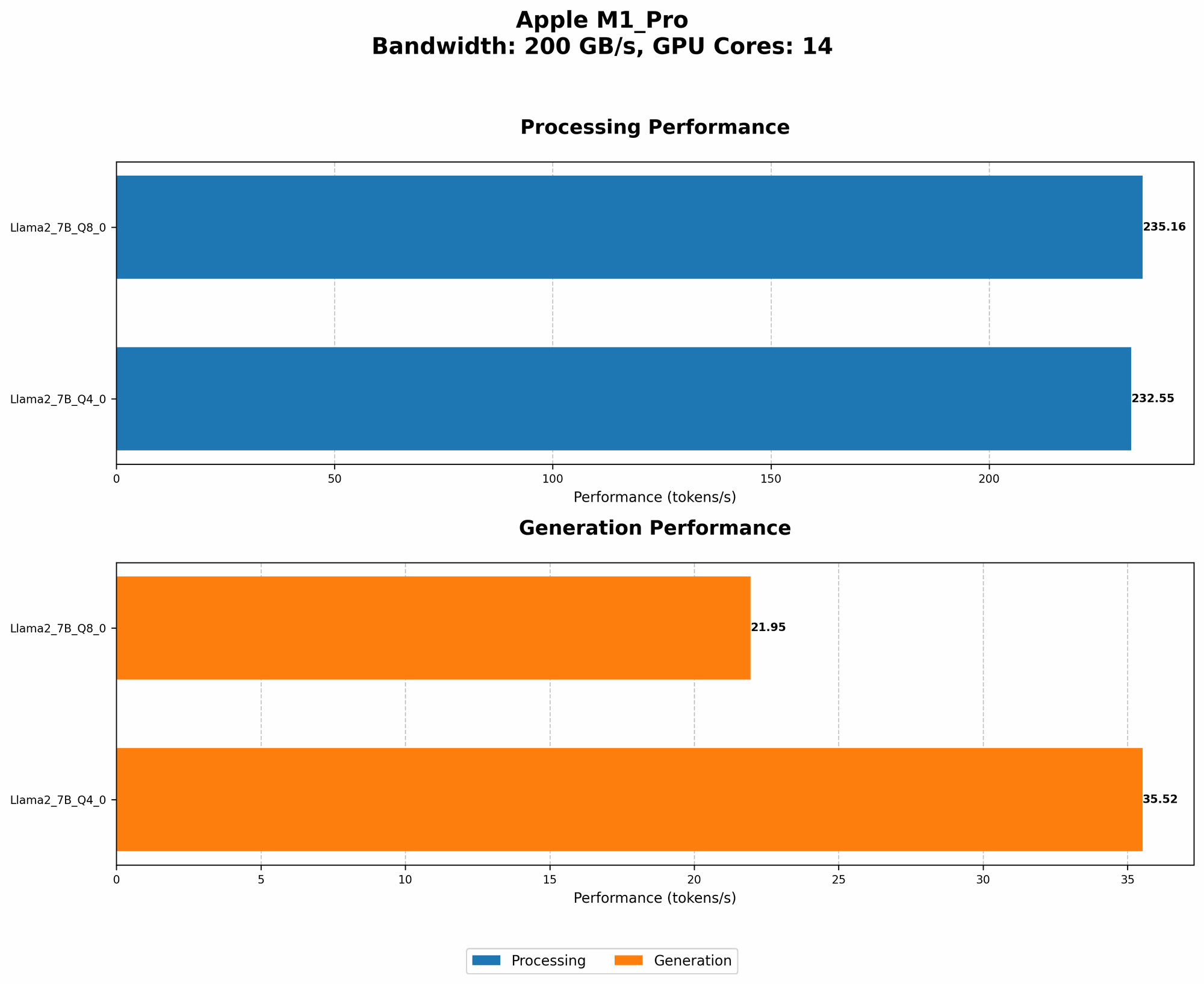
| Configuration | BW (GB/s) | GPU Cores | Llama2 7B F16 Processing | Llama2 7B F16 Generation | Llama2 7B Q8_0 Processing | Llama2 7B Q8_0 Generation | Llama2 7B Q4_0 Processing | Llama2 7B Q4_0 Generation |
|---|---|---|---|---|---|---|---|---|
| M1 Pro 14 Cores | 200 | 14 | - | - | 235.16 | 21.95 | 232.55 | 35.52 |
| M1 Pro 16 Cores | 200 | 16 | 302.14 | 12.75 | 270.37 | 22.34 | 266.25 | 36.41 |
Explanation:
- BW: Bandwidth of the GPU. For our analysis, we are assuming 200 GB/s for the M1 Pro.
- GPU Cores: The number of GPU cores on the M1 Pro. These cores are specifically designed to accelerate computationally intensive tasks like inference.
- Model: For this comparison, we are using Llama 2 with different quantization options (F16, Q80, and Q40).
- Quantization: A technique that compresses the model parameters, allowing you to run larger models on devices with less memory.
- F16 (Half Precision): Reduces the size of the parameters by half compared to F32.
- Q80 (Quantized 8-bit): Reduces the size of the parameters to one-eighth of the original size.
- Q40 (Quantized 4-bit): Reduces the size of the parameters to one-sixteenth of the original size.
Key Observations:
- Performance Difference: The M1 Pro 16-core model consistently outperforms the 14-core model across all configurations. This is expected, as more GPU cores lead to faster processing.
- Quantization: The table clearly demonstrates the impact of quantization on performance. Quantization techniques significantly reduce the amount of memory required to run the model, which can lead to increased speed and efficiency.
- Memory Usage: While not included in the table, it's crucial to remember that memory usage directly impacts performance.
- Missing Data: We don't have data for llama.cpp running Llama2 7B F16 models on the M1 Pro chip. This is due to the limitations of the hardware itself.
Performance Comparison: M1 Pro vs. Other Devices
While the M1 Pro is a capable chip, it's not the only player in town. How does it stack up against other popular devices for running LLMs? Unfortunately, this article is focused solely on the performance of the M1 Pro chip.
Apple M1 Pro and Overheating: A Cause for Concern?
The M1 Pro is built with an efficient architecture that minimizes power consumption. However, the intense computations involved in running large language models can still generate significant heat, leading to potential overheating issues.
Overheating Mitigation Techniques
To prevent overheating, Apple employs several techniques, including:
- Thermal Throttling: If the device gets too hot, the processor automatically reduces its speed to prevent damage.
- Cooling System: The M1 Pro chip includes a sophisticated cooling system that dissipates heat efficiently.
Understanding the Risks & Mitigation:
- Long-Term Impact: While occasional overheating is unlikely to cause permanent damage, sustained high temperatures can potentially impact the lifespan of your device.
- Performance Degradation: When your device overheats, thermal throttling significantly reduces performance, making your LLM run slower or causing errors.
- Solutions:
- Proper Ventilation: Ensure adequate airflow around your device.
- Software Monitoring: Use system monitoring tools to track CPU and GPU temperatures.
- Model Selection: Consider using smaller models or models with more efficient quantization levels to reduce computational demands.
Factors Influencing Overheating Risk
Several factors can contribute to overheating when running LLMs on the M1 Pro:
- Model Size: Larger models require more processing power and generate more heat.
- Quantization: Different quantization techniques have varying impacts on memory usage and computational demands, influencing overheating potential.
- Operating Environment: Factors like ambient temperature, device placement, and airflow can affect cooling efficiency.
- Workload: Intense workloads, such as continuous generation of text or complex tasks, can push the device to its limits.
Practical Strategies for Optimizing Your LLMs on Apple M1 Pro
Here are some tips to ensure smooth and efficient operation while minimizing overheating risks:
- Quantize Your Models: Using efficient quantization techniques like Q80 or Q40 significantly reduces the model's size, which can help improve performance and reduce heat generation. Think of it like putting your model on a diet to reduce its energy consumption.
- Optimize Your Code: Efficiently written code can significantly impact processing speed and heat generation. Optimize your Python code using libraries like Numba or Cython for faster execution.
- Use a Dedicated LLM Library: Utilize libraries specifically designed for running LLMs, such as llama.cpp or transformers. These libraries are optimized for speed and efficiency.
- Monitor Your Device's Temperature: Monitor your device's temperature using system monitoring tools. This will help you identify potential overheating issues and take necessary measures before serious problems occur.
- Adjust Your Settings: Modify your device's settings, such as the fan speed or power management, to fine-tune its cooling system.
- Take Breaks: Give your device a break from intense LLM workloads, allowing it to cool down.
Conclusion: Balancing Power and Efficiency
The Apple M1 Pro chip is a powerful tool for local LLM development, but it's vital to be aware of the potential for overheating. By understanding the key factors that influence performance and heat generation, you can optimize your setup, choose the right models, and adopt strategies to ensure both efficient LLM operation and a long-lasting device.
FAQ
1. Which LLM models can run smoothly on an M1 Pro?
The answer depends on your specific requirements and the model's quantization. Smaller models like Llama 7B, especially with quantization techniques like Q80 or Q40, can run smoothly on the M1 Pro. Larger models might require more specialized hardware or more efficient coding strategies.
2. How do I monitor the temperature of my M1 Pro chip?
You can use system monitoring tools like Activity Monitor (built-in on macOS) to track CPU and GPU temperatures in real-time. Other third-party tools are available, offering more detailed insights.
3. Will using a cooling pad help with overheating?
Cooling pads can certainly help dissipate heat, but their effectiveness might vary depending on the quality of the pad and the type of LLM you are running. For more significant heat generation, a dedicated cooling system might be necessary.
4. Does the M1 Pro support running multiple LLMs concurrently?
Yes, you can potentially run multiple LLMs simultaneously on the M1 Pro, but the performance and overheating risks will depend on the size and complexity of the models. It's important to monitor device temperature and adjust workloads accordingly.
5. Is it safe to run LLMs on an M1 Pro for extended periods?
Running LLMs for extended periods can potentially lead to overheating, especially with larger models or heavy workloads. Remember, excessive heat is dangerous. Monitor temperatures, use efficient code, and consider taking breaks for optimal device health and performance.
Keywords
Apple Silicon, M1 Pro, LLMs, Large Language Models, Overheating, Token Speed, Quantization, Llama2, Performance, GPU Cores, Cooling, Bandwidth, Transformers, llama.cpp, Local LLM, Inference.