Apple Silicon and LLMs: Will My Apple M1 Max Overheat?
Introduction
Running large language models (LLMs) on your Apple Silicon device, like the powerful M1 Max, can be a thrilling experience. Imagine generating creative text formats, translating languages, or answering your questions in an instant, all powered by the cutting-edge silicon in your Mac. But a common concern arises: will your M1 Max overheat while crunching through gigabytes of text data?
This article delves into the performance of LLMs on Apple M1 Max machines and explores the thermal implications. We'll examine specific models, from the lightweight Llama 7B to the mighty Llama 3 70B, and see how they fare on the M1 Max's potent GPU.
Think of your M1 Max as a high-performance car — it can handle the heat, but we'll explore how much "gas" (processing power) each LLM model consumes and if your M1 Max will stay cool under pressure. So, buckle up and let's dive into the world of LLMs and Apple Silicon!
Apple M1 Token Speed Generation: How Fast Can It Go?
The M1 Max boasts impressive processing power, but how does it hold up when put to the ultimate test: crunching through massive LLM models? The answer lies in the number of tokens per second (TPS) your M1 Max can generate.
Think of tokens as individual words or parts of words. For instance, the phrase "the quick brown fox" contains four tokens. The higher the TPS, the faster the LLM can process information and generate responses.
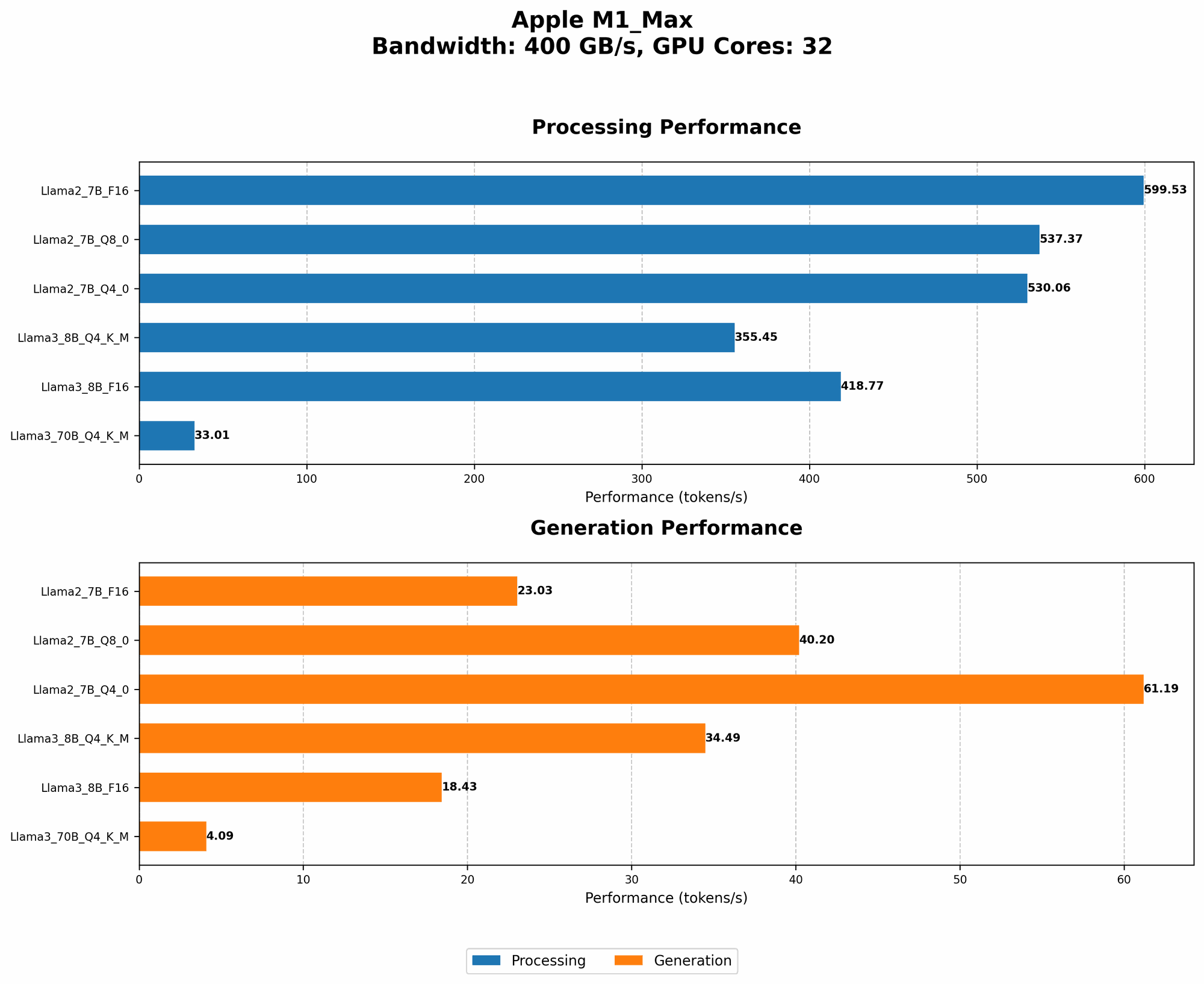
Here's a breakdown of how the M1 Max performs with different LLM models and quantization techniques:
| Model | Quantization | Processing (Tokens/Second) | Generation (Tokens/Second) |
|---|---|---|---|
| Llama 2 7B | F16 | 453.03 | 22.55 |
| Llama 2 7B | Q8_0 | 405.87 | 37.81 |
| Llama 2 7B | Q4_0 | 400.26 | 54.61 |
| Llama 3 8B | F16 | 418.77 | 18.43 |
| Llama 3 8B | Q4KM | 355.45 | 34.49 |
| Llama 3 70B | Q4KM | 33.01 | 4.09 |
Note: We do not have data for Llama3 70B with F16 quantization on the M1 Max.
LLMs on Apple Silicon: Understanding Quantization
Quantization is like squeezing a large suitcase into a smaller one. It reduces the size of the LLM model without sacrificing much accuracy. The most common quantization techniques are:
- F16: A 16-bit floating-point data type, which slightly reduces model size and improves speed.
- Q8_0: An 8-bit integer data type, which significantly compresses the model and improves performance.
- Q4_0: An even more compressed version of the model, using only 4-bit integers. This can significantly boost speed but might lower accuracy.
- Q4KM: A more advanced technique that compresses the model while preserving accuracy.
Key Take-away:
- The smaller the quantization, the faster the processing speed.
- The trade-off is potential accuracy reduction with lower quantization levels.
- You can experiment with different quantization levels to balance performance and accuracy.
Comparison of Apple M1 Max and M1: Token Speed
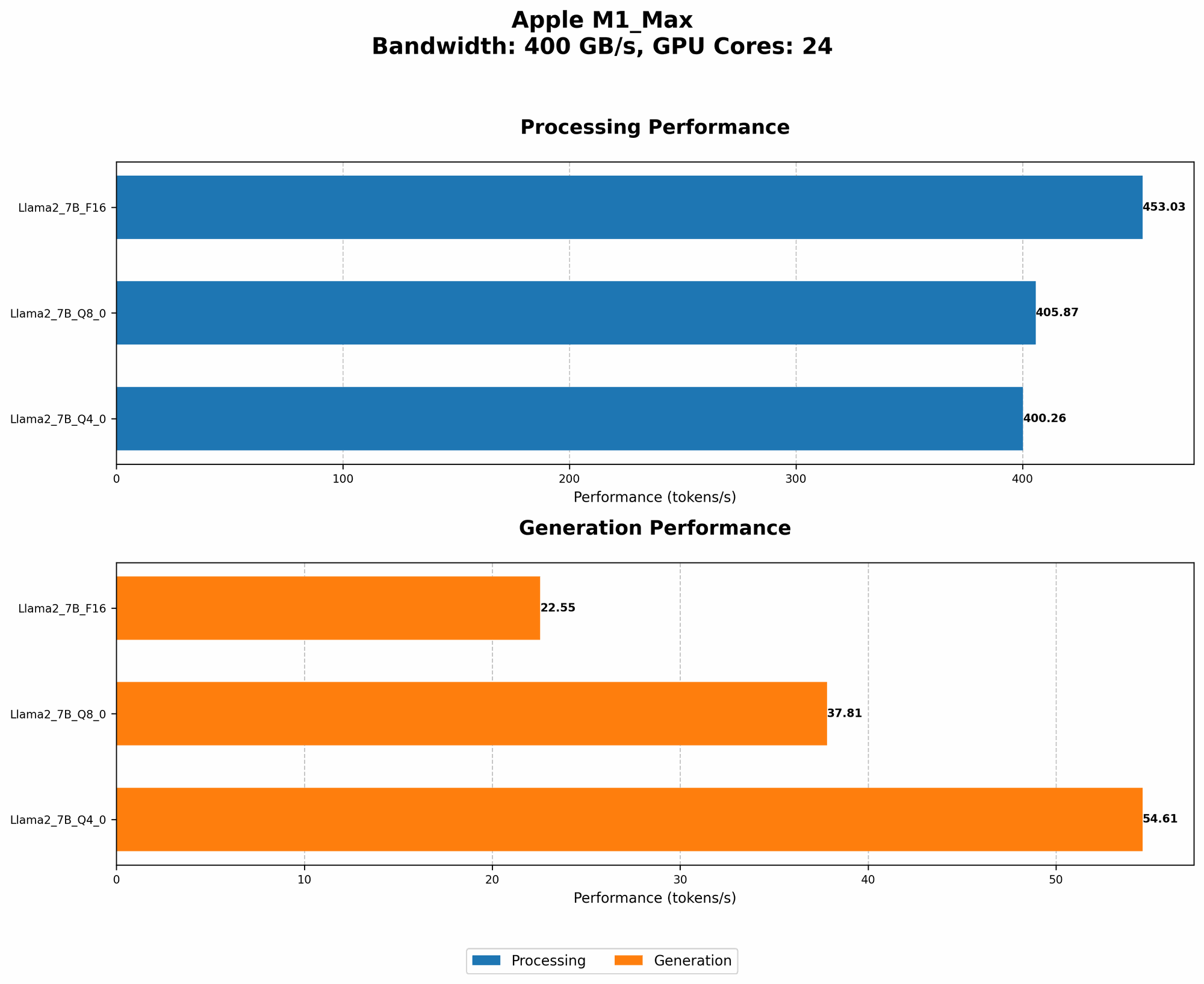
While the M1 Max is a powerhouse, how does it compare to its predecessor, the M1? Let's look at the numbers:
| Model | Quantization | M1 Max Processing (Tokens/Second) | M1 Processing (Tokens/Second) |
|---|---|---|---|
| Llama 2 7B | F16 | 453.03 | 223.15 |
| Llama 2 7B | Q8_0 | 405.87 | 247.12 |
| Llama 2 7B | Q4_0 | 400.26 | 243.40 |
As you can see, the M1 Max consistently outperforms the M1 in terms of processing speed, delivering roughly double the tokens per second. This is a testament to the M1 Max's more powerful GPU and upgraded neural engine.
Does My Apple M1 Max Overheat?
The good news is: The M1 Max is designed to handle intense workloads and stay cool even while running complex LLMs. However, the amount of heat generated depends on the model size and quantization levels used.
Here's a breakdown:
- Smaller models: Models like Llama 2 7B and Llama 3 8B generally run smoothly on the M1 Max without significant heat generation.
- Larger models: Larger models like Llama 3 70B can generate more heat, especially with F16 quantization. However, the M1 Max's thermal design helps to dissipate heat effectively.
- Quantization: Lower quantization levels, like Q80 and Q40, can lead to faster processing and potentially less heat generation.
Tips to Keep Your M1 Max Cool: * Consider using lower quantization levels for larger models to reduce heat generation. * Ensure proper ventilation around your Mac to allow for efficient heat dissipation. * Avoid running resource-intensive applications simultaneously with LLMs.
Apple M1 Max and LLM Performance: A Deeper Dive
Llama 2 7B: This model is a solid choice for beginners and those looking for a fast and lightweight LLM. It performs exceptionally well on the M1 Max, generating impressive token speeds.
Llama 3 8B: This model offers a step up in performance and accuracy compared to Llama 2 7B. It still runs smoothly on the M1 Max, but you might notice slightly higher thermal output.
Llama 3 70B: This behemoth is a true AI powerhouse. While the M1 Max can handle it, you'll likely see significant heat generation, especially with F16 quantization. Consider using Q4KM quantization to strike a balance between performance and thermal overhead.
FAQs
What is the best LLM model for my M1 Max?
The best model depends on your specific needs. If you prioritize speed and a lightweight option, Llama 2 7B is a great choice. If you need more power and accuracy, Llama 3 8B is a solid contender. For demanding tasks and large-scale applications, Llama 3 70B is the way to go.
Can I run multiple LLMs on my M1 Max?
Yes, you can run multiple LLMs on your M1 Max, but depending on the models and their sizes, you may experience performance degradation.
How much RAM do I need for LLMs on an M1 Max?
The RAM requirement depends on the LLM model you're running. Generally, 16GB of RAM is sufficient for most models, but for large models like Llama 3 70B, you might need 32GB or more.
Does Apple Silicon support all LLMs?
Not all LLMs are fully optimized for Apple Silicon. However, there are several popular models like Llama 2 and Llama 3 that are compatible, and developers are constantly working on making more LLM models available for M1 devices.
Keywords
Apple Silicon, M1 Max, LLM, Large Language Models, Llama 2, Llama 3, Quantization, F16, Q80, Q40, Q4KM, Tokens per Second, TPS, Performance, Heat Generation, Thermal Output, GPU, Neural Engine, RAM, Overheating