Apple M2 Ultra 800gb 60cores vs. NVIDIA RTX A6000 48GB for LLMs: Which is Faster in Token Generation Speed? Benchmark Analysis
Introduction
The race to build faster and more powerful devices to power the ever-growing field of Large Language Models (LLMs) is heating up. Today, we're diving into the head-to-head battle between two heavyweights: the Apple M2 Ultra 800GB 60 Core processor and the NVIDIA RTX A6000 48GB graphics card. These are titans in their respective fields, each with unique strengths and weaknesses.
This article aims to dissect their performance in generating tokens, the fundamental units of language in LLMs, using data from real-world benchmarks. By comparing the performance of these devices with various LLMs and quantized models, we'll find out which device reigns supreme in the realm of token generation speed.
Apple M2 Ultra Token Speed Generation
The Apple M2 Ultra is a powerful processor that packs a punch with its 60 cores and 800GB of memory. This beast is known for its impressive performance in many tasks, and its potential for LLMs is certainly worth exploring.
Apple M2 Ultra 60 Core Performance Breakdown
Let's break down the performance of the Apple M2 Ultra with different LLMs and quantization levels. For this analysis, we'll consider the tokens per second metric, which reflects the speed of token generation.
| LLM Model | Quantization Level | Tokens/Second (Processing) | Tokens/Second (Generation) |
|---|---|---|---|
| Llama 2 7B | F16 | 1401.85 | 41.02 |
| Llama 2 7B | Q8_0 | 1248.59 | 66.64 |
| Llama 2 7B | Q4_0 | 1238.48 | 94.27 |
| Llama 3 8B | Q4KM | 1023.89 | 76.28 |
| Llama 3 8B | F16 | 1202.74 | 36.25 |
| Llama 3 70B | Q4KM | 117.76 | 12.13 |
| Llama 3 70B | F16 | 145.82 | 4.71 |
Observations:
- Impressive processing speed: The M2 Ultra shines in processing tokens, particularly for smaller models like Llama 2 7B.
- Faster Q40 generation: The Apple M2 Ultra demonstrates impressive token generation speed for Llama 2 7B in Q40 quantization, outperforming other models.
- Varying performance across quantizations: For the Llama 2 7B model, we see a significant difference in token generation speed based on the quantization levels. F16 offers the fastest processing but slower generation, while Q80 and Q40 have a good balance between both.
Think of it like this: You're trying to solve a giant jigsaw puzzle. The processing speed is like how fast you pick up and examine the pieces, and the generation speed is your ability to place those pieces correctly.
The M2 Ultra is like a speed demon when it comes to picking up puzzle pieces, but with a little more time needed for placement. This could be great for applications where you need a lot of processing power but don't need lightning-fast generation of the final output.
NVIDIA RTX A6000 Token Speed Generation
Now let's turn our attention to the NVIDIA RTX A6000, a powerhouse GPU designed for demanding tasks like machine learning and AI. It boasts 48GB of memory, a large amount for a GPU, allowing it to handle large models efficiently.
NVIDIA RTX A6000 48GB Performance Breakdown
Here's a breakdown of token generation speed for the RTX A6000 with different LLMs and quantizations:
| LLM Model | Quantization Level | Tokens/Second (Processing) | Tokens/Second (Generation) |
|---|---|---|---|
| Llama 3 8B | Q4KM | 3621.81 | 102.22 |
| Llama 3 8B | F16 | 4315.18 | 40.25 |
| Llama 3 70B | Q4KM | 466.82 | 14.58 |
| Llama 3 70B | F16 | null | null |
Observations:
- Superior processing speed: The A6000, with its dedicated GPU capabilities, outperforms the M2 Ultra in processing speed for all the tested models, especially for larger models like Llama 3 8B and 70B.
- Balanced generation speed: The A6000 demonstrates a good balance between processing and token generation speed, especially in Q4KM quantization.
- Missing data for F16 generation: No data is available for the generation speed of Llama 3 70B in F16 quantization on the A6000. This indicates potential limitations or challenges with this specific model-device combination.
Think of the A6000 as a master puzzle solver: This GPU doesn't just pick up pieces quickly; it also places them with precision, showing a consistent performance across different quantization levels.
Comparison of Apple M2 Ultra and NVIDIA RTX A6000
Key Performance Differences
Here's a summarized comparison of the key performance differences between the two devices:
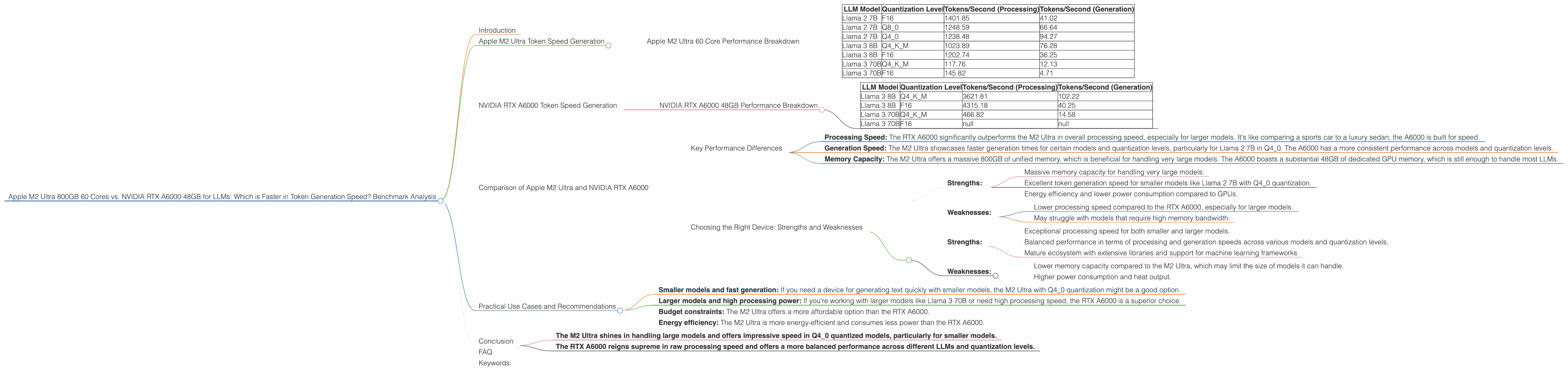
- Processing Speed: The RTX A6000 significantly outperforms the M2 Ultra in overall processing speed, especially for larger models. It's like comparing a sports car to a luxury sedan; the A6000 is built for speed.
- Generation Speed: The M2 Ultra showcases faster generation times for certain models and quantization levels, particularly for Llama 2 7B in Q4_0. The A6000 has a more consistent performance across models and quantization levels.
- Memory Capacity: The M2 Ultra offers a massive 800GB of unified memory, which is beneficial for handling very large models. The A6000 boasts a substantial 48GB of dedicated GPU memory, which is still enough to handle most LLMs.
Choosing the Right Device: Strengths and Weaknesses
Apple M2 Ultra:
- Strengths:
- Massive memory capacity for handling very large models.
- Excellent token generation speed for smaller models like Llama 2 7B with Q4_0 quantization.
- Energy efficiency and lower power consumption compared to GPUs.
- Weaknesses:
- Lower processing speed compared to the RTX A6000, especially for larger models.
- May struggle with models that require high memory bandwidth.
NVIDIA RTX A6000:
- Strengths:
- Exceptional processing speed for both smaller and larger models.
- Balanced performance in terms of processing and generation speeds across various models and quantization levels.
- Mature ecosystem with extensive libraries and support for machine learning frameworks
- Weaknesses:
- Lower memory capacity compared to the M2 Ultra, which may limit the size of models it can handle.
- Higher power consumption and heat output.
Practical Use Cases and Recommendations
Here are some recommendations based on the performance analysis:
- Smaller models and fast generation: If you need a device for generating text quickly with smaller models, the M2 Ultra with Q4_0 quantization might be a good option.
- Larger models and high processing power: If you're working with larger models like Llama 3 70B or need high processing speed, the RTX A6000 is a superior choice.
- Budget constraints: The M2 Ultra offers a more affordable option than the RTX A6000.
- Energy efficiency: The M2 Ultra is more energy-efficient and consumes less power than the RTX A6000.
Conclusion
The choice between the Apple M2 Ultra and the NVIDIA RTX A6000 ultimately depends on your specific use cases and requirements.
- The M2 Ultra shines in handling large models and offers impressive speed in Q4_0 quantized models, particularly for smaller models.
- The RTX A6000 reigns supreme in raw processing speed and offers a more balanced performance across different LLMs and quantization levels.
Both devices are powerful contenders in the LLM world, and the optimal choice depends on your needs, budget, and energy considerations.
FAQ
Q: What is quantization in LLM models?
A: Quantization is a technique used to reduce the size of LLM models without sacrificing too much accuracy. Think of it like compressing a large image file to make it smaller. In LLMs, quantization helps optimize for memory usage and speeds up processing.
Q: What are the benefits of using a dedicated GPU for LLMs?
A: GPUs are designed to excel in parallel processing, which is crucial for the intensive computations involved in running LLMs. They offer faster speeds and enhanced efficiency compared to CPUs.
Q: Which device is best for beginners?
A: If you're a beginner exploring LLMs, the M2 Ultra could be a good choice due to its availability in Macs and affordability compared to dedicated GPUs.
Q: What about other devices like the NVIDIA RTX 4090?
A: This article focused on the M2 Ultra and A6000, and comparing them with other devices is outside the scope of this discussion. However, other high-end GPUs like the RTX 4090 offer impressive performance as well.
Q: How does the A6000 stack up against the M2 Ultra in terms of price?
A: The A6000 is significantly more expensive than the M2 Ultra.
Q: Can I run LLMs on my personal computer?
A: Yes, you can run some LLMs on your personal computer, especially the smaller models. However, you'll need a powerful CPU or GPU to handle the processing load.
Keywords:
Apple M2 Ultra, NVIDIA RTX A6000, LLM, Large Language Model, Token Generation Speed, GPU, CPU, Token/Second, Processing, Generation, Quantization, Q40, Q80, F16, Llama 2, Llama 3, Benchmark, Performance, Comparison, Use Cases, Recommendation, Memory Capacity.