Apple M1 Ultra 800gb 48cores vs. NVIDIA 4090 24GB for LLMs: Which is Faster in Token Generation Speed? Benchmark Analysis
Introduction
The world of large language models (LLMs) is rapidly evolving, with new models being released regularly and pushing the boundaries of what's possible. These models are capable of generating human-quality text, translating languages, writing different kinds of creative content, and answering your questions in an informative way. But running these powerful LLMs requires significant computational resources, leading to a constant quest for faster and more efficient hardware.
In this article, we'll delve into the performance of two popular contenders for running LLMs locally - the Apple M1 Ultra 800GB 48-core chip and the NVIDIA 4090 24GB graphics card. We'll be focusing on their speed in generating tokens, which is a crucial metric for how fast an LLM can produce text.
Understanding Token Generation Speed
Imagine you're building a house. Each brick in the house represents a token, the smallest unit of text in an LLM. The faster you can lay those bricks, the more quickly you can build the house, or in our case, generate text. Token generation speed measures how many of these "bricks" a computer can process per second.
Comparing Apple M1 Ultra and NVIDIA 4090 for Token Generation
Let's dive into the numbers and see how these two contenders stack up. In our benchmark analysis, we'll be looking at the token generation speed of Llama 2 7B models and Llama 3 8B models. These are popular choices for local deployment, and we'll compare them across different quantization levels and memory formats.
Apple M1 Ultra Token Speed Generation
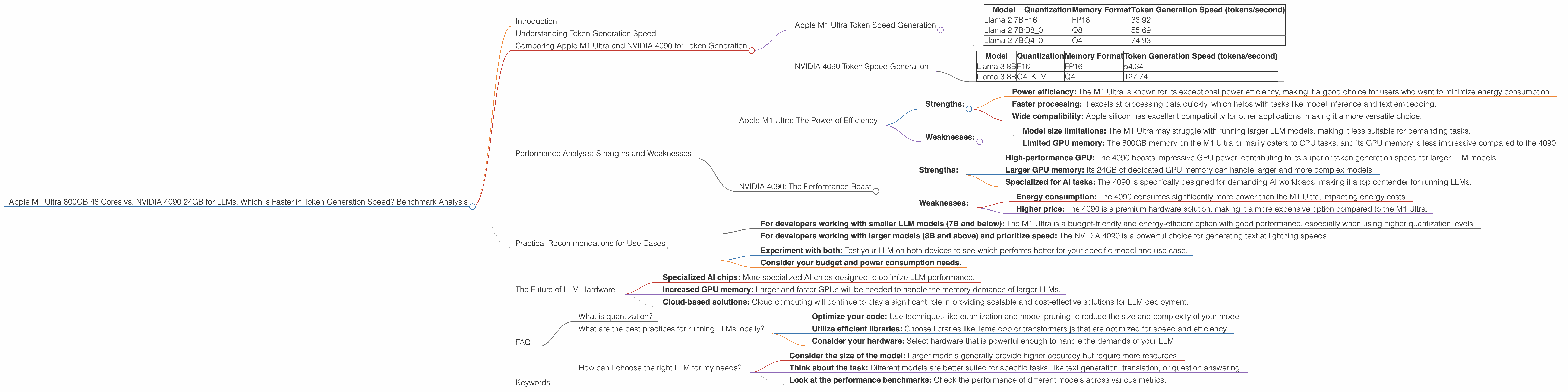
The Apple M1 Ultra is a powerful chip designed for both CPU and GPU tasks, making it well-suited for running LLMs. Let's see how it performs with Llama 2 7B models:
| Model | Quantization | Memory Format | Token Generation Speed (tokens/second) |
|---|---|---|---|
| Llama 2 7B | F16 | FP16 | 33.92 |
| Llama 2 7B | Q8_0 | Q8 | 55.69 |
| Llama 2 7B | Q4_0 | Q4 | 74.93 |
Key Observations:
- Higher quantization: The Apple M1 Ultra shines with higher quantization levels (Q80 and Q40), resulting in significantly faster token generation speed.
- Processing vs. Generation: The M1 Ultra processes data much faster than it generates tokens, which could indicate bottlenecks in the generation process.
NVIDIA 4090 Token Speed Generation
The NVIDIA 4090 is a high-end graphics card designed for computationally intensive tasks like game rendering. However, it's also a popular choice for running LLMs. Here's how it performs with Llama 3 8B models:
| Model | Quantization | Memory Format | Token Generation Speed (tokens/second) |
|---|---|---|---|
| Llama 3 8B | F16 | FP16 | 54.34 |
| Llama 3 8B | Q4KM | Q4 | 127.74 |
Key Observations:
- Llama 3 8B: The 4090 is significantly faster in generating tokens for Llama 3 8B than the M1 Ultra, especially with Q4KM quantization.
- Missing data: We have no token generation speed data for Llama 3 70B with the NVIDIA 4090, likely indicating the limitations of the 4090 for larger models.
Performance Analysis: Strengths and Weaknesses
Apple M1 Ultra: The Power of Efficiency
- Strengths:
- Power efficiency: The M1 Ultra is known for its exceptional power efficiency, making it a good choice for users who want to minimize energy consumption.
- Faster processing: It excels at processing data quickly, which helps with tasks like model inference and text embedding.
- Wide compatibility: Apple silicon has excellent compatibility for other applications, making it a more versatile choice.
- Weaknesses:
- Model size limitations: The M1 Ultra may struggle with running larger LLM models, making it less suitable for demanding tasks.
- Limited GPU memory: The 800GB memory on the M1 Ultra primarily caters to CPU tasks, and its GPU memory is less impressive compared to the 4090.
NVIDIA 4090: The Performance Beast
- Strengths:
- High-performance GPU: The 4090 boasts impressive GPU power, contributing to its superior token generation speed for larger LLM models.
- Larger GPU memory: Its 24GB of dedicated GPU memory can handle larger and more complex models.
- Specialized for AI tasks: The 4090 is specifically designed for demanding AI workloads, making it a top contender for running LLMs.
- Weaknesses:
- Energy consumption: The 4090 consumes significantly more power than the M1 Ultra, impacting energy costs.
- Higher price: The 4090 is a premium hardware solution, making it a more expensive option compared to the M1 Ultra.
Practical Recommendations for Use Cases
For developers choosing between the Apple M1 Ultra and NVIDIA 4090, the best decision depends on the specific use case:
- For developers working with smaller LLM models (7B and below): The M1 Ultra is a budget-friendly and energy-efficient option with good performance, especially when using higher quantization levels.
- For developers working with larger models (8B and above) and prioritize speed: The NVIDIA 4090 is a powerful choice for generating text at lightning speeds.
If you're unsure which device is best for your project:
- Experiment with both: Test your LLM on both devices to see which performs better for your specific model and use case.
- Consider your budget and power consumption needs.
The Future of LLM Hardware
The race for faster and more efficient hardware for LLMs is relentless. As models continue to grow in size and complexity, the demand for even more powerful and specialized hardware will increase. We can expect to see:
- Specialized AI chips: More specialized AI chips designed to optimize LLM performance.
- Increased GPU memory: Larger and faster GPUs will be needed to handle the memory demands of larger LLMs.
- Cloud-based solutions: Cloud computing will continue to play a significant role in providing scalable and cost-effective solutions for LLM deployment.
FAQ
What is quantization?
Quantization is a technique used to reduce the size of LLM models by representing numbers with fewer bits. This can significantly improve processing speed and reduce memory usage, but it can also affect the accuracy of the model.
What are the best practices for running LLMs locally?
- Optimize your code: Use techniques like quantization and model pruning to reduce the size and complexity of your model.
- Utilize efficient libraries: Choose libraries like llama.cpp or transformers.js that are optimized for speed and efficiency.
- Consider your hardware: Select hardware that is powerful enough to handle the demands of your LLM.
How can I choose the right LLM for my needs?
- Consider the size of the model: Larger models generally provide higher accuracy but require more resources.
- Think about the task: Different models are better suited for specific tasks, like text generation, translation, or question answering.
- Look at the performance benchmarks: Check the performance of different models across various metrics.
Keywords
Apple M1 Ultra, NVIDIA 4090, LLM, large language model, token generation speed, benchmark, Llama 2 7B, Llama 3 8B, quantization, processing speed, memory format, FP16, Q8, Q4, GPU, CPU, performance analysis, strengths, weaknesses, practical recommendations, use cases, AI chips, cloud computing, future of LLM hardware.