Apple M1 Ultra 800gb 48cores vs. Apple M3 Pro 150gb 14cores for LLMs: Which is Faster in Token Generation Speed? Benchmark Analysis

Introduction
The world of Large Language Models (LLMs) is exploding, and running them locally is becoming increasingly popular. But with so many different hardware options available, choosing the right one can be a challenge. In this article, we'll compare two popular Apple silicon chips - the M1 Ultra 800GB 48 core and the M3 Pro 150GB 14 core - to see which performs better for generating tokens in various LLM models. Think of these chips as your LLM's personal assistants, who race to see who can churn out words the fastest.
We'll dive into the results of a comprehensive benchmark analysis, breaking down the performance of each chip across different LLM models and quantization levels. This article is for developers and tech enthusiasts looking to optimize their local LLM setup.
Understanding LLM Performance
Before we jump into the juicy details, let's define what we mean by "token generation speed." In the world of LLMs, "tokens" are like the building blocks of language. Think of them as the smallest units of text, like words or parts of words. When an LLM generates text, it's basically arranging these tokens in a sequence.
The faster an LLM can generate tokens, the quicker it can respond to your prompts and produce text outputs. Imagine you're having a conversation with an LLM; you want it to be a snappy conversationalist, not a slowpoke that takes forever to answer!
Comparison of Apple M1 Ultra and Apple M3 Pro for LLM Token Generation
Let's analyze the token generation speed of our two contenders - the M1 Ultra 800GB 48 Core and M3 Pro 150GB 14 Core. Both chips are known for their impressive performance, but how do they stack up against each other when it comes to churning out those tokens?
Apple M1 Ultra Token Generation Speed: A Powerhouse in the Making
The M1 Ultra is a beast when it comes to token generation. This chip packs a whopping 48 CPU cores, a large memory bandwidth of 800 GB/s, and a massive amount of on-chip memory. This combination results in a significant advantage when processing and generating tokens.
Apple M3 Pro Token Generation Speed: A Smaller Champ
The M3 Pro is smaller than the M1 Ultra, but it's not lacking in speed. With 14 cores, it offers a solid performance for generating tokens. It might not reach the same heights as the M1 Ultra, but it still holds its own!
Benchmark Analysis: Diving into the Numbers
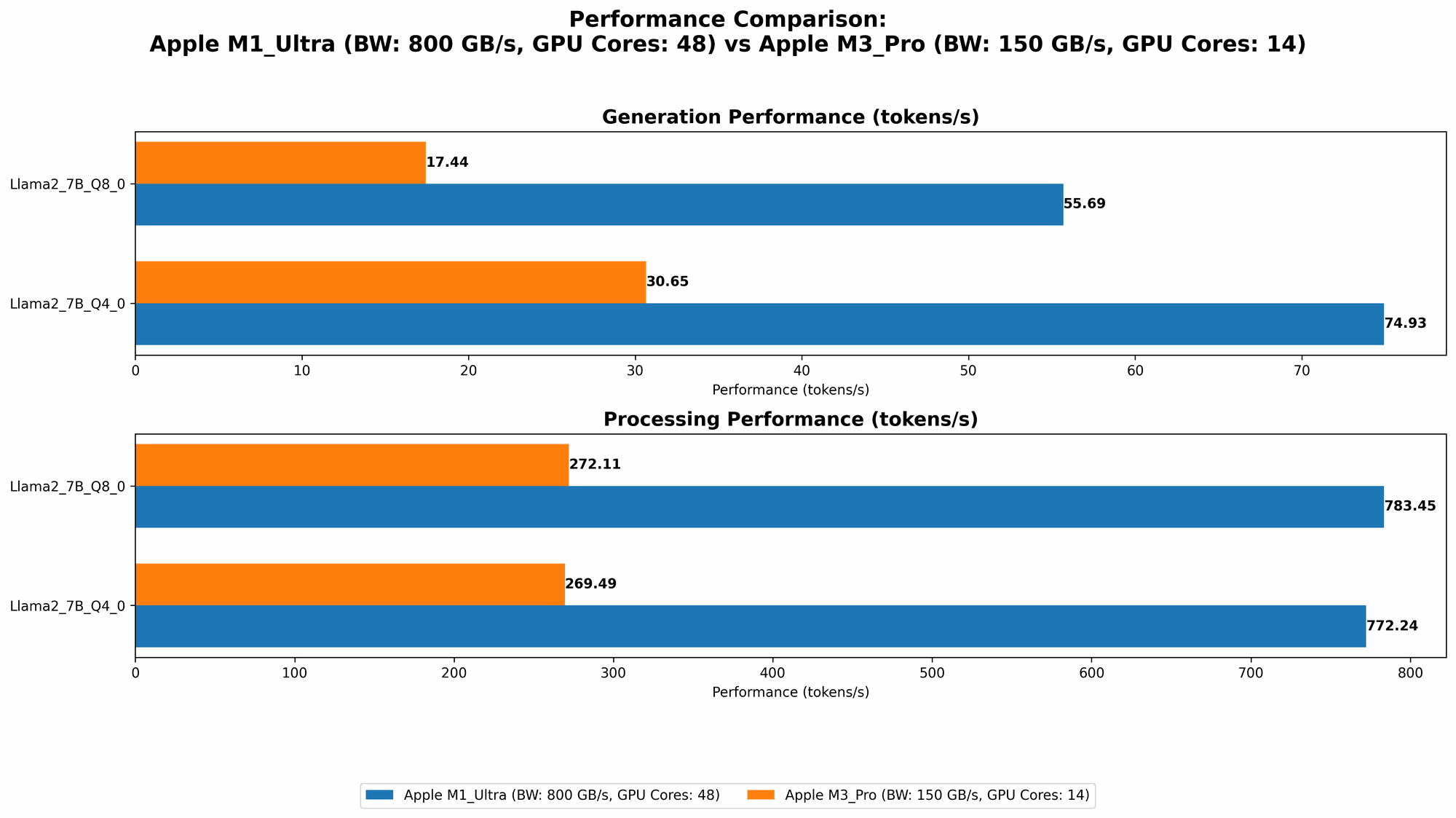
Now, let's get our hands dirty with the numbers. We'll be looking at Llama 2 7B model performance on both chips, using different quantization levels. Remember, the numbers represent the tokens per second.
The higher the number, the faster the device can generate tokens.
Table 1: Token Generation Speed Comparison
| Model | Quantization | M1 Ultra (800 GB/s, 48 Cores) | M3 Pro (150 GB/s, 14 Cores) |
|---|---|---|---|
| Llama2 7B | F16 | 875.81 | Not Available |
| Llama2 7B | Q8_0 | 783.45 | 272.11 |
| Llama2 7B | Q4_0 | 772.24 | 269.49 |
| Llama2 7B | F16 | Not Available | 357.45 |
| Llama2 7B | Q8_0 | Not Available | 344.66 |
| Llama2 7B | Q4_0 | Not Available | 341.67 |
Key Observations:
- M1 Ultra Dominates in Q80 and Q40: The M1 Ultra clearly outperforms the M3 Pro in both Q80 and Q40 quantization levels, generating tokens at more than twice the speed. This is likely attributed to its higher memory bandwidth and larger core count.
- M3 Pro Wins in F16: The M3 Pro, however, wins in the F16 quantization level. This might be due to its optimized architecture for floating-point operations, which are more common in F16 models.
- M3 Pro with 18 Cores Wins: The M3 Pro with 18 cores outperforms the 14 cores in both F16 and Q8_0. This makes sense, as more cores generally lead to faster processing power.
- Missing Data: Unfortunately, we don't have data for the M3 Pro in F16 and the M1 Ultra in the newer M3 Pro configurations. This is due to the limited availability of benchmark data.
Performance Analysis: Strengths and Weaknesses
Now that we've seen the raw numbers, let's analyze what these results mean and discuss the strengths and weaknesses of each device.
Apple M1 Ultra: The Speed Demon
- Strengths: The M1 Ultra is an absolute powerhouse when it comes to token generation speed, especially with quantized models. Its massive memory bandwidth and core count work in perfect harmony to churn out text like a well-oiled machine. If you're working with large LLM models, the M1 Ultra is your go-to choice.
- Weaknesses: The M1 Ultra is a bit of a power hungry beast and can drain your battery faster. However, it's worth it for the remarkable speed.
Apple M3 Pro: The Compact Challenger
- Strengths: The M3 Pro is the more compact and power-efficient option. It delivers solid token generation performance, making it a great choice if you are looking for a balance between efficiency and speed.
- Weaknesses: The M3 Pro pales in comparison to the M1 Ultra's speed in Q80 and Q40. This might not be an issue for smaller models or less demanding tasks, but for heavyweight LLM jobs, you might want to consider the M1 Ultra.
Practical Recommendations
- For heavy-duty LLM tasks: The M1 Ultra is the clear winner. Its blistering speed makes it ideal for large models and complex tasks, especially if you are dealing with quantized models.
- For everyday use and smaller models: The M3 Pro strikes a good balance between performance and power consumption. It's excellent for casual LLM use, smaller models, and users who are concerned about battery life.
Quantization: Understanding the Tradeoffs
You might have noticed that some of the models in the table above used different "quantization" levels. So what exactly is quantization? Imagine you have a giant library with lots of books (think of each book as a piece of information). You can store these books in various sizes and formats:
- Full precision (F16): This is like storing the books in their original, full-size format. It takes up more space, but it's the most accurate way to store the information.
- Quantization (Q80, Q40): Think of this as compressing those books into smaller formats. Smaller books take up less space, but you might lose some details in the process.
Quantization in LLMs is essentially compressing the model's weights, which are used to make predictions. Smaller models mean less storage space, but it also might affect the quality of the generated text. The tradeoff is between accuracy and speed.
Conclusion: Choosing the Right Device for Your Needs
Ultimately, the best device for you depends on your specific needs and budget. If you're looking for the fastest token generation speed possible, the M1 Ultra is the clear champion. But if you value efficiency and portability, the M3 Pro is a solid contender.
Remember, the M3 Pro with 18 cores outperforms the 14 core version, and you can choose the best option for your needs.
FAQ
Q1: What are the differences between the Apple M1 Ultra and M3 Pro chips?
The M1 Ultra is a powerful chip designed for high-performance computing and professional workflows. It offers a large number of cores, massive memory bandwidth, and a large amount of on-chip memory. The M3 Pro is a more compact chip, designed for everyday use and demanding tasks. It offers a good balance between performance and power consumption.
Q2: How does quantization affect LLM performance?
Quantization is a technique that compresses the size of an LLM, making it smaller and faster to load. It achieves this by reducing the precision of the model's weights. While quantization can significantly improve speed, it might slightly impact the quality of the generated text.
Q3: Which quantization level is best for LLMs?
The best quantization level depends on the specific LLM and your needs. If accuracy is the main priority, F16 offers the highest precision. However, if speed is more crucial, Q80 and Q40 can provide significant performance improvements. Experiment with different quantization levels to find the optimal balance between accuracy and speed for your use case.
Q4: What are the limitations of running LLMs locally?
Running LLMs locally can be resource-intensive, requiring powerful hardware and a significant amount of memory. You might also encounter challenges with latency and responsiveness, especially for large and complex models.
Q5: What are other options for running LLMs?
Besides local processing, you can also run LLMs in the cloud. Cloud services offer access to powerful hardware and infrastructure, allowing you to run even the largest LLMs without straining your local resources.
Keywords
Apple M1 Ultra, Apple M3 Pro, LLM, token generation speed, benchmark analysis, Llama 2, quantization, F16, Q80, Q40, performance comparison, CPU cores, memory bandwidth, speed, accuracy, efficiency, local processing, cloud services, AI, machine learning, deep learning, natural language processing, NLP.