Apple M1 Ultra 800gb 48cores vs. Apple M2 Pro 200gb 16cores for LLMs: Which is Faster in Token Generation Speed? Benchmark Analysis
Introduction
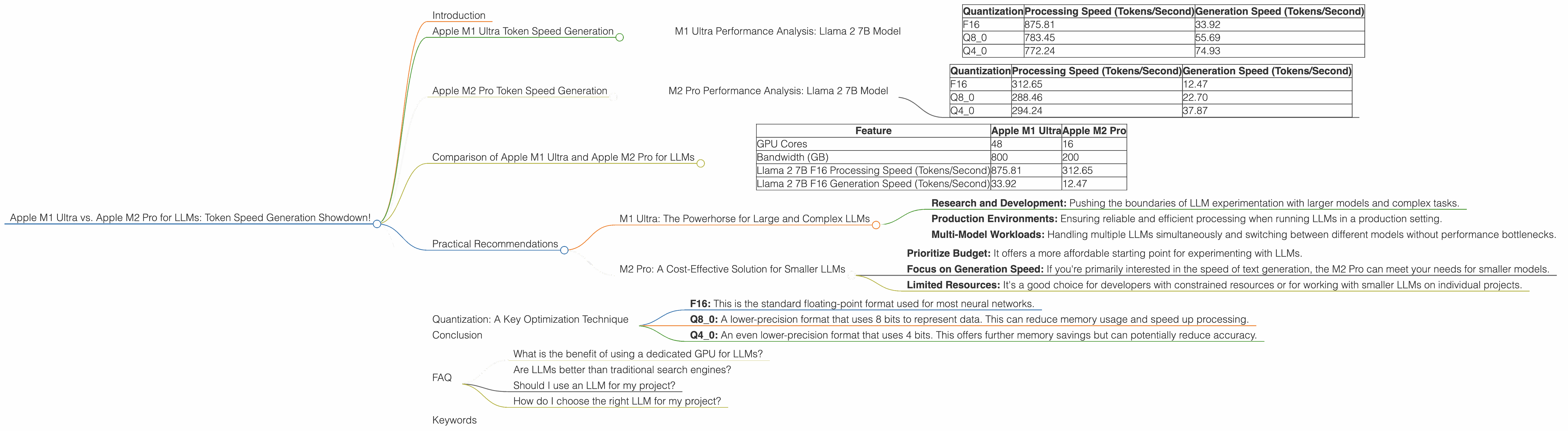
The world of Large Language Models (LLMs) is booming, with developers exploring their incredible capabilities in everything from writing code to composing poetry. But running these models locally requires serious horsepower, and Apple's M-series processors are leading the charge.
This article dives into the performance of two popular M-series chips, the M1 Ultra and the M2 Pro, when it comes to running LLMs. We'll compare their token generation speeds, analyze the performance differences, and help you decide which chip is the best fit for your LLM projects. Whether you're a developer or a curious tech enthusiast, buckle up for a deep dive into the heart of local LLM processing!
Apple M1 Ultra Token Speed Generation
The Apple M1 Ultra packs a whopping 48 GPU cores and 800 GB of bandwidth, making it a beast of a chip. Let's see how this translates to real-world performance with the Llama 2 7B model.
M1 Ultra Performance Analysis: Llama 2 7B Model
| Quantization | Processing Speed (Tokens/Second) | Generation Speed (Tokens/Second) |
|---|---|---|
| F16 | 875.81 | 33.92 |
| Q8_0 | 783.45 | 55.69 |
| Q4_0 | 772.24 | 74.93 |
Observations:
- The M1 Ultra shines in processing speed, achieving an impressive 875.81 tokens/second with F16 quantization.
- Interestingly, while Q80 and Q40 quantization levels improve generation speed, they slightly reduce processing speed. This highlights the trade-off between compression and performance.
- Think of it like this: Q4_0 is like a supercharged car that can travel quickly but gets fewer miles per gallon.
Apple M2 Pro Token Speed Generation
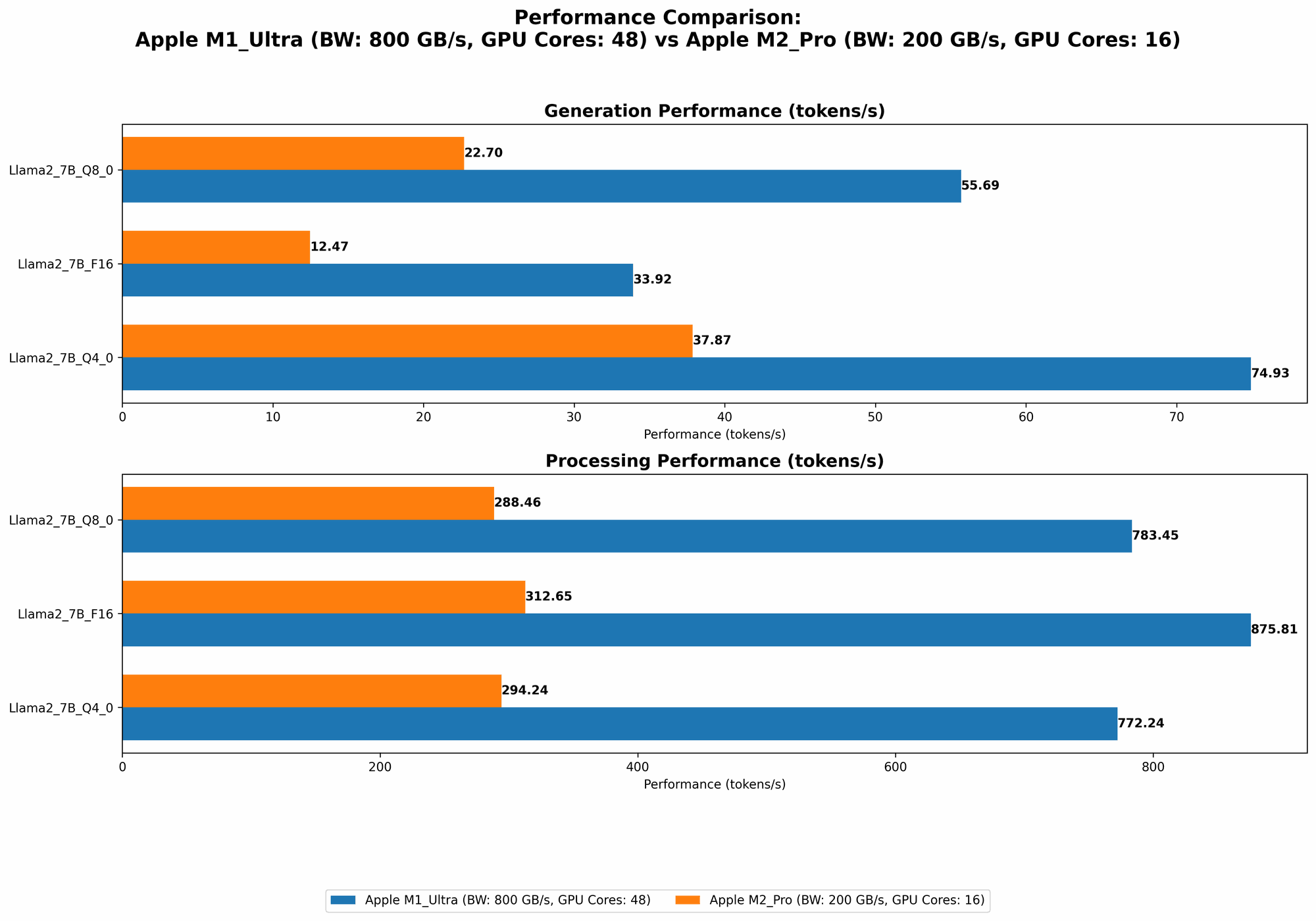
The Apple M2 Pro, while not as powerful as the M1 Ultra, is still a formidable processor. Here's its performance with the Llama 2 7B model.
M2 Pro Performance Analysis: Llama 2 7B Model
| Quantization | Processing Speed (Tokens/Second) | Generation Speed (Tokens/Second) |
|---|---|---|
| F16 | 312.65 | 12.47 |
| Q8_0 | 288.46 | 22.70 |
| Q4_0 | 294.24 | 37.87 |
Observations:
- The M2 Pro falls behind the M1 Ultra in both processing and generation speed, but it's still a capable chip for running smaller LLMs.
- The M2 Pro exhibits similar trends in quantization as the M1 Ultra: Q80 and Q40 boost generation speed but slightly lower processing speed. However, the gains are less significant compared to the M1 Ultra.
Comparison of Apple M1 Ultra and Apple M2 Pro for LLMs
Now let's put the two chips head-to-head:
| Feature | Apple M1 Ultra | Apple M2 Pro |
|---|---|---|
| GPU Cores | 48 | 16 |
| Bandwidth (GB) | 800 | 200 |
| Llama 2 7B F16 Processing Speed (Tokens/Second) | 875.81 | 312.65 |
| Llama 2 7B F16 Generation Speed (Tokens/Second) | 33.92 | 12.47 |
Key Takeaways:
- M1 Ultra Dominates: The M1 Ultra clearly outperforms the M2 Pro in both processing and generation speeds. This is largely thanks to its superior GPU core count and massive bandwidth.
- Smaller Models: The M2 Pro might be a more economical choice if you are working with smaller LLMs or primarily focused on the generation speed.
- The Bandwidth Advantage: The M1 Ultra's higher bandwidth allows it to handle the massive data flow of LLMs more efficiently.
Practical Recommendations
M1 Ultra: The Powerhorse for Large and Complex LLMs
If you're serious about running large and complex LLMs locally, the M1 Ultra is the undisputed champion. Its superior performance makes it ideal for:
- Research and Development: Pushing the boundaries of LLM experimentation with larger models and complex tasks.
- Production Environments: Ensuring reliable and efficient processing when running LLMs in a production setting.
- Multi-Model Workloads: Handling multiple LLMs simultaneously and switching between different models without performance bottlenecks.
M2 Pro: A Cost-Effective Solution for Smaller LLMs
The M2 Pro, despite its less impressive performance, is a solid option for those who:
- Prioritize Budget: It offers a more affordable starting point for experimenting with LLMs.
- Focus on Generation Speed: If you're primarily interested in the speed of text generation, the M2 Pro can meet your needs for smaller models.
- Limited Resources: It's a good choice for developers with constrained resources or for working with smaller LLMs on individual projects.
Quantization: A Key Optimization Technique
Quantization is a technique used in LLM optimization that reduces the memory footprint and computational requirements of the model. It basically "compresses" the model by converting its data into a smaller range of values.
- F16: This is the standard floating-point format used for most neural networks.
- Q8_0: A lower-precision format that uses 8 bits to represent data. This can reduce memory usage and speed up processing.
- Q4_0: An even lower-precision format that uses 4 bits. This offers further memory savings but can potentially reduce accuracy.
The choice of quantization depends on the trade-off between accuracy, speed, and memory usage. You can experiment with different quantization levels to find the optimal balance for your application.
Conclusion
The choice between the Apple M1 Ultra and the Apple M2 Pro for running LLMs ultimately boils down to your specific needs and budget. If you're working with large and complex models or need the absolute highest performance, the M1 Ultra is the clear winner. However, the M2 Pro offers a more affordable option for smaller LLMs and developers who prioritize generation speed.
No matter your choice, remember that optimizing the LLM through techniques like quantization is essential for squeezing out the most performance from your chosen chip. Happy LLMing!
FAQ
What is the benefit of using a dedicated GPU for LLMs?
GPUs excel at parallel processing, which is ideal for the matrix operations involved in running LLMs. This allows them to deliver faster computation speeds than CPUs, significantly improving the performance of LLM models.
Are LLMs better than traditional search engines?
LLMs offer different strengths from traditional search engines. While search engines excel at finding specific information based on keywords, LLMs can understand the context and provide more nuanced and comprehensive responses. They can even generate creative text formats, like poems and stories, which search engines can't.
Should I use an LLM for my project?
The decision to use an LLM depends on your project's needs. If you require text generation, translation, or other tasks that benefit from language understanding, LLMs can be powerful tools. However, if you're primarily focused on information retrieval or have strict accuracy requirements, traditional search engines might still be a better option.
How do I choose the right LLM for my project?
Choosing the right LLM involves considering its size, training data, and capabilities. Smaller models are generally faster and less resource-intensive but may have limited capabilities. Larger models offer greater accuracy and complexity but require more processing power and memory.
Keywords
Apple M1 Ultra, Apple M2 Pro, LLM, Large Language Model, token speed, generation speed, processing speed, Llama 2 7B, quantization, F16, Q80, Q40, performance comparison, GPU, bandwidth, developer, geek, tech enthusiast