Apple M1 Pro 200gb 14cores vs. NVIDIA A100 SXM 80GB for LLMs: Which is Faster in Token Generation Speed? Benchmark Analysis
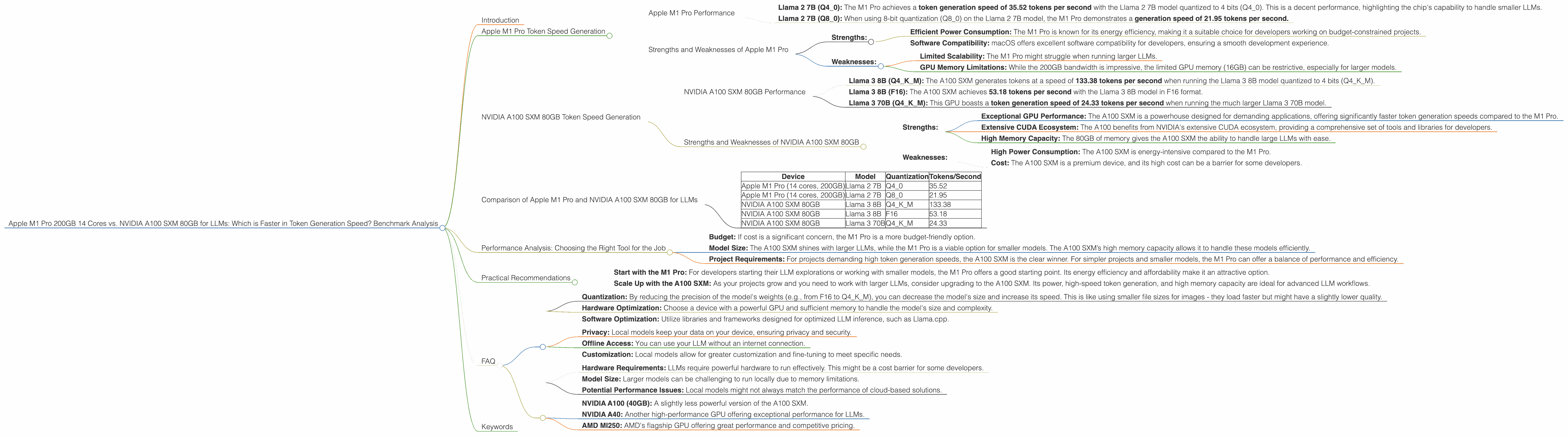
Introduction
The world of large language models (LLMs) is evolving rapidly, with new models and applications emerging constantly. These models are incredibly powerful, but require significant processing power to run effectively. When choosing hardware for LLM development, developers face a crucial decision: which device offers the best performance for token generation speed? This article compares two popular choices, the Apple M1 Pro 200GB 14 Cores and the NVIDIA A100 SXM 80GB, focusing on their token generation performance with various LLM models.
Apple M1 Pro Token Speed Generation
The Apple M1 Pro, with its impressive 14 cores and 200GB bandwidth, presents a formidable option for local LLM development. Let's dive into its token generation performance for the Llama 2 7B model.
Apple M1 Pro Performance
- Llama 2 7B (Q40): The M1 Pro achieves a token generation speed of 35.52 tokens per second with the Llama 2 7B model quantized to 4 bits (Q40). This is a decent performance, highlighting the chip's capability to handle smaller LLMs.
- Llama 2 7B (Q80): When using 8-bit quantization (Q80) on the Llama 2 7B model, the M1 Pro demonstrates a generation speed of 21.95 tokens per second.
Note: The results for Llama 2 7B in F16 format are unavailable for the M1 Pro.
Strengths and Weaknesses of Apple M1 Pro
- Strengths:
- Efficient Power Consumption: The M1 Pro is known for its energy efficiency, making it a suitable choice for developers working on budget-constrained projects.
- Software Compatibility: macOS offers excellent software compatibility for developers, ensuring a smooth development experience.
- Weaknesses:
- Limited Scalability: The M1 Pro might struggle when running larger LLMs.
- GPU Memory Limitations: While the 200GB bandwidth is impressive, the limited GPU memory (16GB) can be restrictive, especially for larger models.
NVIDIA A100 SXM 80GB Token Speed Generation
The NVIDIA A100 SXM 80GB is a powerful GPU designed for high-performance computing, including LLM development. Let's examine its token generation performance with Llama 3 models.
NVIDIA A100 SXM 80GB Performance
- Llama 3 8B (Q4KM): The A100 SXM generates tokens at a speed of 133.38 tokens per second when running the Llama 3 8B model quantized to 4 bits (Q4KM).
- Llama 3 8B (F16): The A100 SXM achieves 53.18 tokens per second with the Llama 3 8B model in F16 format.
- Llama 3 70B (Q4KM): This GPU boasts a token generation speed of 24.33 tokens per second when running the much larger Llama 3 70B model.
Note: Performance data for Llama 2 models on A100 SXM 80GB is currently unavailable.
Strengths and Weaknesses of NVIDIA A100 SXM 80GB
- Strengths:
- Exceptional GPU Performance: The A100 SXM is a powerhouse designed for demanding applications, offering significantly faster token generation speeds compared to the M1 Pro.
- Extensive CUDA Ecosystem: The A100 benefits from NVIDIA's extensive CUDA ecosystem, providing a comprehensive set of tools and libraries for developers.
- High Memory Capacity: The 80GB of memory gives the A100 SXM the ability to handle large LLMs with ease.
- Weaknesses:
- High Power Consumption: The A100 SXM is energy-intensive compared to the M1 Pro.
- Cost: The A100 SXM is a premium device, and its high cost can be a barrier for some developers.
Comparison of Apple M1 Pro and NVIDIA A100 SXM 80GB for LLMs
The comparison between the M1 Pro and A100 SXM is best understood by considering the models and configurations involved.
- For smaller LLMs: The M1 Pro exhibits respectable performance with Llama 2 7B in both Q80 and Q40.
- For larger LLMs: The A100 SXM demonstrates its power when running Llama 3 8B, offering significantly higher token generation speeds.
Here's a table summarizing the results:
| Device | Model | Quantization | Tokens/Second |
|---|---|---|---|
| Apple M1 Pro (14 cores, 200GB) | Llama 2 7B | Q4_0 | 35.52 |
| Apple M1 Pro (14 cores, 200GB) | Llama 2 7B | Q8_0 | 21.95 |
| NVIDIA A100 SXM 80GB | Llama 3 8B | Q4KM | 133.38 |
| NVIDIA A100 SXM 80GB | Llama 3 8B | F16 | 53.18 |
| NVIDIA A100 SXM 80GB | Llama 3 70B | Q4KM | 24.33 |
Let's break down the differences in a way that's easy to understand:
Imagine token generation speed as typing on a keyboard. The M1 Pro is like a decent laptop - perfectly capable for writing emails and browsing the web, but it can struggle with complex document editing or video rendering. The A100 SXM is akin to an ultra-powerful workstation for professionals - capable of handling high-resolution graphics, complex software, and heavy-duty tasks.
Performance Analysis: Choosing the Right Tool for the Job
Choosing the optimal device comes down to the specific LLM, budget limitations, and desired performance levels.
Here's a breakdown of the decision process:
- Budget: If cost is a significant concern, the M1 Pro is a more budget-friendly option.
- Model Size: The A100 SXM shines with larger LLMs, while the M1 Pro is a viable option for smaller models. The A100 SXM’s high memory capacity allows it to handle these models efficiently.
- Project Requirements: For projects demanding high token generation speeds, the A100 SXM is the clear winner. For simpler projects and smaller models, the M1 Pro can offer a balance of performance and efficiency.
Practical Recommendations
- Start with the M1 Pro: For developers starting their LLM explorations or working with smaller models, the M1 Pro offers a good starting point. Its energy efficiency and affordability make it an attractive option.
- Scale Up with the A100 SXM: As your projects grow and you need to work with larger LLMs, consider upgrading to the A100 SXM. Its power, high-speed token generation, and high memory capacity are ideal for advanced LLM workflows.
FAQ
How can I improve the performance of my LLM models?
- Quantization: By reducing the precision of the model's weights (e.g., from F16 to Q4KM), you can decrease the model's size and increase its speed. This is like using smaller file sizes for images - they load faster but might have a slightly lower quality.
- Hardware Optimization: Choose a device with a powerful GPU and sufficient memory to handle the model's size and complexity.
- Software Optimization: Utilize libraries and frameworks designed for optimized LLM inference, such as Llama.cpp.
What are the benefits of using a local LLM model?
- Privacy: Local models keep your data on your device, ensuring privacy and security.
- Offline Access: You can use your LLM without an internet connection.
- Customization: Local models allow for greater customization and fine-tuning to meet specific needs.
What are the limitations of local LLM models?
- Hardware Requirements: LLMs require powerful hardware to run effectively. This might be a cost barrier for some developers.
- Model Size: Larger models can be challenging to run locally due to memory limitations.
- Potential Performance Issues: Local models might not always match the performance of cloud-based solutions.
What are some other devices suitable for running LLMs?
Apart from the M1 Pro and A100 SXM, other devices on the market offer varying levels of performance for local LLM development. These include:
- NVIDIA A100 (40GB): A slightly less powerful version of the A100 SXM.
- NVIDIA A40: Another high-performance GPU offering exceptional performance for LLMs.
- AMD MI250: AMD's flagship GPU offering great performance and competitive pricing.
Keywords
Apple M1 Pro, NVIDIA A100 SXM 80GB, LLM, Token Generation, Performance Benchmarking, Llama 2, Llama 3, GPU, CUDA, Quantization, Local LLM, Inference Speed, Hardware Optimization, Software Optimization, Developer, AI, Machine Learning, Deep Learning