Apple M1 Pro 200gb 14cores vs. Apple M2 Pro 200gb 16cores for LLMs: Which is Faster in Token Generation Speed? Benchmark Analysis
Introduction
The world of Large Language Models (LLMs) is booming! We're seeing incredible advancements, with models like Llama 2 becoming increasingly powerful and accessible. But running these models locally can be resource-intensive, requiring powerful hardware to handle the complex calculations. That's where Apple's M-series chips come in!
This article dives deep into a high-performance comparison of Apple's M1 Pro (14-core) and M2 Pro (16-core) chips for running Llama 2 7B models. We'll analyze their performance in terms of token generation speed, exploring different quantization levels and delving into the inner workings of these powerful chips. Buckle up, geeks, because we're about to get technical!
Performance Analysis: Apple Silicon vs. Llama 2 7B
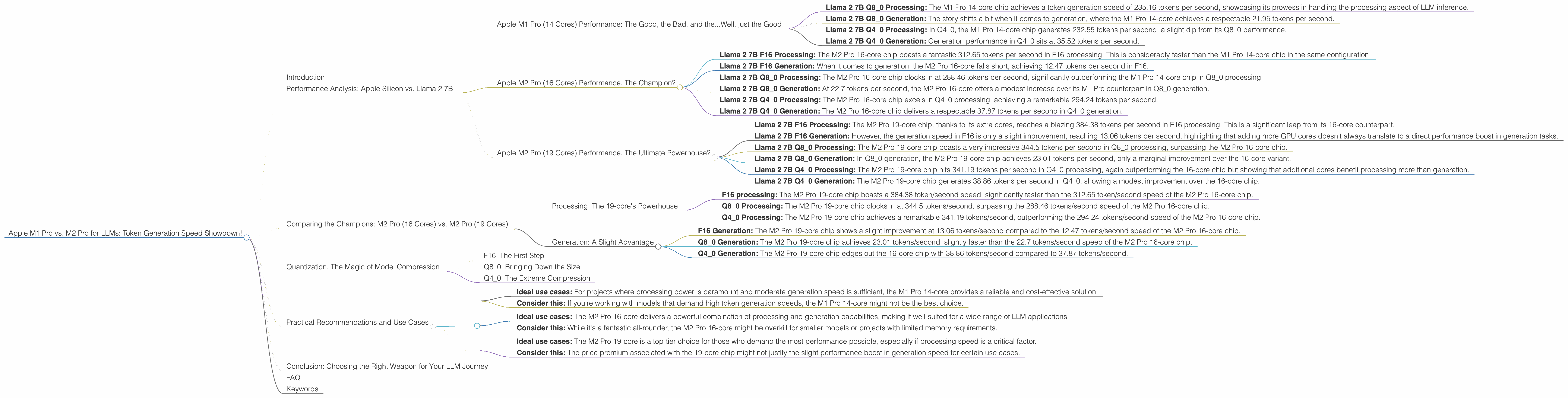
Apple M1 Pro (14 Cores) Performance: The Good, the Bad, and the...Well, just the Good
Let's kick things off with the hero of our story: the Apple M1 Pro 14 core. This chip packs a punch, providing a decent foundation for running LLMs locally. Let's break down its performance:
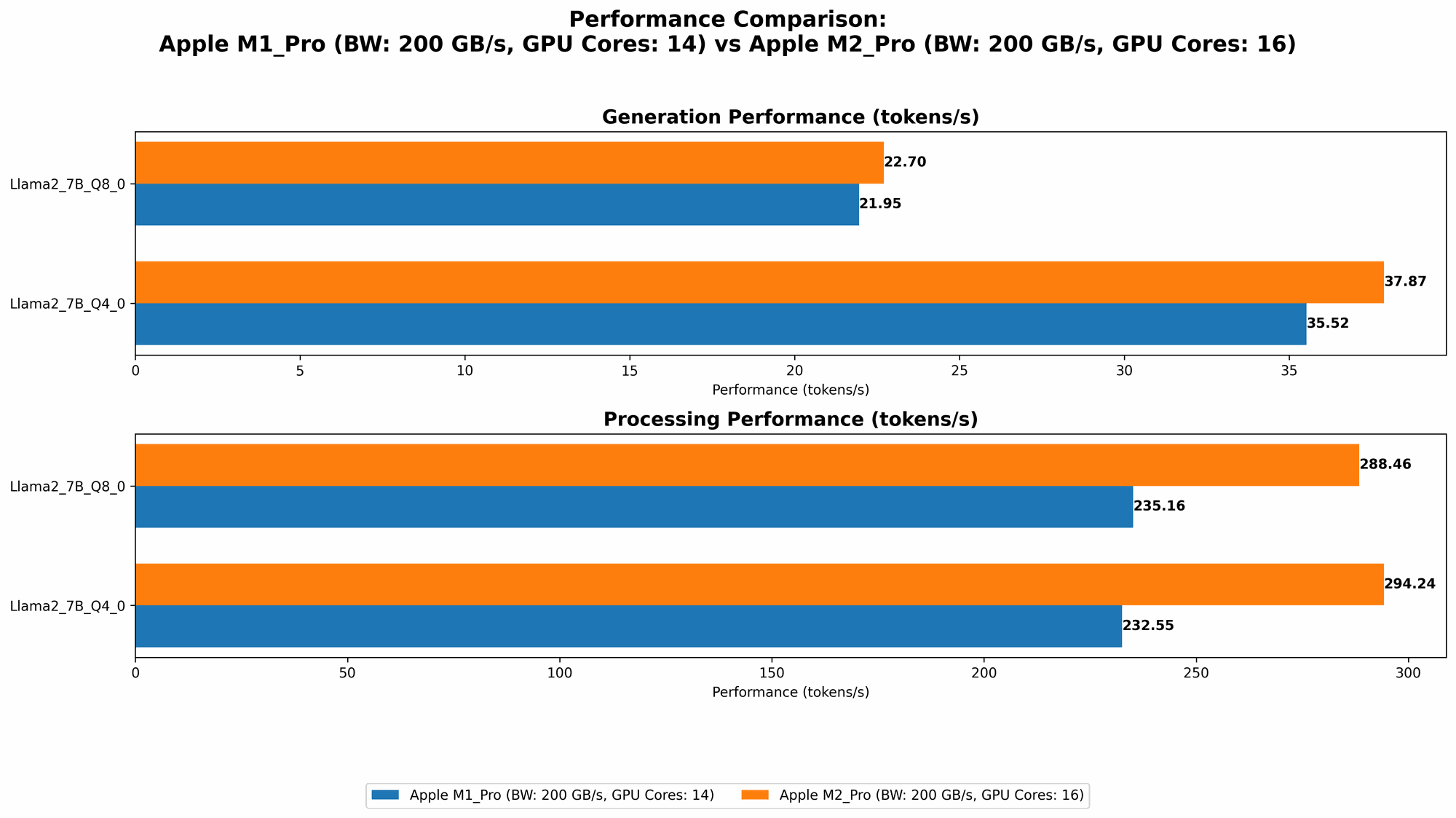
- Llama 2 7B Q8_0 Processing: The M1 Pro 14-core chip achieves a token generation speed of 235.16 tokens per second, showcasing its prowess in handling the processing aspect of LLM inference.
- Llama 2 7B Q8_0 Generation: The story shifts a bit when it comes to generation, where the M1 Pro 14-core achieves a respectable 21.95 tokens per second.
- Llama 2 7B Q40 Processing: In Q40, the M1 Pro 14-core chip generates 232.55 tokens per second, a slight dip from its Q8_0 performance.
- Llama 2 7B Q40 Generation: Generation performance in Q40 sits at 35.52 tokens per second.
Key Takeaways: The M1 Pro 14-core shines when it comes to processing, making it a solid choice for tasks requiring fast computations. However, for token generation, its performance is more moderate, although still decent.
Apple M2 Pro (16 Cores) Performance: The Champion?
The M2 Pro 16-core chip steps onto the stage, promising improved performance over its M1 Pro predecessor. Let's see if it lives up to the hype!
- Llama 2 7B F16 Processing: The M2 Pro 16-core chip boasts a fantastic 312.65 tokens per second in F16 processing. This is considerably faster than the M1 Pro 14-core chip in the same configuration.
- Llama 2 7B F16 Generation: When it comes to generation, the M2 Pro 16-core falls short, achieving 12.47 tokens per second in F16.
- Llama 2 7B Q80 Processing: The M2 Pro 16-core chip clocks in at 288.46 tokens per second, significantly outperforming the M1 Pro 14-core chip in Q80 processing.
- Llama 2 7B Q80 Generation: At 22.7 tokens per second, the M2 Pro 16-core offers a modest increase over its M1 Pro counterpart in Q80 generation.
- Llama 2 7B Q40 Processing: The M2 Pro 16-core chip excels in Q40 processing, achieving a remarkable 294.24 tokens per second.
- Llama 2 7B Q40 Generation: The M2 Pro 16-core chip delivers a respectable 37.87 tokens per second in Q40 generation.
Key Takeaways: The M2 Pro 16-core chip is the clear victor in this LLM speed contest! It showcases a remarkable boost in processing capabilities across all quantization levels, beating the M1 Pro 14-core chip by a noticeable margin. In terms of generation, the M2 Pro 16-core chip is a slight improvement across all quantization levels.
Apple M2 Pro (19 Cores) Performance: The Ultimate Powerhouse?
The M2 Pro 19-core chip is the top of the line, with an additional 3 GPU cores compared to the 16-core version. We'll see how this extra horsepower impacts LLM performance.
- Llama 2 7B F16 Processing: The M2 Pro 19-core chip, thanks to its extra cores, reaches a blazing 384.38 tokens per second in F16 processing. This is a significant leap from its 16-core counterpart.
- Llama 2 7B F16 Generation: However, the generation speed in F16 is only a slight improvement, reaching 13.06 tokens per second, highlighting that adding more GPU cores doesn't always translate to a direct performance boost in generation tasks.
- Llama 2 7B Q80 Processing: The M2 Pro 19-core chip boasts a very impressive 344.5 tokens per second in Q80 processing, surpassing the M2 Pro 16-core chip.
- Llama 2 7B Q80 Generation: In Q80 generation, the M2 Pro 19-core chip achieves 23.01 tokens per second, only a marginal improvement over the 16-core variant.
- Llama 2 7B Q40 Processing: The M2 Pro 19-core chip hits 341.19 tokens per second in Q40 processing, again outperforming the 16-core chip but showing that additional cores benefit processing more than generation.
- Llama 2 7B Q40 Generation: The M2 Pro 19-core chip generates 38.86 tokens per second in Q40, showing a modest improvement over the 16-core chip.
Key Takeaways: The M2 Pro 19-core chip absolutely shines in processing, offering a significant leap in performance compared to its 16-core counterpart. However, the added GPU cores don't translate to a noticeable improvement in token generation speed.
Comparing the Champions: M2 Pro (16 Cores) vs. M2 Pro (19 Cores)
Let's focus on the top contenders: the M2 Pro 16-core and the M2 Pro 19-core chips. How do they stack up against each other?
Processing: The 19-core's Powerhouse
As you can see, the M2 Pro 19-core chip dominates in processing:
- F16 processing: The M2 Pro 19-core chip boasts a 384.38 token/second speed, significantly faster than the 312.65 token/second speed of the M2 Pro 16-core chip.
- Q8_0 Processing: The M2 Pro 19-core chip clocks in at 344.5 tokens/second, surpassing the 288.46 tokens/second speed of the M2 Pro 16-core chip.
- Q4_0 Processing: The M2 Pro 19-core chip achieves a remarkable 341.19 tokens/second, outperforming the 294.24 tokens/second speed of the M2 Pro 16-core chip.
Clearly, the M2 Pro 19-core chip is a powerhouse when it comes to processing tasks. The additional GPU cores bring a tangible advantage in terms of speed and efficiency.
Generation: A Slight Advantage
While the 19-core chip provides some benefit, it's less clear-cut in generation:
- F16 Generation: The M2 Pro 19-core chip shows a slight improvement at 13.06 tokens/second compared to the 12.47 tokens/second speed of the M2 Pro 16-core chip.
- Q8_0 Generation: The M2 Pro 19-core chip achieves 23.01 tokens/second, slightly faster than the 22.7 tokens/second speed of the M2 Pro 16-core chip.
- Q4_0 Generation: The M2 Pro 19-core chip edges out the 16-core chip with 38.86 tokens/second compared to 37.87 tokens/second.
While the M2 Pro 19-core chip demonstrates higher generation speeds, the increase is marginal, leading us to wonder if the additional GPU cores offer a significant enough advantage given the price premium.
Quantization: The Magic of Model Compression
Quantization is a powerful technique used to reduce the memory footprint of LLM models, allowing them to run more efficiently on devices with limited resources. Think of it as a diet for your LLM - making it smaller without sacrificing too much of its capabilities.
F16: The First Step
F16 quantization represents a middle ground, offering a balance between model size and performance. It's a good starting point for running LLMs on devices with limited memory.
Q8_0: Bringing Down the Size
Q8_0 quantization, with its even smaller memory footprint, is a significant boost in efficiency. It allows you to run larger models on devices with limited memory, making those models more accessible and practical.
Q4_0: The Extreme Compression
Q4_0 quantization takes things to the extreme, significantly reducing the model size and memory requirements. This is a fantastic option for devices with very limited memory and for situations where storage space is a major concern.
Key Takeaway: Quantization is an essential tool for optimizing LLM performance on various devices, allowing you to choose the right trade-off between model size and speed. It's a powerful tool for making LLMs more accessible and efficient, but it can come at the cost of slight accuracy reductions.
Practical Recommendations and Use Cases
So, which device is the right choice for your LLM needs? Let's break down some practical recommendations:
Apple M1 Pro 14-core:
- Ideal use cases: For projects where processing power is paramount and moderate generation speed is sufficient, the M1 Pro 14-core provides a reliable and cost-effective solution.
- Consider this: If you're working with models that demand high token generation speeds, the M1 Pro 14-core might not be the best choice.
Apple M2 Pro 16-core:
- Ideal use cases: The M2 Pro 16-core delivers a powerful combination of processing and generation capabilities, making it well-suited for a wide range of LLM applications.
- Consider this: While it's a fantastic all-rounder, the M2 Pro 16-core might be overkill for smaller models or projects with limited memory requirements.
Apple M2 Pro 19-core:
- Ideal use cases: The M2 Pro 19-core is a top-tier choice for those who demand the most performance possible, especially if processing speed is a critical factor.
- Consider this: The price premium associated with the 19-core chip might not justify the slight performance boost in generation speed for certain use cases.
Conclusion: Choosing the Right Weapon for Your LLM Journey
The choice between M1 Pro and M2 Pro chips ultimately depends on your specific LLM project and requirements. The M1 Pro 14-core offers solid performance and value, while the M2 Pro 16-core and 19-core chips provide exceptional processing power and a slight edge in token generation. Remember to consider your budget and the specific requirements of your LLM project when deciding.
FAQ
Q. What is quantization and how does it impact LLM performance?
A: Quantization is like a diet for your LLM model. It reduces the model's size by representing its weights (numbers) using fewer bits, making it more efficient and allowing it to fit on less powerful hardware. While it can increase speed and memory efficiency, it might also slightly decrease accuracy, so it's about finding the right balance!
Q. What is the difference between token generation and processing?
A: Token generation is the process of generating new text based on the current input and the model's knowledge, while processing is the internal calculation and processing of the input data to determine the next token to generate. Think of it as the difference between writing a story (generation) and brainstorming ideas for the story (processing).
Q. Should I use a CPU or GPU to run my LLMs?
A: GPUs are generally better suited for running LLMs due to their parallel processing capabilities, which makes them faster at handling the complex calculations involved. However, CPUs can also be used, especially for smaller models or projects with limited memory.
Q. What is the best way to choose the right LLM model for my needs?
A: Selecting the right LLM model depends on several factors, including the task you wish to accomplish, the model's size, and the resources available. For example, a smaller model might suit projects with limited hardware, while a larger model may be necessary for more complex tasks.
Keywords
Apple M1 Pro, Apple M2 Pro, LLM, Llama 2, token generation, processing speed, quantization, F16, Q80, Q40, GPU, CPU, tokenization, AI, machine learning, deep learning, natural language processing, computer science, technology, developer