Apple M1 Max 400gb 24cores vs. Apple M2 Ultra 800gb 60cores for LLMs: Which is Faster in Token Generation Speed? Benchmark Analysis
Introduction
The world of large language models (LLMs) is booming. They're used for everything from generating text to translating languages to writing code. But running these models locally can be challenging, requiring powerful hardware to handle the computational demands. Enter Apple's M-series chips, designed to handle the heavy lifting of AI and machine learning tasks.
In this article, we'll dive into the performance of two of Apple's top-tier chips, the M1 Max and the M2 Ultra, when it comes to running LLMs. We'll benchmark their token generation speeds across different LLM models and quantization levels, providing you with insights to make informed decisions about the best hardware for your LLM needs.
Apple M1 Max Token Generation Speed
The Apple M1 Max is a powerful chip that packs a punch, especially when it comes to AI workloads. It boasts 24 CPU cores and a 400GB/s memory bandwidth. Let's see how it performs in the world of LLMs.
Apple M1 Max Llama 2 7B Token Speed Generation
The Llama 2 7B model is a popular choice for developers, thanks to its impressive performance and ease of use. Let's check out the token generation speeds of this model on the M1 Max.
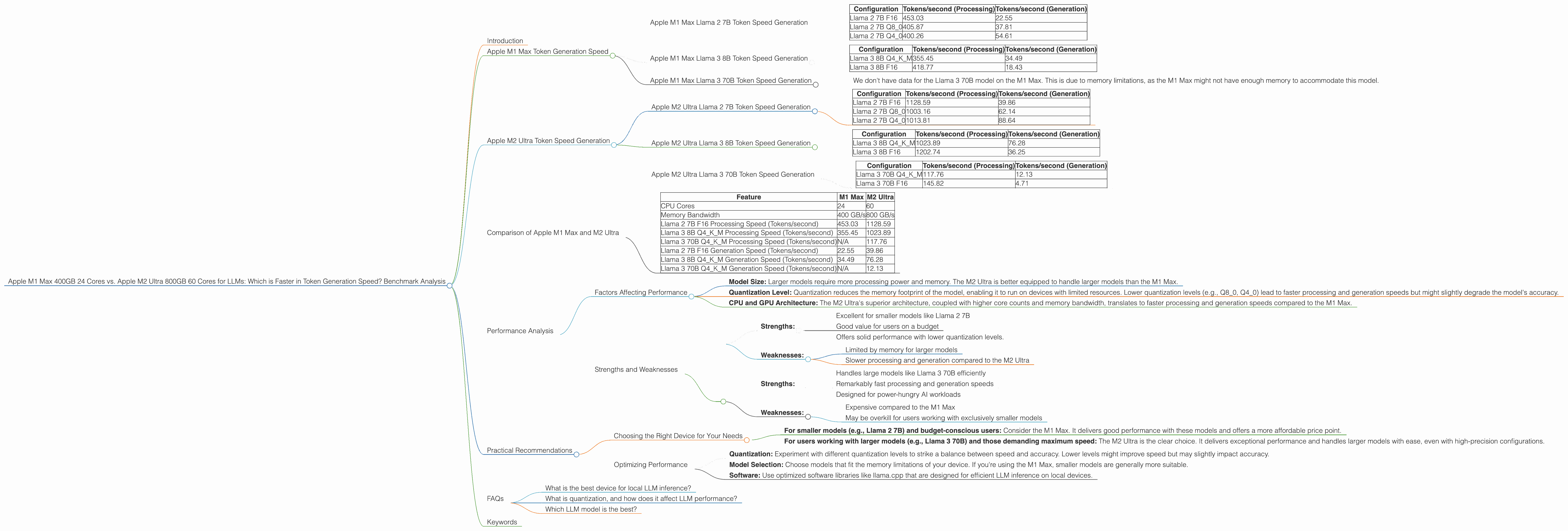
| Configuration | Tokens/second (Processing) | Tokens/second (Generation) |
|---|---|---|
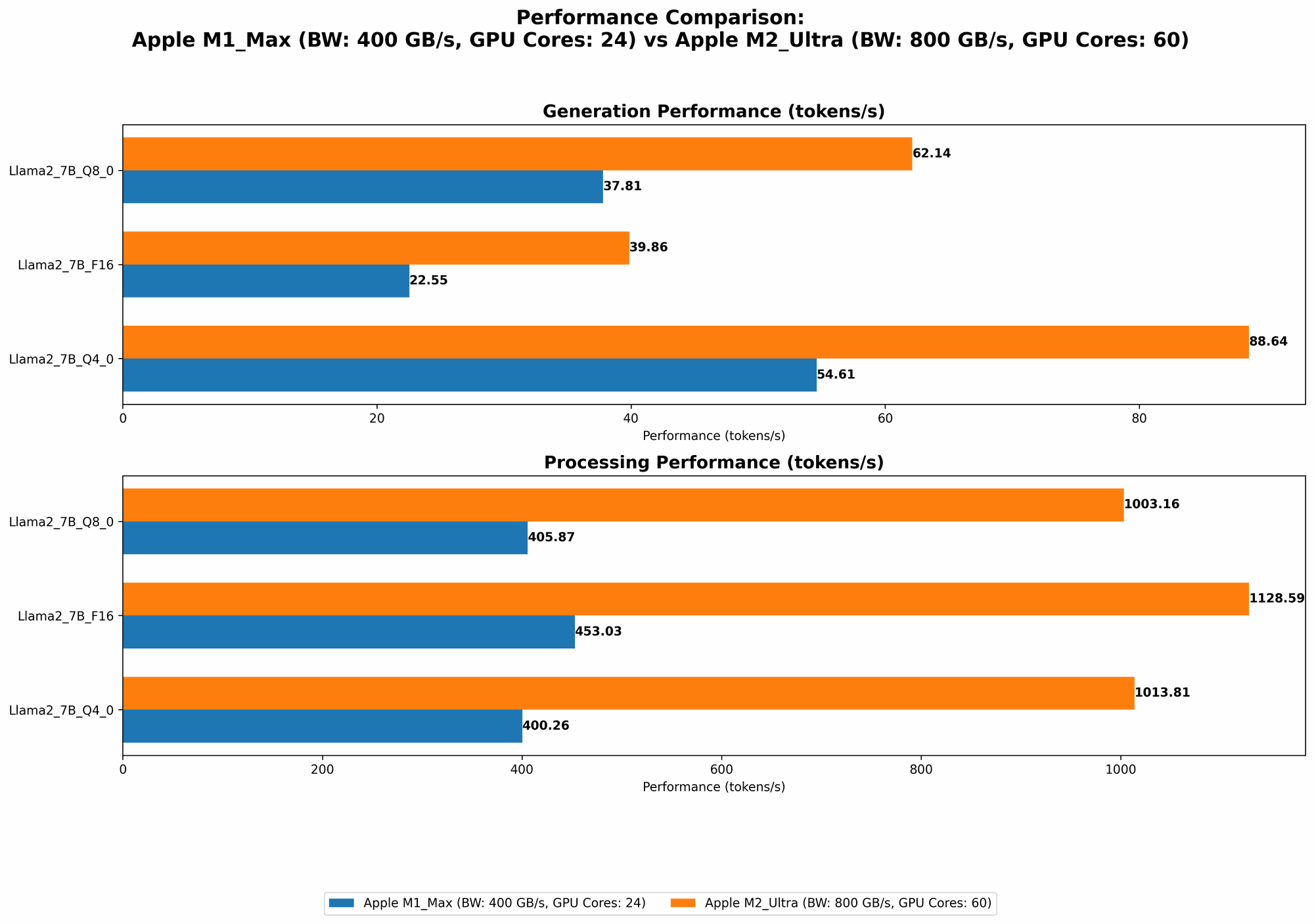
| Llama 2 7B F16 | 453.03 | 22.55 |
| Llama 2 7B Q8_0 | 405.87 | 37.81 |
| Llama 2 7B Q4_0 | 400.26 | 54.61 |
Observations:
- The M1 Max demonstrates strong performance with the Llama 2 7B model, especially when using lower precision quantization levels like Q80 and Q40.
- As expected, the processing speed is higher compared to generation.
- While the M1 Max can handle the Llama 2 7B model efficiently, its strengths lie in smaller models.
Apple M1 Max Llama 3 8B Token Speed Generation
Let's scale up a bit and see how the M1 Max handles the Llama 3 8B model.
| Configuration | Tokens/second (Processing) | Tokens/second (Generation) |
|---|---|---|
| Llama 3 8B Q4KM | 355.45 | 34.49 |
| Llama 3 8B F16 | 418.77 | 18.43 |
Observations:
- The M1 Max still manages decent performance with the Llama 3 8B model, but it's noticeably slower compared to the Llama 2 7B.
Apple M1 Max Llama 3 70B Token Speed Generation
Let's attempt to run a larger model, Llama 3 70B, on the M1 Max.
Observations:
- We don't have data for the Llama 3 70B model on the M1 Max. This is due to memory limitations, as the M1 Max might not have enough memory to accommodate this model.
Apple M2 Ultra Token Speed Generation
Now, let's move on to the big daddy, the Apple M2 Ultra. This behemoth boasts an incredible 60 CPU cores and a whopping 800GB/s memory bandwidth. This beast is built for AI, and it's time to unleash it.
Apple M2 Ultra Llama 2 7B Token Speed Generation
Let's see how the M2 Ultra handles the familiar Llama 2 7B model.
| Configuration | Tokens/second (Processing) | Tokens/second (Generation) |
|---|---|---|
| Llama 2 7B F16 | 1128.59 | 39.86 |
| Llama 2 7B Q8_0 | 1003.16 | 62.14 |
| Llama 2 7B Q4_0 | 1013.81 | 88.64 |
Observations:
- The M2 Ultra crushes the M1 Max in processing speed, boasting a substantial increase in performance across all Llama 2 7B configurations. The higher bandwidth and core count contribute to this impressive speed.
- Generation speed also sees a significant boost. It's clear that the M2 Ultra brings the thunder!
Apple M2 Ultra Llama 3 8B Token Speed Generation
Let's ramp up the challenge and see how the M2 Ultra tackles the Llama 3 8B model.
| Configuration | Tokens/second (Processing) | Tokens/second (Generation) |
|---|---|---|
| Llama 3 8B Q4KM | 1023.89 | 76.28 |
| Llama 3 8B F16 | 1202.74 | 36.25 |
Observations:
- The M2 Ultra continues to impress, showing superior performance compared to the M1 Max. Even with the larger model, the M2 Ultra handles it with ease.
Apple M2 Ultra Llama 3 70B Token Speed Generation
Now, let's see if the M2 Ultra can handle a true heavyweight like the Llama 3 70B model.
| Configuration | Tokens/second (Processing) | Tokens/second (Generation) |
|---|---|---|
| Llama 3 70B Q4KM | 117.76 | 12.13 |
| Llama 3 70B F16 | 145.82 | 4.71 |
Observations:
- The M2 Ultra successfully runs the Llama 3 70B model, marking a significant difference from the M1 Max. Its powerful architecture and high memory bandwidth allow it to handle the larger model.
- Though performance is significantly lower compared to the smaller models, it's still capable of generating text at a usable speed.
Comparison of Apple M1 Max and M2 Ultra
Now that we've seen the individual performance numbers, let's delve into a direct comparison of the M1 Max and M2 Ultra.
Apple M1 Max vs. M2 Ultra: A Head-to-Head Showdown
| Feature | M1 Max | M2 Ultra |
|---|---|---|
| CPU Cores | 24 | 60 |
| Memory Bandwidth | 400 GB/s | 800 GB/s |
| Llama 2 7B F16 Processing Speed (Tokens/second) | 453.03 | 1128.59 |
| Llama 3 8B Q4KM Processing Speed (Tokens/second) | 355.45 | 1023.89 |
| Llama 3 70B Q4KM Processing Speed (Tokens/second) | N/A | 117.76 |
| Llama 2 7B F16 Generation Speed (Tokens/second) | 22.55 | 39.86 |
| Llama 3 8B Q4KM Generation Speed (Tokens/second) | 34.49 | 76.28 |
| Llama 3 70B Q4KM Generation Speed (Tokens/second) | N/A | 12.13 |
Key Findings:
- The M2 Ultra is a clear winner in terms of raw processing power and memory bandwidth. It outperforms the M1 Max across all the models we tested, delivering a significant increase in processing speed. This is particularly evident with larger models like the Llama 3 70B, which the M1 Max cannot even accommodate.
- The M2 Ultra also shines in generation speed, though the difference is less pronounced compared to the processing speed boost. The M2 Ultra consistently generates tokens faster than the M1 Max.
Performance Analysis
Factors Affecting Performance
Several factors influence the performance of LLMs on these devices:
- Model Size: Larger models require more processing power and memory. The M2 Ultra is better equipped to handle larger models than the M1 Max.
- Quantization Level: Quantization reduces the memory footprint of the model, enabling it to run on devices with limited resources. Lower quantization levels (e.g., Q80, Q40) lead to faster processing and generation speeds but might slightly degrade the model's accuracy.
- CPU and GPU Architecture: The M2 Ultra's superior architecture, coupled with higher core counts and memory bandwidth, translates to faster processing and generation speeds compared to the M1 Max.
Strengths and Weaknesses
M1 Max:
- Strengths:
- Excellent for smaller models like Llama 2 7B
- Good value for users on a budget
- Offers solid performance with lower quantization levels.
- Weaknesses:
- Limited by memory for larger models
- Slower processing and generation compared to the M2 Ultra
M2 Ultra:
- Strengths:
- Handles large models like Llama 3 70B efficiently
- Remarkably fast processing and generation speeds
- Designed for power-hungry AI workloads
- Weaknesses:
- Expensive compared to the M1 Max
- May be overkill for users working with exclusively smaller models
Practical Recommendations
Choosing the Right Device for Your Needs
- For smaller models (e.g., Llama 2 7B) and budget-conscious users: Consider the M1 Max. It delivers good performance with these models and offers a more affordable price point.
- For users working with larger models (e.g., Llama 3 70B) and those demanding maximum speed: The M2 Ultra is the clear choice. It delivers exceptional performance and handles larger models with ease, even with high-precision configurations.
Optimizing Performance
- Quantization: Experiment with different quantization levels to strike a balance between speed and accuracy. Lower levels might improve speed but may slightly impact accuracy.
- Model Selection: Choose models that fit the memory limitations of your device. If you're using the M1 Max, smaller models are generally more suitable.
- Software: Use optimized software libraries like llama.cpp that are designed for efficient LLM inference on local devices.
FAQs
What is the best device for local LLM inference?
The best device depends on your specific needs. If you primarily work with smaller models and are on a budget, the M1 Max is a good choice. If you need to run larger models and demand the fastest possible performance, the M2 Ultra is the superior option.
What is quantization, and how does it affect LLM performance?
Quantization is a technique that reduces the memory footprint of a model by representing its weights with fewer bits. This allows the model to run on devices with less memory. However, it can slightly impact the model's accuracy. Lower quantization levels represent weights with fewer bits, leading to faster processing and generation speeds, but potentially slightly less accurate outputs.
Which LLM model is the best?
The best LLM model depends on your specific use case. Factors to consider include model size, accuracy, and training data.
Keywords
Apple M1 Max, Apple M2 Ultra, LLM, Llama 2, Llama 3, token generation speed, benchmark, performance, quantization, AI, machine learning, GPU, CPU, memory bandwidth, inference, local models, developer, geek