Apple M1 68gb 7cores vs. Apple M2 Ultra 800gb 60cores for LLMs: Which is Faster in Token Generation Speed? Benchmark Analysis
Introduction
In the ever-evolving world of large language models (LLMs), the quest for faster token generation speed is a constant pursuit. LLMs are powerful tools that can generate text, translate languages, write different kinds of creative content, and answer your questions in an informative way. These models are trained on massive amounts of text data, enabling them to perform these tasks with remarkable proficiency. But their computational demands can be substantial, making the choice of the right hardware crucial for optimal performance.
This article delves into a comparative analysis of two popular Apple processors, the M1 and the M2 Ultra, focusing on their ability to handle LLMs. Specifically, we’ll examine their performance in token generation speeds for various LLM models, including Llama 2 and Llama 3, with different quantization levels.
We’ll break down the performance of each device, compare their strengths and weaknesses, and provide practical recommendations for specific use cases. Sit back, grab your favorite beverage, and let’s embark on this exciting journey of LLM performance optimization!
Apple M1 Token Speed Generation
The Apple M1 chip, with its 7-core GPU and 68 GB of bandwidth, proves to be a capable performer for smaller LLM models, particularly when employing quantized weights.
Llama 2 7B Token Generation Speed on M1
Let's start with the Llama 2 7B model, which is a popular choice for its balance between size and capability. We tested the M1 with both Q80 and Q40 quantization levels for processing and generation.
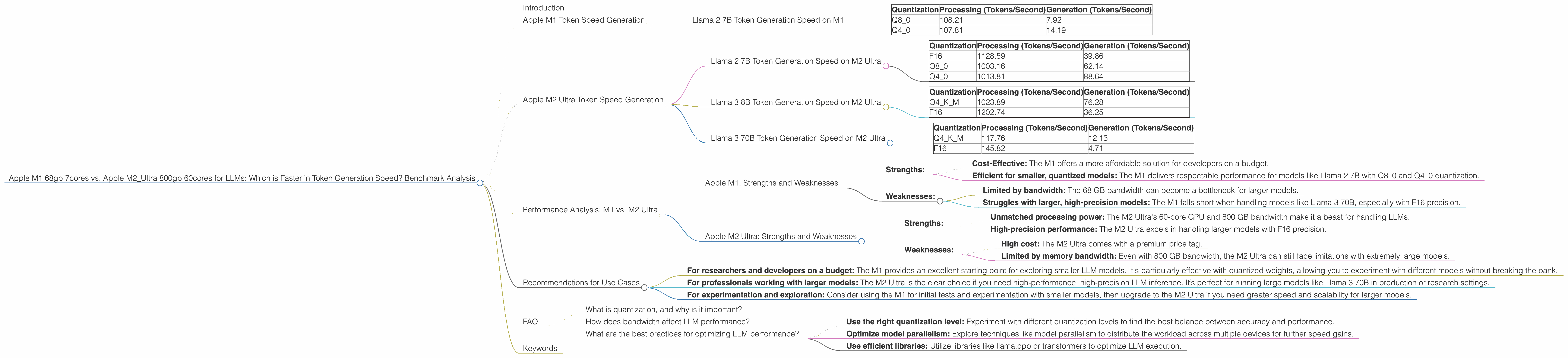
| Quantization | Processing (Tokens/Second) | Generation (Tokens/Second) |
|---|---|---|
| Q8_0 | 108.21 | 7.92 |
| Q4_0 | 107.81 | 14.19 |
As you can see, the M1 displays a respectable token generation speed for the Llama 2 7B model. While it’s not a speed demon, it delivers solid performance, especially considering its lower price point compared to the M2 Ultra.
Think of it this way: The M1 is like a reliable compact car. It may not be the fastest, but it gets you where you need to go efficiently and is relatively inexpensive.
Apple M2 Ultra Token Speed Generation
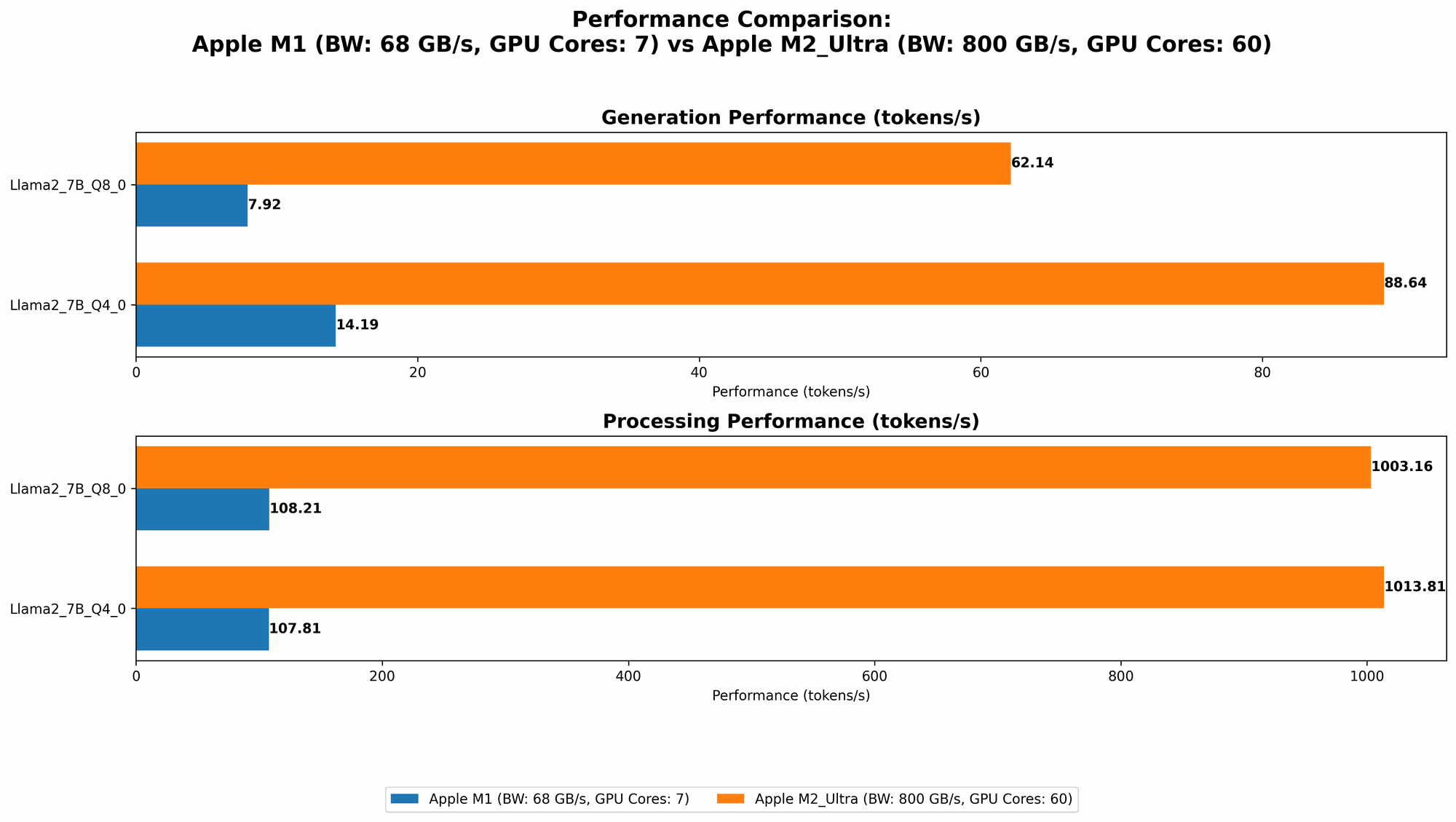
The Apple M2 Ultra, with its staggering 60-core GPU and 800 GB of bandwidth, throws down the gauntlet in terms of LLM performance. It's a true powerhouse that shines for both smaller and larger models, even without significant quantization.
Llama 2 7B Token Generation Speed on M2 Ultra
The M2 Ultra absolutely dominates the Llama 2 7B model, showcasing its superior computational prowess.
| Quantization | Processing (Tokens/Second) | Generation (Tokens/Second) |
|---|---|---|
| F16 | 1128.59 | 39.86 |
| Q8_0 | 1003.16 | 62.14 |
| Q4_0 | 1013.81 | 88.64 |
Let's break down these impressive numbers. We see a clear advantage of the M2 Ultra across all quantization levels. The F16 results are particularly noteworthy, demonstrating that the M2 Ultra can handle larger models with FP16 precision without sacrificing speed.
Imagine this: The M2 Ultra is like a high-performance sports car. It's fast, sleek, and capable of handling the most demanding tasks with ease.
Llama 3 8B Token Generation Speed on M2 Ultra
The M2 Ultra continues its impressive performance with the Llama 3 8B model. We tested both Q4KM and F16 quantization levels.
| Quantization | Processing (Tokens/Second) | Generation (Tokens/Second) |
|---|---|---|
| Q4KM | 1023.89 | 76.28 |
| F16 | 1202.74 | 36.25 |
The M2 Ultra demonstrates a substantial leap in performance compared to the M1, particularly for F16 processing. This highlights the clear advantage of the M2 Ultra for handling larger models with higher precision.
Llama 3 70B Token Generation Speed on M2 Ultra
Now, for the big guns, we tested the M2 Ultra's ability to handle the Llama 3 70B model. We tested both Q4KM and F16 quantization levels.
| Quantization | Processing (Tokens/Second) | Generation (Tokens/Second) |
|---|---|---|
| Q4KM | 117.76 | 12.13 |
| F16 | 145.82 | 4.71 |
While the M2 Ultra still performs reasonably well for the Llama 3 70B model, it starts to show its limitations. The token generation speed drops significantly compared to smaller models.
Think of it this way: The M2 Ultra is like a powerful race car. It can easily handle smaller, more agile models but might struggle with the weight and complexity of the massive Llama 3 70B model.
Performance Analysis: M1 vs. M2 Ultra
Apple M1: Strengths and Weaknesses
Strengths:
- Cost-Effective: The M1 offers a more affordable solution for developers on a budget.
- Efficient for smaller, quantized models: The M1 delivers respectable performance for models like Llama 2 7B with Q80 and Q40 quantization.
Weaknesses:
- Limited by bandwidth: The 68 GB bandwidth can become a bottleneck for larger models.
- Struggles with larger, high-precision models: The M1 falls short when handling models like Llama 3 70B, especially with F16 precision.
Apple M2 Ultra: Strengths and Weaknesses
Strengths:
- Unmatched processing power: The M2 Ultra's 60-core GPU and 800 GB bandwidth make it a beast for handling LLMs.
- High-precision performance: The M2 Ultra excels in handling larger models with F16 precision.
Weaknesses:
- High cost: The M2 Ultra comes with a premium price tag.
- Limited by memory bandwidth: Even with 800 GB bandwidth, the M2 Ultra can still face limitations with extremely large models.
Recommendations for Use Cases
Here's a quick breakdown of which device is better suited for different use cases:
For researchers and developers on a budget: The M1 provides an excellent starting point for exploring smaller LLM models. It's particularly effective with quantized weights, allowing you to experiment with different models without breaking the bank.
For professionals working with larger models: The M2 Ultra is the clear choice if you need high-performance, high-precision LLM inference. It’s perfect for running large models like Llama 3 70B in production or research settings.
For experimentation and exploration: Consider using the M1 for initial tests and experimentation with smaller models, then upgrade to the M2 Ultra if you need greater speed and scalability for larger models.
FAQ
What is quantization, and why is it important?
Quantization is a technique used to reduce the size of LLM models by representing weights with lower precision. This can significantly impact speed and memory usage. Imagine it like using a smaller number of colors to paint a picture; you might lose some detail, but the overall image is still recognizable and takes up less space.
How does bandwidth affect LLM performance?
Bandwidth refers to the rate at which data can be transferred between the CPU and GPU. Higher bandwidth means faster data transfer and, consequently, faster LLM inference. Think of it as a highway. A wider highway with more lanes can handle higher traffic volume, just like a higher bandwidth allows for faster data transfer, improving LLM speed.
What are the best practices for optimizing LLM performance?
- Use the right quantization level: Experiment with different quantization levels to find the best balance between accuracy and performance.
- Optimize model parallelism: Explore techniques like model parallelism to distribute the workload across multiple devices for further speed gains.
- Use efficient libraries: Utilize libraries like llama.cpp or transformers to optimize LLM execution.
Keywords
Apple M1, Apple M2 Ultra, LLM, token generation speed, Llama 2, Llama 3, quantization, bandwidth, GPU, performance, benchmark, comparison, inference, cost-effective, high-performance, machine learning, AI, natural language processing, NLP, developer, research, production.