8 Ways to Prevent Overheating on Apple M3 Max During AI Workloads

Introduction
Running large language models (LLMs) locally is becoming increasingly popular, offering developers and enthusiasts the power of AI without relying on cloud services. Apple's M3 Max chip, with its impressive processing capabilities, is a potent tool for handling these computationally demanding tasks. However, the sheer power of the M3 Max can come with a downside: excessive heat generation. Overheating can lead to performance throttling, potentially hindering your AI projects. This article dives into the key areas of concern and provides practical solutions to help you keep your M3 Max cool and your LLMs running smoothly.
The M3 Max & LLM Powerhouse: A Love-Hate Relationship
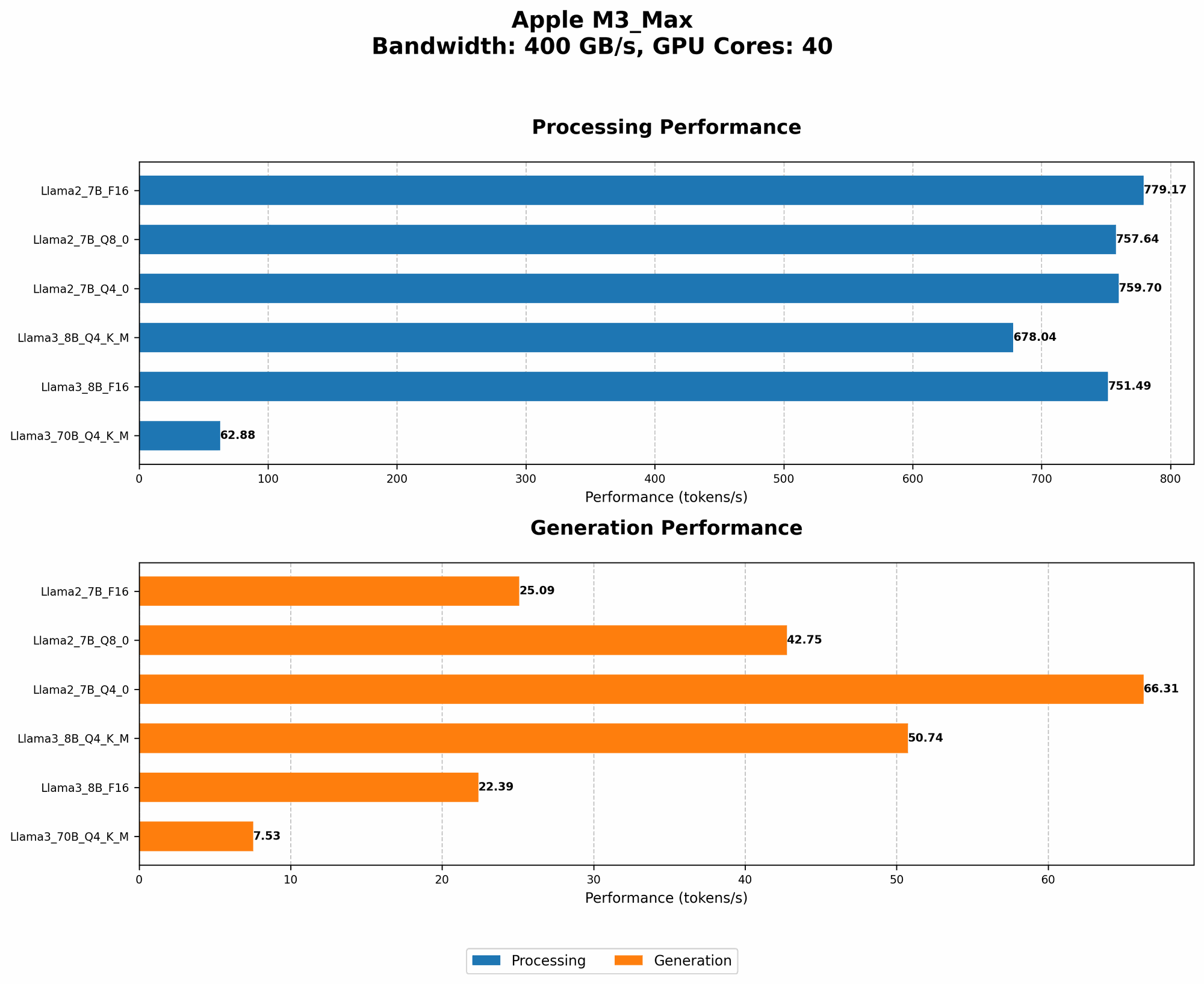
The M3 Max is a marvel of modern engineering, boasting a staggering number of cores and GPU units. It's a dream come true for running LLMs like Llama 2 and Llama 3 locally. These models, with their ability to generate human-like text, translate languages, and even write code, demand substantial processing power. The M3 Max can easily handle the workload, but this power comes at a cost: heat.
Think of the M3 Max as a powerful sports car; it can zoom through computations with ease, but all that horsepower generates a lot of heat. Without proper cooling and optimization, the M3 Max's performance can be severely affected.
8 Proven Strategies to Keep Your M3 Max Cool During AI Workloads
Now that you're aware of the potential for overheating, let's address the core issue: how to effectively manage heat and maintain optimal performance for your M3 Max while running LLMs?
1. Embrace the Quantization Revolution: Smaller Footprint, Cooler Operation
Imagine shrinking a giant LLM model down to a more manageable size, making it easier to process without sacrificing too much accuracy. This is the magic of quantization - a process that reduces the memory footprint of your LLM. Think of it like converting a high-resolution photo to a lower resolution one, making it easier to share and load.
With quantization, you can achieve significant improvements in performance and energy consumption, ultimately leading to lower temperatures on your M3 Max. Let's see how quantization affects specific LLM models:
| Model | Token Speed (Tokens/second) - Q4 KM | Token Speed (Tokens/second) - F16 |
|---|---|---|
| Llama 2 7B | 42.75 | 25.09 |
| Llama 3 8B | 50.74 | 22.39 |
| Llama 3 70B (Q4 KM only) | 7.53 | N/A |
Observations:
- Faster token generation: The M3 Max can generate tokens at a significantly faster pace when using models quantized with Q4 KM.
- Reduced power consumption: Quantization generally leads to lower power consumption, resulting in less heat generation.
- Llama 3 70B: For the 70B model, we currently lack F16 performance data. However, the Q4 KM variant offers a significant improvement in speed compared to the 8B model.
2. Unleash the Power of GPU Acceleration: Speed and Heat Reduction
The M3 Max boasts an impressive GPU, designed to tackle computationally intensive tasks. LLMs are no exception. GPU acceleration can significantly speed up the execution of your model, leading to faster generation times and reduced overall runtime. This shorter runtime translates to less time spent generating heat, ultimately keeping your M3 Max cooler.
3. Fine-Tune Your LLM: Customize for Efficiency
Think of fine-tuning like tailoring a suit to your specific needs. It allows you to personalize your LLM for a particular task. This customization can lead to significant performance gains and potentially reduce the computational demands on your M3 Max.
4. Don't Sleep on CPU Optimization: The Unsung Hero
While GPUs are often in the spotlight, don't underestimate the importance of CPU optimization. The M3 Max is also equipped with a powerful CPU, and optimizing its performance can play a crucial role in achieving the best balance of speed and efficiency, helping to manage heat.
Example:
Using multi-threading libraries like OpenMP or Intel TBB can help you leverage the multiple cores of the CPU for parallel processing.
5. The Power of a Cooler: Hardware Assistance
The M3 Max is designed with a robust cooling system, but certain situations might require additional assistance. A high-quality cooler can work wonders in managing heat, allowing your M3 Max to handle demanding LLM workloads without thermal throttling.
6. Environmental Control: The Air Matters
Your computer's surroundings can play a significant role in its temperature. A well-ventilated environment with optimal airflow can prevent heat buildup. Consider using a dedicated cooling pad or ensuring that your computer is placed in a location with good airflow.
7. Watch Your Power Consumption: Power Limits
The more power your M3 Max uses, the more heat it generates. Consider setting power limits or using power-saving modes (e.g., "Low Power Mode" on macOS) to reduce energy consumption and minimize heat.
8. Master the Art of Monitoring: Stay Informed
Monitoring your M3 Max's temperature is crucial. Numerous tools can help, from system utilities like the Activity Monitor to specialized software. By keeping an eye on temperature readings, you can identify potential overheating issues early on and take corrective measures.
The M3 Max: A Powerful Tool for Modern AI
The Apple M3 Max offers an exciting opportunity to run LLMs locally. The sheer processing power of this chip is ideal for AI workloads, but you must manage heat effectively to avoid performance bottlenecks. By adopting the strategies outlined in this article, you can unleash the full potential of the M3 Max, keeping it cool, efficient, and ready to tackle your most ambitious AI projects.
FAQ
What is the optimal temperature for an M3 Max?
The optimal temperature for the M3 Max is below 85 degrees Celsius. While the chip can handle higher temperatures, it's best to keep it within this range to avoid performance degradation.
How can I monitor my M3 Max's temperature?
You can use the built-in Activity Monitor on macOS or download third-party monitoring software, such as iStat Menus, to track your M3 Max's temperature.
How can I tell if my M3 Max is being throttled?
You'll notice a significant drop in performance if your M3 Max is being throttled. Tasks that usually run smoothly might start lagging or taking longer to complete.
What other devices are suitable for running LLMs locally?
While the M3 Max is currently among the most powerful choices for local LLM deployment, other devices offer good performance, including:
- Nvidia GeForce RTX 4090: A powerful gaming GPU that can be repurposed for LLM inference.
- AMD Radeon RX 7900 XT: A strong contender in terms of performance and price.
- Specialized AI accelerators: Devices like Google's TPU (Tensor Processing Unit) and Cerebras Systems' Wafer-Scale Engine are designed specifically for AI workloads, offering exceptional performance.
Do I need a special cooling system for running LLMs on my M3 Max?
For most everyday use cases, the M3 Max's built-in cooling system is sufficient. However, if you're running very demanding LLMs for prolonged periods, a dedicated cooler can help maintain optimal performance.
Keywords
M3 Max, LLM, Llama 2, Llama 3, overheating, AI, token speed, quantization, GPU, CPU, cooling, monitoring, performance optimization, Apple, Apple Silicon, thermal throttling.