8 Tricks to Avoid Out of Memory Errors on NVIDIA RTX 4000 Ada 20GB
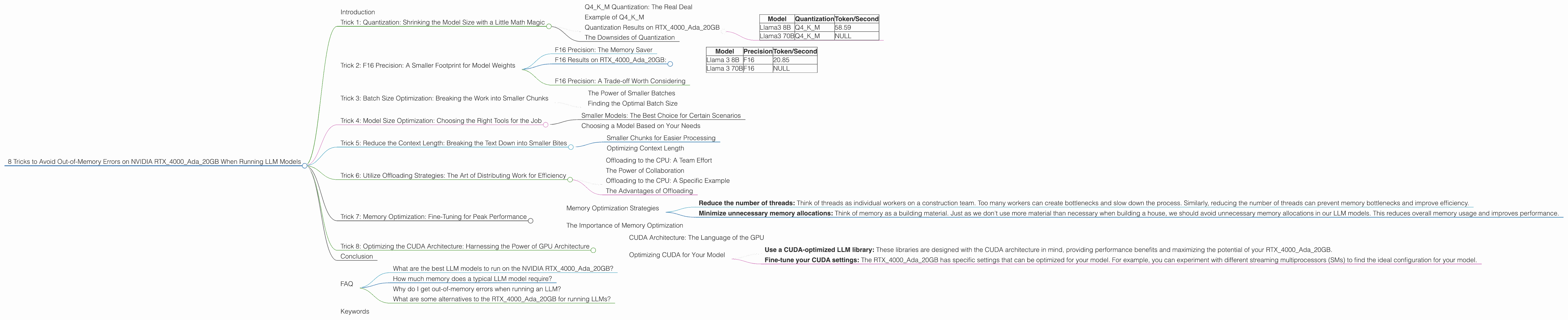
Introduction
Have you ever tried running a large language model (LLM) on your NVIDIA RTX4000Ada_20GB and encountered the dreaded "out-of-memory" error? It's a common problem, especially when working with massive models like Llama 70B or Llama 3 70B. This can be super frustrating, because these models are so powerful and we want to use them!
Don't worry, you're not alone. In this article, we'll explore 8 effective tricks to help you successfully run these models on your RTX4000Ada_20GB without hitting those memory walls. We'll cover topics like quantization, model size optimization, and resource management.
Imagine being able to run sophisticated chatbots, generate creative text formats, and translate languages like a pro - all on your own hardware. We'll unlock the potential of your RTX4000Ada_20GB and give you the tools to push the boundaries of your LLM projects. Let's dive in!
## Trick 1: Quantization: Shrinking the Model Size with a Little Math Magic
Think of quantization like squeezing a giant file into a smaller suitcase – it's the art of reducing the size of a model without losing too much of its functionality. It works by representing model weights with fewer bits. For example, instead of using 32 bits to store a number, we can use only 4 bits. This saves a ton of memory!
Our RTX4000Ada_20GB doesn’t have the luxury of unlimited memory, so using quantization is a game changer for running large models.
Q4KM Quantization: The Real Deal
Q4KM quantization is the magic bullet. It uses a technique called block quantization, where the model’s weights are divided into smaller blocks, each quantized to 4 bits. This is like dividing your suitcase into smaller compartments to pack more efficiently.
Example of Q4KM
Imagine you have a backpack with 100 compartments. Each compartment can hold a single full-sized water bottle. Now imagine that instead of full-sized bottles, you use tiny water pouches. You can fit many more water pouches in the same backpack.
The same concept applies to quantization. We use smaller "pouches" to represent model weights. This reduces the footprint of the model in memory, allowing us to run it on our RTX4000Ada_20GB.
Quantization Results on RTX4000Ada_20GB
Let's see what Q4KM quantization does for our RTX4000Ada_20GB. Here's the raw data for Llama 3 8B and 70B:
| Model | Quantization | Token/Second |
|---|---|---|
| Llama3 8B | Q4KM | 58.59 |
| Llama3 70B | Q4KM | NULL |
- Note: As you can see, we don't have the data for Llama 3 70B in Q4KM quantization on RTX4000Ada20GB. It might be too large for this device, even with Q4K_M.
The Downsides of Quantization
Quantization isn't magic; it has drawbacks. Think of it as trading some quality for size – a smaller backpack, but maybe not as much water for your adventures. Quantization may slightly reduce the accuracy of the model. But, depending on your use case, the trade-off might be worth it.
Trick 2: F16 Precision: A Smaller Footprint for Model Weights
Another way to squeeze a model into your RTX4000Ada_20GB is to use F16 precision. Instead of using the full 32 bits of a number, we can use 16 bits. This cuts the memory usage in half!
F16 Precision: The Memory Saver
Using F16 precision is like using half-sized water bottles in our backpack analogy. It allows us to fit more of the model in memory without sacrificing too much functionality.
F16 Results on RTX4000Ada_20GB:
Here’s the performance comparison:
| Model | Precision | Token/Second |
|---|---|---|
| Llama 3 8B | F16 | 20.85 |
| Llama 3 70B | F16 | NULL |
- Note: Again, the data for Llama 3 70B in F16 precision isn't available. It might be too large for RTX4000Ada_20GB.
F16 Precision: A Trade-off Worth Considering
F16 precision can be a great way to optimize memory usage, but it's not always the best option. Think of it as a smaller backpack, but with a bit less water capacity. You might lose a little precision and potentially a bit of accuracy.
Trick 3: Batch Size Optimization: Breaking the Work into Smaller Chunks


Imagine trying to build a house by yourself. It’s overwhelming! But if you split the job into smaller tasks, it becomes manageable. That's what batch size optimization is all about. We break the data into smaller chunks and process them individually, which reduces the memory requirements.
The Power of Smaller Batches
Think of a batch as a group of tasks. With a smaller batch size, we process a smaller subset of the data at a time, requiring less memory. This makes it easier to run larger models on devices like the RTX4000Ada_20GB.
Finding the Optimal Batch Size
The optimal batch size depends on the model and the device. You need to experiment to find the sweet spot that balances memory usage and performance.
Here’s where it gets interesting: increasing the batch size can improve performance. Think of it like a construction crew – more workers can get the job done faster. However, with a large model, the extra data can overwhelm your RTX4000Ada_20GB’s memory. It’s a delicate balancing act!
Trick 4: Model Size Optimization: Choosing the Right Tools for the Job
Imagine trying to cut down a tree with a pair of scissors. It’s a task better suited for a chainsaw, right? Similarly, when working with LLMs, choosing the right model size is crucial for efficient use of resources.
Smaller Models: The Best Choice for Certain Scenarios
Smaller models are often more manageable on devices like the RTX4000Ada_20GB. They require less memory, meaning you can run them smoothly without hitting those dreaded out-of-memory errors.
Choosing a Model Based on Your Needs
Select the model that best meets your needs. For example, if you're working on a simple task like generating short snippets of text, a smaller model can be the perfect solution. But for complex tasks like writing long-form content or translating entire documents, you might need a larger model.
Trick 5: Reduce the Context Length: Breaking the Text Down into Smaller Bites
Think of a book as a long stream of text. You wouldn't try to read the entire book in one go, right? Instead, you'd probably break it down into chapters or smaller sections. It's easier to digest the information and avoid overwhelmed.
Smaller Chunks for Easier Processing
The same principle applies to LLMs. Breaking down the text into smaller chunks, known as context length, reduces the amount of memory needed to process it. This is especially important when working with large models on devices with limited memory, like the RTX4000Ada_20GB.
Optimizing Context Length
The optimal context length depends on the model and the task. We can experiment to find the sweet spot that balances memory usage and performance. But remember, smaller context lengths generally require less memory.
## Trick 6: Utilize Offloading Strategies: The Art of Distributing Work for Efficiency
Imagine a massive construction project. It's impossible for one person to build a skyscraper alone. Instead, we divide the workload among many specialists: architects, engineers, builders, and so on. LLM models are like complex construction projects, and offloading strategies allow us to distribute workloads for improved efficiency.
Offloading to the CPU: A Team Effort
Offloading to the CPU is like delegating tasks to a team of workers who specialize in different areas. The GPU handles the heavy lifting – the intensive calculations. The CPU handles the lighter tasks, such as processing text input and output.
The Power of Collaboration
This division of labor allows us to run models more efficiently, even on devices with limited memory. It’s like giving each member of the construction crew a designated task, which improves overall productivity.
Offloading to the CPU: A Specific Example
Let's say you are using the RTX4000Ada_20GB to run a large LLM that requires a lot of memory. You can offload the text processing task to the CPU, as it doesn't require as much memory as the GPU.
The Advantages of Offloading
By offloading tasks, we relieve the pressure on the GPU, lowering the memory footprint and improving overall performance. It’s like having a more efficient construction team, working together to achieve a common goal.
Trick 7: Memory Optimization: Fine-Tuning for Peak Performance
Just like we optimize our personal computers by closing unused apps and clearing caches, we can optimize the memory usage of LLMs on our RTX4000Ada_20GB. This includes techniques like reducing the number of threads and minimizing unnecessary memory allocations.
Memory Optimization Strategies
Here are some memory optimization strategies:
- Reduce the number of threads: Think of threads as individual workers on a construction team. Too many workers can create bottlenecks and slow down the process. Similarly, reducing the number of threads can prevent memory bottlenecks and improve efficiency.
- Minimize unnecessary memory allocations: Think of memory as a building material. Just as we don't use more material than necessary when building a house, we should avoid unnecessary memory allocations in our LLM models. This reduces overall memory usage and improves performance.
The Importance of Memory Optimization
Memory optimization can make a significant difference in the efficiency of your LLM on the RTX4000Ada_20GB. It’s like streamlining the construction process – removing unnecessary steps and optimizing resource usage.
Trick 8: Optimizing the CUDA Architecture: Harnessing the Power of GPU Architecture
The Nvidia RTX4000Ada_20GB is a powerful GPU, but it's even more powerful when we optimize it for our specific use case. Think of it as customizing a tool to maximize its effectiveness.
CUDA Architecture: The Language of the GPU
CUDA is a parallel computing platform that allows you to develop and run code on GPUs. It’s like a specific language that allows us to communicate with the RTX4000Ada_20GB's architecture for optimal performance.
Optimizing CUDA for Your Model
Here are some ways to optimize CUDA for your model:
- Use a CUDA-optimized LLM library: These libraries are designed with the CUDA architecture in mind, providing performance benefits and maximizing the potential of your RTX4000Ada_20GB.
- Fine-tune your CUDA settings: The RTX4000Ada_20GB has specific settings that can be optimized for your model. For example, you can experiment with different streaming multiprocessors (SMs) to find the ideal configuration for your model.
Conclusion
Running LLM models on the RTX4000Ada_20GB can be challenging but totally rewarding. By leveraging these tricks, you can avoid out-of-memory errors and unlock the full potential of your LLM projects. Remember, it’s a journey of experimentation, and finding the right balance between model size, precision, and performance is key.
## FAQ
What are the best LLM models to run on the NVIDIA RTX4000Ada_20GB?
It depends on the specific model and the desired use case. For a device like the RTX4000Ada20GB, smaller models like Llama 3 8B in Q4K_M quantization are more likely to run smoothly.
How much memory does a typical LLM model require?
LLM models can vary significantly in size, ranging from a few gigabytes to hundreds of gigabytes. Larger models naturally require more memory.
Why do I get out-of-memory errors when running an LLM?
Out-of-memory errors occur when the model's memory requirements exceed the capacity of your GPU. This is why optimizing memory usage with the techniques discussed earlier is crucial.
What are some alternatives to the RTX4000Ada_20GB for running LLMs?
Other GPUs, like the RTX 4090 or the A100, offer more memory and processing power. You can also consider cloud-based solutions that provide access to powerful GPUs without the need for local hardware.
Keywords
LLM, RTX4000Ada20GB, out-of-memory, quantization, Q4K_M, F16, batch size, context length, offloading, CUDA, memory optimization, GPU, model size, performance, token/second, Llama 3, Llama 8B, Llama 70B, NVIDIA, deep learning, natural language processing, AI, machine learning.