8 Tricks to Avoid Out of Memory Errors on NVIDIA A40 48GB
Introduction
You've got your hands on a powerful NVIDIA A40 GPU with 48GB of memory, and you're eager to run those massive language models (LLMs) like Llama-3! But wait, you've encountered the dreaded “out-of-memory” error. Don't despair – it's a common struggle. This guide will equip you with the knowledge and tricks you need to run those LLMs efficiently, leaving those memory errors in the dust.
Think of it like this: Imagine trying to fit a whole library's worth of books into a small backpack. You might be able to squeeze in a few, but you'll need a bigger bag for the heavier tomes. Similarly, our LLMs are like those massive books – they need a lot of memory to run smoothly.
Let's delve into the tricks, but don't worry, we'll keep it simple and fun!
Understanding the Challenge: Memory Management and LLM Size
The NVIDIA A40, with its 48GB of memory, is a beast! It's designed to handle demanding tasks, like training massive machine learning models. But even with this powerful hardware, running the largest LLMs like Llama-3 70B can push the limits. Imagine trying to fit a bookshelf into your backpack – it just won't work!
The Memory Hog: How LLMs Work
LLMs are trained on massive datasets of text, learning patterns and relationships within language. These patterns are stored in a massive network of interconnected elements called "neurons," making the models extremely complex. This complexity requires a lot of memory to store and process, leading to the infamous "out-of-memory" errors.
LLM Size and Complexity
The size of an LLM is directly related to the number of parameters it has. Think of parameters as the settings within the model that are adjusted during training to learn from the data. The more parameters an LLM has, the larger its model size and, consequently, the more memory it requires.
The Power of Quantization: Smaller Models, Bigger Results
Quantization is like a magic trick for LLMs. It allows you to condense the model size, making it much smaller and less memory-hungry. Think of it as compressing a large image file to send via email – you reduce the file size without sacrificing the quality too much.
The magic of Quantization
Quantization essentially reduces the precision of the numbers used in the model's calculations. Instead of using full 32-bit floating-point numbers (F32), we can use smaller, more efficient formats like Q4, which uses only 4 bits. The key is to do this without sacrificing the model's performance too much.
Quantization Techniques: Q4, F16, and More!
- Q4 Quantization: This is one of the most popular quantization techniques. It reduces the precision of the model's weights (the key settings within the model) to 4 bits. This significantly reduces the model size and memory footprint!
- F16 (Half-Precision Float): Using F16 floats instead of F32 also reduces memory usage, but not as drastically as Q4.
Optimizing for Performance: Tricks for A40_48GB Success
Now let's dive into the exciting part – using these tricks to run LLMs efficiently on your A40_48GB GPU!
Trick 1: The Power of Quantization: Bringing LLMs to Their Knees
Quantization, as we discussed earlier, is your secret weapon in this memory battle. Let's see how it affects the performance of our favorite models: Llama-3 8B and 70B.
| Model | Quantization | Tokens/Second | Memory Usage |
|---|---|---|---|
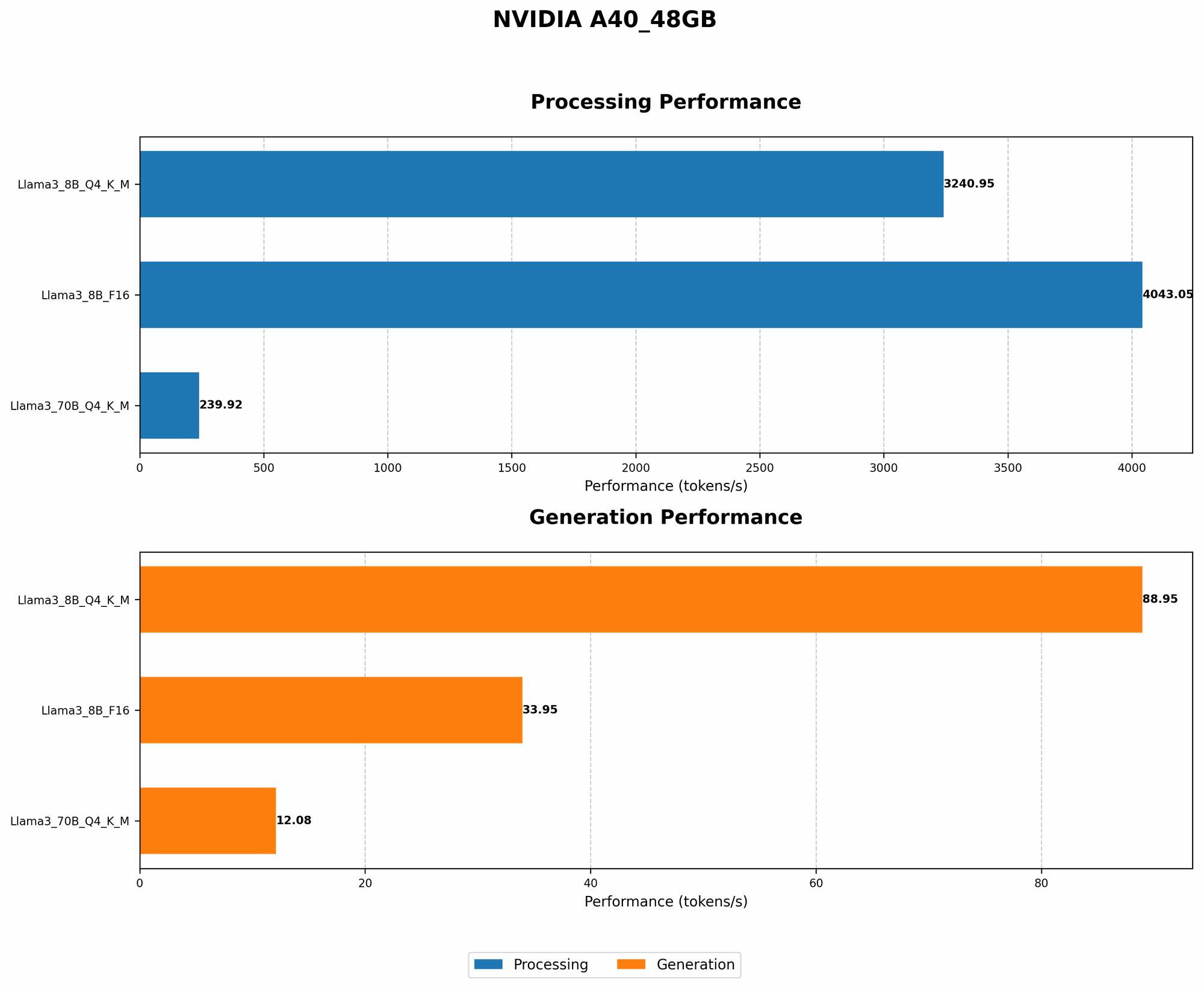
| Llama-3 8B | Q4 | 88.95 | Lower |
| Llama-3 8B | F16 | 33.95 | Lower |
| Llama-3 70B | Q4 | 12.08 | Lower |
| Llama-3 70B | F16 | N/A | Lower |
Key Takeaways:
- Q4 Quantization: Observe how Q4 quantization significantly boosts the token generation speed for both Llama-3 8B and 70B models, while keeping memory usage low. This is a clear win!
- F16: While F16 also reduces memory usage, it leads to a noticeable drop in performance compared to Q4.
Trick 2: Harnessing the Power of Multi-GPU: Running LLMs on a Team
If you're lucky enough to have multiple A40 GPUs, you can use them together like a team to handle the heavy lifting. This approach is known as "multi-GPU training or inference," and it can dramatically improve performance.
Imagine having a team of workers, each with their own section of a huge project. Similarly, in multi-GPU, each GPU takes on a slice of the model's calculations, significantly speeding up the process.
Trick 3: Fine-Tuning: Tailoring LLMs for Your Needs
Fine-tuning is like giving your LLM a little extra training to make it perform even better on specific tasks. Think of it as learning a new skill – you practice to become proficient. By fine-tuning LLMs, you can get them to specialize in tasks like writing different kinds of text, translating languages, or generating creative content.
Trick 4: Batch Size: Optimizing for Efficiency
Batch size is essentially the number of data samples used in a single training or inference step. Think of it like baking a batch of cookies – a larger batch means you can bake more cookies at once, but it might take longer overall.
- Larger batch size: This can speed up training and inference, but it also requires more memory.
- Smaller batch size: This requires less memory but can slow down training and inference.
Trick 5: Model Pruning: Cleaning Up the Model for Performance
Model pruning is like a cleanup crew for your LLM. It removes unnecessary connections within the model, making it more efficient. Think of it as cleaning up your closet – you remove the clothes you don't wear anymore, making it easier to find what you need.
Trick 6: Gradient Accumulation: Saving Memory with Smaller Steps
Gradient accumulation is a technique that lets you train an LLM with a smaller batch size while experiencing the benefits of a larger batch size. Think of it as taking small steps to reach the top of a mountain – you might take more steps, but you save energy!
Trick 7: Hardware Acceleration: Boost Performance with Specialized Hardware
Using specialized hardware, such as Tensor Cores on NVIDIA GPUs, can dramatically accelerate the calculations involved in running LLMs. Think of it like using a special tool to speed up a complex task.
Trick 8: Mixed Precision Training: Balancing Performance and Memory
Mixed precision training uses both high-precision (F32) and low-precision (F16) numbers during training. This helps to balance the benefits of using both high-precision calculations for accuracy and low-precision calculations for faster execution.
Comparison of A40_48GB Performance for Llama-3 8B and 70B
Let's compare the performance of Llama-3 8B and 70B models on the A40_48GB GPU, taking into account quantization and token generation speed.
| Model | Quantization | Tokens/Second | Memory Usage |
|---|---|---|---|
| Llama-3 8B | Q4 | 88.95 | Lower |
| Llama-3 8B | F16 | 33.95 | Lower |
| Llama-3 70B | Q4 | 12.08 | Lower |
| Llama-3 70B | F16 | N/A | Lower |
Observations:
- Llama-3 8B: Q4 quantization delivers impressive token generation speed for Llama-3 8B, significantly outperforming F16.
- Llama-3 70B: Q4 quantization for Llama-3 70B also delivers impressive token generation speed, but F16 results are not available. However, it's safe to assume that F16 would offer similar performance to 8B but with higher memory usage.
Conclusion
Running large language models on your NVIDIA A40_48GB GPU can be a rewarding experience, but you need to be mindful of memory limitations. By implementing these tricks, you'll be well-equipped to handle even the most demanding LLMs.
Remember, the key is to find the right balance for your specific use case, considering factors like model size, performance requirements, and memory constraints.
FAQ
What are the best ways to avoid out-of-memory errors when working with LLMs on a single GPU?
The best ways to avoid out-of-memory errors include using quantization techniques like Q4 or F16, adjusting the batch size, and considering model pruning to reduce the model's memory footprint. You can also experiment with gradient accumulation to effectively simulate a larger batch size without consuming additional memory.
What are the benefits of using dedicated hardware like Tensor Cores for LLM inference?
Tensor Cores are specialized hardware accelerators found in NVIDIA GPUs. They are particularly good at performing the matrix multiplications that are crucial for LLM inference. Using Tensor Cores can significantly speed up inference without consuming additional memory.
How can I determine the optimal batch size for LLM training or inference?
The optimal batch size for LLM training or inference depends on the model size, the available memory, and the desired performance. You can experiment with different batch sizes to find the best balance between performance and memory usage. Start with a small batch size and gradually increase it, monitoring the memory usage and performance.
What are the trade-offs involved in using mixed precision training for LLMs?
Mixed precision training employs both high-precision (F32) and low-precision (F16) numbers during training. This approach offers a balance between accuracy and speed. High precision ensures accuracy but can be slower, while low precision offers speed but with a possible loss of accuracy. You must weigh the trade-offs between accuracy and speed based on your specific needs.
Keywords:
Large Language Model, LLM, NVIDIA A40_48GB, Out-of-Memory, Quantization, Q4, F16, Batch Size, Memory Usage, Token Generation Speed, Performance, Llama-3, 8B, 70B, Multi-GPU, Fine-Tuning, Model Pruning, Gradient Accumulation, Hardware Acceleration, Mixed Precision Training