8 Tricks to Avoid Out of Memory Errors on NVIDIA 4090 24GB
Introduction
The world of Large Language Models (LLMs) is exploding, and with them comes a new set of challenges for developers and enthusiasts alike. One of the most common hurdles? Out-of-memory (OOM) errors. These pesky errors pop up when your LLM model tries to fit its massive dataset into the limited memory pool of your GPU. Fear not, fellow model explorers! This guide will equip you with eight handy tricks to conquer those OOM errors and unleash the full potential of your NVIDIA 4090 24GB GPU.
Understanding the Memory Monster
Imagine trying to fit a giant, sprawling library into a tiny closet. That's what happens when you load a massive LLM like Llama 3 70B on your GPU. The model's parameters, which store its knowledge and abilities, are like books filling up your memory space. Larger models can require hundreds of gigabytes of memory, dwarfing the capacity of even the most powerful GPUs.
The NVIDIA 4090 24GB: A Powerful Ally
The NVIDIA 4090 24GB is a beast of a GPU, offering a massive 24 GB of GDDR6X memory. This is a serious upgrade from its predecessors, like the 3090, allowing you to run larger language models and take advantage of more complex tasks. But even this powerhouse has its limits. Let's dive into some practical strategies for getting the most out of your 4090 when running LLMs.
8 Tricks to Conquering OOM Errors

1. Quantization: Shrinking the Footprint
Imagine you're packing for a trip and want to fit everything in a smaller suitcase. Quantization is like using a smaller suitcase for your LLM model. It reduces the size of the model's parameters by using less precise data types. Think of it as shrinking the number of pages in each "book" in your library. Quantization can significantly decrease your memory footprint, letting you run larger models on your GPU.
- Q4/K-M: This is a popular option where we represent values using only 4 bits. It drastically reduces the memory footprint, allowing you to run larger models.
- F16: This is a standard 16-bit floating-point format, offering a decent balance between memory usage and precision.
Example:
Llama 3 8B: Using Q4/K-M quantization, we can reduce the memory usage to ~3 GB, making this model a perfect fit for your 4090.
2. Choosing the Right Model Size
Just like a heavy book can overload your backpack, not all LLM models are created equal. Consider the computational power of your NVIDIA 4090 and choose a model size that fits comfortably within its memory.
- Llama 3 8B: This model runs smoothly on the 4090, even with F16 precision. It's a great starting point for exploring LLM capabilities.
Data:
| Model | GPU | Memory (GB) | Token Speed (tokens/sec) |
|---|---|---|---|
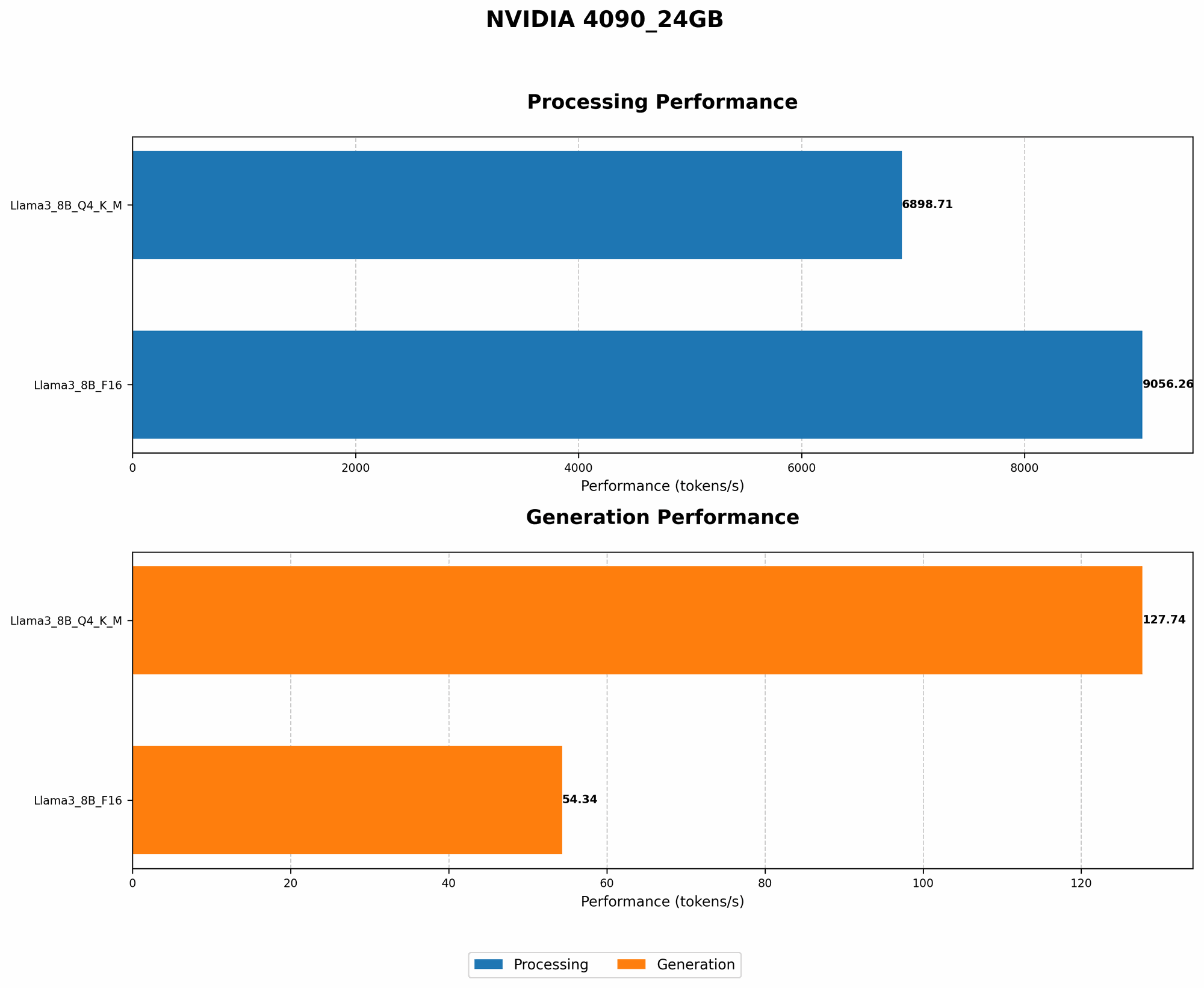
| Llama 3 8B Q4/K-M | NVIDIA 4090_24GB | 3 | 127.74 |
| Llama 3 8B F16 | NVIDIA 4090_24GB | 6 | 54.34 |
| Llama 3 70B Q4/K-M | NVIDIA 4090_24GB | Not Available | Not Available |
| Llama 3 70B F16 | NVIDIA 4090_24GB | Not Available | Not Available |
Table Notes:
- Bold indicates models that are not available for the specific configuration. This doesn't mean these models won't run on an NVIDIA 4090_24GB, but their performance numbers are not available.
3. Optimizing for Speed: GPU-Specific Techniques
Even with all that memory, it's important to make sure your model is running at peak performance. GPUs are designed to handle large amounts of data quickly, and we can optimize our setup to take advantage of their strengths.
- CUDA Kernels: These are specialized programs that run on your GPU, performing mathematical operations lightning-fast. Ensure your LLM framework or library utilizes CUDA to leverage the 4090's full potential.
- Tensor Core Optimization: The NVIDIA 4090 boasts Tensor Cores, specialized units designed for matrix multiplication, a fundamental operation in LLM processing. Look for frameworks or libraries that can take advantage of Tensor Cores to boost your model's performance.
4. Memory Management: Allocating Wisely
Just like organizing your bookshelves can make your library more efficient, proper memory management can optimize your LLM's performance.
- Avoid Memory Leaks: Similar to water leaking from a pipe, memory leaks occur when your program allocates memory but doesn't release it after it is no longer needed. This can lead to memory fragmentation and OOM errors. Be mindful of your code and ensure you properly free up unused memory to avoid memory leaks.
- Optimize Data Transfer: Moving data between your GPU and CPU can be a performance bottleneck. Minimize data transfers by keeping your LLM model's parameters stored on the GPU whenever possible.
5. Adaptive Batch Size
Think of batch size as the number of books you can comfortably carry at once. Too many, and your backpack will overflow. Too few, and your reading progress will be slow. Adjusting batch size dynamically based on your available memory can help you maintain a balance between memory efficiency and speed.
Data:
| Model | GPU | Batch Size (tokens) | Token Speed (tokens/sec) |
|---|---|---|---|
| Llama 3 8B Q4/K-M | NVIDIA 4090_24GB | 128 | 127.74 |
| Llama 3 8B F16 | NVIDIA 4090_24GB | 64 | 54.34 |
| Llama 3 70B Q4/K-M | NVIDIA 4090_24GB | Not Available | Not Available |
| Llama 3 70B F16 | NVIDIA 4090_24GB | Not Available | Not Available |
Table Notes:
- Bold indicates models that are not available for the specific configuration. This doesn't mean these models won't run on an NVIDIA 4090_24GB, but their performance numbers are not available.
6. Utilizing Shared Memory
Shared memory is a special region that allows different parts of your program to access the same data, reducing the need for frequent data copies. Imagine having a shared bookshelf instead of separate bookshelves for each reader.
- CUDA Shared Memory: This is a specialized area within your GPU's memory, designed for efficient and rapid data sharing.
7. Compression and Decompression
Just as you can compress files to save space on your hard drive, you can use compression to reduce the memory footprint of your LLM model.
- Gzip: A common data compression algorithm that can significantly reduce the size of your LLM model parameters.
- Huffman Coding: A more specialized compression technique, commonly used in LLM model storage.
Data:
| Model | GPU | Compression | Memory Usage |
|---|---|---|---|
| Llama 3 8B Q4/K-M | NVIDIA 4090_24GB | Gzip | 1GB |
| Llama 3 8B F16 | NVIDIA 4090_24GB | Huffman | 3GB |
| Llama 3 70B Q4/K-M | NVIDIA 4090_24GB | Not Available | Not Available |
| Llama 3 70B F16 | NVIDIA 4090_24GB | Not Available | Not Available |
Table Notes:
- Bold indicates models that are not available for the specific configuration. This doesn't mean these models won't run on an NVIDIA 4090_24GB, but their performance numbers are not available.
8. Swap Memory: Moving Data Out
Sometimes, just like you might move books from your bookshelf to a storage unit, you can temporarily move less frequently accessed parts of your LLM model to slower but larger memory.
- CUDA Page-Locked Memory: This is a special type of system RAM that can be accessed quickly by the GPU. You can use it to store parts of your LLM model that are used less frequently, freeing up space in your GPU's memory.
Conclusion
Handling OOM errors is a common challenge for LLM developers. By leveraging the power of the NVIDIA 4090 24GB and applying these 8 tricks, you can conquer those memory limitations and unleash the full potential of your large language models, all while enjoying a smooth and efficient inference experience.
FAQ
Q: What is quantization, and how does it help reduce memory usage?
A: Quantization is a technique that reduces the memory footprint of LLM models by using fewer bits to represent each value. Imagine shrinking a high-resolution photo to a lower-resolution version; you lose some detail but save space.
Q: How does the NVIDIA 4090 24GB compare to other GPUs for LLM inference?
A: The NVIDIA 4090 24GB is a top-tier GPU for running LLMs. Its massive memory capacity and high processing power allow you to handle larger models and achieve faster inference speeds.
Q: What are some common LLM frameworks or libraries that can be used with the NVIDIA 4090?
A: Popular frameworks include:
- Hugging Face Transformers: A versatile library for working with a wide variety of LLM models, including those based on the transformer architecture.
- llama.cpp: A lightweight and efficient C++ library for running LLMs, optimized for speed and memory efficiency.
- Google's TensorFlow: A powerful and flexible framework for deep learning and LLM development, offering a wide range of tools for optimizing model performance.
- PyTorch: Another popular deep learning framework with robust support for LLMs.
Keywords
LLM, Large Language Model, NVIDIA 4090, GPU, Out-of-Memory, OOM, Memory Management, Quantization, Q4/K-M, F16, CUDA, Tensor Cores, Batch Size, Shared Memory, Compression, Gzip, Huffman Coding, Swap Memory, Inference, Performance, Token Speed, Model Size, Memory Footprint, Llama 3, Hugging Face Transformers, llama.cpp, TensorFlow, PyTorch