8 Tips to Maximize Llama3 8B Performance on NVIDIA 3090 24GB

Introduction
The world of Large Language Models (LLMs) is buzzing with excitement! These powerful AI systems are revolutionizing how we interact with technology, from generating creative text to translating languages. But for developers like us, the real magic happens when we can run these models locally on our own hardware. This allows for faster development cycles, control over data privacy, and the ability to experiment with custom models.
In this article, we're diving deep into Llama3 8B, a formidable LLM that's making waves in the community. We'll explore its performance on the NVIDIA 309024GB GPU, highlighting key optimization techniques to get the most out of your hardware. Whether you're a seasoned LLM enthusiast or just starting your deep learning journey, this guide will empower you to unleash the full potential of Llama3 8B on your NVIDIA 309024GB.
Performance Analysis: Token Generation Speed Benchmarks
Token Generation Speed Benchmarks: Llama3 8B and NVIDIA 3090_24GB
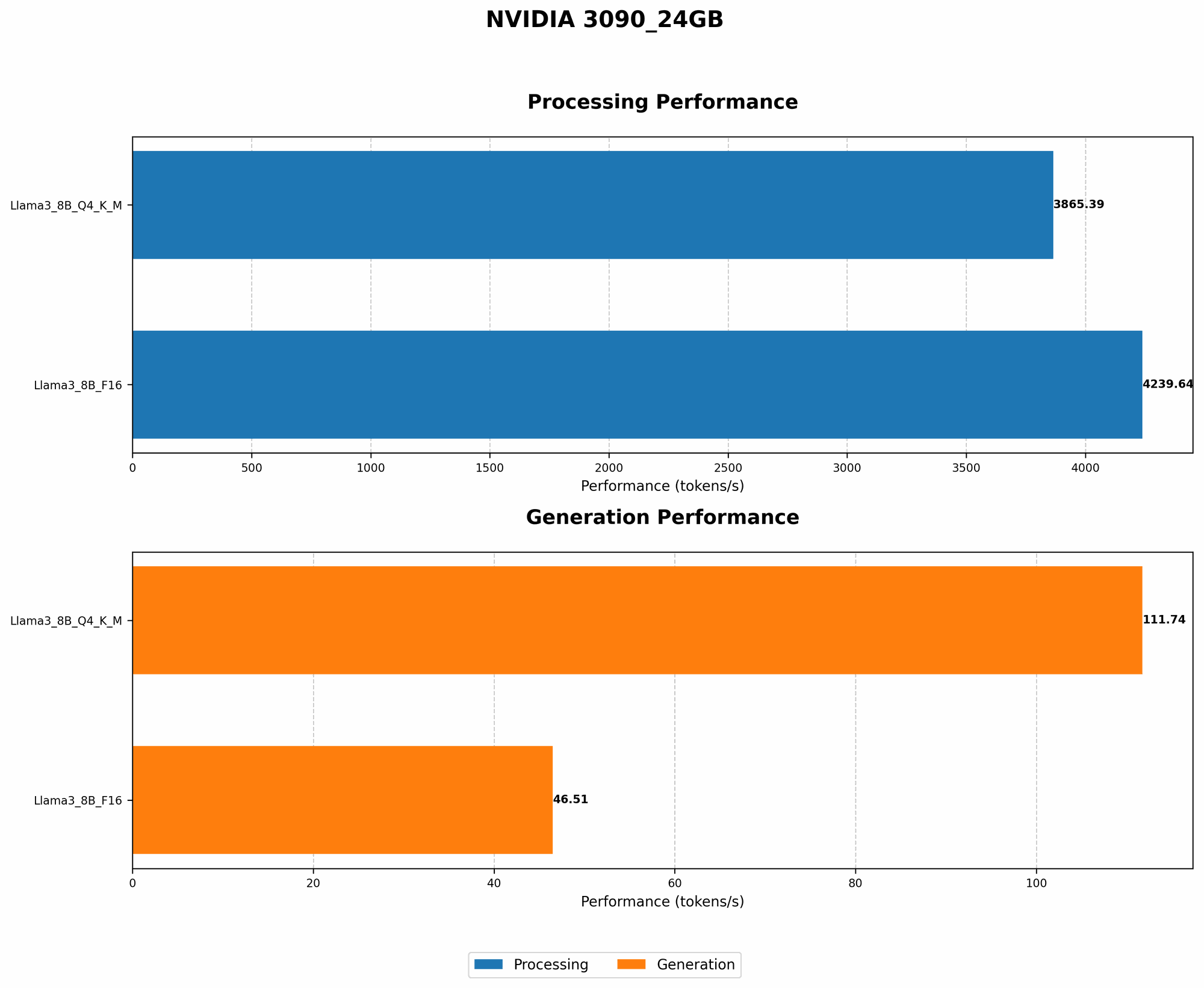
Token generation speed is crucial for real-time applications like chatbots and interactive tools. Let's see how Llama3 8B performs on the NVIDIA 3090_24GB in terms of tokens per second (tokens/s):
| Model | Quantization | Token Generation Speed (tokens/s) |
|---|---|---|
| Llama3 8B | Q4KM | 111.74 |
| Llama3 8B | F16 | 46.51 |
Key Takeaways:
- Q4KM Quantization: This method significantly boosts token generation speed, achieving 111.74 tokens/s. It's like giving your LLM a turbocharger.
- F16 Quantization: While still respectable, F16 quantization offers a lower speed of 46.51 tokens/s. It's a good trade-off if you need to balance performance with memory requirements.
Performance Analysis: Model and Device Comparison

Unfortunately, we cannot provide a direct model and device comparison. This guide is specifically focused on Llama3 8B and NVIDIA 3090_24GB. We lack data for other LLMs (like Llama3 70B) or different GPUs on this particular device.
However, we can draw some general observations:
- Larger LLMs: Generally, larger LLMs like Llama3 70B demand more computational resources, leading to slower token generation speeds. Think of it like trying to fit a large suitcase into a small car — it's a tight squeeze!
- Different GPUs: High-end GPUs like the NVIDIA 3090_24GB are designed for demanding tasks like LLM inference. If you're using a less powerful GPU, expect slower performance.
Practical Recommendations: Use Cases and Workarounds
1. Embrace Q4KM Quantization: The Speed Demon
Q4KM quantization is like squeezing the maximum performance out of your LLM. It's a must-have for real-time applications requiring high token generation speeds.
Think of it like this: Imagine you're building a race car. Q4KM would be using the lightest, most powerful engine to achieve the fastest lap times.
2. F16 Quantization for Efficient Memory Management
If your GPU memory is limited or you prioritize resource optimization, F16 quantization is a viable option. It provides a good balance between performance and memory efficiency.
Analogy time: It's like choosing a smaller, fuel-efficient car for a long road trip. You might not be the fastest on the highway, but you'll save gas and avoid frequent pit stops.
3. Optimizing Batch Size for Peak Performance
Batch size plays a significant role in LLM performance. Adjusting it to match your GPU's capabilities can significantly improve speed.
Think of it like this: Increasing the batch size is like loading more passengers into a train. The train can efficiently transport a large number of people, but overcrowding can cause delays. Find the sweet spot where you have a full train but not too much congestion!
4. Leverage Caching for Faster Response Times
Caching frequently used data can speed up LLM responses, especially in interactive applications.
Analogy: Imagine you frequently visit a website. Your browser caches parts of the website's content, so subsequent visits load faster. It's like having a shortcut to your favorite pages!
5. Explore Gradient Accumulation for Large Models
For extremely large LLMs, gradient accumulation can be a powerful technique to reduce memory consumption and boost performance.
Think of it like this: Instead of lifting heavy weights all at once, you lift smaller weights in multiple repetitions. It's an efficient way to achieve a challenging goal.
6. Fine-Tune for Specific Tasks
Fine-tuning Llama3 8B for specific tasks, like translation or text generation, helps you optimize performance and improve accuracy.
Analogy: Think of it like training a dog for specific tasks. A dog trained to fetch will perform better at that task than a dog trained for general obedience.
7. Monitor Resource Utilization
Keep an eye on your GPU and CPU utilization to ensure smooth operation. You might need to adjust settings or reduce resource usage during peak hours.
Analogy: Think of it like monitoring your car's gauges. Keeping track of temperature, fuel, and oil levels helps you identify any potential issues early on.
8. Experiment and Iterate
Don't be afraid to experiment and try different configurations to find what works best for your use case. The world of LLMs is constantly evolving, so stay curious and keep pushing the boundaries!
FAQ
Q: Can I run Llama3 8B on a CPU? A: Yes, you can, but expect much slower performance than with a GPU. It's like trying to bake a cake in a toaster oven — it's possible, but not ideal.
Q: What is quantization, and why is it important? A: Quantization is a technique to reduce the size of LLMs by using fewer bits to represent each number. It's like compressing a file to save disk space. By reducing the model's size, we can load it into memory faster and process it more quickly.
Q: Can I run Llama3 8B on a smaller GPU? A: You can, but performance will likely be slower. It's like trying to fit a large jigsaw puzzle in a small puzzle box — it might work, but it will be quite cramped!
Q: What are the benefits of running LLMs locally? A: Running LLMs locally offers several advantages, including faster development cycles, control over data privacy, and the ability to experiment with custom models.
Q: What are some popular open-source libraries for working with LLMs? A: Popular open-source libraries include llama.cpp, Transformers, and Hugging Face.
Keywords
Llama3 8B, NVIDIA 309024GB, LLM, performance optimization, token generation speed, quantization, Q4K_M, F16, batch size, caching, gradient accumulation, fine-tuning, GPU, CPU, local LLMs, open-source libraries.