8 Tips to Maximize Llama3 70B Performance on NVIDIA RTX 6000 Ada 48GB

Introduction
The world of large language models (LLMs) is booming, and with it comes the exciting prospect of running these models locally on your own hardware. But with the vast computational demands of LLMs, choosing the right hardware and configuration is crucial to achieving optimal performance. This article delves into the performance of the Llama3 70B model on the NVIDIA RTX6000Ada_48GB, a powerful GPU, and provides practical tips to maximize its capabilities. Think of it as a training ground for your LLM adventures!
Performance Analysis: Token Generation Speed Benchmarks
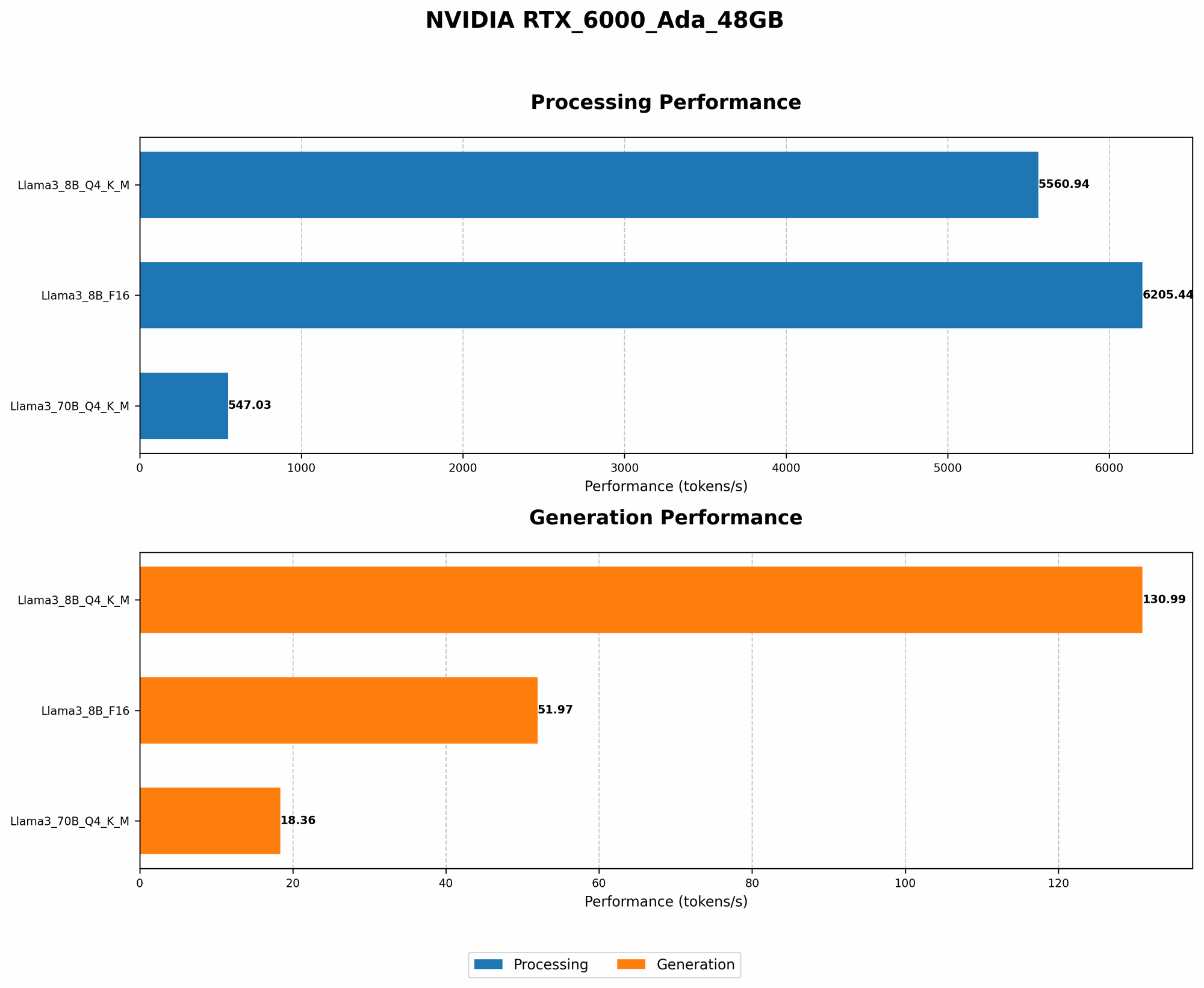
Llama3 70B on RTX6000Ada_48GB: A Token Speed Showdown
The first step towards understanding LLM performance is analyzing its token generation speed. This metric represents how quickly a model can generate new text. Imagine it like a race: the faster it generates tokens, the quicker you get your responses. Here's a breakdown of the Llama3 70B performance on the powerful RTX6000Ada_48GB, showcasing token generation speed:
| Model & Quantization | Generation Speed (Tokens/Second) |
|---|---|
| Llama3 70B Q4KM | 18.36 |
| Llama3 70B F16 (Not Available) | NA |
The Q4KM quantization is a technique that reduces the model's size and memory footprint, allowing for faster processing. We can see that the Llama3 70B model achieves a respectable token generation speed of 18.36 tokens/second with Q4KM quantization. Unfortunately, the F16 quantization data for Llama3 70B is unavailable.
Performance Analysis: Model and Device Comparison
Llama3 70B vs. Llama3 8B: A Tale of Two Models
It's fascinating to see how different models perform on the same GPU. The Llama3 8B model is a smaller, more lightweight variant of the Llama3 70B model, and as expected, it consistently outperforms the larger model in terms of token generation speed.
Let's take a look at a direct comparison of token generation speeds between Llama3 70B and Llama3 8B on the RTX6000Ada_48GB:
| Model & Quantization | Generation Speed (Tokens/Second) |
|---|---|
| Llama3 70B Q4KM | 18.36 |
| Llama3 8B Q4KM | 130.99 |
| Llama3 8B F16 | 51.97 |
As you can see, the smaller Llama3 8B model, even with the more resource-intensive F16 quantization, achieves a significantly faster token generation speed compared to the Llama3 70B, especially in the Q4KM configuration. This difference in performance highlights the trade-off between model size and computational requirements.
Practical Recommendations: Use Cases and Workarounds
Leveraging Llama3 70B on RTX6000Ada_48GB: Tips and Tricks
Now that we've delved into the performance data, let's discuss practical ways to maximize the Llama3 70B model's capabilities on the RTX6000Ada_48GB:
- Choose the Right Quantization: Opting for Q4KM quantization for Llama3 70B can improve token generation speed. Although unavailable, if F16 data were available, it could provide potentially faster performance, but you might need more memory resources.
- Optimize Your Code: You can improve performance by:
- Using a fast language: Python is popular for its simplicity, but C++ can be faster.
- Efficient tensor operations: Leverage libraries like CuPy or Numba for optimized GPU calculations.
- Batching requests: Sending multiple prompts in a single batch can save time compared to processing requests individually.
- Fine-Tune the Model: Fine-tuning your Llama3 70B model on specific tasks or datasets can significantly enhance its performance and relevance to your use case.
- Experiment with Model Size: If you are budget-constrained, consider exploring Llama3 8B or even smaller models to achieve faster speeds.
- Use a Distributed System: For very large LLMs or extremely demanding tasks, consider using a distributed system with multiple machines and GPUs working in parallel.
- Don't Overcomplicate it: Sometimes, the simplest solutions are the best. Avoid unnecessary complexity in your code and stick with proven methods and libraries.
- Remember, it's a marathon, not a sprint: LLM performance is constantly evolving, so be patient and don't get discouraged if you don't achieve maximum efficiency right away.
- Use tools and libraries: Tools like llama.cpp can further optimize LLM performance on devices like the RTX6000Ada_48GB.
FAQ: Addressing Common Questions
Q: Is the RTX6000Ada_48GB the best GPU for running Llama3 70B?
- A: The RTX6000Ada_48GB is a powerful GPU, but there are even more powerful options available. The ideal GPU for you will depend on your specific needs, budget, and the size of the LLM you are running.
Q: Can I run Llama3 70B on my gaming laptop's GPU?
- A: It's possible, but you might experience slower performance than on a dedicated GPU like the RTX6000Ada_48GB. The performance will depend on your laptop's GPU's specifications and the LLM's size.
Q: What does quantization mean?
- A: Quantization is a technique that reduces the size of a model by representing its weights (numbers that determine the model's behavior) with fewer bits. It's like using a smaller map to represent the same area. Quantization can improve performance by allowing the model to fit in memory more easily, leading to faster processing.
Q: What are some real-world use cases for LLMs?
- A: LLMs have a wide range of applications, including:
- Generating creative content: Writing stories, poems, songs, scripts, and more.
- Translating languages: Converting text from one language to another.
- Summarizing documents: Condensing long articles or reports into concise summaries.
- Answering questions: Providing information based on a given context.
- Code generation: Writing code in various programming languages.
Q: Is running LLMs locally the same as using cloud-based services?
- A: Running LLMs locally offers more control and privacy, but you also need to manage the hardware and software yourself. Cloud-based services handle these complexities for you but may involve costs and latency.
Keywords:
LLM, Llama3, RTX6000Ada48GB, GPU, Token Generation Speed, Quantization, Q4K_M, F16, Performance, Model Size, Optimization, Use Cases, Workarounds, Fine-tuning, Distributed System, llama.cpp