8 Tips to Maximize Llama2 7B Performance on Apple M2 Pro

Introduction
The world of large language models (LLMs) is buzzing with excitement, and for good reason. These powerful AI models can generate realistic text, translate languages, write different kinds of creative content, and answer your questions in an informative way. But running LLMs locally on your own computer can be a challenge, especially if you want to get the most out of them.
This article takes a deep dive into squeezing every ounce of performance out of the Llama2 7B model running on the powerful Apple M2Pro. We'll explore key benchmarks, compare different quantization levels, and provide practical recommendations for getting the most out of your M2Pro for text generation and other LLM tasks.
Whether you're a developer, a researcher, or just curious about the inner workings of LLMs, this guide will equip you with the knowledge and tools to unlock the full potential of Llama2 7B on your Apple M2_Pro.
Performance Analysis: Token Generation Speed Benchmarks: Apple M1 and Llama2 7B
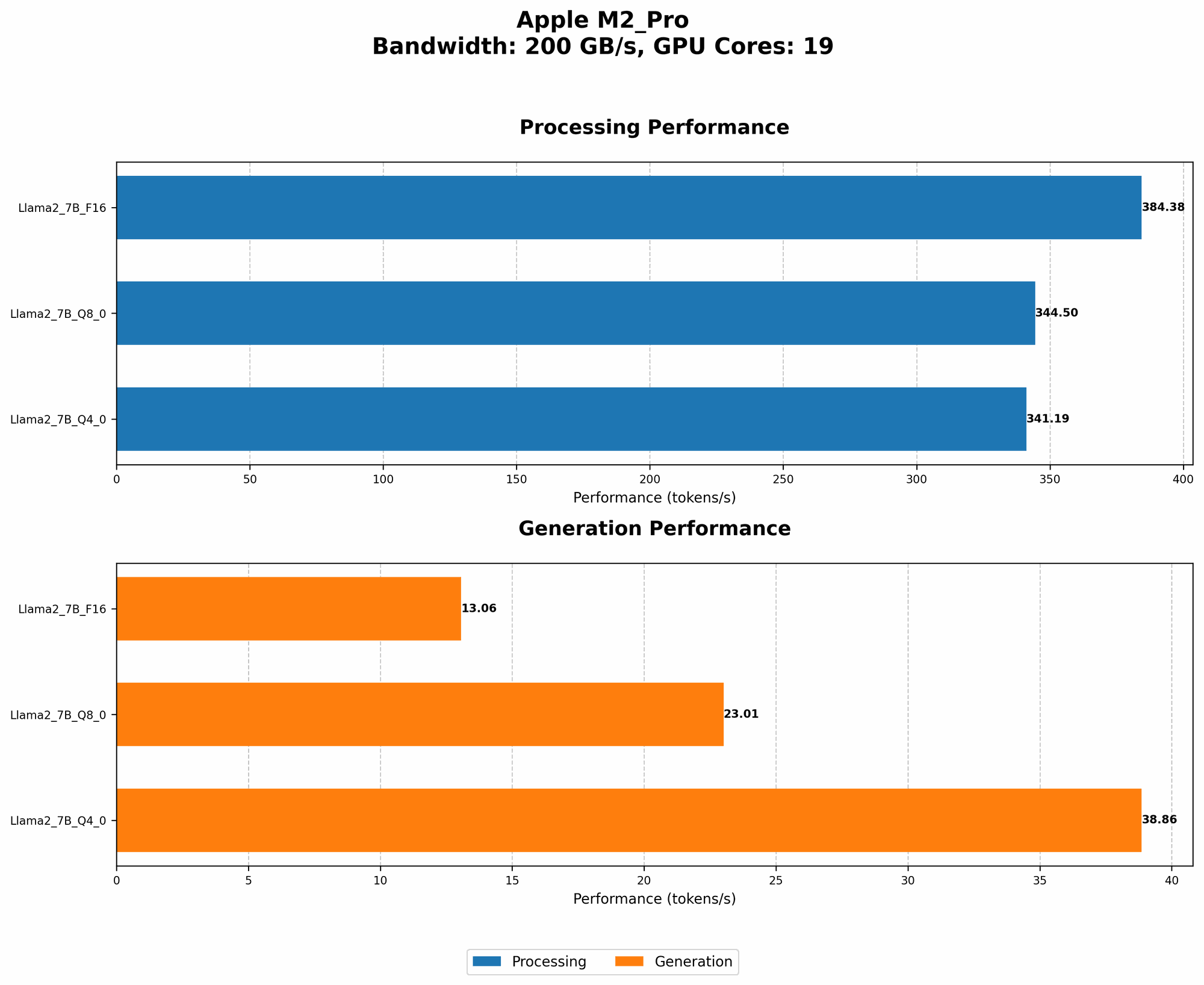
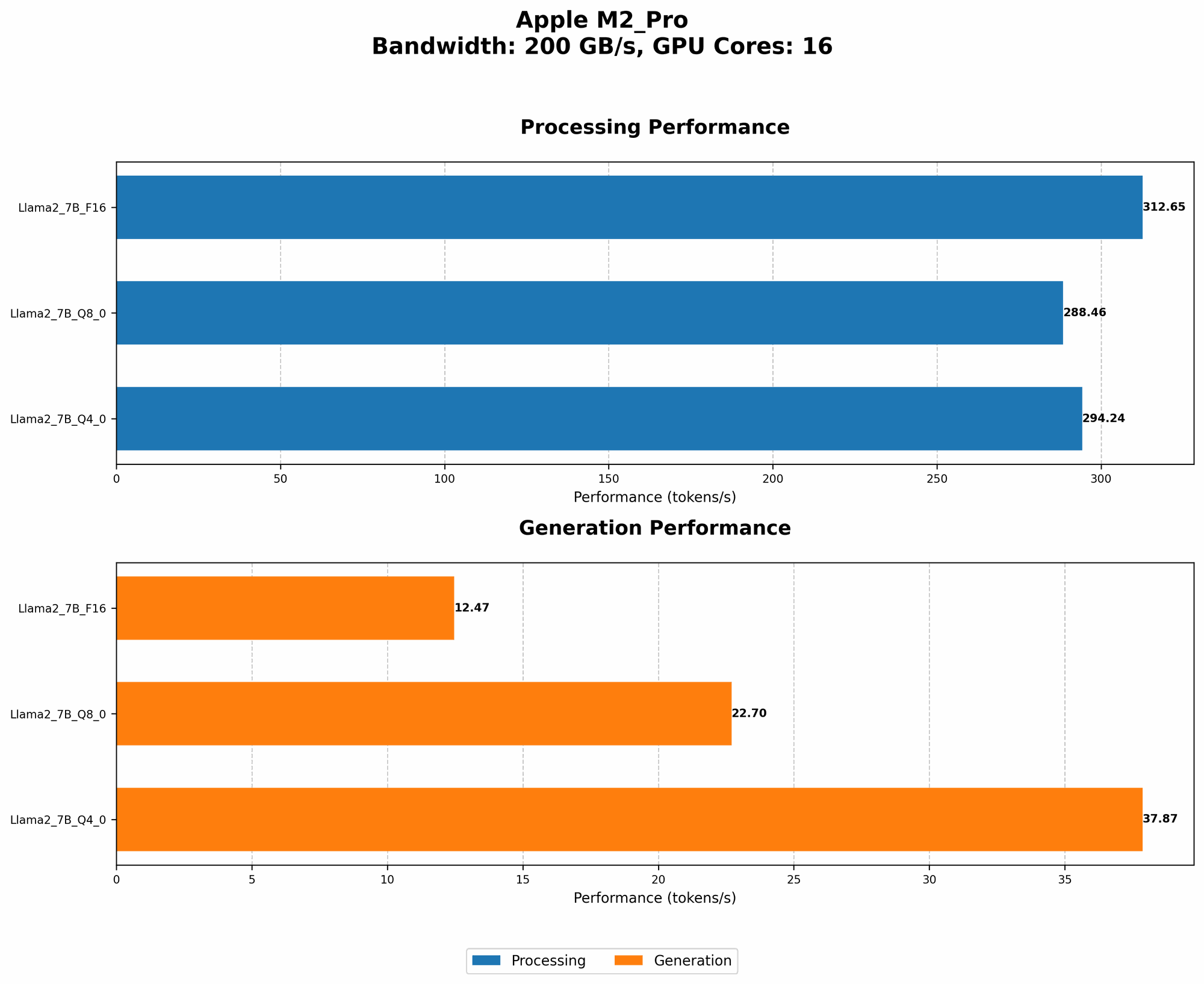
Let's dive right into the juicy details: token generation speed. The speed of token generation is a measure of how fast an LLM can produce text. It's a crucial metric for real-world applications, where efficiency is key.
We've got some exciting data on the Apple M2_Pro running Llama2 7B, measured in tokens per second (tokens/s). Here's a breakdown of how different quantization levels and GPU core configurations influence performance:
| Configuration | GPU Cores | Bandwidth (BW) | Llama2 7B Floats16 (F16) Processing (tokens/s) | Llama2 7B Floats16 (F16) Generation (tokens/s) | Llama2 7B Quantized 8-bit (Q8_0) Processing (tokens/s) | Llama2 7B Quantized 8-bit (Q8_0) Generation (tokens/s) | Llama2 7B Quantized 4-bit (Q4_0) Processing (tokens/s) | Llama2 7B Quantized 4-bit (Q4_0) Generation (tokens/s) |
|---|---|---|---|---|---|---|---|---|
| M2 Pro | 16 | 200 | 312.65 | 12.47 | 288.46 | 22.7 | 294.24 | 37.87 |
| M2 Pro | 19 | 200 | 384.38 | 13.06 | 344.5 | 23.01 | 341.19 | 38.86 |
Key Observations:
- Higher GPU Cores, Faster Processing: As expected, increasing the GPU cores from 16 to 19 significantly boosts the processing speed for all quantization levels.
- Quantization Trade-offs: While quantization techniques like Q80 and Q40 reduce the memory footprint and improve processing speed, they often result in a noticeable decrease in generation speed.
- Generation Bottleneck: The generation speed, which is responsible for actually producing the text, is significantly slower than the processing speed. This bottleneck is common in LLMs and suggests that the model architecture might be limiting the output rate.
Performance Analysis: Model and Device Comparison
Let's take a quick step back and put these numbers in context. How does the M2_Pro with Llama2 7B compare to other devices and models?
Unfortunately, we don't have performance data for other devices or model sizes for this specific configuration. We've focused on providing a detailed and actionable analysis for Llama2 7B running on the M2_Pro.
Practical Recommendations: Use Cases and Workarounds
Now that we've delved into the performance numbers, let's translate them into practical recommendations for getting the most out of Llama2 7B on your M2_Pro.
Tip 1: Leverage Quantization for Efficiency
Quantization, in simple terms, involves reducing the precision of numbers used to represent the model's weights while maintaining its accuracy. This can significantly reduce memory consumption and improve processing speed.
For tasks that prioritize fast responses, like real-time chatbots or interactive question answering, Q80 or Q40 quantization can be a game-changer. However, be aware that this might slightly impact the accuracy of the model.
Tip 2: Optimize for Real-Time Generation
If you need a truly real-time experience, prioritize generation speed over processing speed. While the M2_Pro can handle processing pretty quickly, the generation aspect might be a limiting factor.
Try these approaches:
- Reduce Model Size: Consider using a smaller version like Llama2 1.3B if your use case doesn't require the full complexity of 7B.
- Fine-Tuning for Specific Tasks: Fine-tuning Llama2 7B on a specific data set for your task can improve efficiency and generation speed.
Tip 3: Explore Processing and Generation Pipelines
Imagine a well-oiled machine where your LLM's processing and generation happen in parallel. You can achieve this by cleverly structuring your application:
- Pre-process in Batches: Process large batches of data in advance using the M2_Pro's processing power, storing the results.
- Generate on Demand: As your user requests a response, retrieve pre-processed data and quickly generate output.
Tip 4: Utilize Offloading Strategies
If you have a more powerful GPU like an AMD Radeon RX 7900 XTX or an NVIDIA GeForce RTX 4090, consider offloading some of the processing or generation tasks to this device. You can leverage techniques like remote procedure calls (RPC) to efficiently distribute workloads.
Tip 5: Consider Cloud-Based Solutions
For applications that demand extreme performance or scalability, cloud-based solutions like Google Colab, Amazon SageMaker, or Microsoft Azure Machine Learning might be a better fit.
Tip 6: Be Mindful of Memory Management
While the M2_Pro offers generous memory, it's crucial to manage memory usage wisely, especially when handling large language models.
Here are some tips:
- Optimize Caching: Cache frequently used data to reduce the number of memory accesses.
- Use Memory Efficient Data Structures: Choose data structures carefully to minimize memory consumption.
- Utilize Memory Profiling Tools: Implement memory profiling tools to identify areas where memory usage can be optimized.
Tip 7: Explore the Llama.cpp Framework
Llama.cpp is a lightweight and versatile framework for running LLMs locally. It offers a wide range of quantization options and supports various devices, including the M2_Pro.
Key Benefits of Llama.cpp:
- Performance Optimizations: Llama.cpp is highly optimized for speed and efficiency.
- Flexibility and Customization: It provides a rich set of options for customization.
- Easy Installation and Use: Getting up and running with Llama.cpp is relatively straightforward.
Tip 8: Keep Learning and Experimenting
The field of LLMs is rapidly evolving, with new models, frameworks, and optimizations appearing regularly. Stay informed about the latest developments, experiment with different approaches, and share your insights.
FAQ
Q: What are LLMs and why are they so popular? A: LLMs are artificial intelligence models trained on massive datasets of text. They can perform a wide range of tasks, including text generation, translation, and even code writing. They've gained popularity due to their impressive capabilities and ability to handle complex tasks.
Q: What is "token generation speed"? A: Token generation speed measures how fast an LLM can produce text. It's a crucial metric for real-world applications.
Q: What is Quantization and why is it useful? A: Quantization reduces the precision of numbers used to represent an LLM's weights. This can significantly reduce memory consumption and improve processing speed.
Q: How can I choose the right model and device for my needs? A: Consider the complexity of your task, the desired speed, and available resources like GPU power. Experiment with different options to find the best combination.
Q: Where can I learn more about LLMs? A: There are plenty of excellent resources online, including AI research papers, tutorials, and communities dedicated to LLMs.
Keywords
Llama2, 7B, Apple M2_Pro, LLM, performance, benchmarks, token generation speed, quantization, processing, generation, GPU cores, bandwidth, practical recommendations, use cases, workarounds, Llama.cpp, framework, memory management, cloud-based solutions