8 Tips to Maximize Llama2 7B Performance on Apple M1 Ultra
Introduction
In the world of large language models (LLMs), the race for speed and efficiency is on. We're all eager to harness the power of these AI marvels, but it's not just about raw processing power. Getting the most out of your hardware, especially for local LLM deployment, is key to unlocking the full potential of these models. Today, we're diving deep into the performance of Llama2 7B running on the Apple M1 Ultra – a powerful chip often seen as a powerhouse for creative professionals. But can it handle the demands of LLMs? Let's find out!
Performance Analysis: Token Generation Speed Benchmarks: Apple M1 and Llama2 7B
What are Tokens? Imagine words as LEGO bricks. Tokens are like individual bricks that build the structure of a sentence. An LLM processes these tokens, one by one, to understand the meaning of the text and generate a response.
How Fast is Fast? Token generation speed (measured in tokens per second) is a key indicator of an LLM's performance. The higher the token generation rate, the faster an LLM can understand and respond to your queries. Think of it like a super-fast typist, churning out words with lightning speed.
Llama2 7B on the Apple M1 Ultra: A Speed Race
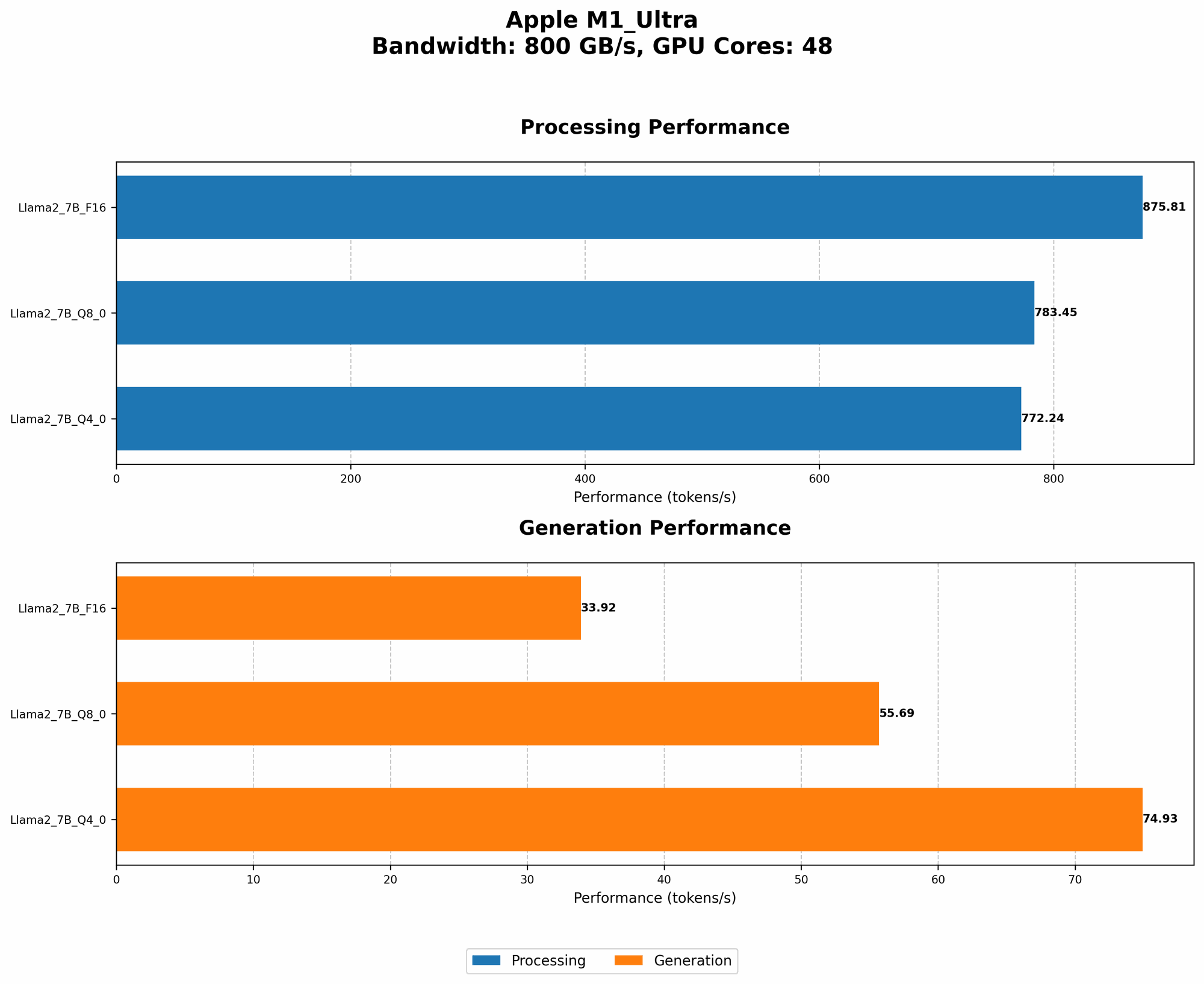
Let's see how the Llama2 7B model performs on the powerful Apple M1 Ultra, broken down by quantization levels (F16, Q80, Q40). These quantization levels represent different ways of compressing the model's data, impacting both performance and accuracy.
| Configuration | Tokens/Second (Processing) | Tokens/Second (Generation) |
|---|---|---|
| Llama2 7B (F16) | 875.81 | 33.92 |
| Llama2 7B (Q8_0) | 783.45 | 55.69 |
| Llama2 7B (Q4_0) | 772.24 | 74.93 |
Key Findings
- Processing Powerhouse: The M1 Ultra demonstrates impressive speed when it comes to processing tokens, especially at the F16 quantization level. This means it can quickly analyze the input text and understand its meaning.
- Generating Responses: The token generation speeds are lower compared to processing, but still respectable. This indicates that the M1 Ultra is capable of generating responses at a decent pace, even with the smaller Llama2 7B model.
- Quantization Impacts: Lower quantization levels (Q80 and Q40) result in a slight reduction in processing speed but significantly improve token generation performance. The trade-off here is accuracy – lower quantization can lead to a slight drop in the quality of the generated text.
Quantization Simplified: Imagine having a book with millions of words. Quantization is like summarizing the book by replacing long words with shorter ones, or even single letters. This makes the book smaller and easier to carry around, but some of the original detail might be lost.
Performance Analysis: Model and Device Comparison
While we're focusing on the Apple M1 Ultra, it's worth comparing the performance of the Llama2 7B model on different devices. This gives us a broader perspective on the strengths and weaknesses of the M1 Ultra.
Unfortunately, we don't have data for other devices running Llama2 7B, making a direct comparison impossible. However, you can find data for other devices and model sizes on resources like the Llama.cpp discussions forum and the GPU Benchmarks on LLM Inference repository.
Practical Recommendations: Use Cases and Workarounds
Use Case 1: Fast Text Processing
The Apple M1 Ultra excels at processing large amounts of text quickly, especially when using the F16 quantization level. This makes it ideal for tasks like:
- Text Summarization: Quickly extract the key points from long articles or documents.
- Sentiment Analysis: Categorize the overall sentiment (positive, negative, neutral) of a large corpus of text.
- Content Moderation: Identify and flag potentially offensive or inappropriate content at high speed.
Use Case 2: Real-Time Chatbots
While the token generation speeds aren't as fast as some dedicated AI chips, the M1 Ultra is still capable of running real-time chatbots for simple conversations:
- Basic Customer Service: Provide quick answers to common questions.
- Personalized Recommendations: Offer suggestions based on user input.
- Language Translation: Translate short phrases or sentences in real-time.
Workarounds
- Lower Quantization: If you need faster response times, consider using lower quantization levels like Q80 or Q40. Be mindful of the potential trade-off in accuracy.
- Hardware Acceleration: Explore hardware acceleration options like Metal or CUDA for even faster performance. However, this may require additional development effort.
8 Tips to Maximize Llama2 7B Performance on the Apple M1 Ultra
- Optimize Quantization: Choose the right quantization level for your specific use case. For faster generation, consider Q80 or Q40, but be prepared for a slight decrease in accuracy.
- Fine-Tune the Model: Fine-tuning the Llama2 7B model on a specific dataset can boost its performance for your specific use case. Think of it like tailoring a suit for a perfect fit.
- Use Efficient Libraries: Employ optimized libraries like llama.cpp or other frameworks that are designed to leverage the capabilities of the M1 Ultra.
- Streamline Your Code: Optimize your code to avoid unnecessary overhead and maximize the efficiency of the M1 Ultra's processing power.
- Minimize Memory Usage: Optimize your code and data structures to reduce memory usage and improve performance. Think of it like decluttering your hard drive for faster access.
- Utilize Multi-Threading: If possible, leverage the multi-core capabilities of the M1 Ultra by parallelizing tasks to speed up processing time.
- Experiment with Parameters: Adjust parameters like the context length, batch size, and number of layers to find the optimal settings for your needs.
- Monitor and Analyze: Track the performance of the M1 Ultra over time to identify bottlenecks and further optimize your setup.
FAQ
Q: What is the difference between Llama 7B and Llama 70B?
A: Llama 7B and Llama 70B are different sizes of the Llama language model. The number indicates the number of parameters in the model. Llama 7B has 7 billion parameters, while Llama 70B has 70 billion. Larger models generally have more capabilities but require more resources to run.
Q: How is Llama2 different from other LLMs?
A: Llama2 is a powerful open-source language model developed by Meta. It's known for its impressive capabilities in tasks like text generation, translation, and summarization. It's also notable for its availability under a permissive license, making it easier to use for research and commercial applications.
Q: Can I use Llama2 7B on other devices besides the M1 Ultra?
A: Yes, Llama2 7B can be used on various devices. The performance will vary depending on the hardware and software configurations.
Q: What are the limitations of local LLM deployment?
A: Local LLM deployment can be resource-intensive, requiring powerful hardware. It also limits the scalability of applications and may not be suitable for tasks requiring access to real-time data or cloud services.
Q: Are there any alternatives to the Apple M1 Ultra for running LLMs locally?
A: Yes, there are a number of alternatives. Consider exploring GPUs offered by NVIDIA (like the RTX 4090) or AMD (like the Radeon RX 7900 XTX). These graphics cards are designed for high-performance computing tasks and are popular choices for running LLMs locally.
Keywords
Llama2 7B, Apple M1 Ultra, LLM performance, token generation speed, quantization, F16, Q80, Q40, processing, generation, use cases, workarounds, optimization tips, local LLM deployment, AI, machine learning, natural language processing, deep learning, open-source