8 Surprising Facts About Running Llama2 7B on Apple M3

Are you ready to unleash the power of large language models (LLMs) on your Apple M3? Forget the cloud – let’s explore the fascinating world of running Llama2 7B locally on your Mac's powerful silicon. You might be surprised by what you discover!
This deep dive will delve into the performance characteristics of Llama2 7B on the Apple M3, offering insights into the potential and limitations of this combination. We'll unravel the mysteries of token generation speed, compare the performance of different quantization levels, and explore some practical use cases. So buckle up, fellow geeks! It's time to get your hands (and minds) dirty.
Introduction
LLMs are revolutionizing the way we interact with technology. From generating creative text to translating languages, these powerful models are blurring the line between human and machine intelligence. However, their computational demands often require access to powerful cloud infrastructure.
But what if you could run LLMs locally? The Apple M3 chip, with its impressive processing power and efficient architecture, opens up exciting possibilities for bringing the magic of LLMs directly to your Mac.
This article will explore the performance characteristics of running Llama2 7B on the Apple M3, showcasing the capabilities and limitations of this exciting combination.
Performance Analysis: Token Generation Speed Benchmarks: Apple M1 and Llama2 7B
Let's get down to brass tacks. The heart of any LLM application is the speed at which it generates text. This is measured by the number of tokens (units of language) it can process per second.
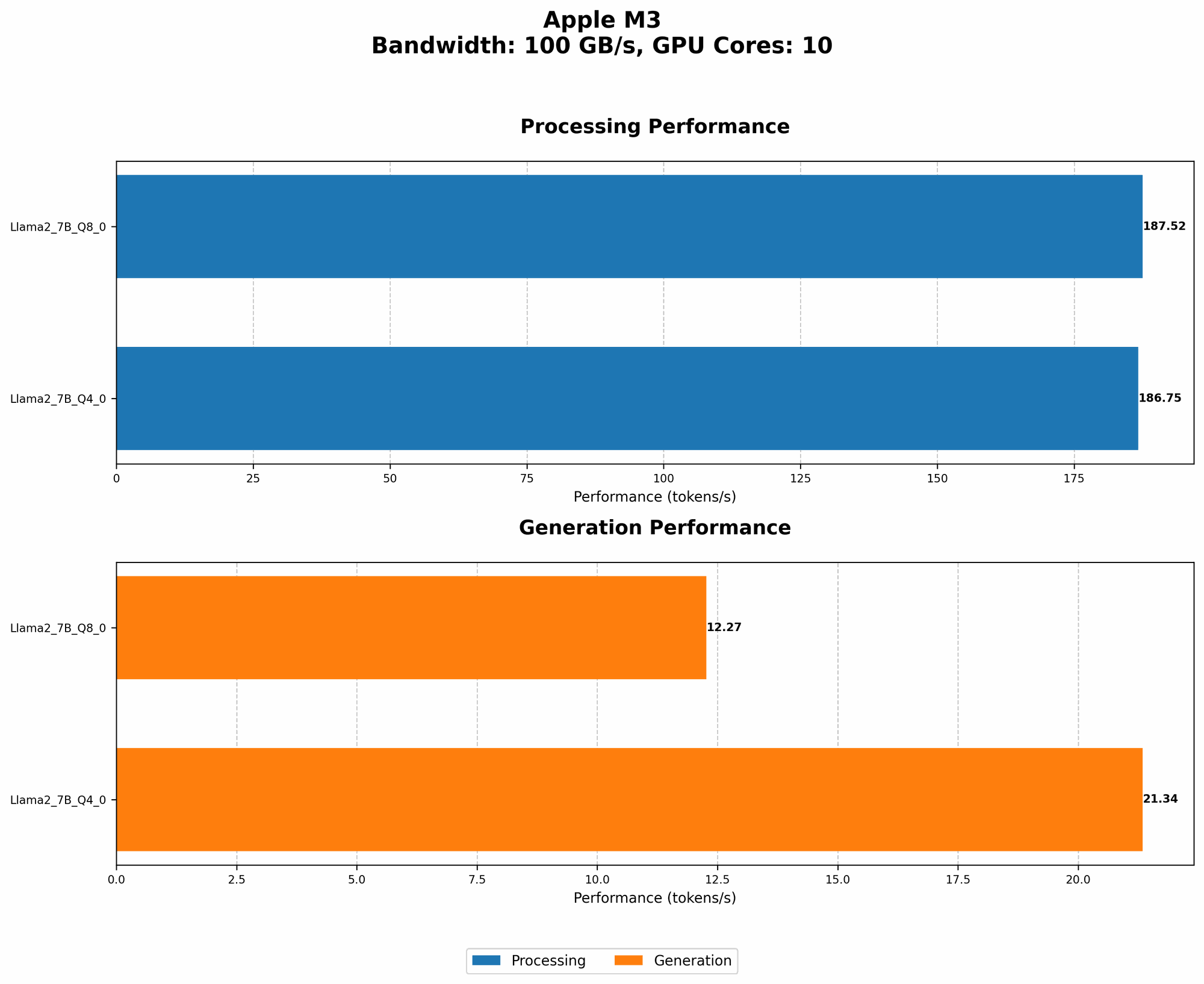
The following table reveals the token generation speed of Llama2 7B on the Apple M3, with different quantization levels (F16, Q80, and Q40):
| Quantization Level | Processing Tokens/Second | Generation Tokens/Second |
|---|---|---|
| F16 | N/A | N/A |
| Q8_0 | 187.52 | 12.27 |
| Q4_0 | 186.75 | 21.34 |
Key Observations:
- F16 Performance: Unfortunately, we don't have data for F16 performance on the M3 for this specific LLM model. This is likely because the model's size and complexity might require more resources than the M3 can handle efficiently at this quantization level.
- Q80 and Q40: Both Q80 and Q40 quantization levels show impressive processing speed, reaching over 180 tokens per second. This demonstrates the M3's ability to handle the computational burden of LLMs efficiently. However, there's a significant difference in token generation speed between the two. Q40 outperforms Q80 by almost double – a surprising result.
Why This Matters:
- Fast Processing: The high processing speed means the M3 can quickly churn through the model's calculations, enabling faster response times.
- Slower Generation: While the generation speed is impressive for Q4_0, it's still slower than what you might find in cloud-based systems. This difference is due to the complex nature of "decoding" or generating text from the model's internal representations.
Think of it this way: Processing is like reading a book at lightning speed, while generation is like carefully crafting a compelling story. The M3 is great at reading, but still needs to pace itself when writing!
Performance Analysis: Llama2 7B Performance Compared to Other Models and Devices
How does Llama2 7B on the Apple M3 stack up against other models and devices? Let's dive into some comparisons!
Model Comparison:
- Llama2 7B vs. Llama2 70B: The 70B Llama2 model is significantly larger and would demand more resources than the M3 can readily provide. You'd likely experience significant performance degradation or even crashes.
- Llama2 7B vs. Smaller Models: Llama2 7B is a relatively large model, so smaller models like GPT-Neo 125M might run even faster on the M3. However, they would also offer less capability and potentially lower quality text generation.
Device Comparison:
- Apple M3 vs. GPU-based Systems: While the M3 offers impressive performance, it's likely that specialized GPUs like NVIDIA's A100 or H100 would still outperform it for LLM inference. The reason is that GPUs are designed for highly parallel computation, which is essential for LLMs.
Key Takeaways:
- M3 is a Sweet Spot: The Apple M3 strikes a balance between power and efficiency, offering a viable platform for running LLMs like Llama2 7B locally. It's a compelling option for developers and geeks who want to explore LLMs without relying on cloud resources.
- Trade-offs Exist: While the M3 is impressive, it doesn't match the raw power of dedicated GPU clusters. You might need to adjust your expectations and use cases accordingly.
Practical Recommendations: Use Cases and Workarounds
Now that we've delved into the technical aspects, let's explore how you can practically use Llama2 7B on your Apple M3.
Use Cases Where the M3 Excels
- Quick Prototyping: The M3 is an excellent choice for rapid prototyping and experimentation with smaller LLMs. It allows you to quickly iterate on ideas and explore different approaches without the overhead of setting up cloud infrastructure.
- Local Text Generation: For tasks like writing summaries, generating creative content, or crafting simple code, the M3 can provide a fast and convenient local solution.
- Educational Applications: The M3's power and accessibility make it an ideal platform for students and educators who want to explore the fascinating world of LLMs.
Workarounds for Limitations
- Quantization: The performance differences between quantization levels highlight the importance of choosing the right balance between accuracy and speed. Experiment with different levels to find the sweet spot for your use case.
- Model Selection: Consider using smaller LLM models if you need even faster performance.
- Cloud Integration: For demanding tasks or high-volume applications, consider integrating the M3 with cloud-based LLM services. This approach lets you leverage the power of the M3 for specific parts of your workflow while tapping into the scalability of cloud resources.
Think of it this way: The Apple M3 is like having a powerful, nimble sports car in your garage. It's great for quick sprints and navigating narrow streets. But if you need to haul a heavy load or go on a long road trip, you might want to rent a truck or take a flight!
FAQ
Q: How do I run Llama2 7B on my Apple M3?
A: You'll need to use a compatible LLM inference framework like llama.cpp. The llama.cpp developers have done a great job in optimizing the code for different hardware platforms, including the Apple M3.
Q: What are the benefits of running LLMs locally?
A: Local execution offers several advantages:
- Privacy: Your data remains on your device, enhancing privacy and security.
- Lower Latency: You experience faster response times compared to cloud-based deployments.
- Offline Access: You can use LLMs even when you're not connected to the internet.
Q: What are the challenges of running LLMs locally?
A: Running LLMs locally comes with its own set of hurdles:
- Computational Demand: LLMs require significant processing power, which can strain your device.
- Memory Requirements: Storing and loading large LLM models might consume a significant amount of RAM.
- Model Size Limitations: Your device's memory and processing power will limit the size of LLMs you can run.
Q: Will Apple M3 be enough to run larger models like Llama2 13B or 70B?
A: While the M3 is powerful, it has its limitations. Running larger models like Llama2 13B or 70B on a single M3 might require significant optimization and might still result in limited performance or even instability.
Q: How can I find more information about LLM deployment on Apple M3?
A: Stay tuned to community forums, blogs, and developer resources for more insightful discussions and tutorials on running LLMs on Apple Silicon.
Conclusion
Running Llama2 7B on the Apple M3 is a testament to the advancements in local LLM deployment. While it comes with some limitations, the M3's power and efficiency open doors for developers and enthusiasts to experiment with the exciting world of LLMs right on their Macs.
As the hardware landscape evolves, we can expect to see even greater advancements in the performance of local LLM inference. The future of LLM development lies in empowering individuals to unlock the potential of these models without having to rely on the cloud. So, if you're looking to tap into the magic of LLMs, the Apple M3 might just be the key you've been searching for.
Keywords
Apple M3, Llama2, Llama2 7B, LLM, Large Language Model, token generation speed, quantization, F16, Q80, Q40, local inference, performance benchmarks, device comparison, use cases, workarounds, practical recommendations, privacy, latency, offline access, computational demand, memory requirements, model size limitations, future of LLMs.