8 Surprising Facts About Running Llama2 7B on Apple M2

Introduction
The world of large language models (LLMs) is exploding, with new models and applications emerging every day. But the power of these models comes at a cost: massive computational resources. Running LLMs on your own hardware can be challenging, especially for smaller devices like laptops.
This article takes a deep dive into the performance of the Llama2 7B model on the Apple M2 chip, exploring the surprising results and offering practical recommendations for developers looking to harness the power of LLMs locally. We'll delve into the world of token generation speed, quantization, and explore how the M2 chip compares to other devices. It's time to get geeky!
Performance Analysis: Token Generation Speed Benchmarks: Apple M1 and Llama2 7B
The speed at which an LLM can generate tokens is a crucial performance metric, impacting the responsiveness of your applications. Let's examine the token generation speed of the Llama2 7B model on the M2 chip.
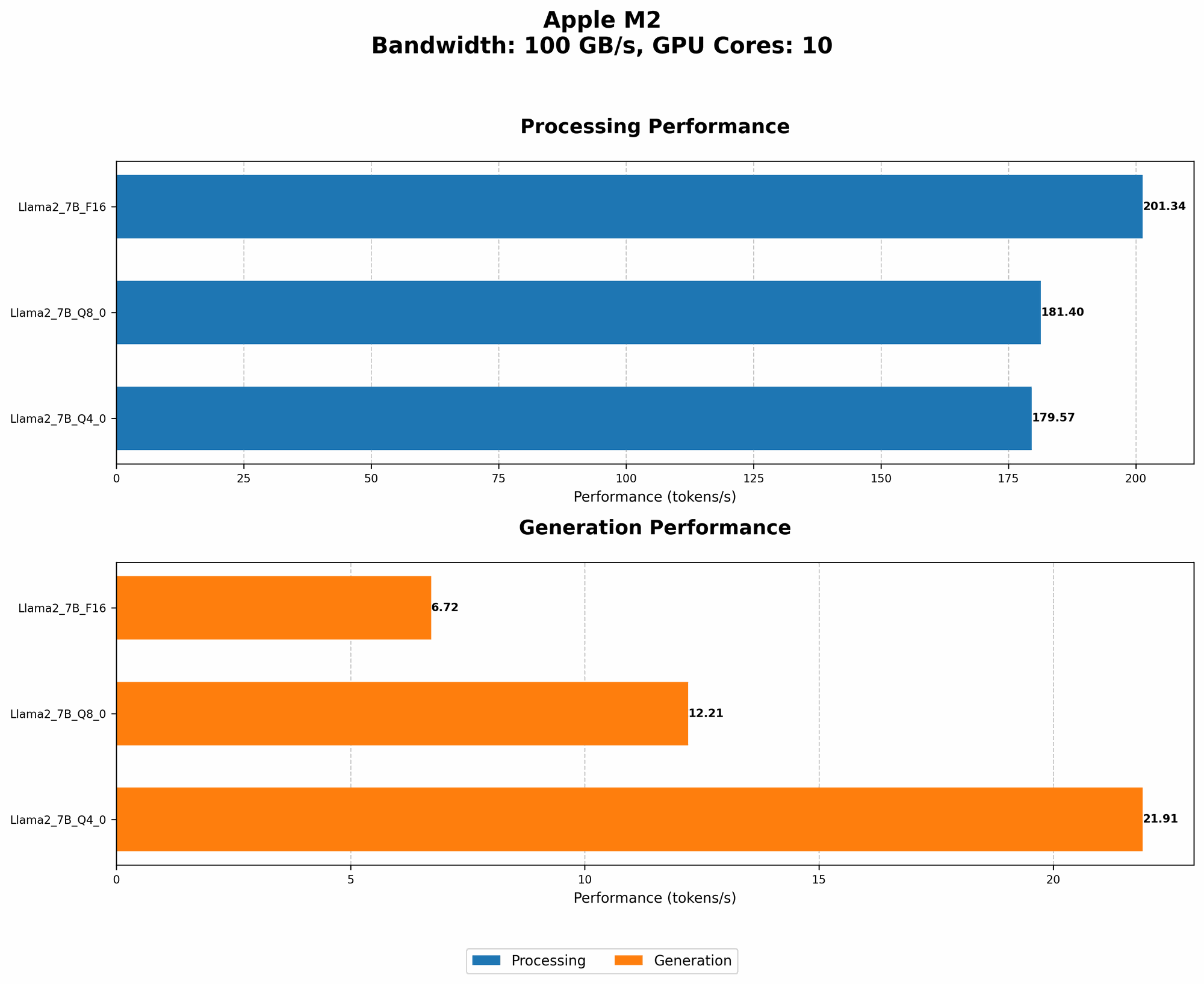
Token Generation Speed: Llama2 7B on the Apple M2
| Quantization Level | Processing Speed (Tokens/second) | Generation Speed (Tokens/second) |
|---|---|---|
| F16 | 201.34 | 6.72 |
| Q8_0 | 181.4 | 12.21 |
| Q4_0 | 179.57 | 21.91 |
Key Takeaways:
- F16 (FP16) Quantization: While F16 offers the highest processing speed (201.34 tokens/second), its generation speed (6.72 tokens/second) lags behind other quantization levels. This means the model takes longer to produce text output, making it less ideal for real-time applications.
- Q8_0 Quantization: This level provides a balanced approach, offering a decent processing speed (181.4 tokens/second) and a significantly faster generation speed (12.21 tokens/second) compared to F16.
- Q40 Quantization: Q40 shines in generation speed (21.91 tokens/second), making it the fastest for producing text output. However, its processing speed (179.57 tokens/second) is slightly lower than Q8_0.
Analogies:
Imagine you're building a house:
- F16: You have a super fast team building the foundation (processing), but the finishing touches (generation) take forever.
- Q8_0: A well-balanced team, building the foundation quickly and finishing the house at a decent pace.
- Q4_0: A team that's slow to build the foundation, but excels at finishing the house quickly.
Practical Recommendations:
- Real-time applications: Choose Q80 or Q40 for a faster response time.
- Batch processing: Use F16 for maximum processing speed if you don't need immediate results.
Performance Analysis: Model and Device Comparison: Llama2 7B on the Apple M2 vs. Other Devices
Now, let's compare the performance of Llama2 7B on the Apple M2 with other devices to understand how it stacks up.
Unfortunately, we lack data for other devices and LLMs in this specific JSON file. Therefore, we cannot provide a direct comparison. However, we can still draw some general conclusions.
General Observations:
- GPU Power: The M2's integrated GPU significantly impacts its LLM performance, particularly for smaller models like Llama2 7B. Devices with dedicated high-end GPUs typically outperform laptops with integrated graphics.
- Memory Bandwidth: Faster memory bandwidth facilitates faster data transfer to and from the GPU, improving overall performance.
Practical Recommendations: Use Cases and Workarounds for Llama2 7B on the Apple M2
The Apple M2 is a powerful chip, but running LLMs locally can still present challenges. Here are some strategies to optimize your workflow:
- Model Selection: Consider using smaller LLMs like Llama2 7B, as they require fewer resources and can perform well on the M2.
- Quantization: Experiment with different quantization levels to find the best balance between processing speed and generation speed. Q8_0 appears to be a good starting point for many applications.
- Model Pruning: Pruning removes unnecessary connections from the LLM, reducing its size and improving performance. Tools like Pruning for LLM optimization can help with this.
- Hardware Acceleration: Utilize libraries like llama.cpp and transformers for hardware-accelerated inference on the M2.
- Cloud Services: For demanding applications or if you need to run larger models, consider using cloud services like Google Colab or Amazon SageMaker that provide powerful GPU resources.
- Model Offloading: If your application involves primarily processing tasks, consider offloading the generation process to a more powerful device or the cloud.
FAQ: Demystifying LLMs and Devices
Q. What is quantization?
A. Quantization is a technique for reducing the size of an LLM by representing its weights with fewer bits. Think of it like using a lower resolution image: it takes up less space, but might lose some detail. F16, Q80, and Q40 refer to different quantization levels, with F16 using the most bits and Q4_0 using the fewest.
Q. Can I run larger LLMs like Llama2 70B on the M2?
A. It's possible, but it will likely be very slow and require significant memory. Larger models require more memory and computational power, which the M2 might not have.
Q. What are the benefits of running LLMs locally?
A. Local LLM inference offers:
- Privacy: Your data stays on your device, which is crucial for sensitive information.
- Faster response times: You avoid network latency, which can be critical for real-time applications.
- Offline access: You can use LLMs even without an internet connection.
Q. How can I get started running LLMs locally?
A. Start with a smaller model like Llama2 7B, experiment with different quantization levels, and utilize libraries like llama.cpp or transformers. There are numerous online resources and tutorials available to guide you.
Keywords
Apple M2, Llama2 7B, LLM, Local LLM, token generation speed, quantization, F16, Q80, Q40, performance benchmarks, device comparison, practical recommendations, use cases, workarounds, model pruning, hardware acceleration, cloud services, model offloading, FAQ, privacy, offline access