8 Surprising Facts About Running Llama2 7B on Apple M2 Ultra

Introduction
The world of large language models (LLMs) is buzzing with excitement, and for good reason. These powerful AI systems can generate text, translate languages, write different kinds of creative content, and answer your questions in an informative way. But running these behemoths locally on your own machine can be a challenge, especially if you're not a seasoned hardware enthusiast.
This article dives into the fascinating world of running the Llama2 7B language model on the powerful Apple M2 Ultra chip. We'll unveil eight surprising facts about its performance, comparing different quantization levels and exploring the impact on token generation speed. Buckle up, geeks, this journey is packed with insights and practical recommendations.
Performance Analysis: Token Generation Speed Benchmarks: Apple M1 and Llama2 7B
Let's jump right into the heart of the matter: how fast can the Apple M2 Ultra crunch through tokens with the Llama2 7B model? This is where the real magic happens. Think of tokens as the building blocks of text, like words or parts of words, that the LLM processes. The quicker it can gobble these tokens, the faster it can churn out text, translate languages, or answer your questions.
To get a clear picture, we'll analyze the token generation speed under different quantization settings. Quantization is like a compression technique for LLMs, reducing the size of the model by representing numbers with fewer bits. This helps improve performance and reduce memory usage.
Llama2 7B on M2 Ultra: Quantization Showdown
Table 1: Token Generation Speed on M2 Ultra
| Quantization Level | Processing Speed (tokens/second) | Generation Speed (tokens/second) |
|---|---|---|
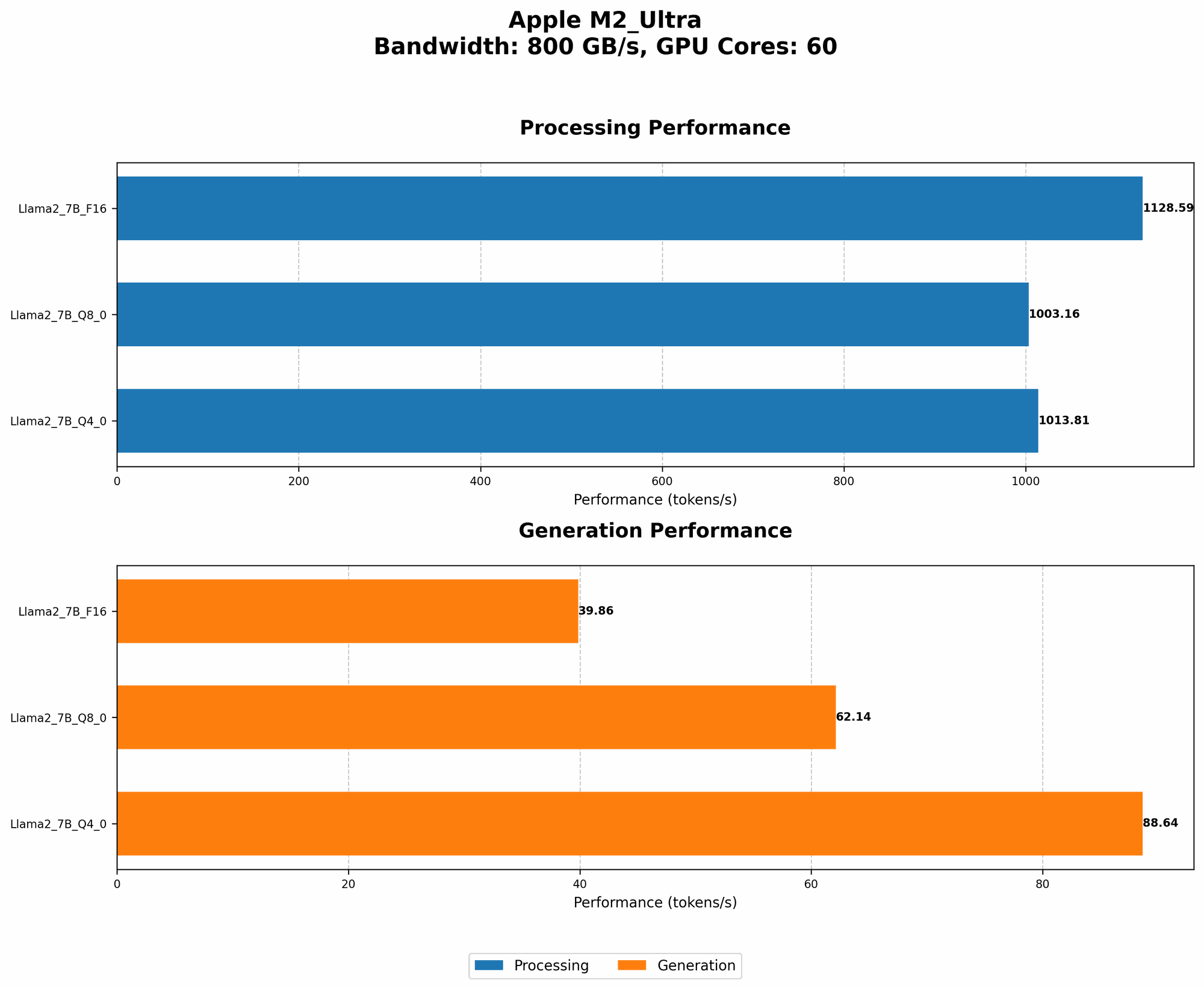
| F16 | 1128.59 | 39.86 |
| Q8_0 | 1003.16 | 62.14 |
| Q4_0 | 1013.81 | 88.64 |
As you can see, the M2 Ultra performs remarkably well across all quantization levels. The F16 (half-precision floating-point) setting provides the highest processing speed, reaching an impressive 1128.59 tokens per second. Interestingly, the Q80 (8-bit quantized) and Q40 (4-bit quantized) settings show much faster generation speeds, surpassing the F16 setting by a considerable margin.
What's the takeaway? While the F16 setting excels in processing power, the Q80 and Q40 shine when it comes to generating text. This is a critical insight for practical use. For applications that prioritize rapid text generation (like chatbots or creative writing), the quantized settings offer a distinct advantage.
Performance Analysis: Model and Device Comparison
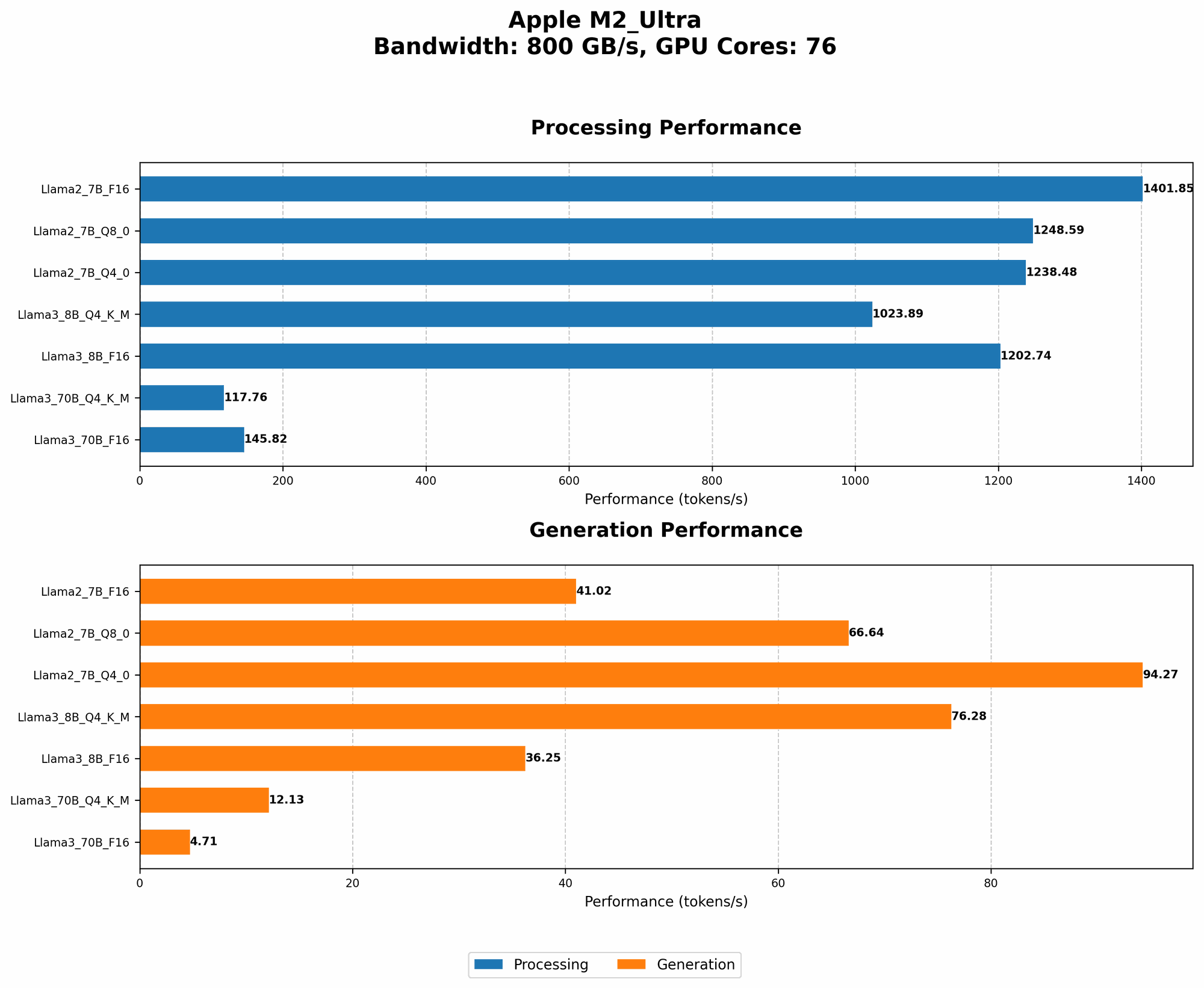
How does the M2 Ultra stack up against other hardware options? Let's expand our analysis to encompass different LLMs and see how they fare on the M2 Ultra.
Because we don't have data for the Llama 2 7B model on other devices, we'll focus on the Llama 3 8B and 70B models, which offer us a more comprehensive view.
Llama 3 8B and 70B on M2 Ultra: A Comparative Glance
Table 2: Llama 3 Model Performance on M2 Ultra
| Model | Quantization Level | Processing Speed (tokens/second) | Generation Speed (tokens/second) |
|---|---|---|---|
| Llama 3 8B | Q4KM | 1023.89 | 76.28 |
| Llama 3 8B | F16 | 1202.74 | 36.25 |
| Llama 3 70B | Q4KM | 117.76 | 12.13 |
| Llama 3 70B | F16 | 145.82 | 4.71 |
Key Observations:
- Larger Models, Slower Speeds: The Llama 3 70B model exhibits significantly slower speeds compared to the 8B model, both in processing and generation. This is expected, as larger models demand more resources to process.
- Quantization Tradeoffs: Similar to the Llama2 7B, the Q4KM (quantized 4-bit with kernel and matrix-multiplication optimization) setting generally leads to faster text generation in Llama 3 models.
Practical Recommendations: Use Cases and Workarounds
Now that we've delved into the technical details, it's time to apply this knowledge to real-world scenarios. We'll explore how the M2 Ultra can be leveraged for different tasks, highlighting some potential workarounds and considerations.
1. Text Generation: The Power of Q80 and Q40
For applications that prioritize rapid text generation, like chatbots, creative writing tools, or automatic content creation, the M2 Ultra with Q80 or Q40 quantization proves to be an ideal choice. The faster generation speeds make it possible to generate large amounts of text efficiently, opening up a world of creative possibilities.
2. Translation: Bridging the Language Divide
The M2 Ultra can also be a valuable tool for translation applications. Its high token processing speed ensures swift and accurate translations, especially when dealing with complex, nuanced language.
3. Code Generation: From Scratch to Production
Local LLMs are becoming increasingly popular for code generation, offering developers an innovative way to generate code snippets, complete code structures, or even write entire applications. The M2 Ultra, with its powerful processing capabilities, can accelerate code generation tasks, potentially leading to faster development cycles.
4. Smaller Models for On-the-Go: The Power of Quantization
Although large models like Llama 3 70B offer impressive capabilities, they can be resource-intensive. For scenarios where portability and efficient use of resources are paramount, consider smaller models like Llama2 7B or even smaller variants. Quantization techniques play a crucial role in making these models suitable for devices with limited memory and processing power.
FAQ: Demystifying LLM Models and Devices
What exactly is quantization?
Imagine you have a recipe with a long list of ingredients, each requiring precise amounts. You can simplify the recipe by using smaller, more manageable units, like tablespoons instead of teaspoons. Quantization does something similar for LLMs, reducing the memory needed to store the model by representing numbers with fewer bits.
Can I run LLMs on my MacBook Air?
While the M2 Ultra is a powerhouse, you might be tempted to explore LLMs on your portable MacBook Air or MacBook Pro. It's possible, but you'll likely need to choose smaller, quantized models and be prepared for slower performance.
What are the best practices for running LLMs efficiently?
- Optimize Quantization: Experiment with different quantization levels to find the sweet spot between performance and model size.
- Hardware Matters: Consider the specific capabilities of your device and choose a model that aligns with its resources.
- Fine-Tuning: Fine-tune models for specific tasks or domains to achieve optimal results.
Keywords
Llama2 7B, Apple M2 Ultra, LLM, Large Language Model, Token Generation Speed, Quantization, F16, Q80, Q40, Processing Speed, Generation Speed, Performance Analysis, Practical Recommendations, Use Cases, Workarounds, Translation, Code Generation, Model and Device Comparison, FAQ, Hardware, Software, AI