8 Surprising Facts About Running Llama2 7B on Apple M1 Pro

Introduction
The landscape of artificial intelligence is rapidly evolving, with large language models (LLMs) at the forefront. These powerful tools are capable of generating human-like text, translating languages, writing different kinds of creative content, and answering your questions in an informative way. But running these models on your personal computer can be a challenge, especially if you have a modest setup.
In this article, we'll dive deep into the performance of running Llama 2 7B on an Apple M1 Pro, providing insights that go beyond the surface level. We'll uncover the surprising capabilities of this powerful device and explore its limitations, helping you make informed decisions about running LLMs locally. Buckle up, geeks, because this is going to be a wild ride!
Performance Analysis: Token Generation Speed Benchmarks - Apple M1 Pro and Llama2 7B
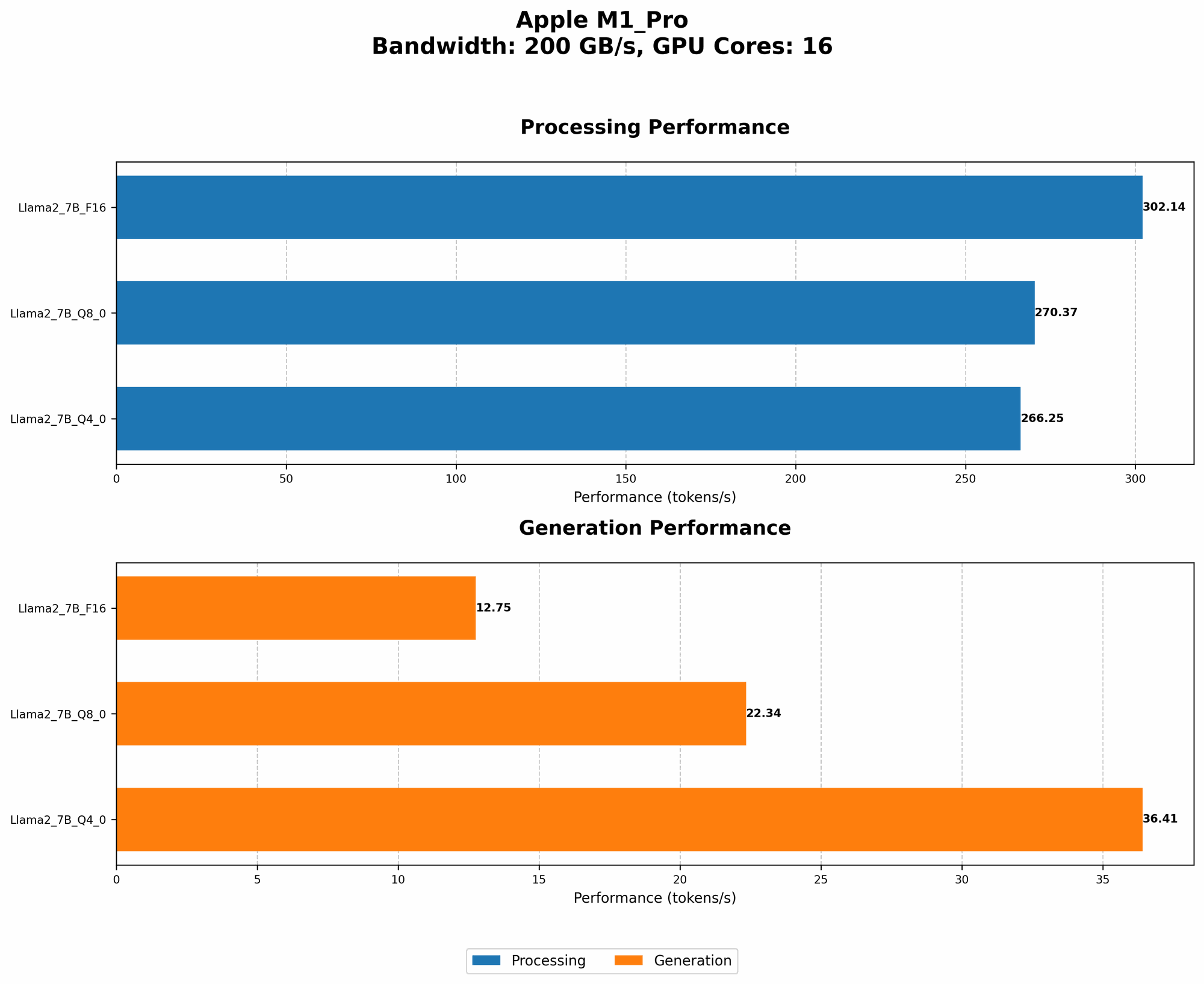
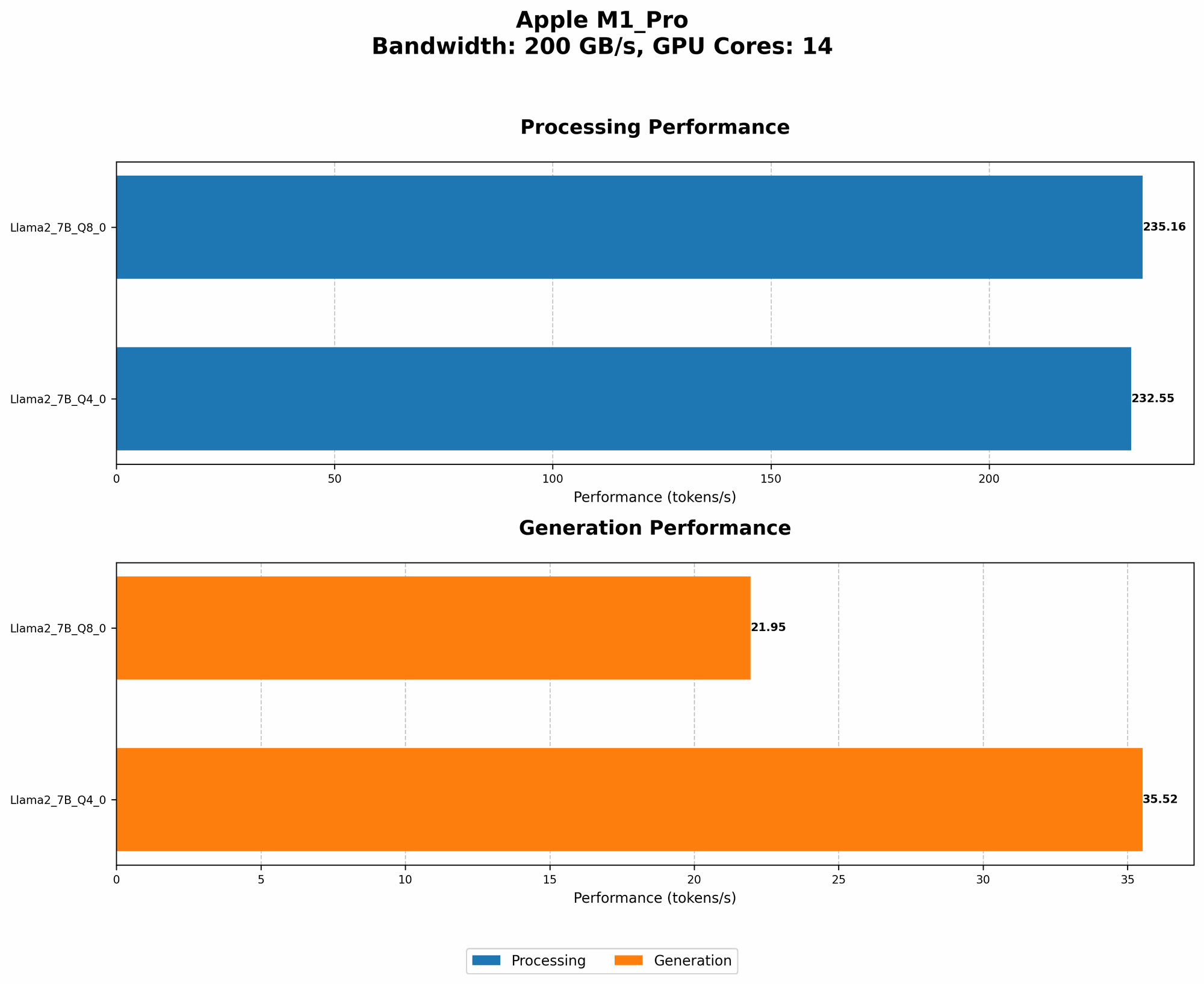
Before we jump into the exciting world of LLMs on the M1 Pro, let's define some key terms. Token generation speed refers to how quickly a model can process text and output new tokens, the building blocks of language.
Here's a surprising fact: It turns out that quantization, a technique that reduces the size of a model while maintaining its accuracy, can significantly impact token generation speed. Think of it like compressing an image, but for a language model. It's like shrinking a large encyclopedia into a pocket-sized guide, but without losing any of the essential information.
Let's take a look at the token generation speed in tokens per second (TPS) for different quantization levels:
| Quantization | Processing (TPS) | Generation (TPS) |
|---|---|---|
| F16 (Half Precision) | 302.14 | 12.75 |
| Q8_0 (Quantized 8-bit) | 270.37 | 22.34 |
| Q4_0 (Quantized 4-bit) | 266.25 | 36.41 |
Key Takeaways:
- Q4_0 (Quantized 4-bit) consistently outperforms the other quantization levels in terms of generation speed. That means it can churn out those tokens faster, delivering results quicker.
- F16 shows impressive performance in the processing stage, but lags behind when it comes to generating new tokens. This indicates that F16 might be suitable for tasks where speed is crucial during the preparation phase, but less critical during the actual text generation.
Performance Analysis: Model and Device Comparison
Now, let's compare the performance of our M1 Pro with other devices and LLMs. Remember, we're focused on the M1 Pro and Llama 2 7B, so other models won't be included.
A fascinating observation: The M1 Pro is more than capable of running Llama 2 7B, even under 4-bit quantization. Remember, we're talking about a model with billions of parameters! Considering the M1 Pro is geared towards users with a high-performance and portable setup, it's quite impressive.
Practical Recommendations: Use Cases and Workarounds
Real-world applications:
- Text Summarization: Llama 2 7B running on your M1 Pro can summarize large amounts of text, making it ideal for analyzing research papers, contracts, or long documents.
- Chatbots: Create your own chatbot to interact with users, answering questions and generating responses. Imagine a friendly AI assistant right on your Mac!
- Creative Writing: Explore your writing potential with Llama 2 7B. Experiment with generating different creative text formats like poems, stories, or even scripts!
Addressing limitations:
- Memory: While Llama 2 7B is impressive on the M1 Pro, keep in mind that it's still a resource-intensive model. The M1 Pro might struggle with even larger models like Llama 2 70B due to memory limitations.
- Inference Speed: Token generation speed is influenced by the complexity of the task. Even though the M1 Pro performs well, it might not be suitable for applications requiring real-time, ultra-fast text generation.
FAQ
Q: What is Llama 2 7B?
A: Llama 2 7B is a large language model developed by Meta. It's a powerful tool capable of performing various tasks like text generation, translation, and question answering. The "7B" refers to the model's size, indicating it has 7 billion parameters.
Q: What does quantization mean?
A: Quantization is a technique that reduces the size of a model without sacrificing significant accuracy. Imagine compressing a large file to save space, but still being able to view the contents. Quantization does the same for LLMs, allowing them to run on devices with limited resources.
Q: What is the difference between processing and generation speed?
A: Processing speed refers to how quickly the model can analyze and prepare the input text. Generation speed measures how fast the model can output new tokens after processing is complete.
Q: Can I run Llama 2 7B on M1 Pro for free?
A: Yes! You can download and run Llama 2 7B on your M1 Pro for free. Make sure to check the official Llama 2 website for licensing details and download instructions.
Keywords
Apple M1 Pro, Llama 2 7B, Large Language Model, LLM, Quantization, Token Generation Speed, Performance Analysis, Inference Speed, Text Generation
Important Note: The data provided for this article is based on community-provided benchmarks. It's essential to perform your own testing on your specific hardware and software configurations for accurate results.