8 RAM Optimization Techniques for LLMs on Apple M3 Max
Introduction
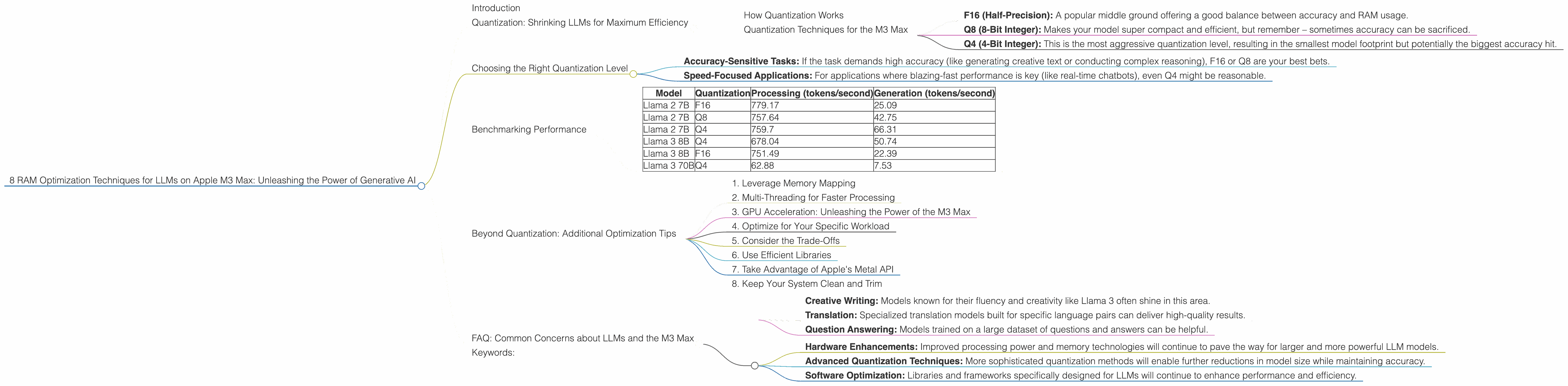
Are you a developer or AI enthusiast eager to explore the exciting world of large language models (LLMs) on your shiny new Apple M3 Max? You're not alone! The M3 Max boasts impressive power and efficiency, making it a compelling platform for running LLMs locally. However, LLMs can be RAM-hungry beasts, and optimizing their performance can be a real headache.
This article delves into the fascinating world of LLM RAM optimization, guiding you through practical techniques that maximize your M3 Max's potential for generating stunning AI-powered outputs.
Quantization: Shrinking LLMs for Maximum Efficiency
Imagine trying to squeeze a giant elephant into a compact car! That's essentially what happens when we try to run massive LLMs on limited hardware. That's where quantization comes in.
Quantization is a clever technique that reduces the size of LLM models while preserving their accuracy. Think of it as a diet for your AI – it helps your LLM shed weight and become more agile.
How Quantization Works
LLMs typically use 32-bit floating-point numbers (F32) to represent their parameters. This precision is fantastic for accuracy but eats up valuable RAM.
Quantization steps in to reduce this bit width, using more compact representations like 16-bit floating-point (F16) or even 8-bit integers (Q8). This means fewer bits are needed to represent the same information, freeing up precious RAM.
Quantization Techniques for the M3 Max
On the M3 Max, you can leverage different quantization levels for your favorite LLMs. The most popular options are:
- F16 (Half-Precision): A popular middle ground offering a good balance between accuracy and RAM usage.
- Q8 (8-Bit Integer): Makes your model super compact and efficient, but remember – sometimes accuracy can be sacrificed.
- Q4 (4-Bit Integer): This is the most aggressive quantization level, resulting in the smallest model footprint but potentially the biggest accuracy hit.
Choosing the Right Quantization Level
The right quantization level depends on the desired accuracy and the specific LLM model you're working with.
- Accuracy-Sensitive Tasks: If the task demands high accuracy (like generating creative text or conducting complex reasoning), F16 or Q8 are your best bets.
- Speed-Focused Applications: For applications where blazing-fast performance is key (like real-time chatbots), even Q4 might be reasonable.
Benchmarking Performance
To truly understand the impact of quantization on your M3 Max, let's look at some real-world benchmarks. We'll be focusing on popular LLM families:
- Llama 2: Developed by Meta, Llama 2 is known for its impressive capabilities and versatility.
- Llama 3: The latest generation from Meta, Llama 3 pushes the boundaries of LLM performance.
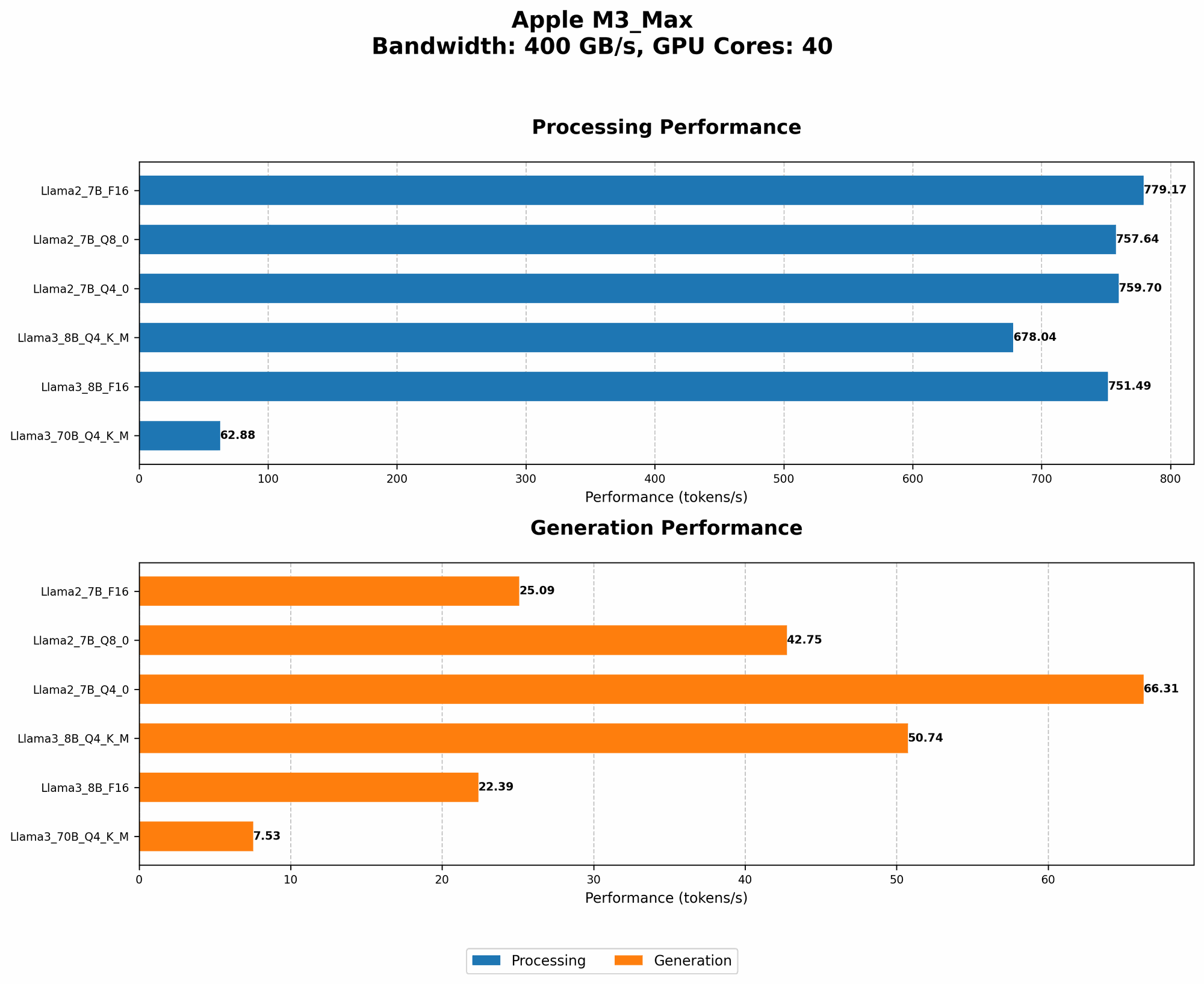
Here's how different quantization levels impact token generation speed (tokens/second) on the M3 Max:
| Model | Quantization | Processing (tokens/second) | Generation (tokens/second) |
|---|---|---|---|
| Llama 2 7B | F16 | 779.17 | 25.09 |
| Llama 2 7B | Q8 | 757.64 | 42.75 |
| Llama 2 7B | Q4 | 759.7 | 66.31 |
| Llama 3 8B | Q4 | 678.04 | 50.74 |
| Llama 3 8B | F16 | 751.49 | 22.39 |
| Llama 3 70B | Q4 | 62.88 | 7.53 |
Observations:
- Llama 2 7B: F16 offers a balance of speed and accuracy. Q8 provides a significant boost to generation speed while maintaining a good level of accuracy. Q4 delivers the fastest generation speed but might compromise accuracy for some tasks.
- Llama 3 8B: Q4 shows a considerable speedup over F16 for both processing and generation, suggesting that it might be a suitable option for tasks where speed is a priority.
- Llama 3 70B: The 70B model requires more RAM than the smaller models, so you’ll need to consider these numbers carefully based on your tasks and RAM constraints.
Remember: These numbers are just a starting point. Actual performance can vary depending on your model configuration, the specific task, and your workflow.
Beyond Quantization: Additional Optimization Tips
While quantization is a powerful tool, it's not the only trick up our sleeve. Here are other techniques to optimize your LLM setup for the M3 Max:
1. Leverage Memory Mapping
Memory mapping is like creating a magical portal between your RAM and your hard drive. Instead of loading the entire LLM into RAM, memory mapping allows you to load only the parts you need at a given moment.
Think of it like a virtual bookshelf where you only pull out the specific book you want to read instead of carrying the entire bookcase. This is a fantastic way to save RAM and improve the speed of your model.
2. Multi-Threading for Faster Processing
Multi-threading is about splitting your LLM's workload across multiple CPU cores. Imagine having a team of workers each tackling a different part of the LLM's processing. This significantly speeds up the processing and generation of tokens, making your model feel snappier.
3. GPU Acceleration: Unleashing the Power of the M3 Max
The M3 Max comes equipped with a powerful GPU. You can harness its processing power for tasks like generating text, translations, and even image editing. Leveraging the GPU can lead to significant speed improvements for your LLM.
4. Optimize for Your Specific Workload
Different LLMs and tasks have different performance characteristics. Experiment with different settings and configurations to find the perfect combination that maximizes RAM efficiency and speed for your specific workload.
5. Consider the Trade-Offs
Remember that RAM optimization is a balancing act. While optimizing for speed and RAM efficiency is good, you don't want to sacrifice accuracy for the sake of it. Weigh the pros and cons of different techniques to determine the right strategy for your needs.
6. Use Efficient Libraries
The right libraries can make all the difference! Choose libraries designed for efficient memory management and processing of large language models. The Llama.cpp library is a popular choice for its speed and RAM efficiency.
7. Take Advantage of Apple's Metal API
Harness the power of the Apple Metal API for improved GPU performance. This API facilitates efficient communication between your CPU and the GPU, enabling a faster and more responsive experience.
8. Keep Your System Clean and Trim
A cluttered system can slow down your LLMs. Regularly clean up unused files and close unnecessary applications to free up valuable RAM and optimize your system for peak performance.
FAQ: Common Concerns about LLMs and the M3 Max
1. How much RAM do I need to run a 70B LLM on the M3 Max?
That's a great question! A 70B LLM in its full, unquantized form can require a considerable amount of RAM, potentially exceeding the capabilities of the M3 Max. However, by using quantization techniques like Q4, you can dramatically reduce the memory footprint, making it more feasible to run these larger models on the M3 Max.
2. What are the best LLM models for the M3 Max?
The M3 Max is a powerful device for running a variety of LLM models. In general, smaller models like Llama 2 7B or Llama 3 8B can run efficiently with or without quantization. For larger models like Llama 3 70B, consider effective quantization strategies to ensure smooth performance.
3. How do I choose the right LLM for my task?
The selection of an LLM depends on the specific task you have in mind:
- Creative Writing: Models known for their fluency and creativity like Llama 3 often shine in this area.
- Translation: Specialized translation models built for specific language pairs can deliver high-quality results.
- Question Answering: Models trained on a large dataset of questions and answers can be helpful.
4. Are there any risks associated with running LLMs on the M3 Max?
While running LLMs locally can offer powerful capabilities, be aware of potential risks related to data privacy and security. It's crucial to carefully consider the data you're using and ensure that you are not exposing sensitive information.
5. What are the future trends in LLM optimization?
The field of LLM optimization is constantly evolving. We can expect further advancements in:
- Hardware Enhancements: Improved processing power and memory technologies will continue to pave the way for larger and more powerful LLM models.
- Advanced Quantization Techniques: More sophisticated quantization methods will enable further reductions in model size while maintaining accuracy.
- Software Optimization: Libraries and frameworks specifically designed for LLMs will continue to enhance performance and efficiency.
Keywords:
LLM, RAM optimization, Apple M3 Max, Quantization, F16, Q8, Q4, Token generation speed, Memory mapping, Multi-threading, GPU acceleration, Llama 2, Llama 3, Metal API, Performance benchmarks, Data privacy, Security, Future trends, AI development, Generative AI, Machine learning.