8 RAM Optimization Techniques for LLMs on Apple M2 Pro
Introduction
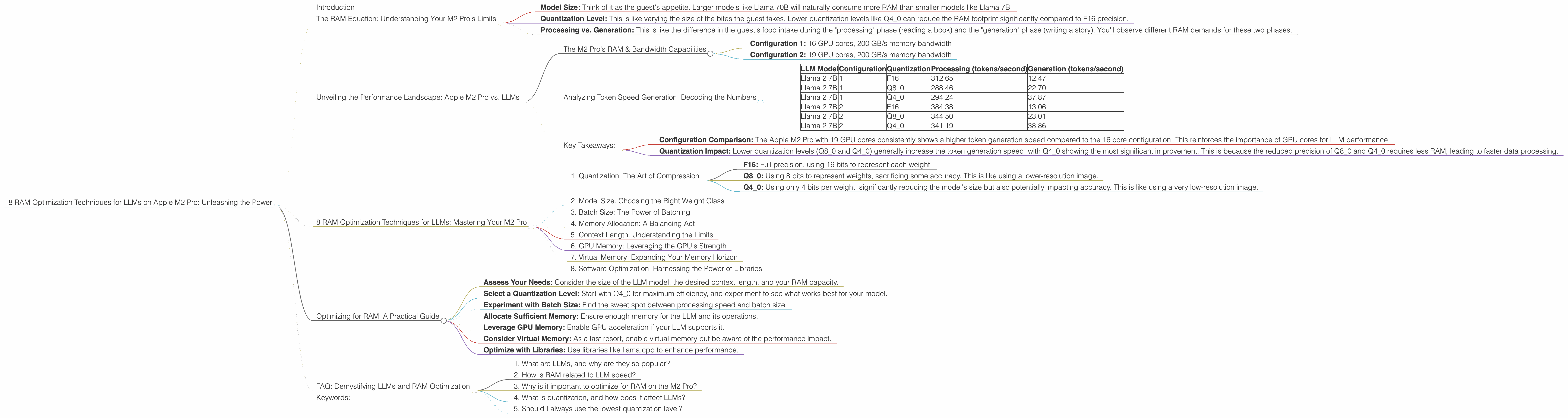
Large Language Models (LLMs) are revolutionizing the way we interact with technology, from generating creative text to translating languages and even writing code. However, running LLMs locally can be a resource-intensive task, especially on smaller devices. If you're an avid developer or simply want to explore the world of LLMs on your Apple M2 Pro, then optimizing for RAM usage is crucial.
This article will dive into the intricacies of RAM optimization for LLMs running on the Apple M2 Pro, guiding you through various techniques and strategies to maximize your experience. We'll explore the nuances of different quantization levels, the impact of model size, and the role of your M2 Pro's power and memory bandwidth.
The RAM Equation: Understanding Your M2 Pro's Limits
Before we dive into the optimization strategies, let's first understand the factors that influence how much RAM your LLMs consume. Imagine your RAM as a gigantic buffet, and each LLM model is a hungry guest. The bigger the model, the more space it occupies, and each bite (token) it takes requires RAM to store its memory.
Here's the key equation:
- Model Size: Think of it as the guest's appetite. Larger models like Llama 70B will naturally consume more RAM than smaller models like Llama 7B.
- Quantization Level: This is like varying the size of the bites the guest takes. Lower quantization levels like Q4_0 can reduce the RAM footprint significantly compared to F16 precision.
- Processing vs. Generation: This is like the difference in the guest's food intake during the "processing" phase (reading a book) and the "generation" phase (writing a story). You'll observe different RAM demands for these two phases.
Unveiling the Performance Landscape: Apple M2 Pro vs. LLMs
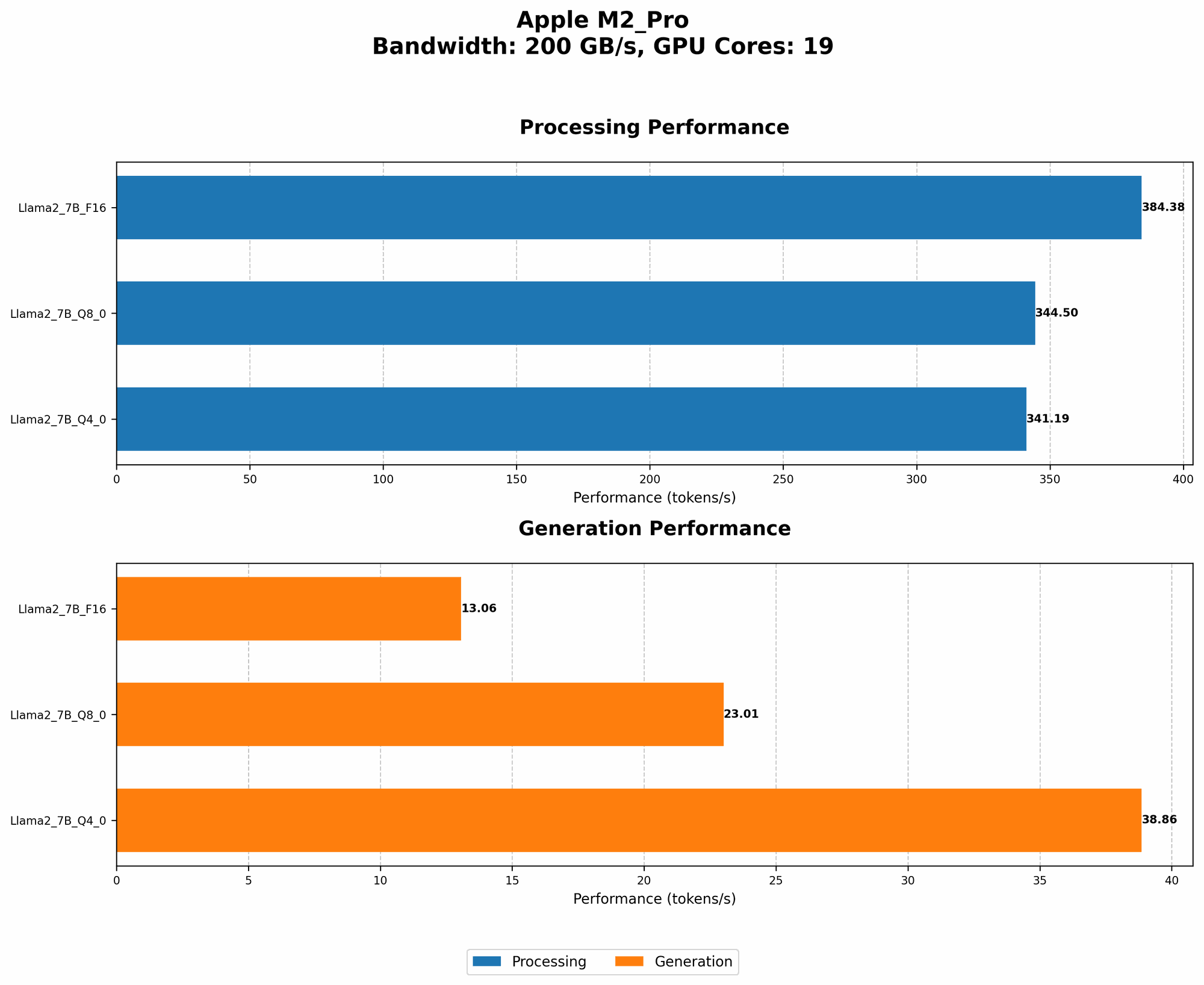
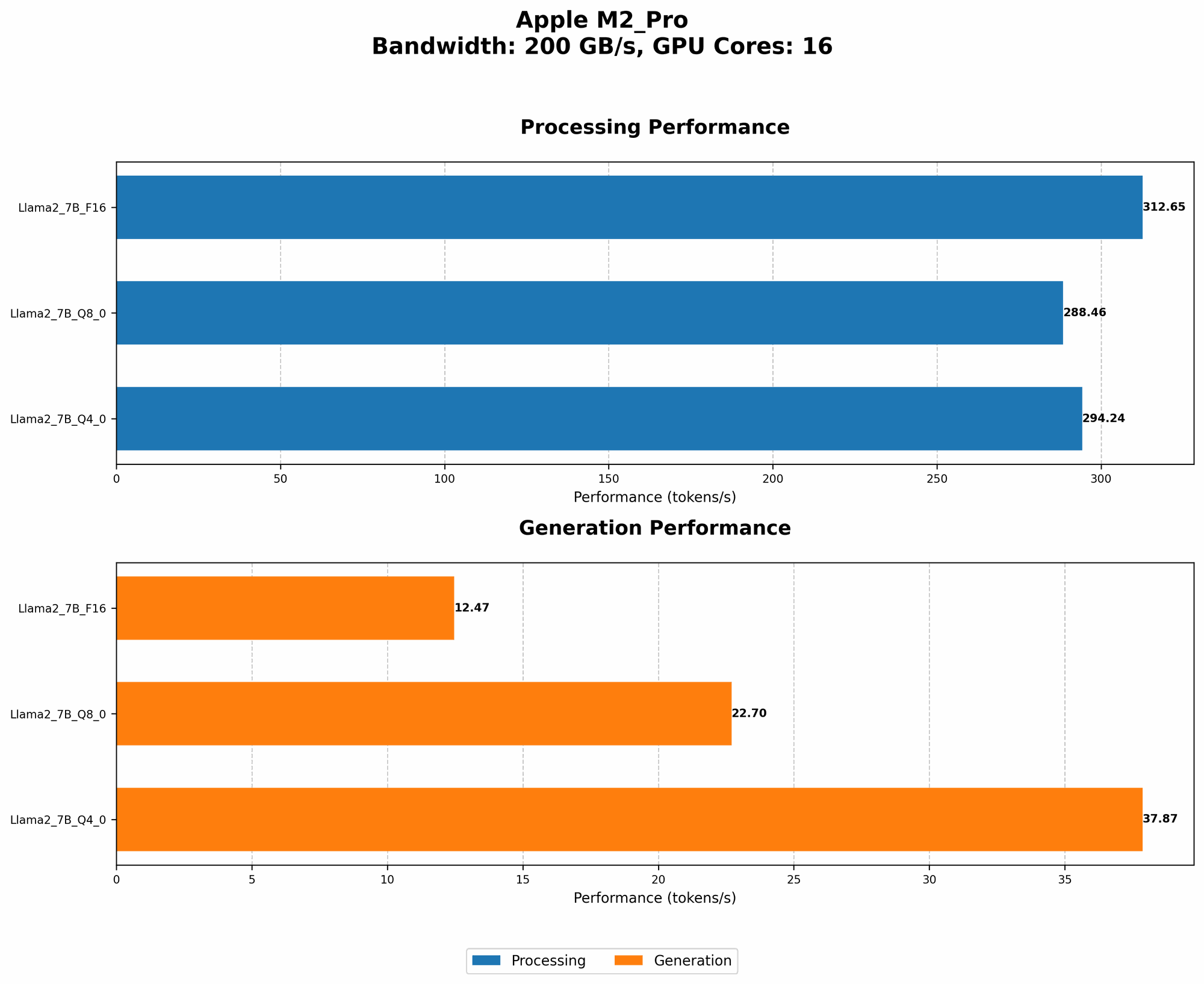
We'll focus on the Apple M2 Pro, a powerful and efficient chip designed for demanding workloads. But how well does it handle running LLMs? Let's analyze the data to get a clear picture.
The M2 Pro's RAM & Bandwidth Capabilities
The Apple M2 Pro packs a punch with its 19-core GPU and impressive memory bandwidth. This means it can handle complex computations and data transfers quickly.
For our analysis, we'll consider two M2 Pro configurations:
- Configuration 1: 16 GPU cores, 200 GB/s memory bandwidth
- Configuration 2: 19 GPU cores, 200 GB/s memory bandwidth
Analyzing Token Speed Generation: Decoding the Numbers
Here's a table summarizing the token-per-second (tokens/second) performance across different LLM models and quantization levels on both configurations.
| LLM Model | Configuration | Quantization | Processing (tokens/second) | Generation (tokens/second) |
|---|---|---|---|---|
| Llama 2 7B | 1 | F16 | 312.65 | 12.47 |
| Llama 2 7B | 1 | Q8_0 | 288.46 | 22.70 |
| Llama 2 7B | 1 | Q4_0 | 294.24 | 37.87 |
| Llama 2 7B | 2 | F16 | 384.38 | 13.06 |
| Llama 2 7B | 2 | Q8_0 | 344.50 | 23.01 |
| Llama 2 7B | 2 | Q4_0 | 341.19 | 38.86 |
Key Takeaways:
- Configuration Comparison: The Apple M2 Pro with 19 GPU cores consistently shows a higher token generation speed compared to the 16 core configuration. This reinforces the importance of GPU cores for LLM performance.
- Quantization Impact: Lower quantization levels (Q80 and Q40) generally increase the token generation speed, with Q40 showing the most significant improvement. This is because the reduced precision of Q80 and Q4_0 requires less RAM, leading to faster data processing.
8 RAM Optimization Techniques for LLMs: Mastering Your M2 Pro
Now that we've established the performance baseline, let's delve into practical strategies to optimize RAM usage for LLMs on your Apple M2 Pro.
1. Quantization: The Art of Compression
Quantization is like squeezing a large file into a smaller one without losing too much quality. It reduces the precision of your model's weights, significantly shrinking its memory footprint.
Here's how it works:
- F16: Full precision, using 16 bits to represent each weight.
- Q8_0: Using 8 bits to represent weights, sacrificing some accuracy. This is like using a lower-resolution image.
- Q4_0: Using only 4 bits per weight, significantly reducing the model's size but also potentially impacting accuracy. This is like using a very low-resolution image.
Example: A 7B model in F16 might require around 28 GB of RAM, while the same model in Q4_0 could occupy just 7 GB, freeing up valuable RAM for other tasks.
The Catch: Quantization can affect accuracy. While you gain RAM efficiency, you might experience a slight reduction in the LLM's performance.
2. Model Size: Choosing the Right Weight Class
Larger models like Llama 70B are powerhouses but come at a cost - they demand a hefty amount of RAM. Smaller models like Llama 7B are more manageable and might be a better choice for budget-conscious users or those with limited RAM.
Example: Llama 70B might need upwards of 60 GB, while Llama 7B can operate comfortably with just 28 GB in F16 precision.
The Catch: Smaller models might have lower accuracy and limited capabilities compared to their larger counterparts.
3. Batch Size: The Power of Batching
Batching can often be likened to cooking in batches. Instead of processing each token individually, you group them into batches, allowing the LLM to process multiple tokens together. This can speed up processing and optimize RAM usage.
Example: Instead of processing one token at a time, you can process 16 tokens together, leading to potentially higher efficiency and faster results.
The Catch: Batching can sometimes lead to increased latency. Larger batches might take longer to process, especially on less powerful devices.
4. Memory Allocation: A Balancing Act
The right memory allocation strategy is like choosing the right-sized container for your ingredients. The LLM needs enough RAM to store its weights and intermediate calculations, but you don't want to allocate excessive memory.
Example: If you're running Llama 7B in F16, it might be sufficient to allocate 32 GB of RAM. However, if you're using a larger model like Llama 70B, you might need to allocate 64 GB or even more, depending on your needs.
The Catch: Too small a memory allocation can lead to errors and crashes, while too large an allocation might slow down your program.
5. Context Length: Understanding the Limits
The length of the context (the text the LLM is processing) influences RAM usage. Longer contexts require more memory to store the information.
Example: Generating a summary of a 2000-word document might require more RAM than generating a 100-word response.
The Catch: Some LLMs have limitations on the maximum context length, which you need to consider.
6. GPU Memory: Leveraging the GPU's Strength
The Apple M2 Pro's GPU provides dedicated memory for computations. By leveraging the GPU's memory, you can reduce the pressure on your system's main RAM.
Example: The GPU can store a portion of the LLM's weights and computations, freeing up RAM for other tasks.
The Catch: Not all LLMs support GPU acceleration. Some might require specific configurations or libraries to take advantage of the GPU's capabilities.
7. Virtual Memory: Expanding Your Memory Horizon
If you're running into RAM limitations, virtual memory can provide a temporary solution. It uses a portion of your hard drive as extra RAM when your system runs out of physical RAM.
Example: Imagine virtual memory as an overflow parking lot for your car. Your garage (physical RAM) is full, so you park your car (data) in a nearby lot (virtual memory).
The Catch: Virtual memory is significantly slower than physical RAM. It can significantly impact performance, especially for memory-intensive tasks like running LLMs.
8. Software Optimization: Harnessing the Power of Libraries
Libraries like llama.cpp are designed to optimize LLM execution on specific devices, including the Apple M2 Pro. They can significantly enhance performance by leveraging the device's features and capabilities.
Example: llama.cpp can perform optimizations like quantization, batch processing, and GPU acceleration automatically, reducing your manual efforts.
The Catch: Libraries might require specific configurations and dependencies to function properly. You need to ensure compatibility and understand their requirements.
Optimizing for RAM: A Practical Guide
Here's a step-by-step approach to optimize RAM usage for LLMs on your Apple M2 Pro:
- Assess Your Needs: Consider the size of the LLM model, the desired context length, and your RAM capacity.
- Select a Quantization Level: Start with Q4_0 for maximum efficiency, and experiment to see what works best for your model.
- Experiment with Batch Size: Find the sweet spot between processing speed and batch size.
- Allocate Sufficient Memory: Ensure enough memory for the LLM and its operations.
- Leverage GPU Memory: Enable GPU acceleration if your LLM supports it.
- Consider Virtual Memory: As a last resort, enable virtual memory but be aware of the performance impact.
- Optimize with Libraries: Use libraries like llama.cpp to enhance performance.
FAQ: Demystifying LLMs and RAM Optimization
1. What are LLMs, and why are they so popular?
LLMs are powerful artificial intelligence models capable of generating human-like text. They are popular due to their ability to perform various tasks, from writing essays to translating languages.
2. How is RAM related to LLM speed?
RAM is the LLM's workspace. The more RAM available, the more data the LLM can process quickly, leading to faster token generation.
3. Why is it important to optimize for RAM on the M2 Pro?
The M2 Pro offers outstanding performance, but its limited RAM can become a bottleneck for large LLMs. Optimization maximizes the M2 Pro's potential by ensuring efficient resource utilization.
4. What is quantization, and how does it affect LLMs?
Quantization compresses LLM weights, reducing the required RAM but potentially impacting accuracy. It's a balance between efficiency and performance.
5. Should I always use the lowest quantization level?
Not necessarily. The optimal quantization level depends on your LLM and your tolerance for accuracy loss.
Keywords:
LLMs, RAM optimization, Apple M2 Pro, Llama 2, quantization, token speed, GPU acceleration, memory bandwidth, batch size, context length, virtual memory, software optimization, libraries, performance, accuracy.