8 Power Saving Tips for 24 7 AI Operations on NVIDIA RTX 5000 Ada 32GB

Introduction
Are you running large language models (LLMs) on your NVIDIA RTX 5000 Ada 32GB and struggling with energy bills? Let's face it, keeping these powerful AI brains humming 24/7 can be quite the energy hog. But fear not, fellow AI enthusiasts! Just like optimizing your code for speed, there are ways to optimize your setup for power efficiency.
This guide will walk you through eight effective strategies to reduce your energy consumption while upholding the performance you expect from your RTX 5000 Ada. We'll dive into the world of quantization, explore the impact of different data types, and share practical tips for optimizing your LLM workflow. Get ready to make your AI operations greener, more efficient, and ultimately, more cost-effective.
Understanding the Basics of Power Consumption
Let's first get on the same page about why power consumption matters, especially for AI. Picture this: your LLM is like a city, buzzing with activity. Each neuron in the model, like a city resident, requires energy to perform its calculations. The larger the city (the model), the more residents (neurons) and the more energy you'll need to keep everything running smoothly.
Now, imagine your city is powered by a single power plant. You want to keep the city running efficiently, without overloading the plant and causing blackouts. That power plant is your GPU. A powerful GPU like the RTX 5000 Ada has amazing processing capabilities, but it also consumes a lot of energy.
This is where the concept of power efficiency comes in. We want to minimize power usage without sacrificing performance. That's like making sure the city runs efficiently, keeping the lights on, but using less fuel from the power plant.
Quantization: The Key to Power Savings
What is Quantization?
Think of quantization as downscaling your city's population. Instead of using a full 32-bit address for each neuron, we use a smaller 8-bit or 4-bit address. This reduces the number of calculations needed, saving energy and making your LLM leaner and meaner.
The Impact of Quantization
Example: Imagine you're trying to measure a room's length. You could use a ruler with very tiny markings (32-bit precision), or you could use a tape measure with larger increments (8-bit precision). The tape measure is quicker and easier to use, just like a quantized LLM is faster and more efficient.
Quantization on RTX 5000 Ada - Llama 3 Models
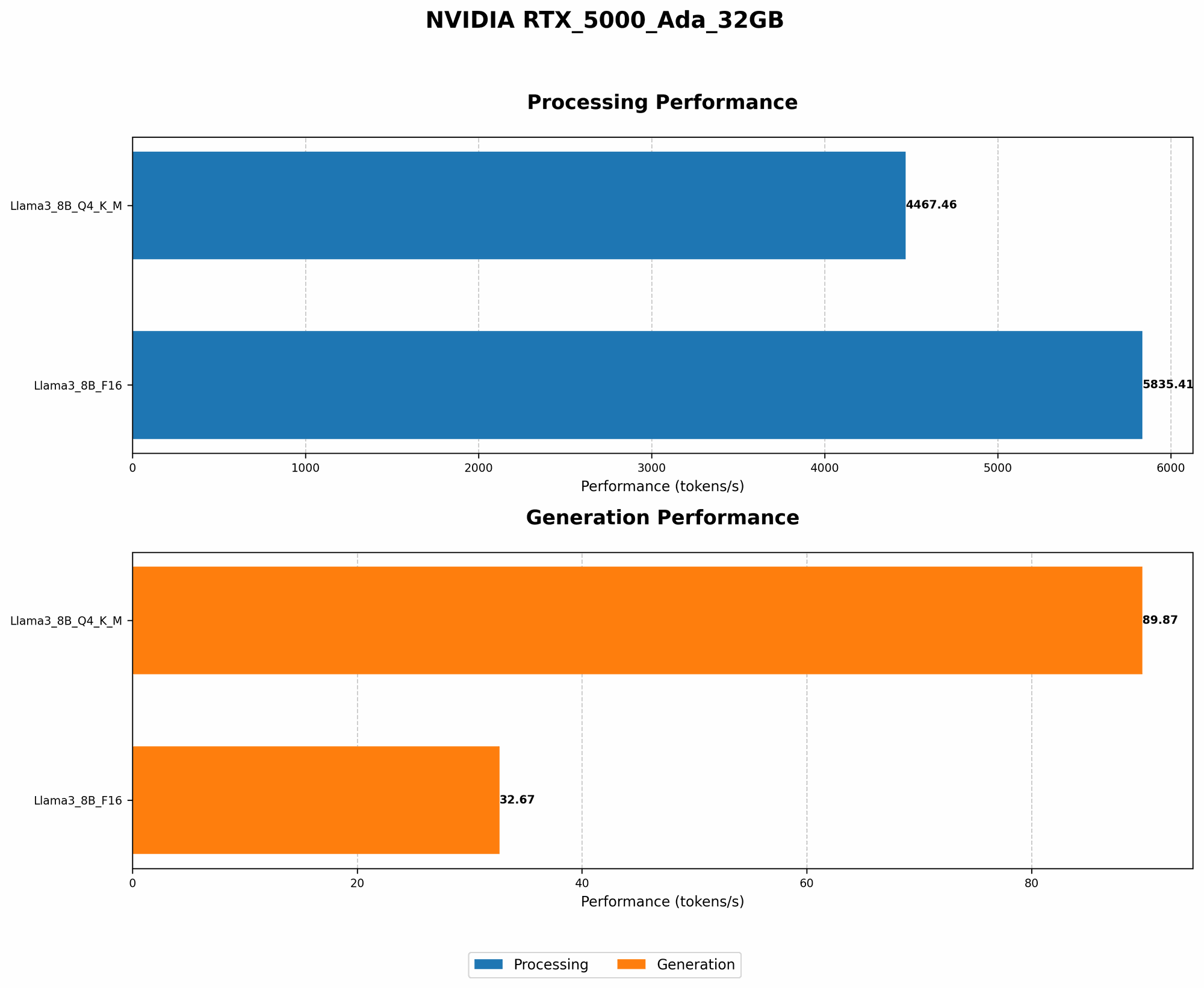
Let's look at how quantization affects performance on the RTX 5000 Ada using Llama 3 models:
| Model | Data Type | Tokens/Second (Generation) | Tokens/Second (Processing) |
|---|---|---|---|
| Llama 3 8B | Q4KM | 89.87 | 4467.46 |
| Llama 3 8B | F16 | 32.67 | 5835.41 |
Data Analysis:
- Q4KM (4-bit Quantization): The Llama 3 8B model achieves a significantly higher token generation rate compared to F16, while also demonstrating impressive processing speed.
- F16 (16-bit Floating Point): While F16 offers slightly better processing speed, it lags behind Q4KM in terms of token generation rate. This highlights the power-saving potential of quantization.
Conclusion: Quantization allows for faster and more efficient inference, especially for token generation. While F16 may be slightly quicker in processing, the overall performance advantage of Q4KM in token generation makes it an attractive choice for power-conscious users.
Data Types: Choosing the Right Fuel for Your AI
The data type you use for your model is like choosing the right fuel for your car. Choosing the right data type can significantly influence your model's performance and energy consumption.
Common Data Types in AI
- F32 (32-bit Floating Point): The most precise data type, offering high accuracy but requiring more computational resources. Think of it as premium gasoline; it provides great performance but is expensive.
- F16 (16-bit Floating Point): A good balance of precision and efficiency. This is like regular gasoline, a good balance of performance and price.
- BF16 (Brain Floating Point 16): Similar to F16, but optimized for AI workloads. It offers improved performance and efficiency for specific AI tasks.
- Q4KM (4-bit Quantization): This is like using a more efficient fuel blend, reducing energy consumption and leading to quicker processing times.
Data Type Impact on RTX 5000 Ada
As seen in the table above, Llama 3 8B model demonstrates significantly higher token generation speed with Q4KM compared to F16, even though the processing speed is slightly lower.
Choose the Data Type Wisely: If you need the highest accuracy, stick with F32. However, if you're aiming for efficient operation, F16 or BF16 can be great choices. For power-hungry tasks, Q4KM can be a clear winner, especially for token generation.
Harnessing the Power of GPU Settings
NVIDIA Settings for Energy Efficiency
- Power Management Mode: Adjusting the power management mode can significantly impact your system's energy consumption while maintaining a healthy balance between performance and power savings.
- GPU Boost: This feature can dynamically adjust the GPU's clock speed to optimize performance based on the current workload. If you don't need maximum performance all the time, you can adjust the GPU Boost settings for greater energy efficiency.
- CUDA Drivers: Ensure you're using the latest CUDA drivers, as they often include optimizations for power consumption.
Understanding GPU Power Limits
The RTX 5000 Ada has a default power limit, which is like a maximum amount of fuel your power plant can handle. Adjusting this limit can have a significant impact on both performance and power consumption.
Example: If you lower the power limit, your GPU will draw less energy. This might result in slightly reduced performance, but it can save you a significant amount of electricity in the long run.
Recommendation: Experiment with power limits to find the sweet spot between performance and energy efficiency.
Optimizing for Power Efficiency in your LLM Workflow
Batching: Processing in Groups
Just like grouping your errands for a single trip, batching your AI tasks can improve efficiency. Instead of processing each input individually, you can combine multiple requests into a single batch, leading to fewer overhead operations and reduced energy consumption.
Caching: Saving Time and Energy
Imagine having a pre-loaded bookshelf for frequently used books. Caching is similar; it stores frequently used data in a readily accessible location for quicker retrieval and reduced processing times. This can lead to significant power savings for recurring tasks.
Pruning: Removing Unnecessary Elements
Sometimes, a model has elements that are not essential for its function. Pruning is the process of removing these elements, making the model smaller and more efficient. Think of it as clearing out clutter from your city, making it more streamlined.
Early Stopping: Knowing When to Stop
Training an LLM is like baking a cake; you need to monitor it closely to make sure it's cooked just right. Early stopping helps you identify when the training process has achieved optimal results and prevent unnecessary energy expenditure.
Utilizing Advanced Power Management Techniques
Dynamic Power Scaling
Dynamic power scaling automatically adjusts the GPU's power consumption based on the workload. This is like adjusting the fuel flow to your car's engine, ensuring optimal performance while minimizing wasted energy.
GPU Power Offload
For tasks that don't require high-performance computation, consider offloading them to other devices, such as your CPU. This allows you to keep the GPU running at a lower power level, saving energy and minimizing heat generation.
FAQs: Answering Your Questions
Q: What is the best way to optimize my RTX 5000 Ada for power efficiency?
A: The best approach is a combination of techniques. Start by quantizing your models, choosing the right data types, and exploring the GPU settings. Then, optimize your workflow using batching, caching, and other techniques to maximize energy savings.
Q: How can I monitor my GPU's power consumption?
A: NVIDIA's tools like NVIDIA System Management Interface (nvidia-smi) and the GPU-Z utility can provide insights into your GPU's power usage.
Q: How can I determine the optimal power limit for my RTX 5000 Ada?
A: You can experiment with different power limits, monitoring the impact on performance and power usage. Start with a lower limit and gradually increase it until you find the sweet spot that balances performance and efficiency.
Keywords
RTX 5000 Ada, LLM, AI, power efficiency, quantization, data types, GPU settings, workflow optimization, power management techniques, NVIDIA, CUDA, GPU Boost, power limit, batching, caching, pruning, early stopping, dynamic power scaling, GPU power offload.