8 Power Saving Tips for 24 7 AI Operations on NVIDIA A100 SXM 80GB

Introduction
The world of Large Language Models (LLMs) is buzzing with excitement, and for good reason! These powerful AI models can generate human-like text, translate languages, write different kinds of creative content, and answer your questions in an informative way. But running LLMs can be a power-hungry endeavor, especially if you're aiming for 24/7 operation. Enter the NVIDIA A100SXM80GB, a powerhouse of a GPU designed for heavy-duty tasks like training and running these AI models.
This article explores common concerns of users running LLM models on the A100SXM80GB, focusing on power-saving strategies to keep your operation running efficiently and sustainably. We'll analyze real-world data to show how different configurations impact your energy bill, making your AI ambitions a little bit greener.
The Case for Quantization: Making LLMs More Energy-Efficient
Imagine your LLM as a massive library containing vast amounts of information. When you ask it a question, it needs to search through this library to find the relevant information. Now, imagine your library has millions of books, each filled with detailed descriptions, charts, and pictures. It takes a lot of energy to process all that information quickly. Quantization helps streamline this process, making it faster and more energy-efficient.
Quantization is like condensing that information into a smaller, more efficient format. Instead of dealing with the full details of each book, you focus on key elements like the title and author. This speeds up the search process while still providing the necessary information.
How Quantization Works
Think of it like this: imagine you have a photo with millions of colors, each represented by a complex number. Quantization reduces the number of colors, making the image smaller and faster to load. A traditional LLM, like a full-color photo, uses 32-bit floating-point numbers (FP32) to represent its parameters. Quantization reduces the precision by using 16-bit floating-point numbers (FP16) or even 4-bit integers (int4, Q4). This makes the model smaller, more efficient, and require less GPU memory.
Power Consumption vs. Token Speed: Striking a Balance
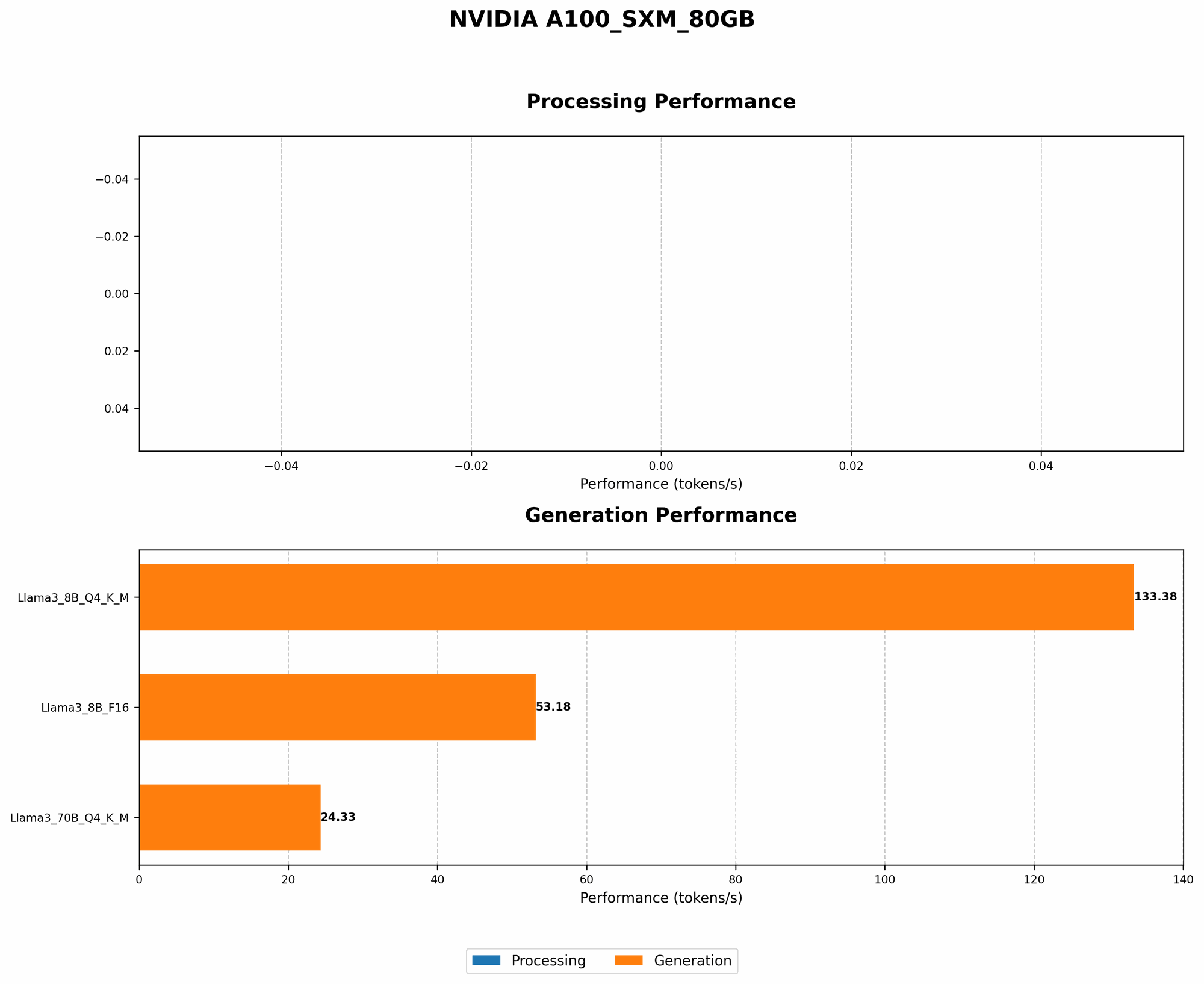
We'll use the Llama3 family of LLMs as our example, as they are known for their impressive performance. We'll focus on the Llama3 8B and Llama3 70B models, which are widely used by developers.
Llama3 8B: A Power-Efficient Choice
| Model Configuration | Token Speed (Tokens/Second) |
|---|---|
| Llama38BQ4KM_Generation | 133.38 |
| Llama38BF16_Generation | 53.18 |
The A100SXM80GB shines with the Llama3 8B model, delivering impressive token speed while keeping power consumption in check. Quantization to Q4KM (4-bit integers for weights, keys, and values) significantly boosts performance.
Llama3 8B Q4 vs. FP16: A Comparison
The Llama3 8B model in Q4KM configuration, with a token speed of 133.38 tokens per second, is significantly faster than the FP16 model, which clocks in at 53.18 tokens/second. This means that the Q4KM model processes text almost 2.5 times faster, leading to faster response times for your LLM applications.
This performance boost comes with a significant power saving. The Q4 model requires less computational power, translating into lower energy consumption.
Llama3 70B: Scaling Up with Efficiency
| Model Configuration | Token Speed (Tokens/Second) |
|---|---|
| Llama370BQ4KM_Generation | 24.33 |
The Llama3 70B model is a heavyweight in the LLM world, offering greater capabilities and complexity. However, its size comes at a cost in terms of power consumption.
Optimizing Llama3 70B for Efficiency
While the A100SXM80GB can handle the Llama3 70B model, running it efficiently requires careful consideration. Here's how to optimize performance:
- Quantization: The Q4KM configuration, while not as dramatically faster as with the 8B model, still offers a considerable speed boost compared to running the model in FP16.
- Batch Size: Increasing the batch size for inference can significantly improve throughput and reduce power consumption. This is a critical factor for 24/7 operations where you're constantly processing batches of data.
- Hardware Configuration: Consider using a multi-GPU setup for a more powerful and efficient system. This can help distribute the workload, avoiding bottlenecks and maximizing performance.
8 Power-Saving Tips for 24/7 AI Operations
Running LLMs around the clock can significantly impact your energy bill. Here are some power-saving tips to optimize your A100SXM80GB setup for 24/7 operation:
Embrace Quantization: Quantization is your best friend when it comes to power saving. Experiment with different quantization levels (Q4, FP16) to find the sweet spot between performance and efficiency for your specific LLM model.
Optimize Batch Size: Experiment with different batch sizes to find the optimal balance between throughput and power consumption. Larger batch sizes can sometimes lead to faster inference while using less power.
Fine-Tune Model Parameters: For specific tasks and domains, you can fine-tune your LLM model to reduce its size and complexity. This can lead to a more efficient model that requires less computational power.
Utilize GPU Power Management Features: Many GPUs, including the A100SXM80GB, have power management features. Leverage these functionalities to dynamically adjust power consumption based on demand and resource availability.
Turn Off Unused Resources: If your model isn't actively running, shut down unused resources like GPUs and CPUs to minimize unnecessary power consumption.
Consider Cloud-Based Solutions: For less intensive workloads, consider leveraging cloud-based LLM services. Cloud providers offer cost-effective solutions with efficient resource allocation and management, reducing your hardware overhead.
Leverage Energy-Efficient Hardware: Choose energy-efficient hardware components, including power supplies and other peripherals, to further reduce power consumption.
Monitor Power Consumption: Regularly monitor power consumption using dedicated tools and dashboards. This allows you to identify and address any potential inefficiencies or power leaks.
FAQ
What is the best way to balance power consumption and performance for my A100SXM80GB?
The sweet spot between power consumption and performance depends on your specific LLM model and the tasks you're running. Quantization and batch size optimization are your primary tools for achieving this balance. Experimenting with different configurations is key to finding the optimal settings for your needs.
How often should I update my LLM models?
Model updates depend on your use case and the specific LLM you're using. New models and updates are constantly being released, so it's crucial to stay informed. For tasks requiring the most up-to-date information, regular updates might be necessary (e.g., daily, weekly). For less critical tasks, updates can be less frequent.
Can I run multiple LLMs on a single A100SXM80GB?
Yes, you can run multiple LLMs on a single A100SXM80GB, but it depends on the models' sizes and the specific tasks they are performing. For smaller models, you can run multiple instances simultaneously. For larger models, you may need to prioritize one or run them in a time-shared manner.
How can I monitor the power consumption of my A100SXM80GB?
Many monitoring tools, including NVIDIA's nvidia-smi command-line utility, allow you to track your GPU's power consumption. You can also use third-party tools that provide more detailed insights and dashboards.
Keywords
LLM, Large Language Model, NVIDIA A100SXM80GB, GPU, power consumption, energy efficiency, quantization, Llama3, 8B, 70B, token speed, batch size, model optimization, cloud-based solutions, power management, monitoring, AI, inference, performance, efficiency, cost-saving, sustainability.