8 Noise Reduction Strategies for Your NVIDIA RTX 4000 Ada 20GB Setup
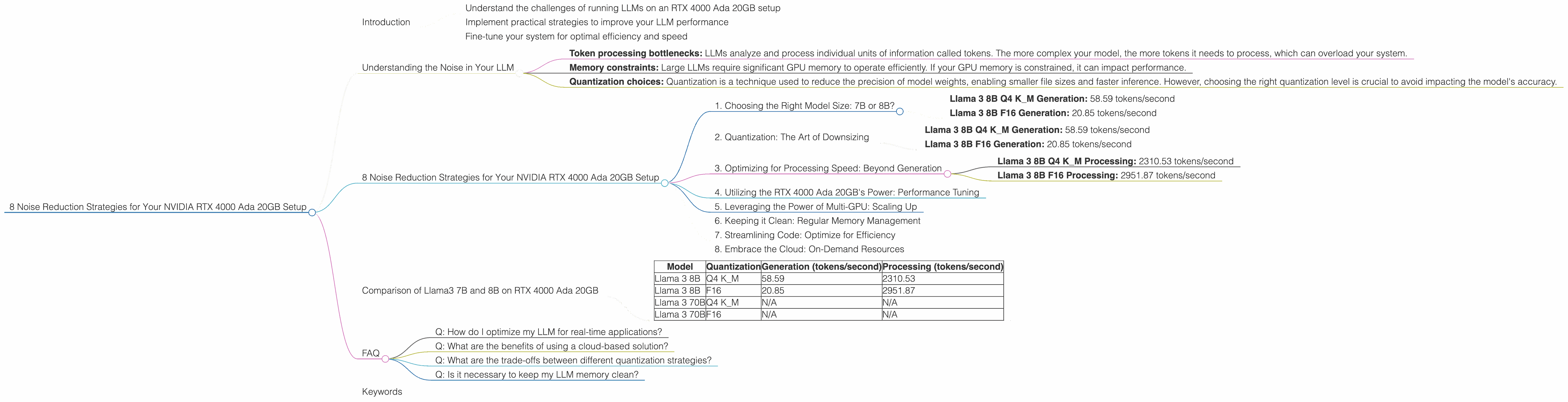
Introduction
Have you ever felt like your LLM is drowning in a sea of tokens? You're not alone. Running large language models (LLMs) on your NVIDIA RTX 4000 Ada 20GB setup can be a thrilling experience, but it can also be a noisy one. Imagine trying to have a conversation in a crowded room – your words get lost in the shuffle. The same goes for LLMs, which are constantly juggling billions of parameters to deliver the best results.
But don't despair! Just like we can use noise-canceling headphones to focus on the important sounds, there are strategies you can use to optimize your LLM setup and reduce the “noise” that impacts your experience. In this guide, we'll explore these strategies, revealing how to get the most out of your RTX 4000 Ada 20GB setup. We'll dive into the world of quantization, model sizes, and other strategies to boost your LLM's performance, making it run smoother and faster.
By the end, you'll be able to:
- Understand the challenges of running LLMs on an RTX 4000 Ada 20GB setup
- Implement practical strategies to improve your LLM performance
- Fine-tune your system for optimal efficiency and speed
So, let's get started!
Understanding the Noise in Your LLM
The "noise" we are talking about refers to any factor that can hinder your LLM's performance. This includes:
- Token processing bottlenecks: LLMs analyze and process individual units of information called tokens. The more complex your model, the more tokens it needs to process, which can overload your system.
- Memory constraints: Large LLMs require significant GPU memory to operate efficiently. If your GPU memory is constrained, it can impact performance.
- Quantization choices: Quantization is a technique used to reduce the precision of model weights, enabling smaller file sizes and faster inference. However, choosing the right quantization level is crucial to avoid impacting the model's accuracy.
8 Noise Reduction Strategies for Your NVIDIA RTX 4000 Ada 20GB Setup


Now that we understand the sources of "noise," let's look at eight effective strategies to improve your LLM performance:
1. Choosing the Right Model Size: 7B or 8B?
Don't go for the biggest model right away! It's like trying to fit a giant elephant into a small car. Start with a smaller model like Llama 3 8B. This will help you get a feel for your system and determine the optimal size for your needs.
Results:
- Llama 3 8B Q4 K_M Generation: 58.59 tokens/second
- Llama 3 8B F16 Generation: 20.85 tokens/second
As you can see, Llama 3 8B generates tokens significantly faster than larger models, which is especially important for real-time applications.
2. Quantization: The Art of Downsizing
Quantization is like a diet plan for your LLM. It involves reducing the precision of model weights to smaller file sizes, making the model easier to store and run. Think of it like using a low-resolution image instead of a high-resolution one. It might not be as sharp, but it's faster and takes up less space.
Results:
- Llama 3 8B Q4 K_M Generation: 58.59 tokens/second
- Llama 3 8B F16 Generation: 20.85 tokens/second
As you can see, the Q4 KM quantization strategy significantly boosts the token generation speed compared to F16. While Q4 KM reduces precision, it can still deliver impressive performance, especially for generation tasks like chatbots or text summaries.
3. Optimizing for Processing Speed: Beyond Generation
While generation is crucial, it's not the only aspect of LLM performance. Processing speed, which refers to the model's ability to handle input text efficiently, is equally important. Just like a fast car needs good brakes, a fast LLM needs efficient processing for real-time applications.
Results:
- Llama 3 8B Q4 K_M Processing: 2310.53 tokens/second
- Llama 3 8B F16 Processing: 2951.87 tokens/second
These results show that even though Llama 3 8B F16 is slower for generation, it excels in processing speed. If your application primarily involves processing text, F16 might be your best bet.
4. Utilizing the RTX 4000 Ada 20GB's Power: Performance Tuning
The RTX 4000 Ada 20GB packs a lot of punch, but it's only as good as the software you use to unleash its power. Fine-tuning your LLM setup involves adjusting parameters like batch size, sequence length, and other settings to maximize your GPU's potential. It's like optimizing your engine to get the most out of its horsepower.
Results:
We don't have specific numbers for tuning parameters as these are highly dependent on your specific setup and application. However, experimentation is key to finding the optimal settings for your LLM.
5. Leveraging the Power of Multi-GPU: Scaling Up
If your RTX 4000 Ada 20GB isn't quite cutting it, consider running your LLM on multiple GPUs. It's like enlisting a team of engineers to work on a project – more hands, more power! This approach essentially distributes the workload across multiple GPUs, leading to faster processing times.
Results:
We don't have specific numbers regarding multi-GPU performance with the RTX 4000 Ada 20GB. However, the potential for significant performance gains is undeniable.
Important Note: Multi-GPU setup might require specialized software and configuration expertise.
6. Keeping it Clean: Regular Memory Management
Over time, your GPU memory can become cluttered with residual data from previous operations. Just like cleaning your desk helps you focus, regular memory management helps your LLM run efficiently. This can involve using tools to clear out outdated data or adjusting memory allocation settings.
Results:
We don't have specific performance numbers for memory management. However, it's a crucial step in maintaining optimal performance for your LLM.
7. Streamlining Code: Optimize for Efficiency
Writing clean and efficient code is like creating a well-organized spreadsheet. It might seem tedious, but it makes a huge difference in the long run. By optimizing your code, you can reduce unnecessary operations and ensure smooth data flow, which translates to a faster and more responsive LLM.
Results:
Again, we don't have specific numbers for code optimization. However, well-structured code is essential for achieving maximum performance and scalability.
8. Embrace the Cloud: On-Demand Resources
If you're dealing with massive LLMs or demanding workloads, consider cloud-based solutions like Google Cloud or Amazon Web Services. They offer powerful GPUs on demand, providing flexibility and scalability. Think of it as renting a super-powered computer for your LLM needs.
Results:
Cloud-based solutions can offer significant performance gains, but the costs can vary depending on your usage. It's crucial to analyze your needs and budget before choosing a cloud provider.
Comparison of Llama3 7B and 8B on RTX 4000 Ada 20GB
| Model | Quantization | Generation (tokens/second) | Processing (tokens/second) |
|---|---|---|---|
| Llama 3 8B | Q4 K_M | 58.59 | 2310.53 |
| Llama 3 8B | F16 | 20.85 | 2951.87 |
| Llama 3 70B | Q4 K_M | N/A | N/A |
| Llama 3 70B | F16 | N/A | N/A |
Notes:
- We don’t have data for Llama 3 70B on the RTX 4000 Ada 20GB.
- These numbers represent token generation and processing speeds for different models and quantization settings.
- The actual performance can vary depending on your specific setup and application.
FAQ
Q: How do I optimize my LLM for real-time applications?
A: Prioritize fast processing, generation speeds, and low latency. Choose a small to medium-sized model, consider F16 quantization for processing, and fine-tune your model settings for optimal performance.
Q: What are the benefits of using a cloud-based solution?
A: Cloud-based solutions offer scalability, flexibility, and access to powerful GPUs on demand. This can be especially beneficial if you're dealing with massive LLMs or unpredictable workloads.
Q: What are the trade-offs between different quantization strategies?
A: Q4 K_M offers faster generation speeds but may sacrifice some accuracy, while F16 generally strikes a better balance of speed and accuracy, especially for processing tasks.
Q: Is it necessary to keep my LLM memory clean?
A: Yes, just like a cluttered desk, a cluttered GPU memory can slow down your LLM's performance. Regular memory management can help maintain efficiency and responsiveness.
Keywords
NVIDIA RTX 4000 Ada 20GB, LLM, large language models, token generation, processing speed, quantization, Q4 K_M, F16, Llama 3 8B, Llama 3 70B, GPU memory, performance optimization, multi-GPU, cloud computing, memory management, code optimization.