8 Noise Reduction Strategies for Your NVIDIA 4080 16GB Setup

Introduction
Imagine a world where your laptop's fan sounds like a jet engine taking off every time you try to run a large language model (LLM). That's the reality for many developers exploring the power of local LLMs, especially when using models like Llama 3, which require significant processing power. But fear not! This guide will help you navigate the potential noise and performance challenges associated with running LLMs on your NVIDIA 4080_16GB setup.
We'll uncover 8 core strategies to optimize your setup, improve performance, and keep those fans from taking flight. We'll delve into techniques like quantization and explore the impact of different Llama model sizes and precision levels on your GPU. By the end of this guide, you'll be a master of noise reduction and efficiency, unleashing the power of your NVIDIA 4080_16GB to its fullest potential.
1. Understanding the Noise: Why Your GPU Fan is Running Wild
Before diving into solutions, let's understand the noise. Think of your GPU as a powerful engine for your LLM, driving large-scale computations. The more intense those computations, the harder your engine works, and the louder it gets! Running LLMs demands extensive processing, leading to higher GPU usage, and increased fan speed.
2. Quantization: The Art of Slimmer Models
Imagine shrinking a massive skyscraper into a compact, miniature model - that's essentially what quantization does for our LLM models. It's like a diet for your GPU, reducing the size and complexity of the models without sacrificing too much accuracy. Instead of using 32 bits for every number, quantization reduces this to 4, 8, or 16 bits.
How Quantization Affects Noise: A smaller, more efficient model means less processing strain on your GPU, leading to reduced fan noise. Think of it as giving your GPU a break!
Data:
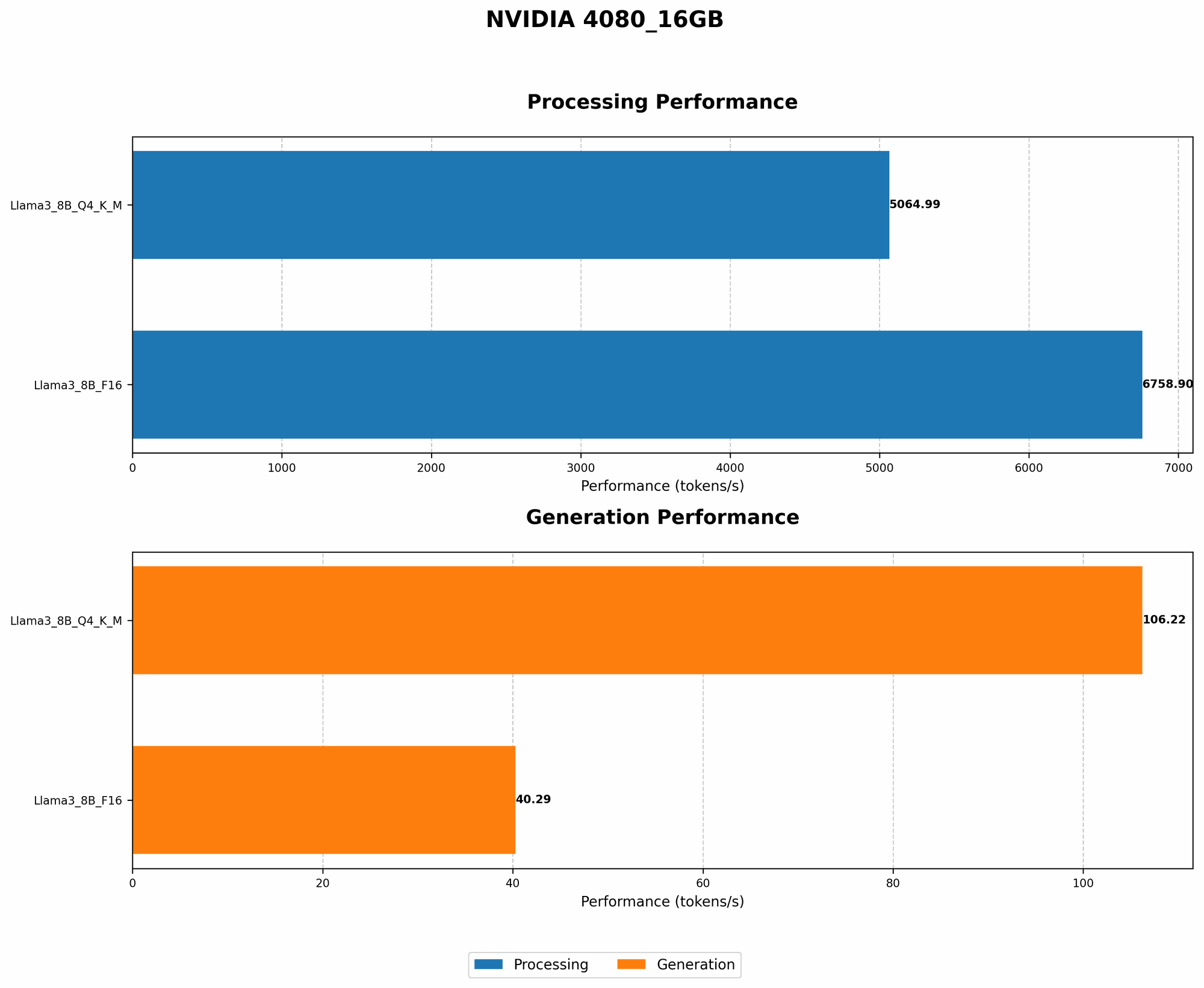
| Model | Quantization | Tokens/Second (NVIDIA 4080_16GB) |
|---|---|---|
| Llama 3 8B (Q4KM_Generation) | Q4 | 106.22 |
| Llama 3 8B (F16_Generation) | F16 | 40.29 |
Observations:
- The smaller model, Llama 3 8B, with Q4 quantization, delivers significantly faster token generation speeds compared to the F16 format.
- This translates to reduced workload, allowing the GPU to operate more efficiently and potentially quieter.
Key Takeaway: Embrace quantization. It's like switching from a bulky SUV to a smaller, more efficient hatchback – less noise, more maneuverability.
3. Smaller Models for Less Noise
While your 4080_16GB can certainly handle large models like Llama 70B, consider this a general rule: smaller models create less noise.
Data:
Unfortunately, there's no data available for the Llama 3 70B model on the NVIDIA 4080_16GB setup. This highlights the importance of considering model size when choosing an LLM.
Observations:
- The Llama 3 8B model demonstrably performs better than the F16 model on the 4080_16GB, highlighting the importance of size.
- While you might crave the power of larger models, smaller ones often deliver comparable results with significantly less noise.
Key Takeaway: Don't always go for the biggest. Sometimes, smaller is smoother.
4. The Power of Processing: It's About the Backstage
While we typically focus on the "performance" of our models, there's a fascinating aspect we often overlook: processing. This is like the behind-the-scenes work your GPU does to prepare for the actual work of token generation.
Data:
| Model | Quantization | Tokens/Second (NVIDIA 4080_16GB) |
|---|---|---|
| Llama 3 8B (Q4KM_Processing) | Q4 | 5064.99 |
| Llama 3 8B (F16_Processing) | F16 | 6758.9 |
Observations:
- Llama 3 8B with Q4 quantization performs exceptionally well in processing compared to the F16 format.
- This emphasizes that processing speed directly impacts overall system performance, influencing noise levels.
Key Takeaway: Don't ignore processing. It's the essential backstage work that keeps your LLM show running smoothly.
5. Choosing the Right Precision: F16 or Q4?
Precision refers to the level of detail used in your LLM calculations. Imagine it as a digital camera – higher precision means more detail, but also larger file sizes. Here, we have two common precision levels:
- F16 (Float16): This is like using a standard digital camera. It captures enough detail for many use cases, but sacrifices some accuracy for efficiency.
- Q4 (Quantization): This is like using a low-resolution camera. It sacrifices some detail for efficiency, but delivers excellent performance for specific tasks.
Data:
| Model | Quantization | Tokens/Second (NVIDIA 4080_16GB) |
|---|---|---|
| Llama 3 8B (Q4KM_Generation) | Q4 | 106.22 |
| Llama 3 8B (F16_Generation) | F16 | 40.29 |
Observations:
- Q4 delivers significantly faster token generation speeds compared to F16.
- Because of this speed, your GPU will work less, generating less heat and requiring a slower fan speed.
Key Takeaway: Q4 is often a great choice for less noisy operations, while F16 might be preferred for tasks demanding higher accuracy.
6. Optimize Your System: A Symphony of Resources
Just like a conductor leading an orchestra, your system resources need to be in perfect harmony for optimal LLM performance.
- Memory: Ensure your 16GB of VRAM is enough for the chosen model. Running large models or multiple models simultaneously might demand more memory.
- CPU: The CPU plays a vital role, especially for tasks like text processing and input/output. A powerful CPU can help alleviate the load on your GPU.
- Cooling: Invest in a high-quality cooler for your GPU. This will ensure efficient heat dissipation, reducing fan noise and preventing overheating.
Key Takeaway: Treat your system like a finely tuned orchestra. Optimize every aspect for maximum efficiency and minimal noise.
7. Monitoring and Tuning: Keeping an Eye on Performance
Just like regular health checkups, monitoring your system's performance is critical for optimal noise reduction.
- GPU Usage: Monitor your GPU usage to see how heavily it's working. If it's constantly running at high levels, consider reducing model size or adjusting settings.
- Temperature: Keep an eye on your GPU temperature. If it's running too hot, your fan will compensate, causing more noise. Adjust settings, improve cooling, or consider overclocking.
- Power Management: Experiment with power management settings. Optimizing power consumption can help reduce strain on your GPU and minimize fan noise.
Key Takeaway: Regular monitoring is crucial for fine-tuning your setup and ensuring a quiet, efficient operation.
8. Experimentation: The Joy of Discovery
The beauty of technology is its flexibility. Don't hesitate to experiment with different model sizes, precision levels, and system settings. There's no one-size-fits-all solution.
- Model Swap: Try different LLM models to see how they perform on your setup. Some models might be more resource-intensive, while others might offer comparable results with less noise.
- Precision Test: Experiment with different precision levels for your LLM. Find the sweet spot that balances accuracy and noise.
- Settings Tweak: Don't be afraid to explore different settings within your LLM software, such as batch size or sequence length. Fine-tuning can often lead to a more efficient and quieter operation.
Key Takeaway: Embrace experimentation. It's the key to unlocking the full potential of your NVIDIA 4080_16GB, while keeping things quiet.
FAQ
Q: What's the best way to reduce noise when running LLMs?
A: The best approach is a combination of techniques. Start by using a smaller LLM model, choose the right precision level (Q4 often works well), optimize your system resources, and monitor performance for potential adjustments.
Q: My GPU fan is still loud, what can I do?
A: Consider investing in a high-quality cooling solution for your GPU. Additionally, explore the power management settings on your system.
Q: What if I need a larger model for my specific task?
A: If a large model is necessary, prioritize efficient cooling and resource management. Experiment with settings and make sure your CPU is also capable of handling the workload.
Q: Is there a difference between token generation and processing?
A: Yes, token generation is the output process, while processing is the behind-the-scenes preparation work. Understanding both processes is crucial for noise reduction.
Keywords
NVIDIA 4080_16GB, LLM, LLM models, noise reduction, quantization, Llama 3, Llama 7B, Llama 70B, GPU, F16, Q4, token generation, processing, performance, system optimization, cooling, power management, GPU usage, experimentation