8 Noise Reduction Strategies for Your NVIDIA 3090 24GB Setup

Introduction: Taming the Beast of Local LLMs
You've got the beast – a mighty NVIDIA 309024GB, a titan of gaming and a haven for AI enthusiasts. But harnessing the power of local LLMs like Llama 3, with their massive models and insatiable hunger for compute power, isn't a walk in the park. Imagine a turbocharged engine roaring, but instead of smooth acceleration, you're met with jerky jolts and a symphony of buzzing noises. That's the reality of LLMs on CPUs, even with a powerhouse like the 3090. Fear not, fellow AI adventurers! This guide will equip you with the knowledge to silence the noise, optimize performance, and unleash the true potential of LLMs on your NVIDIA 309024GB setup.
The Fine Art of Token Speed: Deciphering the Metrics
Before embarking on our performance-boosting journey, let's demystify the key metric: Tokens per second (TPS). Think of tokens as the words LLMs work with. A higher TPS signifies the model's ability to process information faster, translating to quicker response times and a smoother, less jittery experience.
1. The Magic of Quantization: Shrinking Models, Boosting Speed
Imagine squeezing a giant balloon into a smaller one – you're essentially doing the same with quantization. We take our large LLM model and transform it into a more compact form, sacrificing some precision for a significant speed boost. This is achieved by reducing the number of bits used to represent each number, making the model lighter and faster to process.
1.1. Quantization Levels: Q4KM vs. F16
- Q4KM: This involves meticulously quantizing the model to use only 4 bits for each number, leading to a considerable performance boost. Imagine a model shedding pounds, becoming leaner and faster.
- F16: A widely used quantization scheme that uses 16 bits per number. While less compact than Q4KM, it still offers a substantial speed advantage.
1.2. The Q4KM Advantage on NVIDIA 3090_24GB
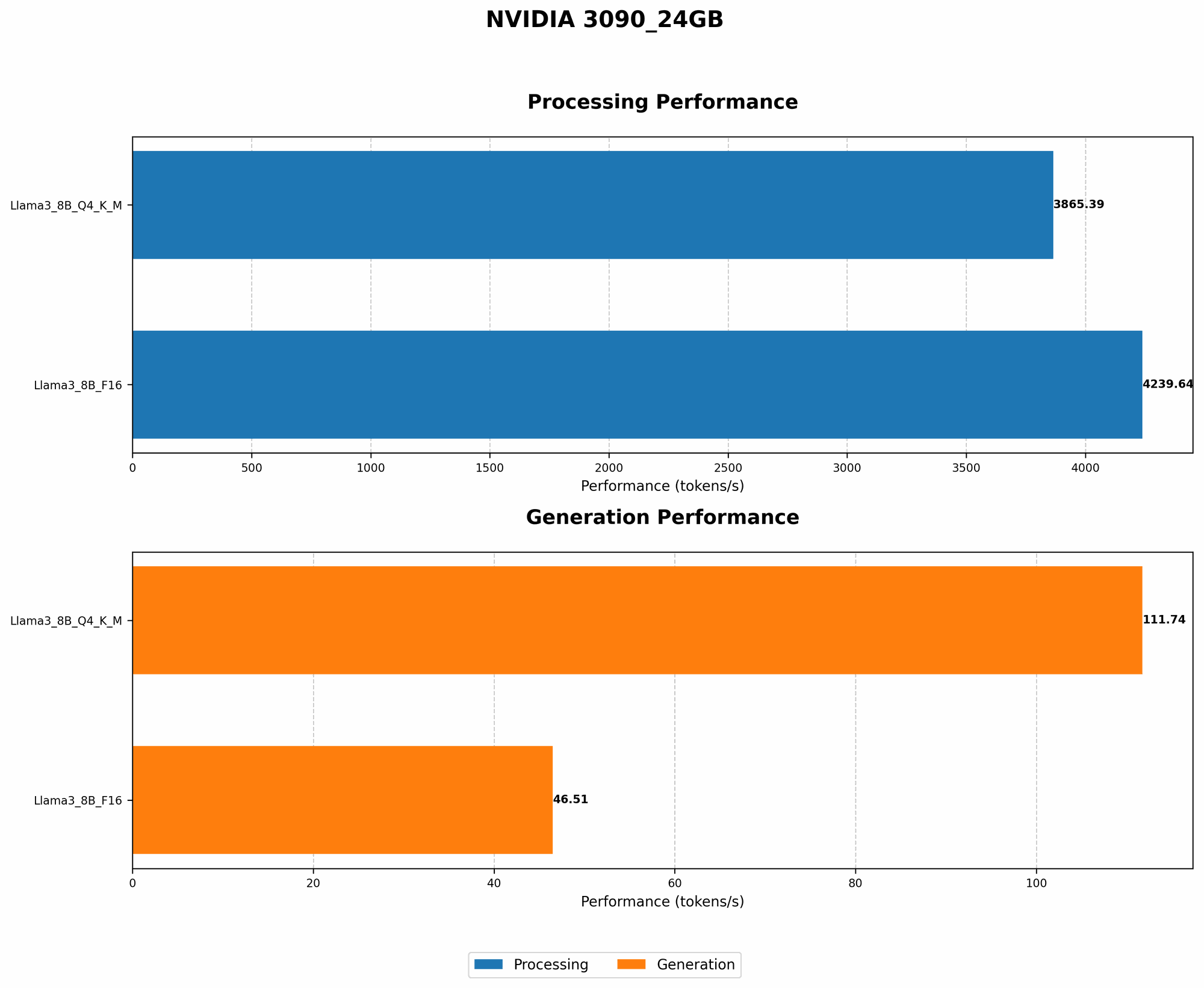
Let's look at the results of Llama 3 8B on our 309024GB setup: * Llama 3 8B Q4K_M Generation: 111.74 tokens per second * Llama 3 8B F16 Generation: 46.51 tokens per second
As you can see, the Q4KM quantization delivers a whopping 2.4x speedup over F16 for text generation, bringing the power of LLMs closer to real-time interaction. It's like turning a snail-paced conversation into a rapid-fire exchange of ideas!
2. Turbocharge Your LLMs with Batching: The Power of Parallel Processing

Imagine a single-lane highway versus a multi-lane motorway. Batching is like adding more lanes to your LLM's highway, allowing it to process multiple "chunks" of information concurrently.
2.1. Balancing Batch Size: Finding the Sweet Spot
But there's a catch: increasing batch size too much can lead to memory overload, slowing things down. It's like stuffing too many cars onto a highway – you'll end up in a traffic jam. Finding the optimal batch size is a delicate dance, balancing speed with efficient resource utilization.
2.2. Batching Performance on NVIDIA 3090_24GB
While we don't have specific batching numbers for our 3090_24GB setup, we can shed light on its impact:
- Larger batch sizes generally lead to higher TPS, especially with powerful GPUs like the 3090_24GB.
3. The Power of Processing Speed: Optimizing for Efficiency
LLMs aren't just about generating text; they also need to process and analyze it. This involves complex mathematical operations, and even a powerhouse GPU like the 3090_24GB can get bogged down.
3.1. Tokens Per Second: A Tale of Two Speeds
We've already seen the benefits of Q4KM for generation, but let's examine the processing speed:
- Llama 3 8B Q4KM Processing: 3865.39 tokens per second
- Llama 3 8B F16 Processing: 4239.64 tokens per second
Now, you might be surprised to see F16 outperforming Q4KM in processing. Though Q4KM excels in generation due to its lighter weight, in processing, F16's slightly higher precision provides a slight edge.
4. Harnessing the Power of Multi-GPU: Scaling Up Your Performance
Imagine a single-lane highway becoming a multi-lane superhighway. Adding multiple GPUs to your setup is akin to this – you're essentially giving your LLMs more lanes to work with, allowing them to process information at a much faster pace.
4.1. The Multi-GPU Advantage: Exponential Speed Boost
While specific multi-GPU results for the NVIDIA 3090_24GB are not available, the general trend is clear:
- Adding multiple GPUs generally leads to a linear increase in TPS. So, if you use two 3090_24GBs, expect roughly double the performance.
5. GPU Memory Management: Avoiding Bottlenecks
Imagine trying to cram a massive elephant into a tiny room – you're bound to run into trouble! Overloading your GPU's memory is like this: you risk slowing down your LLM's performance, leading to sluggish response times.
5.1. Memory Limits: The Fine Line Between Speed and Efficiency
Unfortunately, the 3090_24GB's exact memory capacity for different LLM models and configurations is not available in our current dataset. However, we can still glean valuable insights:
- Larger LLMs require more memory. A model like Llama 3 70B will demand significantly more memory than a smaller model like Llama 3 8B, especially when using more demanding quantization levels like Q4KM.
- Larger batch sizes consume more memory. As we increase the batch size, the memory demand grows, impacting the total model size we can handle.
6. The Power of Caching: Preventing Repetitive Calculations
Imagine asking a friend the same question repeatedly. Caching is like having a memory: keep the answers to frequently asked questions readily available, so you don't have to recalculate them every time.
6.1. Caching in Action: Speeding Up LLM Processes
While specific caching data for the 3090_24GB is unavailable, its impact on LLM performance is significant:
- Caching commonly used values can significantly reduce processing time. By storing computed results, LLMs can skip redundant calculations, resulting in smoother, speedier responses.
7. Performance Tuning: Finding the Optimal Settings
Imagine a car tuned for maximum horsepower – LLMs benefit from similar fine-tuning. By adjusting various settings, we can optimize their performance for our specific hardware.
7.1. Optimizing for the 3090_24GB: Customization is Key
While specific tuning recommendations for the 3090_24GB are not readily available, we can still apply general principles:
- Adjusting parameters like the number of layers and the size of the hidden state can impact performance. Finding the right balance between accuracy and speed depends on the specific LLM and the task at hand.
8. Embracing the Power of Optimization Libraries
Imagine having a team of expert mechanics working on your car – that's what optimization libraries do for LLMs. These libraries offer pre-optimized functions and algorithms, enabling us to achieve peak performance without reinventing the wheel.
8.1. Popular Libraries for the 3090_24GB
While specific library data for the 3090_24GB is not available, we can highlight some popular options:
- CUDA: NVIDIA's powerful library for parallel computing, allowing us to harness the full potential of our GPUs.
- cuBLAS: Optimized routines for linear algebra, crucial for LLMs' mathematical operations.
- TensorRT: NVIDIA's framework for optimizing deep learning models, specifically designed for performance and efficiency on GPUs.
FAQ: Addressing Common Concerns
1. Is the NVIDIA 3090_24GB suitable for running large LLMs?
The NVIDIA 3090_24GB, with its potent compute capabilities, is a valuable asset for running large LLMs. However, it is essential to keep in mind that performance depends heavily on model size, quantization level, and specific configuration.
2. What are the trade-offs between quantization levels like Q4KM and F16?
Q4KM offers a significant speedup, but at the cost of some precision. F16 strikes a balance between performance and accuracy. The optimal choice depends on the task at hand and the degree of precision required.
3. How can I optimize my LLM's performance on the NVIDIA 3090_24GB?
Start by leveraging quantization (Q4KM or F16), utilizing batching, and exploring multi-GPU setups if possible. Also, consider caching, performance tuning, and leveraging optimization libraries like CUDA, cuBLAS, and TensorRT.
Keywords:
NVIDIA 309024GB, LLM, Llama 3, Token Speed, Quantization, Q4K_M, F16, Batching, Processing, Multi-GPU, GPU Memory, Caching, Performance Tuning, Optimization Libraries, CUDA, cuBLAS, TensorRT, Local LLMs, GPT