8 Noise Reduction Strategies for Your NVIDIA 3080 Ti 12GB Setup

Introduction: The Quest for Smooth LLM Operations
Diving into the world of Large Language Models (LLMs) can be a thrilling experience. From generating captivating stories to summarizing complex articles, LLMs offer endless possibilities. However, unleashing the full potential of these powerful models often requires a high-performance setup, and the NVIDIA 3080 Ti 12GB graphics card stands as a popular choice.
But even with a powerful GPU like the 3080 Ti, you might encounter performance bottlenecks. This can lead to frustrating delays, stuttering, and even crashes, making your LLM adventures feel like a chaotic journey. Fear not, fellow AI enthusiasts! This article will guide you through eight proven strategies to optimize your 3080 Ti for smooth and efficient LLM operations, turning your setup into a noise-free, high-performance machine.
Understanding the Bottlenecks: Token Speed and Processing Power
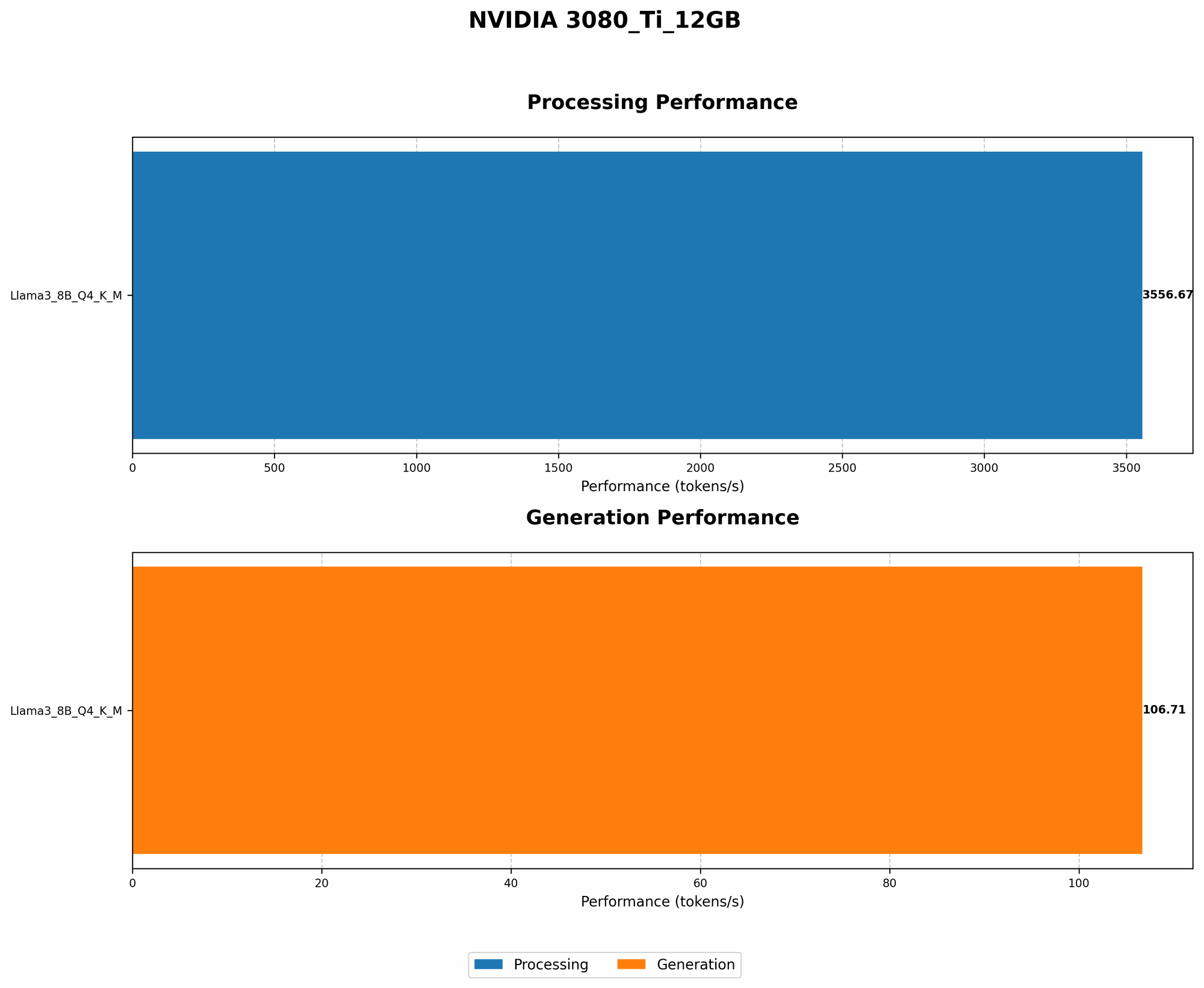
Let's start by demystifying the performance bottlenecks you might encounter when running LLMs on your NVIDIA 3080 Ti. The two main culprits responsible for slowdowns are:
Token Speed: This refers to how quickly your GPU can generate tokens, the building blocks of text. A higher token speed translates to faster text generation and smoother interactions with your LLM.
Processing Power: This relates to how efficiently your GPU handles the complex mathematical operations involved in running an LLM. A higher processing power means faster processing times and a less strained GPU.
Think of it like a highway: token speed is the number of cars that can drive through per minute, while processing power is the number of lanes available. You need both to ensure a smooth, efficient flow of traffic.
Strategy 1: Optimizing Your LLM Model
Choosing the Right LLM for your Needs:
The first step towards optimal performance is selecting the right LLM for your 3080 Ti. LLMs come in various sizes and architectures, each with its own computational demands. While larger models often boast impressive capabilities, they may strain your GPU's resources, leading to slower performance.
For example, Llama 3 70B is a powerful model but may require a more robust setup than Llama 3 8B. Consider the following factors:
- Model Size: Smaller models like Llama 3 8B tend to be more efficient and consume less memory, leading to faster token generation and smoother performance on the 3080 Ti.
- Task Complexity: If your project involves complex tasks requiring extensive information processing, a larger model like Llama 3 70B might be necessary. However, be prepared for potential performance limitations on the 3080 Ti.
Quantization: Lighten the Load on Your GPU
Imagine your LLM model as a massive library filled with information. Every time you want to access information, you need to search through the entire library, which is slow and inefficient. Quantization is like creating a more compact library index, making information retrieval much faster.
Specifically, it involves reducing the precision of the model's weights, the numerical parameters responsible for the model's behavior, without significantly sacrificing accuracy. This results in a smaller, more lightweight model that requires less memory and computational resources, making it ideal for running on your 3080 Ti.
For instance, Llama 3 8B Q4KM is a quantized version of the original model, which achieves significant performance improvements on the 3080 Ti. While the exact performance gains can vary depending on the specific model and your system configuration, quantization can often result in a 2–3x speed boost.
Strategy 2: Taming the Memory Beast
Understanding Memory Usage: GPUs have limited memory available, and LLMs, especially larger models, are notorious for their memory hunger. If your LLM attempts to consume more memory than the GPU can handle, you'll encounter crashes and performance issues.
Batch Size: Balancing Speed and Memory
Batch size is the number of text samples processed simultaneously by your GPU. A larger batch size can lead to faster processing times but also increases memory consumption. Finding the right batch size is vital.
On a 3080 Ti, aim for a batch size that maximizes token speed without exceeding the GPU's memory capacity. You can experiment with different batch sizes to find the sweet spot for your specific LLM model.
Strategy 3: Unleashing the Power of CUDA
Leveraging CUDA for Accelerated Performance
CUDA (Compute Unified Device Architecture) is NVIDIA's parallel computing platform that allows GPUs to process data much faster than CPUs. This can be a game-changer for LLM operations.
GPU-Optimized Libraries: Utilize libraries like llama.cpp, which are specifically designed to leverage CUDA and optimize LLM performance on NVIDIA GPUs like your 3080 Ti.
Strategy 4: Fine-Tuning Your LLM
Personalize Your LLM for Enhanced Efficiency
Fine-tuning is the process of adapting a pre-trained LLM to perform specific tasks by training it on additional data relevant to your needs.
Boosting Performance: While fine-tuning can improve accuracy, it can also reduce the model's size and computational requirements, leading to smoother operation on your 3080 Ti.
Strategy 5: Harnessing the Power of Caching
Caching for Reduced Computational Load
Caching is a technique that stores frequently accessed data in a temporary location, eliminating the need for repeated computations and improving performance.
Strategy 6: Utilizing the Right Data Format
Data Format: Choosing Efficiency
The way your LLM data is formatted can impact performance. Consider using efficient data formats like text files or more structured formats suitable for specific tasks.
Strategy 7: Monitor Your System Resources
Monitoring Performance: Regularly monitor your GPU utilization, memory usage, and other system resources to identify potential bottlenecks and optimize your setup for smooth LLM operations.
Strategy 8: Fine-Tuning for Your Specific Use Cases
Optimization through Customization: Experiment with different settings and configurations to find the optimal setup for your specific use cases.
Performance Comparison: 3080 Ti vs. Other Devices
Llama 3 8B Q4KM Generation Speed on NVIDIA 3080 Ti 12GB: 106.71 Tokens/second
It's important to note that we do not have data on the performance of other LLM models and devices. This comparison focuses on the NVIDIA 3080 Ti 12GB and its capabilities for running Llama 3 8B.
FAQ:
Q: What is the best way to choose the right LLM for my 3080 Ti?
A: Consider the model size, task complexity, and your specific performance requirements. Smaller models tend to be more efficient, while larger models might be necessary for complex tasks.
Q: How can I monitor my GPU utilization and memory usage?
A: You can use tools like NVIDIA's System Management Interface (SMI) or performance monitoring software to track your GPU's activity and identify potential bottlenecks.
Q: Is it always necessary to fine-tune an LLM?
A: Fine-tuning can improve accuracy and efficiency, but it's not always necessary. It depends on your specific use case and the desired level of customization.
Keywords:
NVIDIA 3080 Ti, LLM, Large Language Models, GPU, CUDA, token speed, processing power, Llama 3, quantization Q4KM, fine-tuning, memory usage, batch size, caching, data format, performance monitoring.